User Profile

ehloworldio
Brass Contributor
Joined 7 years ago


User Widgets
Recent Discussions
ASC - AWS EC2 auto onboarding via Azure Arc
Problem: Azure Arc not automatically installing on AWS EC2 instance. Background: EC2 instance is in inventory on ASC Azure Arc Service Principal is configured EC2 has SSM agent installed I can manually install Azure Arc using the script via Service Principal How do I troubleshoot this? Do I need to set up anything with AWS Systems Manager?4.7KViews0likes1CommentLogstash crash
I recently tried building a Logstash server following the articles below. I was able to get the service deploy and configured, however I see the following error and the service seems to be crashing and rebooting every few minutes. I'm not too familiar with Logstash any help would be appreciated. https://techcommunity.microsoft.com/t5/azure-sentinel/scaling-up-syslog-cef-collection/ba-p/1185854 https://github.com/Azure/Azure-Sentinel/tree/master/DataConnectors/Logstash-VMSS824Views0likes1CommentSentinel RBAC not working for Workbooks
I've recently started testing the 3 built-in Azure Sentinel RBAC roles based on https://docs.microsoft.com/en-us/azure/sentinel/roles Azure Sentinel reader Azure Sentinel responder Azure Sentinel contributor Based on the matrix in the documentation "Azure Sentinel contributor" should give the user access to add and view Workbooks. However testing show I was able to add and save new workbooks but not view saved workbooks. All other accesses seems fine I could run queries and everything.Solved3.3KViews0likes6CommentsWhere is the "Exclude by alert name"?
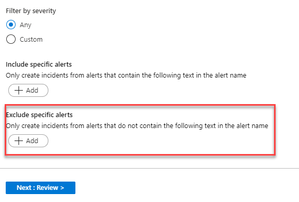
I'm looking at the built-in out of box Create incidents based on <Microsoft security service> alerts rules. When you click on the rule from the Analytics page you see the rule summary page (see attachment #1) there you'll see a field for "Exclude by alert name" When you attempt to edit this same rule, there is no field for "Exclude by alert name" (see attachment #2) Am I missing something?Solved1.5KViews2likes1CommentRe: email service monitor
roopesh_shetty To the best of my knowledge Office 365 connector on Azure Sentinel only pulls in audit logs (update, create, add, and delete activities), not mail flow logs. You might be able to pull in message tracking logs some other way, however I have not seen any Microsoft articles on it. You can try looking through Azure AD Sign-in logs for connection endpoint informations. For all the mail flow related metrics I think you would still need to use Security & Compliance Center. Example: Connections to Exchange Online based on device type SigninLogs | where AppDisplayName == "Office 365 Exchange Online" | extend operatingSystem = parse_json(tostring(DeviceDetail.['operatingSystem'])) | summarize count() by tostring(operatingSystem) | render piechart2.9KViews0likes0CommentsRe: Multiple alerts generating an incident
GaryBushey I think you might be asking about Advanced multistage attack detection in Azure Sentinel or Fusion rules. https://docs.microsoft.com/en-us/azure/sentinel/fusion Fusion rules combine two or more alerts from Azure AD Identity Protection and Microsoft Cloud App Security to create one incident. For example "Impossible travel to atypical locations leading to suspicious cloud app administrative activity", the rule correlate multiple alerts in attempt to predict a multistage attack.8KViews0likes1CommentRe: Office365 S&C Alerts available in Sentinel?
mclaes If i'm not mistaken Office Security & Compliance Center Alerts Connector is currently in private preview. Alternatively, you could ingest these alerts via Graph Security API https://techcommunity.microsoft.com/t5/azure-sentinel/ingesting-office-365-alerts-with-graph-security-api/ba-p/9848886.9KViews1like9CommentsRe: Azure ATP remote calls to SAM blocked RDS connection
Or Tsemah Thank you for your reply. I am aware of this article and the audit mode, however neither this or any other I've read had any direct mention of RDS incompatibility with this policy. Seeing how RDS is a Microsoft product are there any article with recommended/best practice configuration to work with this policy, where we would not need to add all users to this policy to keep RDS working.2.6KViews0likes1CommentAzure ATP remote calls to SAM blocked RDS connection
I recently deployed Azure ATP to a enveriement running Windows 2012 R2 and older machines. During the configuration Azure ATP service account was added to Network access - Restrict clients allowed to make remote calls to SAM and pushed out to all machines via default domain policy as required for https://docs.microsoft.com/en-us/azure-advanced-threat-protection/install-atp-step8-samr detection. Shortly after this change users were denied access through RDS, domain admins were still able to use RDS. As a workaround selected users were added to the Network access - Restrict clients allowed to make remote calls to SAM policy to restore service. I've done some research and did not come across any article around configuration conflicts between the remote calls to SAM policy and RDS service. One https://docs.microsoft.com/en-us/windows-server/remote/remote-desktop-services/troubleshoot/cannot-authenticate-or-must-authenticate-twice#access-denied-a-remote-call-to-the-sam-database-has-been-denied I was able to find talks about changes to RDS in Windows Server 2016, where RCM no longer queries the user's object in AD DS which may or may not be related. Had anyone came across this issue? Anyone have a better understanding of RDS, how SAM-RPC is used, and what the recommended configuration is.2.8KViews0likes3Comments

Recent Blog Articles
No content to show