User Profile

vctgomes
Iron Contributor
Joined 7 years ago


User Widgets
Recent Discussions
Bug and suggestion to web apps in the Edge Canary
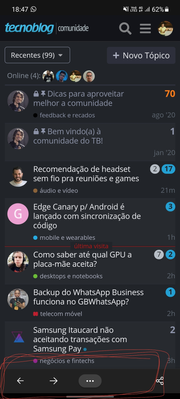
I'm using webapps for a lot of sites that are offering this one, but the Edge for Android doesn't support it so well and the Edge Canary has a BUG! When I install some site as an app, the Edge continues showing the Edge bar (you can see it in my Attachment bellow), as if I were using the browser. It isn't necessary for webapps, but it wouldn't be a problem if it wasn't for a bug in those buttons. The BUTTONS JUST DOES NOT work and it is still in front of the content, even with no function. And now, my suggestion: When I try to add a site as a app the Edge just create a new shortcut, but in others browser (like Samsung Internet), the browser create a really (and almost) native app, with settings page and the links are opened in this webapp installed. Look at the differences between the Edge Can version and the Samsung Internet version, that is almost a app. It has, including, a setup page with uninstall buttons and more. Please, Microsoft, add this new features as well717Views1like1CommentSuggestion to use the Force Dark Mode for Edge for Android
One suggestion that I'd like to see in the future is the "force dark mode" in sites that don't have support to the changing color API. Various browsers for Android already have it. In Edge for Windows I can download extensions to do that, but it doesn't work on Android. Unfortunately, the most most part of the sites doesn't have a dark mode or doesn't respect the system toggle. And, congratulations! The new Edge for Android is incredible you've gone a good job1.9KViews0likes0CommentsEdge-to-edge concept for New Edge Canary for Android
I'd like to give a suggestion too: please, set the nav bar as transparent, using the Edge-to-edge concept from Android 10, like you guys already does on iOS (here: codelabs.developers.google.com/codelabs/gesture-navigation#3 , here http://www.youtube.com/watch?v=Nf-fP2u9vjI, and here developer.android.com/training/gestures/gesturenav?hl=pt-br ) Look how this bar is ugly, makes the screen smaller and pollutes the screen as well... Look how it's very better, like the Edge works on iOS and how it should be on Android as well. The little home bar change its color depending from the background. This division of the interface is also ugly. Another suggestion that I'd like to see in the future is the "force dark mode" in sites that don't have support to the changing color API. Various browsers already have it. And, congratulations! The new Edge for Android is incredible 😄 you've gone a good job.816Views1like0CommentsRe: New Edge Canary Mobile version - Available Now - Updated Chromium version
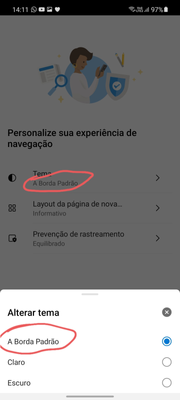
Oh, thanks a lot, HotCakeX I just downloaded and I'm already using. I've been waiting this update for months 😅 and I'm anxious to give my option and feedbacks. So far I've only seen one small error on the welcome page. Where is written "A Borda Padrão", in the changing theme menu, should be, actually, "O tema padrão", "O tema padrão do dispositivo" or something like that. I'd like to give a suggestion too: please, set the nav bar as transparent, using the Edge-to-edge concept from Android 10, like you guys already does on iOS (here: codelabs.developers.google.com/codelabs/gesture-navigation#3 , here http://www.youtube.com/watch?v=Nf-fP2u9vjI, and here developer.android.com/training/gestures/gesturenav?hl=pt-br ) Look how this bar is ugly, makes the screen smaller and pollutes the screen as well... Look how it's very better, like the Edge works on iOS and how it should be on Android as well. The little home bar change its color depending from the background. This division of the interface is also ugly. Another suggestion that I'd like to see in the future is the "force dark mode" in sites that don't have support to the changing color API. Various browsers already have it. And, congratulations! The new Edge for Android is incredible 😄 you've gone a good job.6.4KViews4likes0CommentsRe: Ter uma senha diferente para acessar as senhas
Actually, the Edge has your Microsoft Account to download your passwords and, to view them, the Edge uses the Windows Hello, so it's the same password from your PC. But, I'm not mistaken, the Chrome has the possibility to change this password. Na verdade, o Edge tem sua conta Microsoft para baixar suas senhas e, para visualizá-las, o Edge usa o Windows Hello, então é a mesma senha do seu PC. Mas, não me engano, o Chrome tem a possibilidade de alterar essa senha tbm.1.8KViews1like2CommentsRe: Now, autofill your saved passwords from Microsoft Edge on your phone!
Hey, @HotCakeX Sanjay_Joshi Another suggestion that I have is the Microsoft Authenticator use the new Autofill with keyboards, for those who have the Android 11. http://developer.android.com/guide/topics/text/ime-autofill It cool, including, if the Microsoft SwiftKey has this integration with this API too3.3KViews1like2CommentsRe: Now, autofill your saved passwords from Microsoft Edge on your phone!
It's working well here, except for the battery drain, so I've turned the accessibility mode off. In Samsung Internet, even with the "Autofill on more apps and sites" don't allow me save passwords, but I know it's a Samsung limitations and not the Authenticator. A cool thing that exist on LastPass is the toggle on notifications panel (where is the Wi-Fi, Bluetooth icons). With this toggle, I can trigger a "little LastPass" everywhere, even if the app is closed, saving battery as well. I think it'd be welcome on MS Autofill.37KViews1like1CommentRe: Now, autofill your saved passwords from Microsoft Edge on your phone!
Sanjay_Joshi I'm using it on my phone and I'm loving it. I'm also having some problems with the battery, but that's okay, assuming the Autofill is on Beta yet (I already sent the feedback), but unfortunatelly I can't send the screenshot of the system advice) I hope the Samsung add native support to the Authenticator on Samsung Internet and the Android 8+ API. Microsoft might as well lend a hand in this.38KViews0likes3CommentsRe: "Browser out of date" message on Edge for Android
Rohit Yadav yeah. I just googled my user agent and I saw exactly what you've said. The Edge beta is running the chrome 77, while the Stable Chrome is running the chrome 83. It's really a pity that Edge for Android is abandoned. So many bugs, features missing, design problems and more.3.2KViews0likes2Comments"Browser out of date" message on Edge for Android
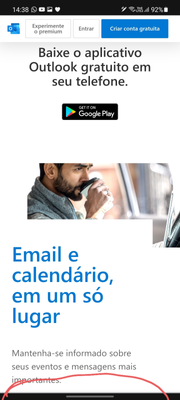
I'm using the Microsoft Edge on PC and phone since a long time ago and I always keep the all my apps up to date via Play Store. I'm, including, a beta tester and, in theory I'm in the last version, however, even that, I'm receiving the message "browser out of date" or "Please, update your browser" in a lot of sites. I took two screenshots (attached bellow) from this one, but the text is in Portuguese. I needed download the Chrome for open this two sites and view its content. My version is the 45.09.24.5074 (updated yesterday). I'm with a Galaxy S10e running the Android 10 in the last update as well.Solved3.4KViews0likes7CommentsHow to hide the vertical tabs icon?
I didn't like the vertical tab and the icon is on a very and desgusting place. Everytime when I touch in the corner, to back to the first tab, I open the useless (for me) vertical tabs). I really hate this icon and I'd like to hide that one, but I didn't find the option in everywhere.1.3KViews2likes1CommentWill the Edge support the new Nearby Share from Google?
Recently the Google released, in a beta version, the Nearby Share, to share files between Androids. Some leakeds also say the Google is testing the Nearby Share for Chrome and it will allow transfer files between Chrome for PC and Android, what's very useful! The Microsoft has a similar feature on "Your Phone" app, but it's terrible because it needs uses the Phone Screen (that's exclusive for some phones), it exiges open a lot of options and it isn't easy. I really hope see the Microsoft's version about that using some the feature enhanced on "Your Phone", but if won't arrive, I'd like to see the Nearby Share, so: will the Microsoft received some of that ones?1.7KViews0likes2CommentsPlease, keep the support for 3rd party Autofill apps on Edge for Android
I've received a update of the Edge Beta on my Android and I've seen a feature that I was waiting a long time and it's the 3rd party apps for Autofill passwords. I love this one because I use the LastPass to sync my passwords. But, the Chrome already added this feature in Beta versions and abandoned in oficial versions, so I came here to beg the Microsoft that don't remove the autofill for 3rd party apps in further updates or the official release. And I hope one day see a official Microsoft Autofill service that work in all Android's apps. Now, to be better, the Edge for Android just need add support to the change color API (bring in the Chromium 78).648Views0likes0CommentsRe: Edge Beta for Android crashing and spending battery
Hi Deleted, I've reported that on Edge for Android. And yes. It happened in older Edge versions too. I have another screenshot from this "Device Care" notification took on 09/03/2020. The MS Edge probably has running the lasted beta version of that day.1KViews0likes1CommentEdge Beta for Android crashing and spending battery
I'm receiving a lot of messages saying the Edge stopped. The various crashes did the Samsung Battery Manager ask to put the Edge to sleep. It just happens in second plan. It also just happens sometimes. I'm running the Android 10 in my Galaxy S10e (SM-G970F) with the lasted Edge Beta (45.02.4.4931)1.1KViews0likes3Comments
Recent Blog Articles
No content to show