User Profile

Dobongsoon
Brass Contributor
Joined 7 years ago


User Widgets
Recent Discussions
Re: Teams that came with Office 365 package does not auto-update
I have the same experience (and it is already 2023). I think, it is because the O365 App package came with Team with the core version (not updated), and it relies on the auto-update to get to the latest version. For example, if I image a computer now in our environment, it will get Teams from the Office 365 App package but I will get a message that Teams need to be updated. If I leave it as is, and after some time, Teams will eventually be up to date and will let you in.2.3KViews0likes0CommentsRe: Secure Score - Items not marking as completed
According here, https://learn.microsoft.com/en-us/microsoft-365/security/defender/microsoft-secure-score-improvement-actions?view=o365-worldwide#take-action-to-improve-your-score, The Completed recommended actions have a "completed" status once all possible points for the recommended action have been achieved. Completed recommended actions are confirmed though Microsoft data, and you can't change the status.5.6KViews0likes0CommentsRenewing Exchange 2019 Hybrid Server wildcard certificate. Do I still need to run Hybrid Config?
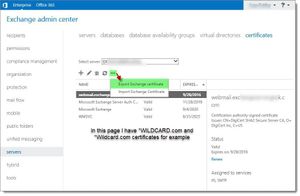
Hi, We are running Exchange Server 2019 Hybrid. All mailboxes are in the Office 365 cloud. This server only has one on-prem account and the assigned services are IIS and SMTP. The current wildcard certificate is about to expire. We renewed it, I imported it, and assigned the same roles. I haven't deleted the old one. So far, the email is flowing, with no apparent issue. Do I still need to run the Exchange Hybrid Configuration? Some online posts say only if I change the name. What "name" are they referring to? Is it the Display name in the picture? Because the Display Names I have are the same except the capitalization is different. For example, *.wildcard.test and *.WILDCARD.test. Is that considered a different name? Hence, I still have to rerun the Hybrid configuration? Thank you.1.6KViews0likes1CommentParticipants not showing up on camera when not consistently talking. Shows profile pic only.
This started last 1/30/2023 only for us. When we are in a meeting and all the cameras are on, the participant who does not talk is not showing up. We only see the profile picture. As soon as the participant talks in a sentence, it automatically turns on the video. It is not a bandwidth issue because we are wired and in an enterprise setting. Is this something new? My Microsoft Teams Version 1.5.00.33362 (64-bit). It was last updated on 1/31/23. Thank you.626Views0likes0CommentsCan I hide this menu in Azure Privilege Identity Management from regular users or customize email?
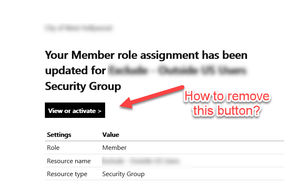
Hi, We use Privilege Identity Management to temporarily allow users to work outside the country. I have two questions related to this. 1. Can I remove the view or Activate button from the notification email that is sent to the user? This leads the user to login to their Azure Portal dashboard, which we don't encourage them to do. 2. If #1 is not possible, how can I prevent users from going to this Manage tab because they don't need to see who the other members of the group are? I want to hide that menu or prevent them from seeing information there.445Views0likes0CommentsRe: ATP - Safe Attachment Modes fully explained
Could someone explain why Block is better, or the recommended default, than Dynamic Delivery? The end result sounds the same to me, except that Dynamic Delivery seems like it would work better in an enterprise setting. For example, with Dynamic Delivery, we'll know that Microsoft blocked certain attachments because the user still gets the email, but with Block, we'll never know if an important email in the queue was blocked.6.5KViews0likes1CommentRe: Microsoft Teams Phone Number Attribute in Active Directory
somnio0505 Thank you for the information. This confirms that there is no direct attribute between the two, and that the information lives in two different environment. I will check out the script. I appreciate the time and help on this.27KViews0likes0CommentsMicrosoft Teams Phone Number Attribute in Active Directory
Hi, I need to find users in Active Directory who have no Telephone number entry in the AD field but with assigned phone numbers in Teams? I have to type the phone number in Active Directory manually. I need to find a report or solution, so I could update our AD if the person in our team already assigned a phone number in Teams. Any solution to this? Thank you.Solved27KViews0likes5CommentsRe: Teams that came with Office 365 package does not auto-update
Here's what I found. For Autoupdate to work, first, the user needs to be logged in to Teams. 15 minutes after the user logs in, Teams will check for updates in the background. After that, the update will only apply if the user is logged in and idle for 30 minutes. In other words, If the user keeps signing out after use or not idle in Teams and computer for 30 minutes after the 15-minute check (total of 45 minutes), the update will not apply. Even if you are not using Teams for 30 minutes, but if you are actively using your computer, it won't auto-update. Knowing this timing helped me understand the problem we had.3.4KViews0likes2CommentsRe: Hybrid Deployment and Wild Card certificate
NunoAriasSilva - We are using a wildcard certificate on our Exchange 2019 Hybrid server. All mailboxes are in the cloud. The certificate is only assigned IIS and SMTP. There is only one on-prem mailbox in this server. We renewed the wildcard certificate from the same company and the same domain information. Exchange server says the certificate is valid after I imported it. Do I still need to re-run the Hybrid Configuration? I prefer not to rerun if not needed. I read somewhere that I don't need to re-run if the names have not changed. Do you know if this is true or we should always rerun the Hybrid configuration? Thank you.12KViews0likes2CommentsHow do I add multiple calendar events from the Office 365 Group Calendar to my personal calendar?
Hi, We have an All Staff O365 Group, associated with an All Staff Group Calendar. How do I copy the events from the Office 365 Group Calendar to my personal calendar? I see the option "Add to my calendar" option on each event, but how do I do that with multiple events? Drag and drop of multiple events in List View to my personal calendar do not work either. What is the best way to copy these calendar events to my personal calendar? Thank you.1.1KViews0likes0CommentsRe: Teams that came with Office 365 package does not auto-update
ChristianBergstrom - I deployed Office 365 Apps with Teams via SCCM Office 365 Client Management to our Windows 10 Enterprise machines. I use the Semi-Annual Targeted Channel. I deployed in November 2019. I noticed that since I deployed Office 365, Teams has not updated since it was installed. I have no problem with Office 365 updates. It gets updated via the updates I received from SUS/SCCM. But with Teams, it is not updating. The version is still from the date I originally deployed it. According to MS documentation, they don't even have an enterprise way to update Teams. I wonder how everyone is doing their Teams update that did not come from the Office installer?4.3KViews0likes8CommentsRe: Teams that came with Office 365 package does not auto-update
ChristianBergstrom - Thank you. My understanding of that article is it is supposed to auto-update by itself. I also understand that it is not part of the regular office apps update. So I am asking for help on how I could make our Teams auto-update. It is not auto-updating. Maybe there is a setup I am missing, group policy or configuration? Thanks.4.3KViews0likes10CommentsTeams that came with Office 365 package does not auto-update
Hi, I deployed Office 365 with Teams via SCCM Application Client deployment using Semi-Annual Channel Target installer. I noticed that Teams do not auto-update. What do I do to make Teams auto-update automatically on client computers?4.6KViews1like12CommentsHow do I block or disable regular users to access certain areas in Security and Compliance?
How do I block or disable regular users to access certain areas in the Security and Compliance Center? See regions highlighted in the attached photo. Regular users can "search." They should not be able to view anything, most especially the Service Assurance area except for managing their spam or quarantined emails. Thank you.1.7KViews0likes1Comment
Recent Blog Articles
No content to show