User Profile

Andrew_Allston
Iron Contributor
Joined 9 years ago


User Widgets
Recent Discussions
Re: Windows 365 Hybrid AAD Join Health Check PC?
Thanks, I knew I saw this info somewhere but why I'm looking this up again is because all these disabled devices keep requesting and getting issued computer certs from my PKI, and I have been pulling my hair out over this. I guess I just need to deny them, but that will just move the problem from 100's of issued certs to 100's of failed requests. If anyone has any ideas on how to really solve for this, I would appreciate it :)216Views1like0CommentsRe: Problems accessing Tiered Azure Files using MacOS 14.3.x (Sonoma)
Kidd_Ip Sorry for the late reply, but there really isn't anything helpful. If we open a video file we get: If we try to copy the file to the local desktop we get something like this: No errors in the File Server logs for AFS or Dedup, nothing that says this is server side. All clients not running that version don't seem to have any issue. Most of our fleet is running Windows 10/11.1.3KViews0likes1CommentRe: Create directory in Azure Storage-different experience in Azure Storage Explorer vs Window ISE app
Have you tried Visual Studio Code (Free in the MS App Store)? I have left the ISE in the dust for this exact reason, when you use ISE not all commands execute the same way, it can be very annoying. I might be wrong, but once I moved to VSC I haven't had those issues. Every script I have authored in VSC has executed as expected on other hosts... barring any other PowerShell versioning quirk...488Views0likes1CommentProblems accessing Tiered Azure Files using MacOS 14.3.x (Sonoma)
Has anyone else having any issues with accessing files that have been tiered by an Azure Storage Sync enabled server? We have a handful of Macs, not enough to test this with fully, but the ones running Mac OS 13.x or earlier have no issues, but clients running 14.3.1 do. Now I have no idea if this started prior to this last update like in 14.0, but the troubled hosts are on 14.3.1 now. They can access the share with no issue, they can access files that are not tiered without issue, they can even access small, tiered files, like just a couple hundred MB, but if you try to access a file around a 1GB or larger you just get an error. To make it even more odd, you can use the duplicate function on the file while tiered, it will duplicate the file in the existing location and once done both files are accessible, both the original and the new duplicate. Not looking for a solution per se, just looking for corroboration... that this issue does exist and I'm not crazy or that I have to go rip apart a working infrastructure... all because a trillion-dollar company needs to save face by not publishing a known issue document when they push OS updates without testing. Thanks in advance!1.6KViews0likes9CommentsRe: HOW TO: Hiding the consent prompt for Single Sign-On
You need to look up those apps in your Directory and grab the object ID (SPN) for those app IDs and use those and NOT the app IDs themselves. And since these exist already you need to use PATCH not POST to update the record. You will need to use POST for the next step when creating the group. And remember you can always test with GET.2.6KViews2likes2CommentsRe: AVD License - LicensingNegotiationFailed (2056)
DvFals I assume you are using a Windows10/11 multiuser SKU? I have seen the same a few times in the last couple weeks. We haven't gotten any complaints, and it's transient but we see them in the Insights. I too would love to understand why this is happening and how to resolve it before it becomes a larger issue. And since Multiuser SKUs don't require CALs and therefore no classic TS licensing server, there is little to check or do on our side... This has to be a bug somewhere.2.1KViews0likes2CommentsRe: HOW TO: Hiding the consent prompt for Single Sign-On
Andrew_Allston for anyone else a bit confused and wants to try before the detailed instructions are posted. The available links seem to suggest you need to create these attributes/objects. But you are modifying the SPNs for the two applications listed in the docs. This means PATCH should be used and not POST which is the method which is linked to.2.9KViews0likes1CommentRe: Auto-LogOff User after closing last application
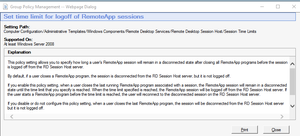
Dennis_Schierenbeck I know I'm like 8 months late but check out the "Set time limit for logoff of RemoteApp sessions" GPO Setting. It works for us. We have it set to 5 Min and if all apps are closed in a session the session is terminated after 5 min of no other app being launched. Cheers!5KViews0likes0CommentsRe: Office bypassing Target Version set by Intune
Martin, again this info is GREAT! But just to pick your brain a bit, I have a few PCs listed as managed in the config.office.com console but the ignoregpo key is set to 0. Any idea why this would be? We still have duplicate AD computers in our directory since we are in Hybrid, so i was thinking maybe config.office.com is adding the unused dupe computer account but the computers are actively communicating with Config.office.com. And it's only a subset of computers. I may try to update the key manually on a test machine, but I would love any insight you might have on this.10KViews0likes0CommentsRe: Office bypassing Target Version set by Intune
This is SUPER useful information. I have been pulling my hair out for over a week with about 20 PCs that rolled back (or maybe never updated) from 2103 (?!?!) This just answered my question, seems that a super old GPO wrote a that build to the registry of these PCs. But there is no GPO doing that now so this was hard to figure out. Quick follow up, do you know if there is a setting that sets the IgnoreGPO key? Or just push the key itself?11KViews0likes4CommentsRe: KB5016623 Issues with AAD App Proxy
GeirF. I was mistaken, I did have RunAaPPL enabled. I also disabled the ASR rule so I don't know if that has any impact. When its safe to try I will reenable the ASR LSASS rule and update the thread for anyone interested. Also, if anyone has any idea how to disable this in Azure it would be greatly appreciated. As per the doc UEFI boxes can tattoo the setting in its UEFI. MS offers a efi file to help remove the setting but requires access to UEFI to accept the setting change. To my knowledge this is not possible in Azure so I just moved the apps to on prem proxies till I rebuild or figure that part out. Thanks again!16KViews2likes1CommentRe: Windows 10 Enterprise not activating
Did you find a solution for this? I too have this exact same problem. I have confirmed all the requirements are in place but there are no error messages in the Activation area and my Surface Pro 4 just stays on Pro with its existing OEM license.6.4KViews1like0CommentsRe: .Net Rollup July 2020 on Server 2019 Not detected by Defender ATP
SusanBradleyGeek Hi! I use Azure Automation for my servers updates and WUFB (Intune) for my Windows 10 Clients. Both sets of devices installed this round of preview patches, and going back the whole history available to me, none of these devices installed preview patches automatically in the past. And in an interesting turn of events, ATP now detects the patches correctly but the servers that I manually uninstalled the patches from started to report incorrectly that ASR and other security measures were disabled. After reinstalling the patches ATP reports everything correctly again.1.9KViews0likes1CommentRe: How to find the source IP of 4776 events?
NaturelDragon Not sure if this helps, but the 8004 events don't get logged to the Security Log, it took me a while to figure it out, instead they are in the windows > NTLM > Operational log. All the docs about this don't mention where the event gets generated and obviously everyone just assumes it will be in the Security log with the reset of the Audit messages.17KViews0likes0Comments

Recent Blog Articles
No content to show