User Profile

Layne123
Copper Contributor
Joined 7 years ago


User Widgets
Recent Discussions
Re: MS 365 Defender - What permissions are needed to move and delete emails in Explorer?
Hi Its the Microsoft jargon that's making it impossible for me to figure out how to enable this. I followed your settings and my coworker still can't move emails from the defender page. I read all the info and can't figure out how to resolve. I guess I'll suffer through a 6 month back and forth Microsoft Support ticket. Thanks.351Views0likes0CommentsRe: MS 365 Defender - What permissions are needed to move and delete emails in Explorer?
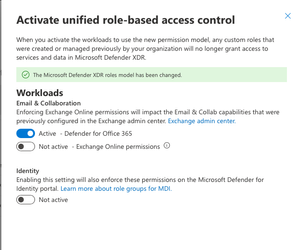
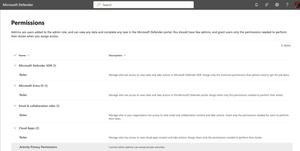
cyb3rmik3 Under System > Permissions, it takes me to the page in my screenshot. Which item do I choose to create the role? Defender XDR Entra ID Email & Collab Cloud Apps I tried to create it in Defender XDR yet at the end it gives me the option to Activate Workloads > Activate unified role-based access control: I'm not sure what Enforcing Exchange Online permissions will impact the Email & Collab capabilities that were previously configured in the Exchange admin center or Enabling this setting will also enforce these permissions on the Microsoft Defender for Identity portal. will affect my tenant. Thanks for any further assisantance!725Views0likes2CommentsMS 365 Defender - What permissions are needed to move and delete emails in Explorer?
I need a tech with limited permissions to be able to https://learn.microsoft.com/en-us/defender-office-365/remediate-malicious-email-delivered-office-365 These are the options I have in Admin. I tried a bunch of recommended actions, yet I don't seem to have the correct Admin portals as shown https://learn.microsoft.com/en-us/defender-xdr/manage-rbac. For example, I don't have MS 365 Defender Permissions Group shown in the video:Outlook Mac 2019 Search not working
I have a user with latest Outlook (16.41.20091302) and MacOS 10.14.6 who when they search the search returns no items. I went through most of the troubleshooting here pertaining to Apple's Spotlight indexing which took hours to Index. No joy. I'd rather not reinstall or delete the user profile, yet if I do I'd like some insight into exactly what each does to the user's experience. For example if I do have to https://support.microsoft.com/en-us/office/uninstall-office-for-mac-eefa1199-5b58-43af-8a3d-b73dc1a8cae3, how will that affect Outlook. Will the user have to recreate anything like folder structure or rules or signatures? Same for https://support.microsoft.com/en-us/office/manage-profiles-or-identities-in-outlook-for-mac-fed2a955-74df-4a24-bef6-78a426958c4c the user profile or recreating it and setting it as default. Any help is greatly appreciated.1.4KViews0likes1CommentOutlook Mac "there is no default application specified to open document"
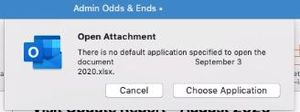
User complaining that after updating to latest Office 2019 they are getting the following error: User says its for a variety of file types. This error was generated by trying to open a pptx file. MacOS 10.14.6 Outlook version: 16.41.20091302Solved6.1KViews0likes6CommentsMacOS user has severe issue with Asian fonts
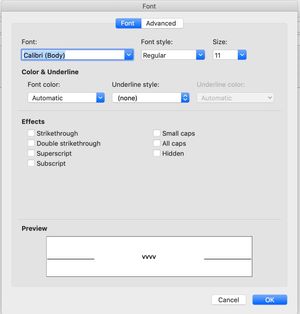
For some reason sometimes when crafting emails, Word docs or adding calendar events the fonts default to Asian fonts and a very small font size. The top screenshot is what my Format > Font looks like in Outlook and the bottom one is from the user having issues:652Views0likes0CommentsUser missing font in Word for MacOS
From user: I was trying to create letters this morning -- and Adobe Garamond Pro seems to be missing from my computer's font styles. It will work as "Adobe Garamond Pro Bold" but won't go "Adobe Garamond Pro Regular" -- i.e. normal! Microsoft Word.app 16.40.20081000 The font is available in Excel. Thoughts on troubleshooting? Thanks.Solved5KViews0likes10CommentsRe: Outlook Mac "there is no default application specified to open document"
From Outlook Support for what it's worth: Appreciate your help in providing information related to the issue you are facing. We have identified this behavior as a BUG and report is already filed with the product engineering team and the issue is under investigation. I understand the severity of the issue and the requirement for the resolution. Since this needs to be tested and the fix needs to be rolled out, we would not be able to provide an ETA on the fix. The details provided by you have been updated to the bug for investigation. Once the fix is rolled out to any BUG filed with the product engineering team, then it'll be released through updates for Outlook. Hence, keep your Outlook updated. You may refer to the Microsoft blog, where all the updates to the latest features and fixes are announced. Here is the link: https://docs.microsoft.com/en-us/officeupdates/release-notes-office-for-mac They also suggested I keep an eye https://support.microsoft.com/en-us/office/fixes-or-workarounds-for-recent-issues-in-outlook-for-mac-54afa5e3-db38-422a-9d94-3b55330ded8e?ui=en-us&rs=en-us&ad=us.5.7KViews0likes1CommentRe: Outlook Mac "there is no default application specified to open document"
So working with user when they open the attachment they get the no default application warning when opening the attachment from inside Outlook email: Yet the correct application opens the attachment anyway even with the above dialog showing. It also seems that after the user chooses the correct application (Excel in this example) the warning goes away. I'm not sure if it's gone forever so I'd like some help troubleshooting in case the issue returns...5.8KViews0likes2CommentsRe: User missing font in Word for MacOS
I'm working with Microsoft Support and they suggested we use a https://support.microsoft.com/en-us/office/update-office-for-mac-automatically-bfd1e497-c24d-4754-92ab-910a4074d7c1?ui=en-us&rs=en-us&ad=us They want me to add just for Word yet the only way I see to do that is change to Insider Slow, manually check for updates and then only choose Update next to Word. So I'm waiting for clarification from Microsoft Support to see exactly what they want me to do...4.5KViews0likes3CommentsRe: User missing font in Word for MacOS
I have 2 MacOS 10.14.6 computers running the latest Word (I run software update and no new updates on both) and I am not having the issue. I should be clear in case Microsoft shows up, https://docs.microsoft.com/en-us/office/troubleshoot/third-party-add-ins/third-party-installed-font-fails-appearing and it didn't help.4.5KViews0likes5CommentsRe: User missing font in Word for MacOS
My troubleshooting so far: Does work in Excel. "Regular" shows up with check mark. Does not work in Word and Outlook - only bold and italic work and there are no checks next to the font styles. (see attached image for what it looks like when working) There are no check-boxes next to the font styles in Garamond yet the check-boxes do show in other font families. Verified there were no enabled duplicate fonts in FontBook. Repaired the fonts anyway. The issue seems to have started with the last Office update. Booted in Safe Mode and it didn't help. Reinstalled the latest version of Word. Deleted Word and Office user pref plists from user/library/preferences The attached image is what the font family should look like from my computer running the same version of Word and the same MacOS.4.6KViews0likes8Comments

Recent Blog Articles
No content to show