User Profile

lightupdifire
Brass Contributor
Joined 7 years ago


User Widgets
Recent Discussions
Re: MS Teams | Azure AD API | Access Restriction(Limitation)
Strange isn't it? There is a solution for limiting Exchange Online API using: New-ApplicationAccessPolicy There is a solution for limiting SharePoint Online API access by using "Sites.Selected" But when developing the MS Teams, no security solution was added 🙂 Feedback is on the way. Have a great one 😉1.3KViews0likes0CommentsRe: MS Teams | Azure AD API | Access Restriction(Limitation)
Prasad_Das-MSFT We plan to use the Power Automate standard connector for creating channels in MS Teams. For this, we must register Azure AD API, and give permissions like: Channel.Create/Delete, Channel.Members.ReadWriteAll and permissions are required to be set on Application, not Delegated. When the Application level permissions are set, then this API will be able to Delete/Create any channel in any MS Teams. Then of course a question, how can limit this API to access only dedicated MS Teams?1.4KViews0likes2CommentsMS Teams | Azure AD API | Access Restriction(Limitation)
Hello, We would like to manage the MS Teams Channel using the Azure AD API, It seems that the solution requires Application level permissions, But then this API will be able to manage (Delete/Create Channel) for any MS Teams in a tenant, Is there a way to limit Azure AD API to only specific MS Teams? There is a solution for limiting Exchange Online API using: New-ApplicationAccessPolicy There is a solution for limiting SharePoint Online API access by using "Sites.Selected" But why there is no solution for MS Teams? No security is needed...Solved1.6KViews0likes4CommentsMicrosoft Office 365 E3 Update management
Hello, Please help to understand: 1. Apply automatic update 2. Report about Office versions in the organization 3. The Office 365 Update process Apply automatic update: Deployed the Intune policy Administrative template to: a) Enable Automatic Updates b) Hide the end-user option to disable the update c) Set update release as Current Channel d) Deadline for Office update X days e) Set Admin.Microsoft.Com to use Current Channel Is it good enough to set that tenant users will be Office up-to-date? Or we better enroll under https://config.office.com monthly enterprise profile? If we enable Get other updates with Windows Updates, this process will update Office? Report about Office versions in the organization: Having the most accurate report, the best like live, For example, recently there was a Vulnerability related to Office Update, would be Extremely necessary to know the current status together with the last device sync date... But, we have 4x locations: a) https://config.office.com/officeSettings/officeapphealth/overview b) https://admin.microsoft.com/Adminportal/Home?#/softwareupdates c) https://intune.microsoft.com/#view/Microsoft_Intune_DeviceSettings/AppsMonitorMenu/~/discoveredApps d) https://security.microsoft.com/vulnerability-management-inventories/applications/microsoft-_-office Knowing that a-b-d reports require from 48 up to 72 hours to get an update, not sure if we can really count on those reports for "live view"... So which is best to use? Intune? The Office 365 Update process Is it the Task Scheduler that is triggering the office update? Can admins trigger the office update when critical updates are needed, how? PowerShell for Intune? If the user uses the Outlook Desktop app for the whole day, but in order to apply Office updates, all the Office apps must be closed, does this mean that Office updates will apply only after the user restarts the device? And what if the user uses Sleep mode? Why the Task Scheduler task "Office Update 2.0" has the status "the task never run"?Solved2.7KViews0likes3CommentsRe: Feature request: Block readaccess to Windows Defender exclusions
Hello Stefan, There is an option now, called in the GPO "HideExclusionsFromLocalAdmins"; But, I'm challenged now why we cannot Disable of use of the Exclusions for users also with Administrative rights, I think this will be better. And could be interesting to deploy an Intune profile, that simply locks any Exclusions to be added, viewed, accessed, only Intune service/tenant admins can.1.3KViews1like0CommentsRe: WVD logging in issue
bhuwan8051 1. Get user SID, can run AD PowerShell (replace mailto:firstname.lastname@domain.com with affected user userprincipalname): get-aduser -filter {UserPrincipalName -eq "firstname.lastname@domain.com"} -Properties * | select objectSid 2. Check every Session host in the farm and go to: "HKLM\SOFTWARE\Microsoft\Windows NT\CurrentVersion\ProfileService\References<sid affected user>" 3. Search for value RefCount and change all values to 00 So for example below is the current value: Then you change it to: The user will now be able to log in again.2.7KViews0likes0CommentsRe: WVD Single Sign On / Double Authentication
Hello, many Azure AD customers try to phase out ADFS and try to use Passwordless and go Cloud only as much as possible. Also deploying Windows Hello for Business is not an option anymore as it requires one or another on-premise environment. Would be good to have a "light" solution for WVD that uses SSO, so can easily go Passwordless and stay independent from ADFS.20KViews0likes0CommentsWVD and WIP | Windows 10 AADJ & Intune
Hello, Right now, if connected to the WVD, the local PC drives mapped by default to the WVD session. Then if do a copy of any file from WVD directly to PC, file not encrypted by WIP. Does anyone have an idea of how to make sure that files copied from WVD will be encrypted by WIP policy? Setup used: 1. Azure AD Join Windows 10 devices 2. MDM -> Intune 3. WIP pushed thru Intune 4. WVD in Azure1.2KViews0likes0CommentsRe: No one from Microsoft is responding to this issue for WVD PASSWORDLESS LOGIN
Deepu_k Have a question about passwordless too, more like is it supported and in which scenario. Found some info in here: https://www.jasonsamuel.com/2020/03/02/how-to-use-microsoft-wvd-windows-10-multi-session-fslogix-msix-app-attach-to-build-an-azure-powered-virtual-desktop-experience/ Passwordless authentication with Microsoft Authenticator phone sign-in https://www.jasonsamuel.com/2019/03/04/how-to-setup-password-less-phone-sign-in-authentication-with-microsoft-authenticator-azure-ad-and-citrix-workspace/ which I have talked about many times in the past is supported by Azure AD, therefore it is supported by WVD. Authentication happens before authorization and enumeration of the WVD service. Since WVD is a native Azure service, it is able to support Azure AD natively as a result. There is nothing you need to do to make this work. It’s already built-in, you just need to enable it under Azure AD in Authentication Methods for your users as I have previously discussed https://www.jasonsamuel.com/2019/09/18/how-to-enable-fido2-password-less-authentication-with-microsoft-azure-ad-for-use-with-windows-10-and-saas-web-apps/#Enabling_Authentication_Methods_and_FIDO2_Security_Keys_for_your_Azure_AD_tenant.723Views0likes0CommentsRe: Windows Information Protection - WIP in RC
Philip Büchlercan you please show, explain about which "flag" you are talking about? I found that if install new Edge, then WIP no longer applies, by checking Publisher info, it looks different then the existing Edge in WIP policy, I'm just thinking it will be required to add new Publisher info for Edge browser, or the Publisher info will be updated after Edge will be added to the Windows Store with GA..2.6KViews0likes5CommentsWIP/EFS shows protection on Network shares
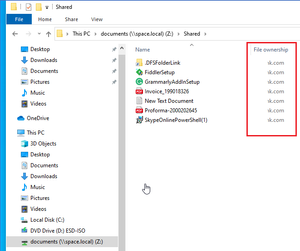
Hello, Maybe someone has experience: 1. The device is joined to the on-premise domain 2. User mapping network drive from DFS share from domain 3. The on-premise domain is as an example: space.local 4. User Enroll device to MDM to another domain, as an example: vik.com 5. MDM push WIP policy to user fine and apply configuration 6. All files and folder in network drives become marked as WIP protected/company identity977Views0likes2Comments



Recent Blog Articles
No content to show