User Profile

JohnForth
Brass Contributor
Joined 7 years ago


User Widgets
Recent Discussions
OneDrive Group Policy Template changes
I'm curious, about OneDrive Group Policy settings. Knowing that the ADMX Template files come down when the Sync Client is installed, if there a list of any updates to those ADMX Templates like Microsoft Office's templates have an Excel file that show changes, etc.? How often are those ADMX Templates updated? The https://learn.microsoft.com/en-us/sharepoint/use-group-policy page doesn't list when there are updates made to the ADMX files. What's the recommended best practice for how often an Enterprise ADMX Central Store should be updated with the updated templates?2.6KViews0likes1CommentRe: Copying OneNote Files from/to OneDrive and SharePoint
Luke Hoffman https://support.microsoft.com/en-us/office/move-a-onenote-notebook-to-onedrive-0af0a141-0bdf-49ab-9e50-45dbcca44082#:~:text=To%20move%20a%20notebook%20to%20OneDrive%20if%20you,like%2C%20you%20can%20keep%20the%20...%20See%20More8.4KViews0likes0CommentsOneDrive / OneDrive for Business using DEM and FSLogix Office Profiles
Greetings Community. Has anyone implemented OneDrive and/or OneDrive for Business along with VMWare Dynamic Environment Manager and FSLogix Office Profiles? In a non-persistent VDI Scenario we are using DEM to manage the user side of our profiles, and the FSLogix Office Profiles to manage the Office side. A few questions: Data center/building cache - is there a mechanism for building-level cache, or does every user have to long-line back to Azure every time? Non-persistence – Does the OneDrive Sync Cache save to the FSLogix Office Profile container? Does it cache on logon or upon accessing a file and the purge the cache on log off or does it persist in FSLogix? What are the minimum and recommended storage requirements for FSLogix for OneDrive? Any tips and tricks would be greatly appreciated. Thank you!1.4KViews0likes0CommentsRe: Skype for Business / Make Invited Person an Admin to allow sharing
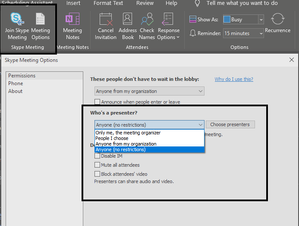
When you set up your calendar invite, you can select Meeting Options, and set your preferences. Or you can select the person you want to be a presenter in your chat message, right-click and select Mark as Presenter In the actual Skype for Business chat: Follow steps at this link https://www.osibeyond.com/resources/making-others-presenter-skype-business-meeting/ In Outlook: Create a new Meeting invite click the Skype Meeting button from the Ribbon, a new option will appear next to the Skype Meeting button. Click that. https://support.microsoft.com/en-us/office/change-participant-settings-for-skype-for-business-meetings-9175e297-de5f-43b2-8e0f-85cc05e24986 Good luck! John1KViews0likes0CommentsRe: Sign-in pop-up does not work in Office, Office 365 ProPlus Student
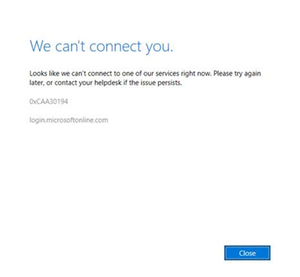
RoyalVirgin We had a similar issue this month with activation. In our case, the problem was caused by the March cumulative update for Windows 10. The fix is to make sure you've got all of the most recent OS Updates. Then, open a command prompt as an admin, type: 1. net stop nlasvc and press ENTER 2. net stop netprofm and press ENTER 3. Net START netprofm and press ENTER Close and reopen an MS Office Application and attempt to sign in.9.6KViews0likes0CommentsRe: Microsoft sure knows how to make life easy with a brand spanking new Surface Pro i7
whydoineedtodothis Have you tried using an uninstall xml? run Office Deployment tool "Setup.exe /configure .\uninstall.xml" Setup your uninstall XML like this and save as Uninstall.xml <!-- Uninstall Office 365 /> --> <Configuration> <Remove All="TRUE"> </Remove> <Display Level="None" AcceptEULA="TRUE" /> <Logging Path ="C:\Windows\SYSWOW64\PKG_LOGS"/> </Configuration>1.3KViews0likes0CommentsRe: How to update office 365 proplus offline
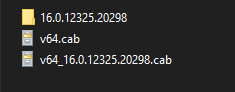
Tien Ngo Thanh I've ran into this before in my offline patching. 2 things to make sure of: 1. Check your install source to make sure all of the files are there: in the \Office\Data folder, there should be 2 cab files and a file folder. In some cases, I've seen the v64.cab file missing. Without that file, office will fail. Inside the 16.0.12325.20298 folder: 2. Check your XML file, and make sure there isn't a an entry on the first <Add > tag that tells it specifically what version to use. If there is, remove that line.7.5KViews0likes2Comments
Recent Blog Articles
No content to show