User Profile

Alanjmcf
Brass Contributor
Joined 7 years ago


User Widgets
Recent Discussions
Re: EM+S E3 50 Seat Legacy donation - some customers being charged - why?
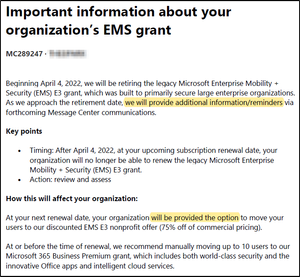
We've just had our first customer hit with this. As Daniel noted, for the E2 deprecation they warned clearly and often, but not for this EMS-E3 one!! They really dropped the ball. Thanks for the hint to go back to 2021 for MC289247, Colin. Luckily we haven't deleted the emails, since it's not accessible now in admin center as far as I can see! It is clear they made a mistake! It says very clearly there will be more communication and "option" (my emphasis below). (screenshot below) "As we approach the retirement date, we will provide additional information/reminders via forthcoming Message Center communications." "will be provided the option to move your users to our discounted EMS E3 nonprofit offer" Alan5.8KViews1like3CommentsRe: Find and Replace dialog box show weird characters
Do you all have Z@*.tmp files in "%TEMP%\acrord32_sbx\" (ie "C:\Users\___???___\AppData\Local\Temp\acrord32_sbx\") Turns out this is caused by 'odd' fonts used in PDFs. These special fonts are used to protect (obscure) the text in the PDF. The fonts have the letters and numbers at odd codepoints in the font and the encryption(?!) tool re-writes the text into the PDF using the remapped codepoints. Thus one can't copy&paste /search etc. Somehow Edge is using that font.4.8KViews0likes2CommentsRe: Find and Replace dialog box show weird characters
One of my contacts at Microsoft has let me know "... they're rolling out a fix but I'm not sure when you'll see it" I see it fixed Friday morning on my user's PC. As we know it was sometime took a bit to appear so hopefully its really gone.5KViews0likes0CommentsRe: Find and Replace dialog box show weird characters
One of my contacts at Microsoft has let me know "... they're rolling out a fix but I'm not sure when you'll see it" I see it fixed this morning on my user's PC. As we know it was sometime took a bit to appear so hopefully its really gone.5.1KViews0likes0CommentsRe: Find and Replace dialog box show weird characters
It’s something that has to be done each time, so its only a test, not a fix. See the video in my tweet https://twitter.com/alanjmcf/status/1620806678873780225?s=20&t=yMgC1JLlxXL5SOTDWpoeZg However note that one has to add the “font-family” line, I’d already added it when I recorded that.6.1KViews0likes0CommentsRe: Find and Replace dialog box show weird characters
We’re seeing the same. Re-built the PC (win 10). Edge still shows the issue. Same user on a different PC (same AAD login) - good (so far) Another Edge profile on first PC, different 365 user — BAD Installed Chrome — occurs there too BAD. Installed Firefox — doesn’t occur (so far). Logged into the same PC as another (local) user. — good. (so far) Also, using browser’s Dev tools, changed the font away from Arial, correct characters appear! So, affects Edge and Chrome. Not seen in Firefox. Only affects one user profile on one PC (so far) — reoccurred after a rebuilt. Only affects Arial. I’ve put lots of “so far” because, as noted her by other folks, and we’ve seen, that the issue can take time to appear. https://twitter.com/alanjmcf/status/16207905543376158726.6KViews0likes3CommentsRe: DKIM selector1 record missing at 365
I’m guessing this is normal intentional behaviour now ie: after a key rotation (and after sufficient time for emails using the old key to be delivered), they remove the old key, and don’t bring a new key back to that selector until the next key rotation. I can’t see any issues that creates for email delivery — a bit annoying for diagnostics tools though!31KViews0likes3CommentsRe: DKIM selector1 record missing at 365
I checked an hour or three ago and it is NOT fixed. The selector1 record is still missing except for those domains where I did the PowerShell command suggested by Pierfish That brings the record back to life — even though that option is already set to true.31KViews0likes1CommentRe: DKIM selector1 record missing at 365
From a quick check (from my iPhone) looks like the records are back — well for that one domain at least. Just a wee blip I guess. But I also wonder why key rotation apparently happened for all domains at the same time. Maybe to do with https://www.microsoft.com/en-us/microsoft-365/roadmap?featureid=5675232KViews0likes2CommentsRe: DKIM selector1 record missing at 365
I’ve sent a grand total of two emails from two tenants and both were sent with selector2. So after that huge test…hopefully the lack of selector1 isn’t breaking email delivery. Maybe all tenants did a key rotation to selector2 and something stopped them creating selector1. My experiences with support recently have been somewhat lacking (they don’t escalate clear issues etc) so reporting it here was my alternative. :-,)32KViews0likes3CommentsRe: DKIM selector1 record missing at 365
Pierfish I didn't mention that I've changed nothing and this has suddenly affected twenty tenants in the last week (or thereabouts). That seems set already as I'd expect. (Doesn't appear in Get-'s output.) @@PS C:\Users\AlanMcFarlane\Documents\Temp> set-DkimSigningConfig -Identity XXndeesen.org -PublishTxtRecords WARNING: The command completed successfully but no settings of 'XXndeesen.org' have been modified.32KViews0likes7CommentsDKIM selector1 record missing at 365
Anyone else seeing DNS failures resolving the selector1 TXT record supplied by EXO for each domain? selector2 is fine. I'm seeing that across my fleet of customer tenants. @@PS C:\Users\AlanMcFarlane\Documents\Temp> Resolve-DnsName -Type cname -Name selector1._domainkey.XXundeesen.org | fl Name : selector1._domainkey.XXundeesen.org Type : CNAME TTL : 14371 Section : Answer NameHost : selector1-XXundeesen-org._domainkey.Xsen.onmicrosoft.com @@PS C:\Users\AlanMcFarlane\Documents\Temp> Resolve-DnsName -Type TXT -Name selector1-XXundeesen-org._domainkey.Xsen.onmicrosoft.com Resolve-DnsName : selector1-XXundeesen-org._domainkey.Xsen.onmicrosoft.com : DNS name does not exist At line:1 char:1 + Resolve-DnsName -Type TXT -Name selector1-XXndeesen-org._domainkey.DS ... + ~~~~~~~~~~~~~~~~~~~~~~~~~~~~~~~~~~~~~~~~~~~~~~~~~~~~~~~~~~~~~~~~~~~~~ + CategoryInfo : ResourceUnavailable: (selector1-dunde...onmicrosoft.com:String) [Resolve-DnsName], Win32 Exception + FullyQualifiedErrorId : DNS_ERROR_RCODE_NAME_ERROR,Microsoft.DnsClient.Commands.ResolveDnsName @@PS C:\Users\AlanMcFarlane\Documents\Temp> Resolve-DnsName -Type TXT -Name selector2-XXndeesen-org._domainkey.XSEN.onmicrosoft.com |Fl Name : selector2-XXndeesen-org._domainkey.XSEN.onmicrosoft.com Type : TXT TTL : 3594 Strings : {v=DKIM1; k=rsa; p=MIGfMA0GCSqGSIb3DQEBAQUAA4GNADCBiQKBgQDWc7LSbVYlbIU5iacAKqoglZISad9rZBna+O8rc9j5iOMyzvgGuoEtFx8MXyuq2nVQXkVWgjPxbOB4Ov3FYaFDPTJtP4Gc9PcAc+ncu0UTfGgsVlcAU5ahISHr+0xKLJ7EzNtTxvjTeeQV5CtndtAMSfFCMixHzfIn0sRgv1tnlQIDAQAB;} Domain names slightly modified for privacy!41KViews0likes20Comments
Recent Blog Articles
No content to show