User Profile

Rory2019
Copper Contributor
Joined 7 years ago


User Widgets
Recent Discussions
News/page publishing process changes
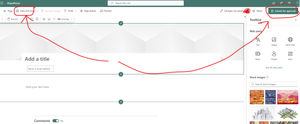
We've had a workflow in place so that when people create news articles, it runs through a powerautomate workflow first. The process would be : Create news item, populate content Click "Submit for approval" in the top right. Side panel opens to tick some boxes (to create tags) User clicks "Publish", the workflow is processed A few minutes later it appears on some other pages which have a webpart configured to display this news. However in recent months, Microsoft seemed to have required all news/pages to have the "Save and close" button in the top left to be clicked first. I'm guessing this is related to the default check in/out workflow that sharepoint uses. What this has resulted in is much confusion, as the two processes work totally independently, and users dont know that they have to click "Save and close" first before then clicking the "Submit for approval" button to kick off the workflow. Has anyone else seen this? Can the "save and close" function be incorporated into the flow itself? The workflow is used to create managed metadata for the article, so that different categories of news can be displayed on different pages. This is not particularly relevant though to this issue i dont think.47Views0likes1CommentShow filter button by default
Is it possible to show the filter button (which results in the right hand fly out menu) by default? I think the answer is "no not in the standard sharepoint experience", but what if the list was migrated into PowerApps or something, could a filter menu be displayed so its more obvious to users? I have a list of volunteering opportunities (with different fields) in the Gallery view, and the vast majority of people will certainly want to use the filters, so making this as obvious as possible is ideal.90Views0likes1CommentGet page views into column
I can see there is a standard column for "Like count" but not for "page views"? I want these 2 columns sitting side by side in the page library list. How can i get page views into a column? Currently the information only seems to be accessible by going to the "Details" icon.54Views0likes1CommentShow page views as page library column
I want to add a new column to the page library for a news site which shows the views. All i can see as a standard column though is "Page likes". The page view data is there, as i can see it in the "info" tab for each page, but i'm not sure how to create the column. Any ideas?95Views0likes1CommentKQL query for managed metadata
Hello, I'm quite new to KQL , however it appears to be the best way to do what i want which is I'm using the Highlighted Content webpart and wish to display documents from another site which are tagged with one or more managed metadata column. For example, on Site A i wish to display documents from Site B which are tagged with Term set (Office) = Term (London). What would the query be? Currently mine is the following however it's not working: ows_taxId_Office:"GP0|#7ee8fd39-392c-4d6e-a05b-e4903122ab25"3.4KViews0likes1CommentRe: Upload documents and create links in modern pages
Martin-Coupal This is alright, but far from ideal particularly from a general user perspective who just wants to upload a file as they're adding text. They are hardly likely to know to do this. It also seems quite heavy handed to have to insert a widget to do this which, in addition, results in the widget having to be on an entirely different row to the text it's related to, rather than just a link saying something like "View/download this document"6.5KViews0likes3CommentsRe: Upload documents and create links in modern pages
Pete Bostrom This is the only thread on this i can find, not sure if a solution was ever found. This is a baffling omission of functionality. Being able to upload a document 'on the fly' is an absolutely essential bit of functionality. Like you say, the only alternative is to use the "file viewer" webpart which takes up the entire page, or first upload the document then go back in an edit the page and use the "insert link" button. Both of these options are significantly worse than a simple "Upload file" feature, which is fundamental in every CMS i've ever used except this one.6.5KViews0likes0CommentsAudience targeting with Sharepoint Modern experience
We now have audience targeting enabled on our tenant, however our requirement is for anyone to be able to pick audiences in an intuitive way. The current modern experience template a) requires that you open the "Page properties" tab, and b) select by input as opposed to check-boxes. This isnt really a good solution for us, as the "page properties" tab is not a particularly obvious place for people to be able to pick the right audiences. Also, without providing a pre-defined selection of audiences, users can potentially pick ANY audience which includes a mix of sharepoint groups, AD groups and distribution groups. In short, it's far too confusing for the average person to target a page to an appropriate audience. So my questions are: Can the page properties be made more obvious in this template? Can the audience targeting of pages be restricted to a pre-defined list of audiences (such as those we've imported as managed metadata) Thanks732Views0likes1CommentAudience targeting on modern sharepoint pages
I see that this is now available on sharepoint modern pages, which is useful, however it only seems possible to target pages to specific audiences from the page library view, which is not useful when you have various people across the organisation creating news items. How can this column be added to the "page properties" tab so that users can target content at the same time as creating the page/news item?3KViews0likes5Comments
Recent Blog Articles
No content to show