User Profile

lyncer2013
Copper Contributor
Joined 7 years ago


User Widgets
Recent Discussions
DKIM signing config EXO while using Cisco CES for all internet emails
Hi, We've got Exchange Online to host our mailboxes, and configured our internet send connector to pass via a Cisco CES. So we aren't delivering directly to the internet via Exchange Online. DKIM signing is enabled on the Cisco CES. I'm quite sure we never had issues with our DKIM signing, but did notice we do now. In our EXO DKim config we have DKIM disabled for all our custom domains. On the OnMicrosoft I see that it's still enabled. We have DKIM signing errors when I check the headers of emails, and the reason is that EXO is already signing with the default domain. I always thought that DKIM signing should occur on the last servers before delivering to the internet, which is our Cisco CES. I opened a ticket at support, and they keep telling me I need to enable DKIM signing on EXO for the custom domain.. I really don't see why? Why can't we just disable dkim signing on all custom domains and the onmicrosoft domain and let CES take care of it? Also I'd expect it to be done there, as those are our last servers before internet.698Views0likes0CommentsRe: Safe Links : Disable scanning for internal url's in Teams
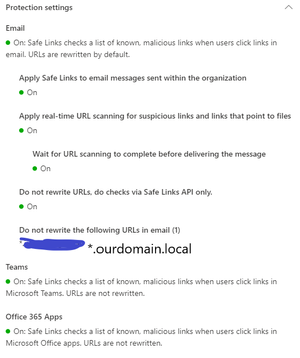
Thanks! So this means we can't "whitelist" our internal domain from Safe Links scanning,. So the only option we have then is to report our internal domain to https://security.microsoft.com/reportsubmission And then every 30 days ask to add it again?5.3KViews0likes1CommentSafe Links : Disable scanning for internal url's in Teams
Hi, I got redirected by an admin from answers.ms to this community, so here's my question 🙂 We're using safe links in our environment, and have a "do not rewrite url" setup for our internal environment mydomain.intra, to make sure internal sites aren't checked. We notice this is working in Outlook, but it doesn't work in Teams. When users receive an internal url in teams, like https : [//] holidayrequests.mydomain.intra the link is still being checked, causing a delay since it's not publicly available. Can someone shed a light on the following : * How can we make sure these internal url's aren't verified by safe links in Teams? (most important question :-)) * We notice that for some users there is no redirect to Safe Links, and for others there is. The safe links policy is configured for everyone though, so there shouldn't be a difference. I verfied this with Fiddler. On my own Teams I don't see any redirects to be scanned by Safe Links, while for some other colleagues I clearly see the redirect).Solved8.6KViews0likes5CommentsDKIM / DMARC Office 365 for third party senders
Hi, I have a DKIM / DMARC question. We migrated our mailboxes from Onpremise to Exchange Online about a year ago. At the time we had setup SPF records so that our external partner could send from our domain name. For 2021 it will be a requirement for the company to also use DKIM and DMARC on our email domains. So if I'm correct : To enable DKIM I need to create following records in our external dns : selector1._domainkey.ourdomain.fr. IN CNAME selector1-ourdomain-fr._domainkey.ourdomain.onmicrosoft.com. selector2._domainkey.ourdomain.fr. IN CNAME selector2-ourdomain-fr._domainkey.ourdomain.onmicrosoft.com. Then I enable it from the O365 portal. Sign messages for this domain with DKIM signature So when done, I cover my emails sent from our Office 365 tenant, right? Now, I wonder what happens if our external partner sends an email from @ourdomain.fr after this configuration? Will it be blocked by antispam? Or will it just send out without DKIM signing? If it sends out without DKIM signing, how can I make sure they do? If we then decide to do DMARC too, how can we go from there? And will third party senders will still be able to send if we only configure DKIM/DMARC for our Office365 tenant?3.3KViews0likes1CommentGet-PacFile.ps1 - difference option 1 and 2
Hi, We're configuring proxy bypass using the script https://www.powershellgallery.com/packages/Get-PacFile/1.0/Content/Get-PacFile.ps1 Can someone explain the difference between 1 and 2, since it isn't clear to us : .PARAMETER Type The type of prioritization to give. Valid values are 1 and 2, which are 2 different modes of operation. Type 1 will send Optimize traffic to the direct route. Type 2 will send Optimize and Allow traffic to the direct route.2.1KViews0likes0Comments
Recent Blog Articles
No content to show