User Profile

Chris-Yue
Iron Contributor
Joined 10 years ago


User Widgets
Recent Discussions
Re: Unable to join forwarded External Teams Meetings to MTR
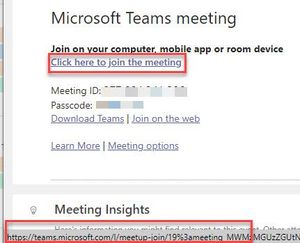
jameshamilton Thanks for the detailed response. The Mimecast rule is all set up and I can that there is no rewrite when hovering over the Teams Invite link. The issue for me is as follows where the organiser is external to the Company. Scenario 1 Before accepting the meeting, the INBOX message invite is forwarded to the Meeting Teams Room (MTR). The invite is accepted by the MTR and recognised as a Teams Meeting (Teams icon present). Scenario 2 The INBOX message invite is accepted and an entry appears in the users calendar. The original message in the INBOX disappears. The meeting invite is forwarded via the calendar entry, but the MTR does not accept the forward and no entry appears on the MTR as a result. In your environment, do both scenarios work?2.8KViews0likes0CommentsRe: Unable to join forwarded External Teams Meetings to MTR
jameshamilton I am using Mimecast and am experiencing the same issues when forwarding a MS Teams invite to a Meeting Teams Room device. I have disabled URL rewrite on Mimecast in 2 places: Administration > Services > URL Protection Bypass Administration > Gateway > Polices > URL Protection Bypass I can now see that the URL is no longer rewritten but this is still not working. Join on the web URL is still being rewritten but I did not think that was important. Also, when forwarding a Teams invite from a company user to the MTR do I still need to run the following PowerShell command? Set-CalendarProcessing -Identity email address removed for privacy reasons -ProcessExternalMeetingMessages $True2.7KViews0likes2CommentsHow to prevent users automatically enrolling their mobile devices in MDM for O365
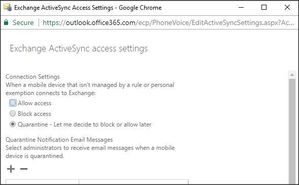
I am using MDM for Office 365 and need some advice on how to automatically prevent users from enrolling their mobile devices for email and where ActiveSync comes into play in all of this. I do not have Azure premium. Q. Does MDM require the use of ActiveSync? I have noticed that even if I turn off ActiveSync against a user mailbox, the user is still able to receive mobile email, so long as he/she meets the requirements of the default Mobile device mailbox policy (eg 4 digit passcode etc). Typically the user will have an iPhone and the native mail client or the Outlook app. Q. There seems to be 2 locations to create a Mobile Device Policy:- Admin Centers > Exchange > Mobile > Mobile device mailbox policies Admin Centers > Security & Compliance > Data Loss Prevention >Device security policies Why is there two places for this? Is the first method when just ActiveSync (without company portal app) is used and the second when MDM (with the Company Portal app) is used? Q. Which of the above policies take precedence? Q. For:- Admin Centers > Security & Compliance > Data Loss Prevention >Device security policies There is a Deployment option to associate the policy with a security group. Does the group need to be mail enabled to work? What happens if the user does not belong to the group the policy is being deployed against? Q. How can I by default prevent users from receiving email if turning off ActiveSync fails to stop them? I have managed to quarantine the device initially though. Any comments or advice would be welcome.2KViews0likes0CommentsOffice 365 E3 or Microsoft 365 E3
Has anyone come across a matrix that compares the above? For me, I am looking for a plan that includes Azure Premium P1 (I need the Conditional Access Piece). Seems cheaper to get the E3 plan and add the Azure Active Directory Premium P1 instead, unless there are other bells and whistles I am not aware of. Any comments would be appreciated.34KViews1like6CommentsDialog Prompt box for authentication to O365 services
Environment:- Office 365 Business Essentials (aka no Office 365 Pro Plus) Office 2013 Standard (ISO Version) ADAL enabled When signing into O365 services (eg OneDrive) they get a dialog prompt (see attached). Looking at the dialog prompt this does not look like the one when Modern Authentication has been enabled. Can anyone clarify? Entering the correct credentials will fail all the time. I know it must be profile related but any advice would be helpful.2.8KViews0likes3CommentsWindows Hello for Business - I forgot my pin feature not working - Intermediate sucess
Windows 11 Professional Device Azure AD Joined WHfB setup using PIN code Windows AutoPilot spawned When using the I Forgot My PIN option I get the a full screen (blue background) with the heading Sign in with Microsoft and the Send Notification command button (similar to the onboarding screen users see when enrolling via AutoPilot). When I acknowledge the notification using the MS Authenticator App, I am returned back to the login screen. If I try a couple of more times I eventually get the reset PIN option but this is a bit hit and miss. Has anyone come across this? If I sign into the device with my password, I am able to reset my PIN code under Accounts > Sign-in Options >PIN > related links I forgot my PIN2.7KViews0likes3CommentsRe: Autopilot support for multiple Domains on a single tenant
Rudy_Ooms_MVP thanks for the response. The UPN does match the email address already but I think with the article, I could possibly use another one of the email aliases. So in other words, mailto:user@company2.com is the non working UPN domain, but I guess I could test and see if user@<tenant-name>.onmicrosoft.com might work also as a possible workaround.4.8KViews0likes1CommentAutopilot support for multiple Domains on a single tenant
My office 365 tenant includes multiple domains to include the following: mycompany1.com mycompany2.com mycompany3.com I have also setup Windows Autopilot (AAD Join) for my tenant. However only email addresses from mycompany1.com are recognised accepted when enrolling Windows 10 devices. How do I add the other domains to the accepted list of email domains for Autopilot?5KViews0likes3CommentsRe: Is it possible to invite a Ms Teams Device when you are not the organiser?
Hi Graham, when the room is invited, the invitation is accepted but the meeting does not appear on the MTR panel. I read somewhere you need to an the external email/domain to the O365 Tenant before it appears. The best approach I found works, is as follows: Internal Attendee is in a room with a MTR device and joins on his personal device as per normal Once in the meeting, the same attendee then calls the room via the participants button After the room accepts the call, the attendee drops out of the meeting from the personal device1.2KViews0likes0CommentsIs it possible to invite a Ms Teams Device when you are not the organiser?
We are using MS Teams Devices. When we get an invite from an external company, there does not seem a way of inviting the Teams device, unless you are that Organiser. That works internally if a staff member sets it up and invites the Teams device (aka room). If the Organiser sends an invite to the email address of the room itself it still does not work even though I am pretty sure I set this via powershell. Can anyone suggest a workaround?1.5KViews0likes3CommentsManaging PIN complexity on FIDO Security Keys
I have FIDO2 security keys working as part of Windows Hello for Business login to Windows 10 devices. Whilst I can set PIN complexity as part of the user gesture PIN code, I don't seem to be able to do this when FIDO2 keys are used. I am using the on KEY-ID ones that requires a PIN followed by a button press on the key to confirm physical presence. Can anyone advise in this regard?7.6KViews0likes6CommentsRe: Installing .MSI and .EXE based applications as part of Autopilot
So we use a RMM solution called Kaseya VSA. What looks to be the best option in my case is to have Autopilot deploy the VSA agent and nothing more. Once the agent registers with Kaseya then run a script from Kaseya to deploy the remaining core software instead.28KViews0likes0CommentsInstalling .MSI and .EXE based applications as part of Autopilot
I am setting up a POC for autopilot for my Azure AD joined devices. Looking to deploy some applications which are a mix of .MSI and .EXE based ones. I sure an article from Microsoft that recommends not to mix the above during Autopilot. https://docs.microsoft.com/en-us/mem/intune/apps/apps-win32-app-management#app-dependencies When you're deploying Win32 apps, consider using the https://docs.microsoft.com/en-us/mem/intune/apps/intune-management-extension approach exclusively, particularly when you have a multiple-file Win32 app installer. If you mix the installation of Win32 apps and line-of-business apps during AutoPilot enrollment, the app installation might fail. The Intune management extension is installed automatically when a PowerShell script or Win32 app is assigned to the user or device. Has anyone ran into problems as mine tests so far have worked.Solved31KViews0likes6CommentsRe: Device Migration from On-prem AD to Azure AD
Our devices are currently Hybrid Azure AD Joined and I am considering moving new devices over to Azure AD joined to simplify enrolment to Windows Hello for Business and Autopilot. The only downsides I could see is as follows: No login scripts will run at sign in when connected to the LAN No Group Policy control No granular control regarding local admin rights to the local device (it is all or nothing) Just wondering if anyone has found any other disadvantages/benefits and what motivated you to consider making the change over to Azure AD Joined?107KViews0likes1CommentDo I need to setup a CA Authority for Windows Hello for Business to work?
Hybrid Azure AD joined Windows 10 devices AD Connect setup complete with SCP Managed by Endpoint Manager (Intune) All devices appear correctly in Azure AD Identity Policy created for Windows Hello for Business PIN requirement set When I tested this, I can see my test devices being prompted for the wizard for set up a PIN. When they log off and back in again the PIN is not recognised. Are there any requirements to set up a CA Authority to get this to work?3.1KViews0likes2CommentsRe: Intune Enrollment via GPO User eXperience
almarlibetario Thanks for the tip. On the articles I have seen, I saw reference to Enable automatic MDM enrolment using default Azure Ad but not the device registration one. Another thing I have noticed is the following. Where a user picture has been assigned to Office 365, which is visible in office.com and mobile apps, should this appear on Windows 10 devices at the login screen? I got this once, but since retiring the device and re-enrolling again, I don't see it anymore.11KViews0likes0Comments
Recent Blog Articles
No content to show