User Profile

Erik365Online
MCT
Joined 10 years ago


User Widgets
Recent Discussions
Re: Custom App requests authentication on Teams Mobile (iOS)
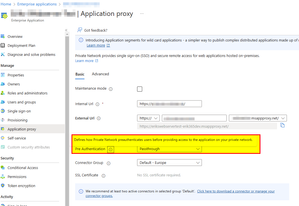
Thank you, Sayali! I will check conditional access policies and Entra ID app proxy settings. Just tried Pre Authentication with "Passthrough" which directly makes the website available and accessible even through MS Teams on iOS. However, this is insecure because it will not request any auth. I'll check conditional access policies as well.91Views0likes0CommentsRe: Custom App requests authentication on Teams Mobile (iOS)
Hi Sayali-MSFT, sure, the Teams App manifest. { "$schema": "https://developer.microsoft.com/en-us/json-schemas/teams/v1.17/MicrosoftTeams.schema.json", "version": "1.0.2", "manifestVersion": "1.17", "id": "XXXXXXXX-XXXX-XXXX-XXXX-XXXXXXXXXXXX", "name": { "short": "EWA", "full": "EWA - Eriks Web App" }, "developer": { "name": "Erik Kleefeldt", "mpnId": "", "websiteUrl": "https://somelegacywebappnamereplacedhere.msappproxy.net/", "privacyUrl": "https://www.contoso.com/about/", "termsOfUseUrl": "https://www.contoso.com/about/" }, "description": { "short": "EWA is designed to demo a web-based app showing up as a Teams integrated app", "full": "Eriks Web App - EWA - Is designed to demo a web-based app showing up as a Teams integrated app" }, "icons": { "outline": "outline.png", "color": "color.png" }, "accentColor": "#FFFFFF", "staticTabs": [ { "entityId": "YYYYYYYY-YYYY-YYYY-YYYY-YYYYYYYYYYYY", "name": "Web", "contentUrl": "https://somelegacywebappnamereplacedhere.msappproxy.net/", "websiteUrl": "https://somelegacywebappnamereplacedhere.msappproxy.net/", "scopes": [ "personal" ], "context": [ "personalTab" ] }, { "entityId": "about", "scopes": [ "personal" ] } ], "validDomains": [ "somelegacywebappnamereplacedhere.msappproxy.net", "*.msappproxy.net", "*.contoso.com" ], "webApplicationInfo": { "id": "ZZZZZZZZ-ZZZZ-ZZZZ-ZZZZ-ZZZZZZZZZZZZ", "resource": "https://somelegacywebappnamereplacedhere.msappproxy.net/user_impersonation/" }, "configurableProperties": [ "name", "smallImageUrl", "largeImageUrl", "accentColor" ] } The legacy web app behind is a HTML website secured behind a Entra ID app proxy (...msappproxy.net). The HTML website itself does not require any authentication only the Entra ID app proxy seems to require pre-authentication. But this pre-authentication within Teams on iOS is not passed through. Best Regards Erik66Views0likes1CommentCustom App requests authentication on Teams Mobile (iOS)
Hello everyone, I have a legacy web app that is hosted locally and published via Entra ID App Proxy, ensuring it is secured by conditional access policies. I wanted to test its integration in Teams, and it works fine as a custom app. When I call the "Entra ID App Proxy" app within a custom Teams app, it functions seamlessly with SSO on the Teams app for Windows and in MS Edge. However, I encounter an issue with SSO when I open the custom app in Microsoft Teams (version 6.18.2) on iOS (version 18.0.1). It always prompts for credentials (username, password, and MFA code), which is different from my experience on Windows and in the browser. Has anyone else tried something similar to make a legacy app available within Microsoft Teams? Any insights or solutions would be greatly appreciated. Thank you!Solved470Views0likes4CommentsRe: Adding an external number to a teams call queue
Caution, I think fowler_23 means with a different/extra user. Because by adding a user into a call queue while the user has sim ring enabled does not work because these personal settings are not processed. A (external) phone number can be used in the call queue's exception handling area as overflow if no agents of a call queue answering calls within a defined amount of time or if defined number of callers are calling.4.8KViews0likes3CommentsRe: Having Two Versions of Teams on One PC
You can use Microsoft Teams as an app installed on Windows/Mac etc. but you can also in parallel access Teams using a common web browser like MS Edge by opening the Teams app on the web (https://teams.microsoft.com). With this approach you can log in with two Teams accounts. You might use different versions or subscriptions or Microsoft Teams. See here for more details what the differences are: https://www.microsoft.com/en-us/microsoft-teams/teams-for-home You might need to use a "group chat" instead of a team in Microsoft Teams if this is not available by using on the the Teams user accounts.6.5KViews0likes1CommentRe: Voice on Teams
Hi shilpaM8515 there are APIs for communication features available, see Teams Communication API / cloud communication API in Graph https://learn.microsoft.com/en-us/graph/api/resources/communications-api-overview?view=graph-rest-1.0 https://learn.microsoft.com/en-us/graph/cloud-communications-concept-overview Or you could go with Azure Communication Services (if you want to develop your own communication service...)1.2KViews0likes0CommentsChat is visible to users who declined a Teams meeting invitation
Hello everyone, I stumbled upon a Teams meeting behaviour which I did not really pay attention to until I was asked. It is not an issue or problem, the question is, is the following behaviour by design? And did it change recently? We noticed the following: if someone gets a Microsoft Teams meeting invitation, the person declines the invitation the person still gets access to the declined Teams meeting chat. the person who declined will see when the Teams meeting takes places the person who declined will see if someone who attends the meeting starts to chat the person who declined will still be able to join the Teams meeting. Users are on Exchange Online and Teams-only Users are internal ones Is this behaviour by design? And did this behaviour change recently or did I just not notice this before? Is this anyhow adjustable? Any configuration option for this? Yet, I haven't found one. BR, ErikSolved13KViews2likes8CommentsOneDrive for Business User ID Mismatch - Access Denied
Hello all, after a required user re-creation process (removing accounts from AAD connect sync, removing licenses, delete accounts in AAD/M365 recycle bin, adding users back to AAD connect sync, re-assign licenses) I'm experience the issue that users cannot access their OneDrives with a Access Denied error. Based on some research this is a known issue and a Microsoft Support ticket should be raised. I've been waiting for four days until now to get any feedback from Microsoft support so far. https://answers.microsoft.com/en-us/msoffice/forum/all/access-denied-onedrive-for-business/6b593e25-ac2c-4230-adfd-2151f78ecd8es https://docs.microsoft.com/de-de/sharepoint/troubleshoot/administration/access-denied-or-need-permission-error-sharepoint-online-or-onedrive-for-business The question is: Did someone else also experience this and found another way to cope with it? Without Microsoft Support? E.g. Using SPO/PNP Shell or something to fix it. I did not yet find another way to resolve it. Any ideas are welcome. Thank you.Solved4.1KViews0likes1CommentRe: Assign a number to a Teams channel to receive SMS
Hi YourFavoriteCollabMSTeams555555, if you have Teams calling in place for this and you assign a phone number to a Teams call queue (via a Teams resource account) which routes the call to a Teams channel will start to play music on hold before anyone can get the call answered. Some time I ago I wrote and blog post giving an high-level overview on calling in Teams channels: Calling gets integrated into channels within Teams in Microsoft Teams – erik365.blog As of now there is, as you mentioned, no native solution that the SMS is received in a Teams channel with Teams voice capabilities. For this purpose you need a third-party app/services which provides the SMS capabilities and can send it into a Teams channel. In this case you should get the phone number from the third-party app/provider, you don't assign the phone number to the channel, you assign it to the "flow" which brings it to the channel to which it should be sent.33KViews0likes1CommentRe: Microsoft Teams Incoming call via Direct Route shows "Spam Likely" for 4-digit extension
Good to hear. Like you, I'm also waiting on some more details (in the documentation) on the spam call notification behavior and process in regards on how a call is marked as spam, e.g. based on what evidence and data.20KViews1like3CommentsRe: Microsoft Teams Incoming call via Direct Route shows "Spam Likely" for 4-digit extension
Hi Wilson007, Is this still ongoing or could it be fixed with the Microsoft Support? You might check the Teams Calling Policy to disable it now or later, did you already see and read that Microsoft plans to rollout spam call notifications for Teams which seems to be the "feature" you are already having and experiencing. I wrote an article about it: https://erik365.blog/2021/08/15/microsoft-teams-spam-call-notifications/ also covering the Teams Calling Policy parameters to enable/disable it, e.g globally with Set-CsTeamsCallingPolicy -Identity Global -SpamFilteringEnabledType "Disabled"23KViews1like5CommentsRe: No missed call notifications on busy
Hi GerkensM, Thank you! I 'd guess that something was changed due to new / changed busy options. True, as you said, since a while you can not only just enable/disable busy on busy, you can also select "unanswered" which uses the user's unanswered setting. Best Regards, Erik8.3KViews0likes0CommentsNo missed call notifications on busy
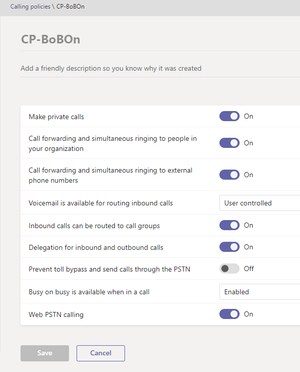
Hello all, since a while I experience a changed behaviour when receiving calls in case I'm busy on another call/meeting. The option "Busy on busy is available when in a call" in Teams Calling Policies is set to "Enabled" and assigned to the users. Teams Direct Routing is configured with an Audiocodes Mediant VE 7.20A.258.661. Everything works as expected except missed call notifications on busy. Past (probably a few weeks ago) In the past I was on a call, busy, and another person was calling. The other person is receiving a busy tone and the call gets rejected, as should. I then got a missed call notification in my missed calls. Today I'm on a call, busy, and another person is calling The other person is receiving a busy tone and the call gets rejected, as should. I DO NOT get a missed call notification in my missed calls (issue) SBC The SBC logs are fine showing SIP 486 Busy. I could not recognize a change here. Microsoft Phone System to SBC: SIP 486 REASON: Q.850;cause=34;text="...;User is busy and currently active on another call." SBC to Provider: SIP 486 Manipulated SIP Header Reason Cause Code from 34 to 17; 34 is sent bei MS Phone System to the SBC is wrong, IMO) Reason: Q.850 ;cause=17 ;text="...;User is busy and currently active on another call." I deleted the Teams client cache on Windows but this did not make a difference. I can reproduce the issue everytime. I can reproduce it in other Teams Direct Routing deployments as well. So, did this behaviour change? Is it a Teams (client) bug? Is anyone else experiencing this changed behaviour? I wrote a blog about an issue last year where the behaviour for missed notifications on the Teams Clients was different. Call loops after enabling busy on busy for Microsoft Teams Calling with Audiocodes Mediant – Erik's Blog (erik365.blog) The documentation does not state anything regarding missed call notifications in case of a call is rejected due to busy on busy is enabled as far as I could see. Set up policies - Microsoft Teams | Microsoft Docs Best Regards ErikSolved8.6KViews3likes7CommentsAre there any customization options available for the default portal.office.com landing page?
Hello all, are there any customization options available for portal.office.com? Which can be configured org-wide by an admin? I'm asking about the "content space" where the recent documents are shown. Is there any way to embed a SharePoint Online site, a external website or else for the user landing instead of the list of documents? Thank you. Best Regards, ErikSolved813Views0likes1Comment

Recent Blog Articles
No content to show