User Profile

sbuntun
Brass Contributor
Joined 7 years ago


User Widgets
Recent Discussions
How to prevent users from installing applications on full desktop?
Is there any way to prevent end users from installing applications on their own when using a full desktop group? I noticed someone managed to install an app into the program files folder so all of the users received it.14KViews0likes4CommentsRe: Workaround for non-responsive Windows 10 Enterprise multi-session hosts
Hi Pieter, are you able to elaborate on those scenarios? We did have a lot of trouble with our previous host pool vms becoming unresponsive and need to determine if we have to disable this task on our current vm's.8.5KViews0likes5CommentsUpdated Published app won't launch
Can someone help me track down why an app I previously published and just updated, now won't launch? I tried using the same info to publish it again with a new name and the app launches. I'm not sure what is going on. I'm publishing through powershell. "Avatar" doesn't work, but "Avatar Cloud" launches just fine. Old Updated App: TenantGroupName : Default Tenant Group TenantName : omitted HostPoolName : omitted AppGroupName : Test RemoteAppName : Avatar FilePath : C:\Program Files\Avatar\Avatar.bat AppAlias : CommandLineSetting : DoNotAllow Description : FriendlyName : Avatar IconIndex : 0 IconPath : C:\Windows\System32\Icons\Avatar.ico RequiredCommandLine : ShowInWebFeed : True New App: TenantGroupName : Default Tenant Group TenantName : omitted HostPoolName : omitted AppGroupName : Test RemoteAppName : Avatar Cloud FilePath : C:\Program Files\Avatar\Avatar.bat AppAlias : CommandLineSetting : DoNotAllow Description : FriendlyName : Avatar Cloud IconIndex : 0 IconPath : C:\Windows\System32\Icons\Avatar.ico RequiredCommandLine : ShowInWebFeed : True830Views0likes1CommentRe: Unable to activate office
UPDATE: For any interested parties, I was able to resolve this by disabling Modern Authentication for this user. Once the login interface changed and the user got the password prompt, they were able to activate office. I'm not sure how this will affect the the other user with this problem who has MFA enabled. I hope this will not start to become a widespread issue. https://docs.microsoft.com/en-us/office365/admin/security-and-compliance/enable-modern-authentication?redirectSourcePath=%252fen-us%252farticle%252fenable-modern-authentication-for-office-2013-on-windows-devices-7dc1c01a-090f-4971-9677-f1b192d6c910&view=o365-worldwide3.9KViews0likes2CommentsUnable to activate office
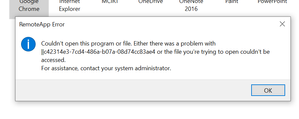
Hello, Is anyone else starting to have trouble activating Office for their WVD users? All of them have E3 licenses and were able to activate before. Office is set up for shared activation and was working for our first 20 or so users. This is the error I received for a brand new user. I would appreciate it if anyone had any suggestions. We're running Windows 10 multi-session w/ Office 365 pro plus en.4KViews0likes3CommentsRe: Version 1.2.241 of the Windows client available to Insiders
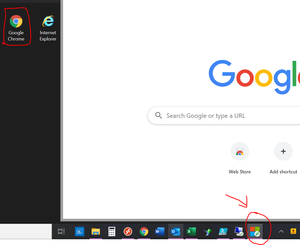
So I've pointed this out in the earlier releases, but I'm having a strange thing happen where if I publish a browser and a shortcut to a url that uses the browser, the icons in the taskbar sometimes get confused. For example, I click on Google Chrome and the taskbar icon that pops up is for the Office 365 login shortcut I published that runs in Chrome. This also happens with Internet Explorer and it's associated shortcuts. Any chance there's a fix so my employees don't get confused? The icons are stored in a file share vm and browsers are installed on each WVD vm in the hostpool.DavidBelanger3.1KViews0likes1Comment

Recent Blog Articles
No content to show