User Profile

Odenkaz
Brass Contributor
Joined 7 years ago


User Widgets
Recent Discussions
High CPU usage with Intune in macOs using Tahoe OS version
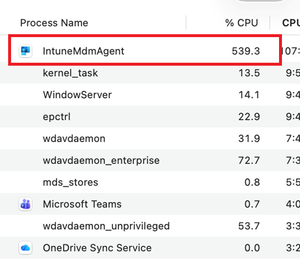
Hi, I have a macOS with the Tahoe version and I noticed that my battery would drain rapidly. When I go check, I noticed that Intune is consuming over 500% of the CPU. Is this a known issue? Is there a temporary fix or workaround? Thank you!608Views0likes1CommentAny advice on a self service way of having managers access mailbox from terminated employees?
Greetings, I'm looking for some advice on a challenge we are facing with accessing mailboxes from terminated users. Currently, we have some managers who need access to terminated employees' emails for valid business reasons, and our current process involves exporting PSTs from eDiscovery, which can be time-consuming and cumbersome. Moreover, once we pass the PST to the requestor, we lose control of it, which is not ideal because it's not subject to retention policies. We've considered creating a shared mailbox, importing the PST there, and giving access to the requestor, but that takes too long and involves too many parties in the process (exporting the PST, legal team, creating the shared folder, X team, giving access to said shared mailbox, eventually removing it, Y team, etc.). I would like to know if there is a self-service way for approved employees to access mailboxes from terminated users (users that no longer exist in Active Directory and are only available in eDiscovery). Any insights or advice you can provide would be greatly appreciated. Thank you in advance for your help.DLP policies take too long to tag new files uploaded to OneDrive
I work at a financial institution (Bank) and securing information is critical. We are trying to apply DLP policies for when employees begin sharing with external users. We are running tests to see how responsive is the system and one thing that we saw that could potentially scrap the whole idea of sharing with externals is the fact that DLPs take too long to tag a file with more than 50 SSNs. During the time that it takes for the DLP policies to kick in, the damage is done. We tested this and from the external's side, they were able to access the list of 50 SSNs without an issue. After the DLP kicks in, the external user no longer has access to the file, but again...the damage is done by this time. So if an employee finds out about this, they can potentially leak a lot of high sensitive documents and the external can download them within the time limit without issues. I know there was an older thread from 2017 which had the same issue and the answers were not really convincing. Just wanted to know what exactly does Microsoft recommend when it comes to situations like these? Right now we have a need that unfortunately MS cannot provide due to limitations of the features and we use O365 for everything. Any ideas are welcomed! Was this issue addressed?Restrict applying retention labels in sharepoint site documents
My organization is looking to use retention labels on documents within sharepoint sites, but wants to only allow sharepoint administrators or site owners to be able to do this. They don't want to allow sharepoint site members from applying a retention label in order to prevent other users from applying retention labels on non-relevant documents. Is this possible?Conditional Access not working with specified parameters
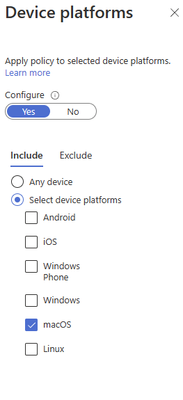
We are trying to restrict access to O365 and any use of the O365 apps in a personal macOS device even if it's enrolled with Intune. This means that only macOS devices with Corporate ownership are allowed However, whenever I try to test it on a personally owned macOS that is enrolled in Intune, I am able to access it still even if the conditional access action is set to Block. This is what I have for the conditional access policy, but it's not working. Maybe I am misunderstanding something or I am missing something?Re: Could not download the identity profile from the encrypted profile service on MAC
Rudy_Ooms_MVP Do you happen to know what would be equivalent to the vmx file for VirtualBox? I want to run some tests with company portal in macOS image in VirtualBox but have this problem as well.5.7KViews0likes0CommentsRestricting access to Office 365 if a specific application is not installed
Greetings, Is it possible to enforce restriction through conditional access where if a macOS device doe not have Microsoft Defender installed they lose access to the Office 365 environment until they do?948Views0likes1CommentOrganization Wide RSS Feed for Teams?
Greetings, My group is trying to check up and see if an RSS feed exists for Teams that covers the entire organization. Meaning that employees can see it maybe on the left bar or something? We are aware of the Microsoft Company Communicator App. But wasn't sure if we can classify it as an "RSS feed" . Anyway, does such thing like an RSS exist (without considering the Company Communicator)? we are trying to avoid re-inventing the wheel here. Thank you!938Views0likes1CommentRe: DLP Policy Slow to Screen New Files in OneDrive For Business and SharePoint Online
bgrono1 I tried it and I am having trouble. I can still share newly uploaded files even with this feature turned on. I read that this is a feature still on roll out. How would I know if I can now use it or not?3.8KViews0likes0CommentsTurn On "Save Password" setting for Edge mobile app for a group of corporate mobiles
Hello, So I was wondering if it's possible to Turn On "Save Password" settings and duplicate that to 100-200 cellphones that have the Edge app? I was thinking maybe thru Intune, but not sure if it's possible.1.1KViews0likes2CommentsFile Policy: Change stale externally shared files from modified to created with same parameters
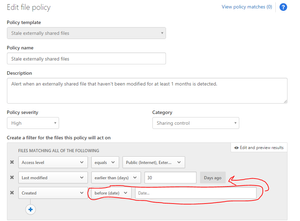
Hello, So I applied a file policy which works great with our organization which is the "Stale externally shared files". This File policy detects any files shared externally that have not been modified for X amount of days. My question is, can I change this modified parameter so that instead of modified, it's created? Here's a screenshot of what I mean. When I add the Created parameter, it only gives me data ranges instead of by days like in the last modified parameter. Is this a customized parameter that comes with the policy? Can I replicate it with Created? How can I make it so that it can detect any files that were created more than X days, to apply governance actions? Thank you!Enforce IRM on all sharepoint and onedrive with powershell?
I know that individually I can configure IRM on my OneDrive and SharePoint site, however I was wondering if there is such thing as powershell cmds that help force activate IRM on all SharePoint and Onedrive within an O365 tenant?1.4KViews0likes1CommentRe: Turning off sharing with externals on all sharepoint sites, teams and groups?
Erick A. Moreno R. Hi Erick, Thanks for the help! I have a doubt. Did you use the Template IDs? If so, what is the ID for modern team sites? I'm trying to play around with the snippet you shared and it's not disabling sharing for team sites. is the code for modern team site: STS#3?2.2KViews0likes1CommentRe: Turning off sharing with externals on all sharepoint sites, teams and groups?
Erick A. Moreno R. wrote: Odenkaz Hello Odenkaz. As far as I know, everything can be done through PowerShell if you try and test enough =), Hope this solves your request: $AllSitesURLs = $(Get-SPOSite | where{$_.status -eq 'Active'}).URL #You can play with the filter to set only those sites that you require Foreach($SiteURL in $AllSitesURLs) { Set-SPOSite -Identity $SiteURL -SharingCapability Disabled #Here you can set the sharing options that you consider better.https://docs.microsoft.com/en-us/sharepoint/turn-external-sharing-on-or-off } Regards Erick Moreno Hi Erick, thank you for your reply! I tried your snippet and got the following error: Additionally: To filter only those with external sharing enabled i would have to add in the where clause the exact name of the column shown in the report?2.2KViews0likes3CommentsTurning off sharing with externals on all sharepoint sites, teams and groups?
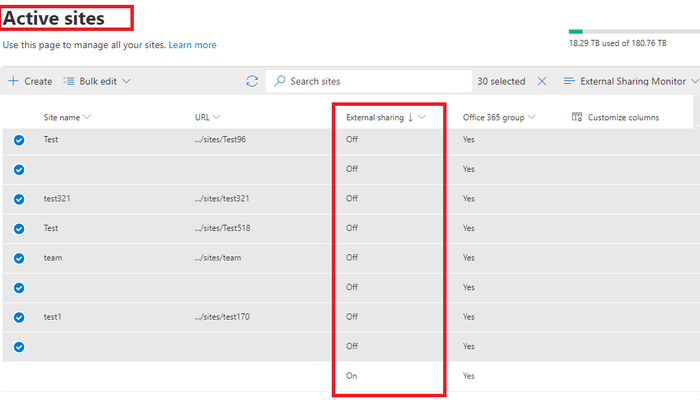
Hi, I am looking to see if it's possible thru powershell to turn off the sharing capability of all sharepoint sites. groups and team sites? It's very hard to go thru every 30 sharepoint sites/groups and edit bulking them when there's over 1,000. This what I mean.... Is it possible to do in PowerShell?Solved2.4KViews0likes5CommentsRe: DLP policies take too long to tag new files uploaded to OneDrive
BenStegink PeterRising I tested it out and the external user was still able to see the contents of the document. I ran this cmd from the linked documentation you posted: Set-SPOTenant -MarkNewFilesSensitiveByDefault BlockExternalSharing Update: Re-read the documentation and this solution doesn't cover OneDrive yet. "Note This cmdlet applies to newly added files in all SharePoint sites. It doesn't block sharing if an existing file is changed. The cmdlet doesn't cover files added to OneDrive. We're working to bring this functionality to OneDrive." My issue is strictly with OneDrive external collaboration. We do not have SharePoint enabled for external sharing yet. Is there an estimate of how long this new cmd will be able to cover OneDrive?3.6KViews1like4CommentsOneDrive: Force expire content that is shared externally without using Anonymous links
Hello, As the title suggest I am trying to find a way so that we can force links shared externally to expire after X days, but WITHOUT using anonymous links. Sometimes we have high sensitive documents that we would like to have available for 24 hours and then expire. I did notice that this setting only works on anonymous links, however we are trying to avoid using that feature since it's the most permissive and since we are a financial institution...this can prove quite problematic when it comes to highly sensitive data that may be shared like SSN, CCN, etc... Is there a way to do this?Perhaps using powershell cmds?1.8KViews0likes2Comments


Recent Blog Articles
No content to show