User Profile

VNJoe
Iron Contributor
Joined 7 years ago


User Widgets
Recent Discussions
Re: New 365 Admin portal showcases 'Business Advisors' that aren't my company?
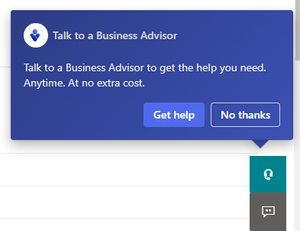
This has been submitted to 'Feedback'. However, these links aren't currently functional. All they seem to do is take you the Support page for now. I'm just attempting to understand what the final goal is for these links and whether or not you plan on advertising for my competitors to my customers. Note that I as the partner cannot click anything. The customer can click No Thanks. They always do, but that doesn't make this a proper placement that puts competition in front my customers that I've brought in to Microsoft. I did submit feedback as well, but the portal people don't know and don't care about partner concerns. That's what this forum is for.Re: New 365 Admin portal showcases 'Business Advisors' that aren't my company?
No. Not the answer. I don't want Microsoft advertising services unless they are through me, and I don't want options for customers to receive advertising for any competitors via the product I partner with them to sell with. "No thanks" isn't enough. I'd like a more defined answer please.New 365 Admin portal showcases 'Business Advisors' that aren't my company?
Hello For years, we as partners have requested better tie ins to the Office 365 portal regarding support, but as it stands, we don't even have permissions to change the customer's Help Desk setting to redirect to us unless we log in directly as a Global Admin on their tenant. It's not available via GDAP (nor DAP). Now, I've logged in to setup a new customer's tenant, and I'm greeted with this popup at the bottom of the screen prodding my customer to connect with some Business Advisor that is very likely not my organization. What is the purpose of this pop-up and what is being done to connect it directly and solely to us, the selling partner instead of some other unknown partner? Moreso, how can it be turned off for all our customers? The only consolation here is that it does nothing at all except take you to O365 support, yet another item Partners have requested for years that's gone unfinished. All the customer gets after they spend their precious time entering all the details of their issue is that they need to contact us directly for support, which has been a horrible customer experience according to my customers. So when will this all get resolved and what is the plan here for this new pop up?Re: Voicemail not visible in Teams under call tab.
supadmin1555 This sounds like you found the root cause: The message is classified incorrectly upon receipt. It should be an "IPM.Note.Microsoft.Voicemail.UM.CA", and Microsoft has another bug to fix. They should hire you, it seems! Thanks for sharing! Hopefully the developers see this and decide to fix it!5.1KViews0likes2CommentsRe: is there away to disable reactions to emails
Insert your admin UPN below and run # Connect to Exchange Online Connect-ExchangeOnline -UserPrincipalName <email address removed for privacy reasons> -ShowProgress $true # Define the custom header and its value $CustomHeaderName = "x-ms-reactions" $CustomHeaderValue = "disallow" $RulePriority = 1 # Create the mail flow rule New-TransportRule -Name "Drop Reactions" -SetHeaderName $CustomHeaderName -SetHeaderValue $CustomHeaderValue -Priority $RulePriority # Disconnect from Exchange Online Disconnect-ExchangeOnline -Confirm:$false20KViews2likes3CommentsRe: is there away to disable reactions to emails
No, you're great, thanks for sharing this! I'm planning on requesting it for all my customers who are complaining about these meaningless social media gags on a business system, hopefully there's a PowerShell command to run to disable it.26KViews3likes1CommentRe: Extremely Slow Performance Since Defender Was Pushed on Us
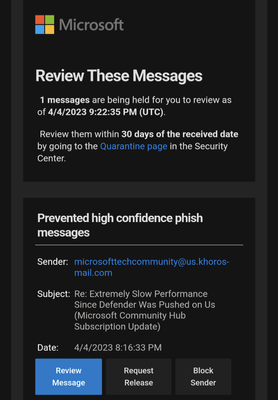
It gets better... I submitted it to them and they reclassified it as Bulk Mail... 😄 It just needs to get out of the way of mail delivery, period. Getting tons of complaints from customers about valid emails being "lost" since they turned this on but decided NOT to notify end users by default.16KViews0likes0CommentsRe: is there away to disable reactions to emails
It means: - Email is business communication - 'Liking' things is a social media mechanism, not a business messaging mechanism - Any email "feature" that's not universal on all email systems (not a Microsoft tenant) is exclusionary - Liking emails from customers that don't have O365 gives the impression an employee did something good and the customer the impression that their vendor did NOTHING because they don't get a response at all It's pretty straightforward.31KViews5likes2CommentsWhy is Microsoft creating services like Defender's Sense that are Automatic Startup yet shutdown?
Why is Microsoft creating services like Defender's Sense that are Automatic Startup yet shutdown and are brought back up only when needed? Isn't that a Manual service by definition? It becomes difficult to manage system services when they alert because Automatic Services should always be running, be restarted quickly when they stop or fail, and create turmoil when alerting systems monitor Automatic services to ensure proper operation of a Windows OS. Another is sppsvc (Software Protection Service), and sometimes MSI Installer is set to Automatic as well. This is straightforward logic that Microsoft built and now ignores. Why?720Views0likes1Comment

Recent Blog Articles
No content to show