User Profile

vand3rlinden
Brass Contributor
Joined 7 years ago


User Widgets
Recent Discussions
self-to-self spoofing attack with honor DMARC policy turned on
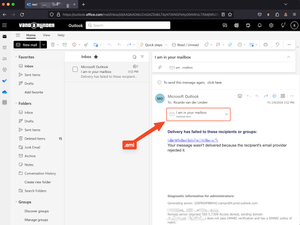
Dear Community, I have a concern, I am an absolute fan of the ‘Honor DMARC record policy when the message is detected as spoof’ setting in the Anti-phishing policy. Especially the action ‘If the message is detected as spoof and DMARC Policy is set as p=reject’ to set this on reject the message. However, from the field I have seen that when a user is attacked by self-to-self spoofing. They will receive an NDR from Exchange Online with the original email attached in .eml format, expected but unwanted. This .eml file contains all the links that could be exploited by an attacker. I have reproduced the problem from my own mail server, and my demo tenant with a DMARC compliant domain on p=reject. Here is an example: -The user received a Non-Delivery Report (NDR) from Exchange Online indicating that their message was rejected by DMARC because the sending domain has a DMARC policy set to reject. -As you can see in the screenshot above, the original email is attached as an .eml, which may contain suspicious content and links to AitM phishing sites. This is expected, but unwanted by self-to-self spoofing attacks. I found two solutions: Solution 1: Set the detection ‘If the message is detected as spoof and DMARC Policy is set as p=reject’ on “Quarantine the message” instead of “Reject the message”. But that is not exactly you want when you want to honor the DMARC policy, and the Configuration Analyzer also recommend to set it on “Reject the message”. Solution 2: Creating a mail flow rule with the following content I'm curious if there are other smarter solutions, or if Microsoft needs to investigate this issue within the Defender for Office 365 product team. What are your thoughts? Have a nice Sunday! 🙂 RicardoWindows Sandbox No Internet Connection after KB5028185
Hi all, I'm using Windows Sandbox for a while now, but since KB5028185 which was installed on my device, my Windows Sandbox keep saying 'No Internet Connection'. When looking around, I have tried plenty of possible solutions: -Reinstalled Windows Sandbox -Have verified that the following features are enabled: Containers, Hyper-V, virtual machine platform, Windows hypervisor platform -Flushed my DNS -Run Internet Connection Troubleshooter, but I don't have any network issues on my host device I'm also not using a VPN, it just stopped working since KB5028185. Can someone confirm if this KB let Windows Sandbox stop working, or someone knows the golden fix? Thanks in advance. Kr, Ricardo4.3KViews0likes2CommentsAzure AD SSPR Password write back issue
Hi all, A company I work for have issues with the reset password function with AD Connect. In the SSPR audit logs in Azure AD, we face on 'Reset password (self-service)' the status reason 'OnPremisesAdminActionRequired', with a follow up event log within the AD connect server: event ID: 33004 with error "hr=80230626, message=The password could not be updated because the management agent credentials were denied access" I face this issue before and this was causing because the AD DS connector account did not have the right permissions. In this case this is not. What I have done so far: - Updated AD Connect from 2.0.89.0 to 2.0.91.0 - enforced TLS 1.2: https://eur02.safelinks.protection.outlook.com/?url=https%3A%2F%2Fdocs.microsoft.com%2Fen-us%2Fazure%2Factive-directory%2Fhybrid%2Freference-connect-tls-enforcement&data=04%7C01%7CRicardo.van.der.Linden%40wortell.nl%7C99649d63055b44e871c308d9ec7ff08b%7Cb1a6616c94734cab82b6b6affeed3e12%7C1%7C0%7C637800856524039043%7CUnknown%7CTWFpbGZsb3d8eyJWIjoiMC4wLjAwMDAiLCJQIjoiV2luMzIiLCJBTiI6Ik1haWwiLCJXVCI6Mn0%3D%7C3000&sdata=GRdHd0Swz7JMK45OAg4Z0MmOC2TwvwT6iu%2BlSbiIC%2BY%3D&reserved=0 - Checked AD DS connecter account 'MSOL_xxxxxxxx' permissions: https://eur02.safelinks.protection.outlook.com/?url=https%3A%2F%2Fdocs.microsoft.com%2Fen-us%2Fazure%2Factive-directory%2Fauthentication%2Ftroubleshoot-sspr-writeback%23verify-that-azure-ad-connect-has-the-required-permissions&data=04%7C01%7CRicardo.van.der.Linden%40wortell.nl%7C99649d63055b44e871c308d9ec7ff08b%7Cb1a6616c94734cab82b6b6affeed3e12%7C1%7C0%7C637800856524195272%7CUnknown%7CTWFpbGZsb3d8eyJWIjoiMC4wLjAwMDAiLCJQIjoiV2luMzIiLCJBTiI6Ik1haWwiLCJXVCI6Mn0%3D%7C3000&sdata=eUD%2Fdx9FTc0VvcjXxvGksfS30ZD9SKsbl9LQK1d1eA0%3D&reserved=0 - the user do not have the options 'password never expires' or 'user cannot change password' configured - Let AD connect talk to another DC dc02 instead of dc01 - Checked connection to SSPR service from DC's : Test-NetConnection -ComputerName ssprdedicatedsbprodscu.servicebus.windows.net -Port 443 - The action 'Change password (self-service)' are successful (via my account portal) , only action 'Reset password (self-service)' face this issue (via passwordreset.microsoftonline.com) -- both use the same OnPremisesAgent ->> AADConnect Have anyone a idea what else I can try more? Regards, RicardoSolvedRe: Exchange Online: Connector creation failed
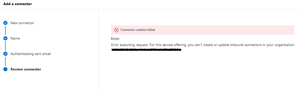
Rana_BanerjeeI completely agree with you, a dev tenant should contain all possibilities. Unfortunately, Microsoft will not change this. They mentioned this in their https://learn.microsoft.com/en-us/office/developer-program/microsoft-365-developer-program-faq#does-the-instant-sandbox-have-different-capabilities-than-a-standard-microsoft-365-e5-subscription-: In Exchange Online, inbound connectors for mailflow are not supported. If you try to create an inbound connector, you will get the following error: "Error executing request. For this service offering, you can't create or update inbound connectors in your organization."33KViews0likes0CommentsRe: Exchange Online: Connector creation failed
Hi Dennis, found our answer: https://learn.microsoft.com/en-us/office/developer-program/microsoft-365-developer-program-faq#does-the-instant-sandbox-have-different-capabilities-than-a-standard-microsoft-365-e5-subscription- But this brings me some questions, I there asked the support team the following: 1: Why is this changed? I was always able to do this. 2: As Microsoft 365 developers and engineers, we need to test anything for our customers without limits. Could it be clarified why this isn't functioning? 3: Could you contact the developer program leads and ask them about this situation?35KViews2likes7CommentsRe: Exchange Online: Connector creation failed
Hi Dennis, thanks, great to hear that I'm not the only one. I do not understand why, like you and I guess all others, we test all things in our DEV tenants before doing changes in PROD. This causes delays in our work if we can no longer test everything properly. Microsoft tells me now to create a ticket in their ServiceNow, will update this post when I have new information.35KViews0likes0CommentsRe: Exchange Online: Connector creation failed
I found this was a global issue with Microsoft Reference : EX417250 and it was resolved on 06/09/2022. Unfortunately not for my tenant. This tenant is created on: developer.microsoft.com. Have someone advise to contact Microsoft? Office 365 support don't bring any luck.35KViews0likes0CommentsExchange Online: Connector creation failed
Hi all, I have a dev tenant running to do some POCs for customers. I need to do a POC and for this POC I need to create a connector in Exchange Online. I was always able to doing so, but now I get the error: ################################### Connector creation failed Error: Error executing request. For this service offering, you can’t create or update inbound connectors in your organization ‘TENANT ID’. ################################### I'm trying to search online, but it does not bring any luck. Created a case at Microsoft, also no luck (yet). I was (2 months ago) always able to create or edit connectors (in the GUI or PS) and now suddenly not. Does someone knows how to fix this? Regards, RicardoSolved37KViews0likes14CommentsRe: Recover calendar items from a Microsoft 365 group
VasilMichevThanks, this was the trick. For future readers, hereby the full fix. <# Get-RecoverableItems and Restore-RecoverableItems The cmdlets are available only in the Mailbox Import Export role, and by default, the role isn't assigned to any role groups. To use this cmdlet, you need to add the Mailbox Import Export role to a role group (for example, to the Organization Management role group) #> #### 1: Add the role if not exist New-ManagementRoleAssignment -SecurityGroup "Organization Management" -Role "Mailbox Import Export" #### 2: Search on FilterItemType IPM.Appointment (Meetings and appointments) #Search all Get-RecoverableItems -Identity "primarysmtp" -FilterItemType IPM.Appointment #Search on range Get-RecoverableItems -Identity "primarysmtp" -FilterItemType IPM.Appointment -FilterStartTime "3/17/2022 12:00:00 AM" -FilterEndTime "6/15/2022 11:59:59 PM" #### 3: After you check the results, you can go over to the restore #Restore all Restore-RecoverableItems -Identity "primarysmtp" -FilterItemType IPM.Appointment #Restore in range Restore-RecoverableItems -Identity "primarysmtp" -FilterItemType IPM.Appointment -FilterStartTime "3/17/2022 12:00:00 AM" -FilterEndTime "6/15/2022 11:59:59 PM" #All Item Types and Message Classes: https://docs.microsoft.com/en-us/office/vba/outlook/concepts/forms/item-types-and-message-classes2.4KViews0likes0CommentsRecover calendar items from a Microsoft 365 group
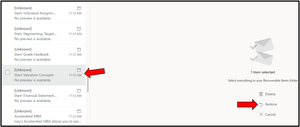
Hi! Someone at an organization I work for have accidentally delete all the calendar items of a Microsoft 365 Group. I am trying to restore those items, I added the Microsoft 365 Group as a shared folder in OWA. From there the deleted items folder is visible, with all the deleted items, but it give not a restore option. Normally you see something like this: At this moment, I do not have any option to restore the calendar items in the deleted items folder of the Microsoft 365 Group. I'm trying to search online on how to restore this, but didn't find any answers. Hope someone knows the trick 🙂 Regards, RicardoSolved2.6KViews0likes2CommentsUser get onmicrosoft.com instead of default domain
Hi, I got an environment with a local AD, synced with AAD. If I create a user on the local AD with User.LogonName@mydomain.com and sync this with AAD. The user get the right UPN in AAD, also in admin.microsoft.com -> users. Mydomain.com is default. But only in Exchange Online the user get User.LogonName@mydomain.onmicrosoft.com. I can quick fix that to fill the Mail attribute in the Local AD and sync this again. But I want to fix it that if I create a user, he get the right email domain in Exchange Online. Also under EXO -> accepted domain is mydomain.com as default. Please guys help me out, Thanks in advance Ricardo23KViews0likes5CommentsCannot Delete a Mailbox with Retention Policies Enabled
Dear, In my environment I have a retention policy in the Secure & Compliance center for Exchange Online mail. Now I have an service account that had a mailbox in the past, but not needed anymore and the service account still need to exist in the environment for some reason. If I open the user in de admin portal a message appear: "Exchange: An unknown error has occurred. Refer to correlation ID: xxx-xx-xxx". Now I got the error message with command; (Get-MsolUser -UserPrincipalName domain@domain.com).errors[0].ErrorDetail.objecterrors.errorrecord.ErrorDescription Get-MsolUser -HasErrorsOnly | Format-Table DisplayName,UserPrincipalName,@{Name="Error";Expression={($_.errors[0].ErrorDetail.objecterrors.errorrecord.ErrorDescription)}} -AutoSize "Exchange can't disable the mailbox, because it is on In-Place Hold." What I've done for trouble shooting: 1. Give the service account back the license, exclude him from the retention policy, wait till the policy is success and remove the license. No luck. 2. Re provision mailbox with "Redo-MsolProvisionuser -ObjectID". No luck. 3. Follow this great guide: https://masterandcmdr.com/2020/04/24/cannot-delete-a-mailbox-with-retention-policies-enabled/ No luck In the guide on step 3, they are speaking over a inactive mailbox. My service account is not inactive, it still exist. I just want to delete the mailbox for this service account. I hope anyone can help me out. Regards, Ricardo7KViews0likes9CommentsRe: Azure AD SSPR Password write back issue
Thank you for sharing Jan and great that you have fix event ID 33001, will save your solution! For ID 33008, I updated my blog post as well. 33008 can have multiple solutions: https://vand3rlinden.nl/index.php/2020/07/03/fix-sspr-failure-reason-onpremisesadminactionrequired/23KViews1like0CommentsRe: Azure AD SSPR Password write back issue
Hi Bilal, the SSPR reset is functioning again! I found out that the “Network access: Restrict clients allowed to make remote calls to SAM” GPO was setup in the local GPO of the DCs. The issue is resolved by adding the AD DS connector account into that GPO on both domain. For future readers: 1: Open Local Security Policy, click Start, type secpol.msc 2: Navigate the console tree to Security Settings\Security Options\Network access: Restrict clients allowed to make remote calls to SAM 3: Right-Click and Select Properties 4: On the Template Security Policy Setting, Click Edit Security 5: Under Group or user names, Click Add the AD DS connector account 7: Leave everything default, and Click OK Thank you again for your knowledge and time.24KViews3likes2CommentsRe: Azure AD SSPR Password write back issue
Hi Bilal, had a call yesterday with Microsoft regarding the issue. Microsoft told me to check the “Network access: Restrict clients allowed to make remote calls to SAM” GPO. However this GPO is not defined on both Domain or Domain Controller GPO policies. But the reg key ‘RestrictRemoteSam’ that is tied to that GPO setting, is listed in the DC's that talks with AD connect, this interesting. I propose a change to delete the REG key on 1 domain controller first and let AD Connect talk with that DC only that has not the REG key ‘RestrictRemoteSam’. https://docs.microsoft.com/en-us/windows/security/threat-protection/security-policy-settings/network-access-restrict-clients-allowed-to-make-remote-sam-calls But it remains strange that the SSPR reset function has suddenly stopped since Monday 7/2/22, but this is an interesting progression. Will update this post ASAP.23KViews1like4Comments
Recent Blog Articles
No content to show