User Profile

ShehzadUIT
Brass Contributor
Joined 7 years ago


User Widgets
Recent Discussions
Implementing Microsoft Defender Application Control with and without Virtualization Based Security
Hi, I want to get a full understanding of what happens when you enable Microsoft Defender Application Control (MDAC) aka Windows Defender Application Control (WDAC) with Virtualization Based Security (VBS) and Hypervisor-protected Code Integrity (HVCI) and without it. I know there is no dependency between the two but i want to measure the increase in security when MDAC\WDAC is enabled with VBS and HVCI. The key questions are: 1. When MDAC\WDAC is enabled with VBS and HVCI, does it store the code integrity (CI) policy within VBS? And when MDAC\WDAC is enabled without VBS and HVCI, where doesn't it store the code integrity (CI) policy? and how secure is that approach? 2. When MDAC\WDAC is enabled without VBS and HVCI but Microsoft Defender Credential Guard is on, will it encrypt\hash the code integrity policy like it does encrypt\hash password, Kerberos tokens?1.1KViews0likes0CommentsImplementing Microsoft Defender Application Control with and without Virtualization Based Security
Hi, I want to get a full understanding of what happens when you enable Microsoft Defender Application Control (MDAC) aka Windows Defender Application Control (WDAC) with Virtualization Based Security (VBS) and Hypervisor-protected Code Integrity (HVCI) and without it. I know there is no dependency between the two but i want to measure the increase in security when MDAC\WDAC is enabled with VBS and HVCI. The key questions are: 1. When MDAC\WDAC is enabled with VBS and HVCI, does it store the code integrity (CI) policy within VBS? And when MDAC\WDAC is enabled without VBS and HVCI, where doesn't it store the code integrity (CI) policy? and how secure is that approach? 2. When MDAC\WDAC is enabled without VBS and HVCI but Microsoft Defender Credential Guard is on, will it encrypt\hash the code integrity policy like it does encrypt\hash password, Kerberos tokens?Azure Active Directory Application Proxy: Some links are not working
hi All, I have just configured an AAD Application proxy for our intranet homepage. i can successfully access most of the links on the homepage via the external URL, however, i am unable to access some links from outside (i.e. via the external URL). are there any rules\considerations of what you can and what you can't access via the external URL in AAD application proxy? thanks in advance646Views0likes0CommentsAdding Domain to the Custom Domain Names in AAD
Hi All, I have a issue: Problem Description: We have configured AAD Connect to sync all on prem users to Azure Active directory. The on-prem AD UPN suffix is @technet.org.au and the Azure AD user UPN suffix is @technet.onmicrosoft.com. After the initial sync, I could see all the on-prem users in AAD with the suffix mailto:username@technet.onmicrosoft.com. That is when I realized that the custom domain name i.e. technet.org.au wasn’t added to the custom domain names in AAD\Office 365. So I went ahead and registered the custom domain in Office 365. As part of the registration process, it asked to add a TXT record to the DNS service which we did. But it looks like the custom domain is added incorrectly. Instead of technet.org.au, the UPN suffix is: technetorgau. Proposed Solution: So In order to revert the change, i am thinking i should do this: Make sure that none of the users’ UPNs are updated to @technetorgau. (Revert it back to @technet.onmicrosoft.com if that is the case) Delete the domain from the Custom Domain Names Delete the TXT record from DNS am i on the right path? Thanks everyone in advance1.6KViews0likes3CommentsGrant Permissions to Configuration Manager Server and Client Apps for Co-Management
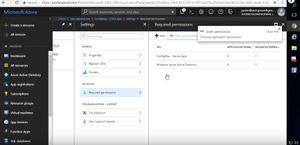
Hi All, i am trying to Grant Permissions to my Configuration Manager Server and Client Apps in Azure portal but i cannot find Settings --> Required Permissions --> Grant Permissions anymore as per the this screenshot that i got from tutorial: Note: This is required to setup Cloud Management Gateway. Can someone please tell me where are these settings in the latest version of the Azure portal console?Solved1.5KViews0likes1CommentAccess to the delegated container subnet from the rest of the network
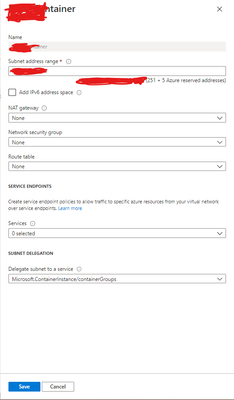
Hi All, We have an on-premise network: ONPREM-VLAN which is connected to an Azure VLAN: AZUREVLAN1 using Site to Site VPN connection. This AZUREVLAN1 is in subscription-1. We have another subscription: subscription-2 which has two more VLANs: AZUREVLAN2 and AZUREVLAN3. AZUREVLAN2 is one Azure region (same as AZUREVLAN1 i.e. Australia Southeast) and AZUREVLAN3 is in another Azure region (i.e. In Australia East). We have enabled Vnet peering between all the three VLANs. We have also established routing from our on-premise network: ONPREM-VLAN to all the three Azure VLANs. However, when we created a delegated container subnet in AZUREVLAN3 it is only accessible from other subnets within AZUREVLAN3. it is not accessible from any other VLANs (AZUREVLAN2, AZUREVLAN1 and ONPREM-VLAN) in the network. Here is the screenshot of that delegated container subnet: Is there a way i can enable routing from the rest of the network to this delegated subnet?772Views1like1CommentRe: Publishing universal printer to Azure Active Directory devices\users
yes the users are connected and given access in Access Control in universal Print. Do we need to deploy these two packages as well for the discovery to work: https://docs.microsoft.com/en-us/universal-print/fundamentals/universal-print-intune-tool i thought, publishing shared printers to AAD (as they become AAD joined devices) eliminates the need for the deployment of the above two packages as stipulated in the link.1.4KViews0likes1CommentPublishing universal printer to Azure Active Directory devices\users
I am currently running a PoC in our tenant for universal print. I have configured a connector on which I have installed a printer. I have then shared that printer and given 4 users access. I can see the printer object in Azure Active Directory --> Devices as an "Azure AD joined" object. However, none of users (the 4 that I have shared the printer with) can see the printer when they search for it in Windows --> Settings --> Devices --> Printers and Scanners. i have ensured that all the 4 users have Universal Print license assigned to them. any ideas why the user can't see the printer on their device after it has been published to Azure Active Directory? has anyone else having the same issue?1.5KViews0likes3CommentsAutomation Script to Logoff users with a notification
Hi All, I am trying to create an Azure Automation script that logs off all users (whether Active or disconnected) at a particular time. i am all good with that. However, what i am after is that is there a way to send a message to users (the active ones) that they are about to be logged off? Thanks822Views0likes0CommentsApplications in WVD requires a specific date format
We have a situation where certain applications require Time and Date in specific format. we have a startup script that sets the data to the right format (AEST). However, for this to work, every user will need to login to the full desktop experience in WVD. we don't want that. we have applications published and we want the users to use them via the Remote desktop app. has anyone else come across this situation? any ideas? thanks in advance.918Views0likes0CommentsDomain Controllers replication issue
Hi I Have configured a new domain controller in a new site a couple of days ago. this new DC is a GC. it is getting synced from the other DCs but the other DCs are not getting synced from this DC. I can assure that it is not a RODC. Any reason why this would be the case?? Thanks In advance.1.1KViews1like2CommentsError migrating Recovery Service Vault to another subscription
I want to migrated our recovery service vault to another subscription within the same tenant. the had backups of my three VMs. the VMs are already migrated the target subscription. before migrating the VMs i disabled soft delete as per the instructions (https://docs.microsoft.com/en-us/azure/azure-resource-manager/management/move-limitations/virtual-machines-move-limitations#virtual-machines-with-azure-backup) and then moved the VMs successfully. when moving the recovery service vault, i ensured that all backups are stopped/disabled. but when tried moving the vault, it gave me the error: {"code":"ResourceMoveProviderValidationFailed","message":"Resource move validation failed. Please see details. Diagnostic information:, timestamp '20200914T043807Z', subscription id <subscription_ID>', tracking id <tracking_id>, request correlation id <request correlation id>.","details":[{"code":"ResourceMoveProviderValidationFailed","target":"Microsoft.RecoveryServices/vaults","message":"\"[{\\\"code\\\":\\\"UserErrorResourceMoveUnsupportedContainersPresent\\\",\\\"message\\\":\\\"The vault, 'Recovery service vault name' in resource group, '<original resouce group name>' and subscription, '<subscription_ID>' has unsupported container(s) of type, 'VMAppContainer'. Remove the unsupported containers and try again.\\\"}]\""}]} Any ideas? Thanks for your help in advance.Re: vnet peering working only in one direction
TomWechsler and kailashmishra ....thanks gents for pointing me in the right direction. creating an inbound rule for icmpv4 in the windows firewall did the trick. Also, for completion, the VM in vNetB when i tried adding it to the domain, it would fail. the error was that it couldn't find the DNS server. To resolve that, i had to add the DNS server which is hosted in vNetA as a custom DNS server in vNetB.4.5KViews0likes0Commentsvnet peering working only in one direction
Hi all, I have two subscriptions. SubA and SubB. i have a virtual network vNetA in SubA and a virtual network vNetB in SubB. i have created vnet peering between vNetA and vNetB. i can successfully ping a VM in vNetA from a VM in vNetB but not the other way around. Also, the VM in vNetB from which i can successfully ping a VM in vNetA, i cannot domain join that VM to a DC which is running in vNetA. Any ideas? Thanks in advance.Solved4.6KViews0likes3CommentsRe: New User accounts replication issue between AD and AAD
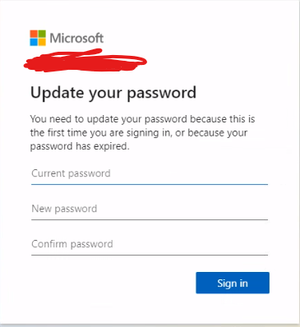
PeterRising Thank you for guiding me to the right link. All i want to add for future viewers is that once you enable this, the password reset option doesn't appear on the device logon but appears when you try accessing SharePoint Online or OutLook (exchange online):1.5KViews0likes0CommentsNew User accounts replication issue between AD and AAD
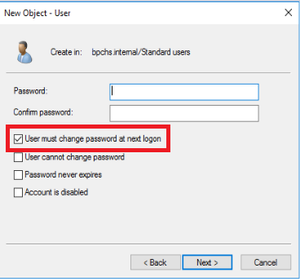
Hi, We provision all our new user accounts in on-premise AD. we have AAD connect configured with password hash synchronization. Our devices are Azure AD Joined only. When we create a new user account with the following option ticked: and when that user logs in to the device which is Azure AD joined only, he gets an error message (password incorrect). However, if we don't tick that option, the user can login fine. In addition, i should say that password changes done on-premise are replicating to Azure AD and vice versa without any issues. So, my question is to those who manage user identities on-premise and sync them to AAD, how are they dealing with this situation when they provision new user accounts? Thanks in advance everyone.Solved1.6KViews0likes2CommentsOffice 365 offline apps from Store requires registration
Hi All, i have downloaded office 365 apps (word, excel, ppt) from Windows store for business as offline apps. i have then deployed them to a Kiosk build. all good so far. but when i launch them in the Kiosk build, they require me to sign-in with my online account. is there a way, i can use these applications without signing -in using an online or a licensed account? thanks in advance. Office Apps Office 365572Views1like0CommentsWindows Store for Business - Offline Apps Licensing
When we download an offline version of a store app (e.g. Microsoft Word), we get the source media in the form of (.AppxBundle) extension, a license file in the form of .bin and dependencies if any as well. and we get all of the above by logging into our Windows Store for Business for our Tenant. The question is: can we use the license file (.bin) we downloaded from Windows Store for business for Tenant ABC in any other tenant XYZ or outside in general? Thanks in advance for your replies.1.2KViews0likes0Comments
Recent Blog Articles
No content to show