User Profile

Aaron44126
Brass Contributor
Joined 7 years ago


User Widgets
Recent Discussions
Strange scrolling/rendering behavior
Getting this issue on multiple PCs with Edge 80.0.361.48. Visit a page with lots of text. I am able to reproduce it with the Edge page on Wikipedia: https://en.wikipedia.org/wiki/Microsoft_Edge It also helps if the browser is maximized (easier to reproduce if the window is large). Using the mouse scroll wheel, scroll the page from top to bottom and then back up again very quickly. You should run into areas where the screen becomes un-rendered, a light grey color with no text, and it takes a moment for the browser to catch up. This is annoying behavior. I am not able to reproduce it in other browsers, including Google Chrome. At first, I thought that it was some performance-saving "feature" with Edge only rendering part of the page to the GPU buffer. But I realized that if I do the same thing using the scrollbar (drag it up and down) rather than the mouse scroll-wheel, the issue doesn't occur; the page remains fully rendered no matter how crazy my scrolling is. It seems to be worse with pages with a lot of different elements, tables, images, etc. For instance, this Wikipedia page on the presidential primaries, I don't have to scroll far at all before the browser seems to be struggling to catch up. https://en.wikipedia.org/wiki/2020_Democratic_Party_presidential_primaries Does anyone know what is up with this and if there is some flag that I can change to stop this behavior?2.2KViews0likes1CommentApple TV+ locking up
Anyone else an Apple TV+ subscriber and tried watching from the browser (tv.apple.com)? When I try to watch a show full-screen, the video pauses and locks up after a while (less than a minute). I have to exit full-screen to get it to start playing again. It also sometimes causes the entire browser to lock up and I have to close and restart it. I haven't been able to reproduce this in other browsers, including regular Chrome. And it doesn't happen with other streaming services (Netflix, YouTube, etc.).863Views0likes0CommentsApple TV+ causing some kind of soft lock
Hi, I was wondering if anyone else who is subscribed to Apple TV+ could check and see if they run into this issue. You can access Apple TV+ content from a web browser at https://tv.apple.com/. If I go to a show page and keep it open for a minute or so, or try to watch a show, the Edge browser starts to act funny. I get into a situation where the browser seems to still be working but the image displayed is stuck so it looks like it has locked up. Basically, it looks like the browser has totally locked up, but I know that it is working and just not changing the image displayed because if I close tabs (Ctrl+W) before quitting and restarting the browser, it will open up with those tabs closed. I tested with Google Chrome and was not able to reproduce this issue there. I haven't run into anything like this with any other sites in Edge. I do watch streaming video content from other sources without any issues. This is with Edge Beta on Windows, version 79.0.309.11. It might matter that I am running in a graphics switching configuration (Optimus) with Intel HD Graphics 4000 and NVIDIA Quadro M5000M.744Views0likes0CommentsOutlook not processing rules while idle
Using Office 365 version 1902 / 11328.20438 (semi-annual channel) on Windows. I have an Exchange account for work. I run Outlook on my work PC, my home PC, and my phone. On my work PC, there are rules set up to move some emails into folders in a local PST file. These are mostly automated alert messages that I don't need to look at right away. Because the messages are filed into a local PST, the rules must run on the client and not on the server. I leave Outlook running on my work PC all of the time, day and night, whether I am working or not, so that the rules will keep working and my inbox isn't full of clutter when I check it from home or from my phone. Recently I have been noticing that the rules are not working after my work PC has been idle for some period of time. My inbox starts to fill up with things that would normally be filtered out. Normally when this happens I assume that my work PC has either rebooted for updates or maybe crashed when I was not present, but in the last few weeks this has not been the case. When I go to check my work PC, I find that it is still up and running (and not in sleep/hibernate or something as I can still also access this PC remotely), and Outlook is right there, and as soon as I touch it, Outlook all of a sudden wakes up and processes the rules, moving the messages. Has Outlook recently been updated to start going into some kind of low-power / sleep / idle mode when the PC isn't used for a while, that would prevent it from either checking for new emails, or from processing local rules? If so, how do I disable this behavior? Or, any other ideas?1.3KViews0likes0CommentsAfter changing your Diagnostic data setting, we recommend you restart the browser
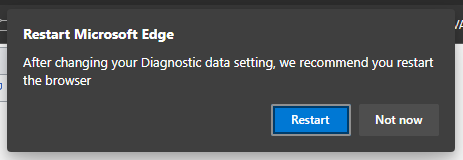
Since I installed the beta channel build, I'm regularly getting this popup on my work system (every hour or so?). I've been hitting "not now". Once I hit "restart" and the browser restarted, and it came back with the same prompt again immediately. I am not making any change to the "diagnostic data setting" to prompt it, but we do have AD managing the Windows 10 diagnostic data settings with group policy.3.3KViews1like11CommentsGetting crashes from Intranet site (Websockets?)
Edge has been crashing on me frequently when I am using a particular custom Intranet site. Unfortunately, since it is an Intranet site, I can't share a public link to it; however, I can mention that the site makes heavy use of JavaScript Websockets (uncommon so I wonder if that might have something to do with the crashes?). What I am wondering is, how does one dig more deeply into this to figure out what exactly is causing the crash? When Edge crashes it is unspectacular; the browser window (with all open tabs) simply closes. When I re-open Edge, it says that "Edge closed unexpectedly" and it prompts me to restore the session which brings back all of the tabs that I had open previously. Edge does appear to generate crash dumps and these appear to be being sent over to Microsoft (judging from edge://crashes/). I do have access to the site JavaScript so I can make changes if needed, but I'd have to figure out where the problem is first. Though, I haven't been able to reproduce these crashes in Google Chrome, it appears to be totally stable. I don't think that a page (even a buggy one) should be able to totally take the whole browser down like this... ...Thoughts?1.3KViews1like3CommentsRe: Browser and GPU process are much higher compared to Brave
sambul95 I stated nothing of the sort. I just stated that what the "CPU %" shown in Task Manager means is different between the two... task managers. To compare the two you have to multiply or divide by the number of logical cores in your system. If one process within Edge process uses more than one CPU core it will register higher than 100% in Edge task manager10KViews1like6CommentsRe: Browser and GPU process are much higher compared to Brave
Keep in mind: It appears that there is a discrepancy between the number reported between Windows Task Manager and the browser's Task Manager. Windows Task Manager reports the CPU use where 100% would mean that all logical CPU cores are fully loaded. (i.e. In a system with 8 logical cores, 100% would mean that all 8 are under a full load whereas a single-core load would be 12.5%.) The browser task manager reports 100% for one core worth of full load, so an 8-core load would be 800%. Something to keep in mind when making comparisons.10KViews3likes13CommentsRe: Browser and GPU process are much higher compared to Brave
Marco Mollace Possible corroboration? I hopped on here because I noticed background CPU usage for Edge seems unreasonably high. I only have two tabs open and they are both for static pages. I closed and restarted the browser and there was no change. I checked in the browser "task manager" (accessible by right-clicking on the title bar) and "GPU process" seems to be gobbling a lot of CPU cycles. Why is this happening when there is basically nothing going on in the browser? [Edit] Figured I would mention the system specs, my system has an Optimus configuration of Intel HD Graphics 4000 and Quadro M5000M, but when I took this screenshot I was accessing it remotely over Remote Desktop. [Edit 2] For comparison, I just opened Chrome for a comparison check. I opened the exact same two tabs. The extensions installed are the same. In Chrome, the "GPU process" sits mostly at 0% CPU use and occasionally spikes to 3%. Why is it so busy in Edge?17KViews2likes0CommentsRe: I broke favorites sync!
I will also mention, I have had a few times when I have seen it "double up" a Favorite (add what appears to be an exact copy of an existing entry in the same location) and I'm guessing that sync is responsible for that. Haven't found a solid way to reproduce it.1.6KViews0likes0CommentsRe: I broke favorites sync!
birdiewins I have the Microsoft Authenticator app and I can use that to log in, but I haven't flipped any setting that requires 2FA. Anyway, sync has been working for me after the first shaky day. Not sure what I did, but it eventually prompted me to sign out and in again, and it has been working since then. The "favorites" toggle is greyed out but it enables itself if I sit on that screen for several seconds, and I have confirmed that "favorites" sync is functional between two PCs. (I wish that it would also sync with Edge iOS...)1.6KViews0likes4CommentsRe: Feature Request: Display Open/Save As option for files just like old Edge/IE
leonidev@CodeDJ This download behavior isn't really strange at all, it is exactly as Chrome/Chromium behaves. Hopefully, Microsoft enhances the download experience over the next few months before this browser is properly released to be in more line with what IE/Edge users are used to.3.2KViews2likes1CommentRe: Feature Request: Display Open/Save As option for files just like old Edge/IE
CodeDJ Also note, in Windows Storage Sense settings (Settings -> System -> Storage -> "Change how we free up space...") there is an option to clean files out of the "Downloads" folder automatically if they have been there longer than a set number of days.3.3KViews2likes0Comments
Recent Blog Articles
No content to show