User Profile

Daniel1175
Copper Contributor
Joined 7 years ago


User Widgets
Recent Discussions
Re: WebView2 external dependency cannot be installed from an MSIX package on a Windows 10 target machine
TIMOTHY_MANGAN : Hi Tim, Thank you for your thorough research on this! Your findings should be just enough for Microsoft team to easily investigate and find out the root cause of the issue. However, seems like the MSIX project is not one of the Microsoft top priority anymore since no one from their side even bother to have a closer look on this. :(( All the best, Daniel2.6KViews0likes4CommentsRe: WebView2 external dependency cannot be installed from an MSIX package on a Windows 10 target machine
MikeH Mike, I am not re-signing the WebView2 installer nor do I pass any command line arguments to it. To recap, the WebView2 is specified in the manifest of an MSIX package as a dependency. This means that when the MSIX package is installed the Microsoft's App Installer tool will download the WebView2 installer (from Microsoft's hosted repository) and launch it for installation. The WebView2 installer download and install operation is solely handled by the Microsoft App Installer app. So I think this issue is on the Microsoft App Installer app side. Once again the MSIX package (you can download and test it from my previous post) is built as per the specs of https://docs.microsoft.com/en-us/uwp/schemas/appxpackage/uapmanifestschema/element-win32dependencies-externaldependency.4.8KViews0likes8CommentsRe: WebView2 external dependency cannot be installed from an MSIX package on a Windows 10 target machine
Aditi_Narvekar I really think there is no other proper channel than the current one to submit this issue. It's an MSIX deployment issue and this is why I have posted it on MSIX community. In case this helps, here it is a download link for an MSIX package that easily replicate this problem. https://drive.google.com/file/d/1gJf1C9TdZQf5_mnuHgNlfA_47vq4CRzw/view?usp=sharing You should just try to install it on a Windows 10 test machine with no WebView previously installed. Also do not forget to manually install the certificate the sample MSIX is signed with under the "Trusted Root Certification Authorities" store on your local machine. Same steps like the ones exposed here: https://www.advancedinstaller.com/install-test-certificate-from-msix.html I think this is all you need to replicate and investigate the issue, generate whatever logs do you need, etc. Let me know if you can have a look on this.5KViews0likes10CommentsWebView2 external dependency cannot be installed from an MSIX package on a Windows 10 target machine
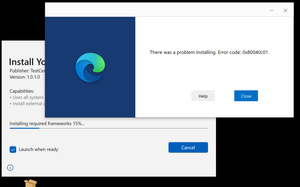
Hi, I have built an MSIX package that includes https://docs.microsoft.com/en-us/uwp/schemas/appxpackage/uapmanifestschema/element-win32dependencies-externaldependency using Microsoft Packaging Tool (also tried to build same MSIX with Advanced Installer too). When trying to install the MSIX on a Windows 10 machine (v21h2) I get the following WebView error: There was a problem installing. Error code: 0x80040c01 Is there any known issue with WebView2 external dependency installation from an MSIX on Windows 10 machines? How can I troubleshoot this issue? Here it is the full manifest of the sample MSIX I have built: <?xml version="1.0" encoding="utf-8"?> <Package xmlns="http://schemas.microsoft.com/appx/manifest/foundation/windows10" xmlns:win32dependencies="http://schemas.microsoft.com/appx/manifest/externaldependencies" xmlns:build="http://schemas.microsoft.com/developer/appx/2015/build" xmlns:uap="http://schemas.microsoft.com/appx/manifest/uap/windows10" xmlns:rescap="http://schemas.microsoft.com/appx/manifest/foundation/windows10/restrictedcapabilities" IgnorableNamespaces="uap rescap build win32dependencies"> <Identity Name="YourCompany.YourApplication" ProcessorArchitecture="x64" Publisher="CN=TestCert_2022-3-30_10-31-15" Version="1.0.1.0" /> <Properties> <PublisherDisplayName>Your Company</PublisherDisplayName> <DisplayName>Your Application</DisplayName> <Logo>Assets\Store50x50Logo.png</Logo> </Properties> <Resources> <Resource Language="en-US" /> <Resource uap:Scale="100" /> </Resources> <Dependencies> <TargetDeviceFamily MaxVersionTested="10.0.22000.0" MinVersion="10.0.17763.0" Name="Windows.Desktop" /> <win32dependencies:ExternalDependency Name="Microsoft.WebView2" Publisher="CN=Microsoft Windows, O=Microsoft Corporation, L=Redmond, S=Washington, C=US" MinVersion="1.1.1.1" Optional="true" /> </Dependencies> <Applications> <Application EntryPoint="Windows.FullTrustApplication" Executable="AI_STUBS\AiStub.exe" Id="updater.exe"> <uap:VisualElements BackgroundColor="transparent" Description="Advanced Updater" DisplayName="updater.exe" Square150x150Logo="Assets\updater.exeSquare150x150Logo.png" Square44x44Logo="Assets\updater.exeSquare44x44Logo.png"> <uap:InitialRotationPreference> <uap:Rotation Preference="portrait" /> <uap:Rotation Preference="landscape" /> </uap:InitialRotationPreference> </uap:VisualElements> </Application> </Applications> <build:Metadata> <build:Item Name="OperatingSystem" Version="10.0.22000.708" /> <build:Item Name="AdvancedInstaller" Version="19.6 (bf52c98e)" /> <build:Item Name="ProjectLicenseType" Version="architect" /> <build:Item Name="SignTool.exe" Version="10.0.20348.1" /> <build:Item Name="MakePri.exe" Version="10.0.20348.1" /> </build:Metadata> <Capabilities> <rescap:Capability Name="runFullTrust" /> </Capabilities> </Package> Thanks, Daniel6KViews0likes12CommentsApp Package Upload File (.appxupload or .msixupload)
Hi, Could anyone give me more details about what is an App Package Upload File? After reading the https://docs.microsoft.com/en-us/windows/uwp/packaging/packaging-uwp-apps I really cannot get a clear view of this MSIX package type. Can this format bundle multiple MSIX packages for different products? I guess not... Does anyone know a practical use case for this package file?Solved3.5KViews0likes1Comment
Recent Blog Articles
No content to show