User Profile

VirtualTech
Brass Contributor
Joined 7 years ago


User Widgets
Recent Discussions
data loss prevention policies for sensitive information.
Hi I created data loss prevention policies for sensitive information. I don't have an E5 license to review the data in activity explorer and my trial ended. I am a global admin with E3 license. Is there another way to review the policy data? Perhaps powerbi. thanks in advance267Views0likes0Commentsdata loss prevention policies for sensitive information
Hi I created data loss prevention policies for sensitive information. I don't have an E5 license to review the data in activity explorer and my trial ended. Is there another option to review the policy data? Perhaps powerbi.380Views0likes1Commentwhitelist exernal domain correct method in Exchange online or EOP
Hi HR department will use a third-party tool to bulk send emails to employees. I was provided the sender domains and IPs. I want to avoid the emails going to junk folder or quarantine. What is the best way to whitelist the sender domains? I it thru the tenant allow list, anti-spam inbound policy allow sender list or mail flow exchange rule?how to remove members from dynamic groups in Azure
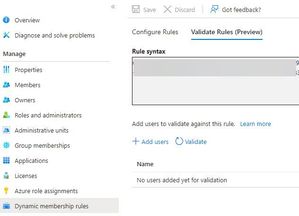
Hi Can someone please shed some light on "how to remove members from dynamic groups in Azure". The group type:security membership type:dynamic user group is for a O365 license. The rule syntax adds members to an O365 license. Under Dynaminc membership rules>Validate rules, there is an option to Add users only.Azure automation account script error
Hi I have an azure automation account and all runbooks are failing. I don't know why. As a test I only ran this command, and it fails too. $cred = Get-AutomationPSCredential -Name "Name" Import-Module ExchangeOnlineManagement Connect-ExchangeOnline -Credential $cred This is the job Exception log: Connecting to remote server outlook.office365.com failed with the following error message : Bad Request For more information, see the about_Remote_Troubleshooting Help topic. (Connecting to remote server outlook.office365.com failed with the following error message : Bad Request For more information, see the about_Remote_Troubleshooting Help topic.) Any ideasSolvedSharePoint Anyone links expiration date
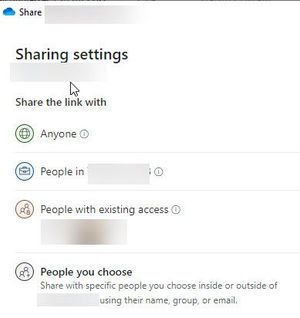
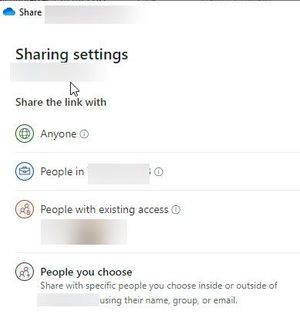
Hi Everyone In SharePoint Admin center, I only see an option to set expiration date for AnyOne Links. Does the expiration date expire fore internal users? Can the expiration date be set for People in the organization? I could not find any supporting articles. Thank you in advance902Views0likes1CommentTeams AutoAttendant
Hi We currently use AudioCodes media pack to connect analog devices in Teams. I am looking for advice on how to setup this paging system process in Teams Telephony. On the old system calls are parked on an extension. The person who answered calls the pages the shop floor and says call 10. Shop floor person can pickup on any phone and press 10 to pickup the call. Can you please advice how this would be setup in the AutoAttendant or call queue?Exchange Online Compliance Search export to PST
Hi I have a requirement to export mailbox to PST for a large number of users from Exchange Online. The users PST will be loaded on the new O365 tenant. I looked around and nothing comes up. New-MailboxExportRequest cmdlet does not work in exchange online. Does anyone have suggestions? I know a third-party tool is the best option. Thanks.1.7KViews0likes5Commentsgrant admin consent
Hi I been reading many blogs and maybe I am not fully understanding. I am hoping someone can shed some light on this. Question: Why are users not getting the traditional consent prompt? Currently, the app URL opens for anyone. I read a potential reason could be since the verify App that you developed in house, the only way for users to be prompted for consent is to add the parameter prompt=consent to each request. What I have done: Clicked on Grant admin consent User consent settings: Allow users to consent apps from verified publishers. All users can consent for permissions classified as low impact. Admin consent settings: Users can request admin consent to apps they are unable to consent to. set to No1.2KViews0likes2CommentsOneDrive remove files from all location prompt
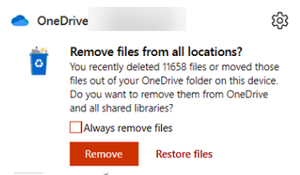
Hi A user backing up the desktop files with OneDrive for business and suddenly paused the sync and now a prompt appears 'remove files from all location'. User is concern some files will be lost. Any suggestion how to make this prompt go away? I can definitely unlink the account but don't want to risk loosing any files.2KViews0likes1CommentAllow my organization to manage my device in windows 10
Hi Is it really necessary to enable "allow my organization to manage devices" and no, sign in to this app only? We currently manage mobile devices with Airwatch, sync devices to cloud with Azure AD connect and use modern authentication. We don't push any policies like bitlocker with itune. Machines ar windows 10.1.1KViews0likes0Comments

Recent Blog Articles
No content to show