User Profile

maxwell2k19
Brass Contributor
Joined 7 years ago


User Widgets
Recent Discussions
unable to provide consent
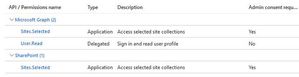
Hi All, I am facing an issue with API permissions. I have an Azure App Registration with the following Microsoft Graph API permissions. Let's say the App Registration name is TESTAPP and the Client ID is xxxx-xxxx-xxxxx-xxxxx. I have a SharePoint site, let's say mysite1, and I am trying to provide permissions in the following way: I obtained the site ID using the following URL: https://mydomain.sharepoint.com/sites/mysite1/_api/site/id. Let's say the site ID i got is 11111-111-1111-11221 i have logged into https://developer.microsoft.com/en-us/graph/graph-explorer/ Post-->v1.0-->https://grapsh.microsoft.com/v1.0/sites/{11111-111-1111-11221}/permissions Request headers: Key:application/json Request Body: { "roles": [ "write" ], "grantedToIdentities": [ { "application": { "id": "xxxx-xxxx-xxxxx-xxxxx", # This is my app regisration id "displayName": "TESTAPP" } } ] } When i click modify permissions and search for sites permissions, i am unable to provide consent, its grayed out. I am a global admin and i have full access on the SharePoint site. Please guide me.430Views0likes0Commentscreate guest account
Hi All, I want to create a guest account. I have logged in to the Exchange Online Admin Center and created a mail contact. However, I am not seeing this mail contact in Azure AD. Will mail contacts not show up in Azure AD? If i need to create a guest account in Azure AD should i use invite external user in EntraID? The guest account will be used for B2B. I want to invite external user in Azure EntraID, Please help me with PowerShell syntax to create guest users with below fields in EntraID, is the below syntax correct? Email: DisplayName: Send Invite Message:(This box to be checked) FirstName LastName UserType:Guest CompanyName: JobTitle $email = "email address removed for privacy reasons" $displayName = "FN LN" $sendInviteMessage = $true $firstName = "FN" $lastName = "LN" $userType = "Guest" $companyName = "SomeCompany" $jobTitle = "Developer" New-AzureADMSInvitation -InvitedUserEmailAddress $email -InvitedUserDisplayName $displayName -SendInvitationMessage $sendInviteMessage -InvitedUserType $userType -InvitedUserOrganizations $companyName -InvitedUserJobTitle $jobTitleQuery on License
Hi All I am not much aware of power automate desktop version. I am using Exchange 2016 hybrid environment. we create users in onprem and migrate to online. I am using Microsoft 365 E5 license. I can see we have Microsoft Power Automate Free licenses available in our office 365 license portal. will this license be applicable to desktop version or is there any different license for power automate. Please guide me904Views0likes0Commentsrestore planner
Hi All I am using Microsoft E5 license. for one of my user, all the items in one of his planner is empty. I am not sure of the planner. Is it possible to recover the items with in that planner. experts guide me. How can i check the audit logs of that planner.Solved5.8KViews0likes2CommentsQuery on Viva Insights
Hi All I am using exchange 2016 hybrid environment. I have a shared mailbox which is created in onprem and migrated to online. Do Viva Insights support shared mailboxes. i have assigned Viva insights license to a shared mailbox. . Viva insight feature is greyed out on the shared mailbox. experts guide me.Query on Viva Insights
Hi All i was referring the below article to set work hours and location https://support.microsoft.com/en-us/office/learn-more-about-work-hours-in-outlook-af2fddf9-249e-4710-9c95-5911edfd76f6 In Outlook on the web users can set work hours and location. Can user set work hours in vivainsights, if it is possible to set, will these settings be reflected in Outlook & Outlook on the web464Views0likes1Commentunable to add comments
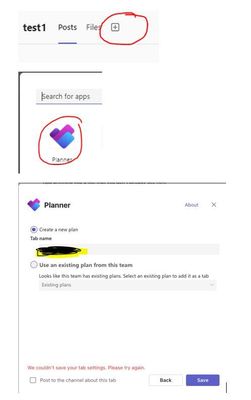
Hi All I am not much aware of planner. We use exchange 2016 hybrid environment. we create users in onprem and migrate to online. we use E5 license. One of my user is facing issue with planner. User is a member of a group that has access to planner lets say test1.The user is facing issue adding comments. when user clicks save, screen pops up and comments disappear. i suspect user can create a task and add comment but not to all tasks. user is also getting error 415, unsupported media type in their team Planner884Views0likes1Commentunable to add comments
we use exchange 2016 hybrid environment. we create users in onprem and migrate to online. we use E5 license. One of my user is unable to add comments on tasks in Microsoft Planner in SharePoint. user doesn't get any message or gets error 415 (Unsupported Media Type)480Views0likes0CommentsMR entires
Hi Experts One of my office365 user says that he sees multiple accepted meeting requests in his mailbox in Sent items. i.e around 15 to 20 emails in sent items. ( user has accepted a meeting request but in sent items he is seeing 15 to 20 sent emails for the same request which he has accepted).user profile has been reconfigured on mobile as well as outlook but same issue. This is happening for most of the meeting requests for this user.Only this user is facing the issue not other users.Solved941Views0likes1CommentOne Drive
Hi Experts I am using exchange hybrid environment and all my users are in cloud. i have global admin access. I have a user who says that his folder in one drive is missing is it possible to check from backend if so how can i check. I have a another user lets say user1@contoso.com who wants to rename one folder in onedrive and share it to a user lets say user2@contoso.com. user1 cannot rename since the user has limited access to mails as the user is on vacation. is it possible to rename the folder from backend.1.2KViews0likes1CommentRemote Server returned '550.4.4.7 Queue.Expired; message expired
Hi All One of my user(john@mydomain.com) is not getting email from other domain user(Glenn@extdomain.com). my user is getting emails from other users of that domain except one user i.e Glenn. Glenn is getting the below NDR when he is sending email to my user. is it issue at my end or at other domain end. When i check at email gateway, i can see similar email with same subject from Glenn received by one of my other user on a different date. Below is the NDR which is Glenn is getting when sending to my user. Delivery has failed to these recipients or groups. The server has tried to deliver this message, without success and has stopped trying. The recipient mail server may be temporarily offline or temporarily unable to accept message. Diagnostic information for administrators: Generating server: server01.europe.extdomain.com Total retry attemps:75 john@mydomain.com Remote Server returned '550.4.4.7 Queue.Expired; message expired.Solved2.8KViews0likes1Commentdynamic unified group
Hi Experts I am using exchange hybrid environment, i have custom attributes in AD for all users which are synced to Azure AD. For example I have manager Tim, Time reports to Roger and Roger Reports to John, i want to create dynamic unified group for Johns Organization,please help me with the syntax. i have permanent employees who employee ids stats with 5000, for example 5000,5001 and temporary employee whose employee ids starts with T1000, T1001 for example user todd has this AD attribute in extensionAttribute05---|John|Roger|<Tim>| How do i use the below information and create a query to build unified group. John Temporary-----(user.extensionAttribute05 -like '*John* ') and (user.employeeId -like 'T*') John Permanent-----(user.extensionAttribute05 -like ' * John* ') and (user.employeeId -notlike 'T*')Solved1.1KViews0likes1CommentRe: Delete meeting invite
How do i delete the meeting requests, i want to try the below syntax but notsure $Search=New-ComplianceSearch -Name "DeleteMeeting" -ExchangeLocation "searchlocation" -ContentMatchQuery AND (Subject:"TEST") AND (To:"mailto:user1@contoso.com")' Start-ComplianceSearch -Identity $Search.Identity New-ComplianceSearchAction -SearchName " DeleteMeeting " -Purge -PurgeType SoftDelete1.2KViews0likes0CommentsDelete meeting invite
Hi all I want to delete recurring meeting requests for one user mailbox. For example mailbox is mailto:user1@contoso.com and Meeting Subject is TEST and the meeting owner is user1 itself. How do i delete it as search mailbox is depreciated. Experts guide meSolved1.2KViews0likes1Commentrecover deleted files
Hi experts i have a share point site which has folders and sub folders. Some of the files and folders are deleted and i can see them in recycle bin, i dont want to restore all of them, is it possible to export the items of recycle bin from shell to csv file and then edit the csv file with the files and folders i require and import this csv file to restore. 1. is it possible to restore it to some other folder rather than overwrite.Solved1.8KViews0likes1CommentOneNote Sync issue
Hi Experts One of my office365 user is facing issue with onenote, his onenote is not syncing, the user is getting the below message. OneNote can't connect to the network, we will try sync your notes when the network is available The user doesn't have any issue with one drive or outlook or owa. experts guide me on thisSolved
Recent Blog Articles
No content to show