User Profile

Dhruv_Jain
Former Employee
Joined 7 years ago


User Widgets
Recent Discussions
Re: Help your users be successful with Microsoft 365 and Office 365 with training & tips in their inbox
Asif Rehmani Thank you for your message. If you were part of the selected tenant group, you should have received a Message Center post on April 2nd with details of the initiative. Furthermore, you will receive an Admin Reminder email tomorrow, which is one week before we send out the email directly to your users. Please feel free to reach out to me with any further questions.14KViews0likes0CommentsHelp your users be successful with Microsoft 365 and Office 365 with training & tips in their inbox
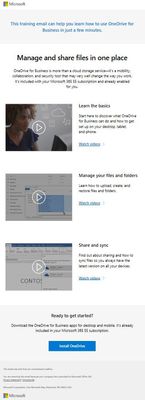
As a steward for your business, you’re always looking for ways to help your users get more from the technology you provide to them. We’ve heard from admins that one way to achieve this is with product tips and training content that their users can quickly use. This content often is available at the Office 365 Training Center , but users must currently seek it out themselves—and too often, they don’t. Email for product tips and training is coming The new email content from Microsoft will include only tips and training relevant to products and services you have enabled for your users. Be assured that we will not send your users sales, marketing, or advertising messages. Here is an example of a training email. Phased rollout We recognize that smaller organizations are juggling different priorities and often their IT admins wear multiple hats. That’s why we’ll start by sending the email communications to subset of customers that have Office 365 Business Essentials, Office 365 Business Premium, and subscriptions in the US and Australia. If you are an administrator for an organization that is part of this rollout, you’ll receive a notification in the Message Center, as well as an email reminder seven days before the first training tips email is sent to your users. Please note that you will be notified by the message center before the first training email is sent to your users. All training emails will only be sent from MicrosoftOffice365@email2.office.com email address. Admin is in control As the administrator for your organization, you’re in control. You have the flexibility to unsubscribe from these emails at any time on behalf of your organization by switching the ‘End User Communications’ setting to Off in the admin center. You can always subscribe later by changing the setting to On. Follow these steps to unsubscribe your organization from the training emails: 1. Sign In to the admin center 2. Click on Show all from the left navigation bar 3. Click on Settings 4. Click on Services & add-ins 5. Click on End User Communications 6. Change the setting and click on Save If you leave the email messages enabled for your organization, individual users can still unsubscribe at any time by clicking on the Unsubscribe link in the email footer. Users can also visit the Security & privacy page of their My Account Portal to unsubscribe. Preview the first training email and send it yourself Seven days before the first message is sent to users, global admins will be sent an email reminder with the opportunity to preview the content. This preview email will be sent only for the initial training content. If you prefer to send the training email yourself, just unsubscribe at the tenant level, then download a ready-to-send template from the preview email and send the first training email at your convenience. Give us feedback We’re always listening and learning from you. Please continue to provide feedback using the feedback button within the admin center.Solved
Recent Blog Articles
Microsoft wants your ideas on end user adoption & engagement with Microsoft 365 & Office 365
Microsoft is looking for IT professionals like you to provide feedback on end user adoption and engagement for Microsoft 365 / Office 365 through a brief survey. Topics include key challenges in your...21KViews21likes31Comments