User Profile

ShawnLar
Brass Contributor
Joined 7 years ago


User Widgets
Recent Discussions
Sharepoint Online user profiles when user is deleted from AzureAD
I am wanting to verify that a Sharepoint Online users profile (metadata for Created by and Modified by) will not be lost when a user is deleted from AzureAD. I can not find any Microsoft documentation that explains this. My understanding is that when a user is deleted from AzureAD their SPO User profile will not be deleted and any documents and list items they created in SPO will still show their name. Is this correct? Thanks in advance.Solved3.8KViews0likes4CommentsSharepoint page Button Web Part- I want linked document to open in desktop app
On my Sharepoint page I am using the default Button web part and when clicked I want it to open the linked document in the desktop app and not in browser. I have Advanced settings set to 'Open in the client application', but the system produced link always opens in browser when using the Button web part. I changed the link to be like 'https://xxxxxxx.sharepont.com/Test/Purchase%20Request.xlsx', but it only downloads the document. The web part wont let me put ms-excel:ofe|u| in front of the HTTPS in this web part either. Thanks in advance for anyone that knows how I can make this work.585Views0likes0CommentsCustom Permission Level and Sharing Documents
In SPO I am creating a custom permission level with a copy of default Edit. In my custom level I am removing the Delete options, Use Self Site Creation, and Add/Remove Personal Web Parts. Users assigned to this custom permission level then can not share documents. Testing I have found that I need to have both Self Site Creation and Add/Remove Personal Web Parts checked/included in the permission level for users to be able to share with others who do not currently have access. I have looked online and can't find a explanation for this so was wondering if others had this same issue and if anyone could explain to me why these two setting affect sharing? See Attached screen shots.1.2KViews1like1CommentRe: Allowed Apps not showing up in Teams
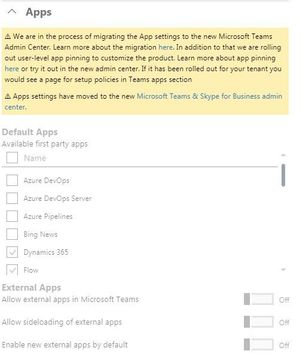
This has been resolved. Just as a FYI, In my M365 Admin Portal under Settings > Services and Add In > Teams > Apps it is subdued and I can not make changes there any longer. In the Teams admin console under Teams Apps > Permission Policies under Microsoft apps i have 'Allow specific Apps and Block all others' and this is where i had set new apps to allowed. Then just this afternoon a little warning icon showed up on the apps saying i needed to allow thru Org-wide app settings in Teams Admin Console. I went in there and unblocked and they now show up. adam deltinger ChrisHoardMVP60KViews1like1CommentAllowed Apps not showing up in Teams
When we started testing Teams, we only set a few apps as Available/Allowed in Admin Center, Services & Add-ins. Now we are wanting to set a few more apps as Allowed, but have to do this in the Teams Admin Console which we did last week. However these apps are not showing up in Teams. I have verified the users all have the proper App Permission Policy(Global) assigned. Any ideas why these aren't showing up in Teams? Thanks62KViews1like7Comments
Recent Blog Articles
No content to show