User Profile

bake13
 Microsoft
Joined 7 years ago


User Widgets
Recent Discussions
Re: SQL Server not returning (all) rows (Schrödingers Database)
Hi Dixus -- This is interesting, but I am with LainRobertson in that without seeing the view logic there are simply too many variables. My only other idea is to check your ANSI_NULLS setting on the connection/table/view etc. to ensure the value is not being eliminated, though without additional testing I'm not sure that would address all of your scenarios. Take care.2.7KViews0likes3CommentsRe: azure data studio "postgres unhandled exception while executing query: 'list' object has no attribut
Hi sekharsql -- This appears to be a known issue that is currently being worked. I too am able to repro the issue with versions 0.5.0 and 0.5.1 of the Azure Data Studio Postgres extension. Take care.1.6KViews0likes1CommentRe: Error connecting to SQL Server using another machine SSMS
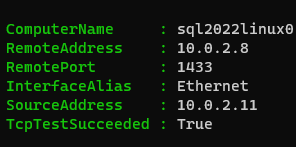
Hi threw000 -- As a quick first test, use test-netconnection to ensure that connectivity to the SQL Server is actually being established. test-netconnection -computername <servername or IP address here> -port 1433 Successful output will appear similar to that shown below. Take care.1.3KViews0likes1CommentRe: Azure SQL DB Data growing constantly whenever truncate/delete load
Hi ibk2510 -- What is the log file size for the database? SELECT file_id, name, CAST(FILEPROPERTY(name, 'SpaceUsed') AS bigint) * 8 / 1024. AS space_used_mb, CAST(size AS bigint) * 8 / 1024. AS space_allocated_mb, CAST(max_size AS bigint) * 8 / 1024. AS max_size_mb FROM sys.database_files681Views0likes0CommentsRe: How Get Application name in a Login Failure
Hi Nei_Bala -- This is not possible without writing a bit of code to capture that information and output to the SQL errorlog. Take a look at the RAISERROR function. Take care. RAISERROR (Transact-SQL) - SQL Server | Microsoft Learn2.9KViews0likes6CommentsRe: Not able to find sql 2017 developer edition download link
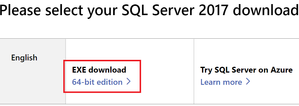
Hi Asaigoli -- Try the process below. Take care. 1. Go to: SQL Server 2017 | Microsoft Evaluation Center 2. Choose the Download link shown below. This will download the SQL Server 2017 Evaluation Edition Installer. 3. Run the Evaluation Edition Installer and choose Download Media. The full SQL Server installer download will begin. 4. Launch the downloaded ISO or EXE and choose Installation --> New stand-alone instance. 5. On the Product Key screen, use the "Specify a free edition" dropdown to choose Developer edition.990Views1like0CommentsRe: Backup and restore postgres to blob
Hi SimonWright -- As the link you provided below mentions, while it is possible to mount storage and backup via cloud shell, I personally not found it to be a scalable solution suitable for production use. Have you considered creating a temporary VM in Azure to perform the pg_dump and pg_restore operations, then simply delete the VM? In my experience this works well. Take care.6.1KViews1like2CommentsRe: issue in connecting ssms
Hi tulasi123 -- So that I ensure I understand, are you having trouble starting the SQL Server engine service through SQL Configuration Manager or only having an issue attempting to connect? Your statement, "I tried all the options such as trying to start the instance through sql server configuration manager and services however could not.", leads me to believe the service is unable to start. Take care.1.3KViews0likes0CommentsRe: Null Question
Hi sam870 -- If I'm understanding correctly, you might be able to use the information_schema views to dynamically generate the select statements. Take care. select 'SELECT * FROM ['+table_schema+'].['+table_name+'] WHERE '+column_name+' IS NULL' FROM INFORMATION_SCHEMA.COLUMNS order by TABLE_NAME,ORDINAL_POSITION834Views0likes0CommentsRe: Import XML into SQL server
Hi jeffery2110 -- See if the code below helps you get started. Take care. SELECT MY_XML.Names.query('Report_x0020_Names').value('.', 'NVARCHAR(96)') AS ReportName FROM (SELECT CAST(MY_XML AS xml) FROM OPENROWSET(BULK '/home/fourthcoffeedba/info.xml', SINGLE_BLOB) AS T(MY_XML)) AS T(MY_XML) CROSS APPLY MY_XML.nodes('//./ReportNames') AS MY_XML (Names);1.4KViews1like1CommentRe: Converting a varchar field to Numeric
Hi RayMilhon -- To find only records having numeric data, you can use the isnumeric function. A simple example of its use is shown below. https://docs.microsoft.com/en-us/sql/t-sql/functions/isnumeric-transact-sql?view=sql-server-ver16 select * from aTable where isnumeric(colone) = 1 But if I'm understanding correctly, it seems like you want to convert the existing column from char to numeric. The only way that you can do that is to first delete all records with non-numeric data in the existing char column. Otherwise, you ALTER TABLE statement will fail. Another alternative would be to create a new numeric column, hydrate it with numeric-only data from the existing char column (using the isnumeric function), then rename the old column and new columns so existing queries, stored procedures, views, etc. are not broken. Take care.1.8KViews0likes0CommentsRe: how to downgrade sql server 2019 standard to sql server 2014 standard
Hi peterkimani -- Thanks for the information. My recommendation would be to start working through a few of these items. Index and statistics maintenance should be a high priority. From there, enable Query Store on the database for a while to gain an understanding of which queries are performing poorly. I don't have context around the wait types, but you may want to consider adjusting max degree of parallelism either at the instance or database level as I noticed CXPACKET was a predominant wait type. Beyond SQL Server, you didn't mention whether the new SQL2019 instance was on a new server, but I'll assume that is the likely scenario. Have you used perfmon or other monitoring tool to verify the server is correctly sized, IO throughput is sufficient, etc.? Take care.17KViews0likes2Comments