User Profile

almarlibetario
Brass Contributor
Joined 7 years ago


User Widgets
Recent Discussions
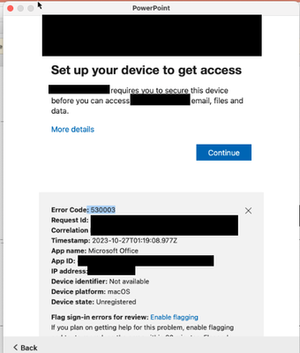
Device became Unregistered after reset password prompt on Sonoma 14.0
Got this error today on all MS Apps and the Company portal. The end user said he was prompted to reset his password which he did but stuck on the loading screen after entering. He did a force reboot and got all these errors when trying to open apps. macOS Sonoma 14.0 Tried reinstalling MS Apps, but the same issue Also excluded the user temporarily from the conditional access policy now starting the Sonoma 14.1 update which is taking forever to complete551Views0likes0CommentsVerifying the same Domain in Separate O365 Tenant
Hello Everyone, I know this question sounds really dumb but I hope any of you here has the same requirement as me. The Scenario: We are about to have an O365 Tenant to Tenant Migration and 1 of the requirement is to sync the on-premise AD users to the new Tenant. Currently, they do not have the synchronization and all email users are purely on cloud and they have a separate account for on-prem login. I know it is still not supported to verify a domain in multiple O365 tenants but I am just wondering if there is already a workaround for this. In my past experiences, when we tried to sync on-premise users to O365 without a verified domain, they were automatically being assigned an onmicrosoft.com domain. However, when the on-premise domain has been verified in O365, some users UPN did not change automatically. Though the verified domain is still there, it was assigned as Alias not primary. On this project, we are trying to avoid this scenario as we are dealing with 1000+ users and multiple business entities on a single tenant. Any inputs are highly appreciated. Thank you and be safe everyone!Re: -2016281111 error Intune windows 10 update rings Using deadline settings
I have both Windows 10 Enterprise E3 and M365 Business premium assigned to the users (disabling the Windows update for business and Windows 10 business feature from the M365 Business Premium license). I haven't tried a fresh install device yet for this policy and I got the 10.0.18362.1256 update for the 1903 builds.40KViews0likes0CommentsRe: -2016281111 error Intune windows 10 update rings Using deadline settings
These devices are using SCCM before we hybrid-joined them to AD. And yes, they have very old versions of Windows 10 when we came in to the picture to manage their devices. No idea why the previous MSP did that to these devices but as of this writing, we already decommissioned the SCCM server and unenrolled these devices from SCCM. I also removed any group policies that was set before to block the Windows updates. However, the Not applicable error I am getting is only showing from devices with 1903 and above version.49KViews0likes2CommentsRe: -2016281111 error Intune windows 10 update rings Using deadline settings
Yes, the policy applied to 1709 devices were successful. All errors I got are starting from build 1903 onwards. there is no WUfb safeguards configured or any other policies aside from Windows defender. To give you an overview of the enrollment, these devices are hybrid-joined from on-premise AD. We joined them now initially to managed the Defender and Updates then later on deploy policies. I can confirm no GPO policies related to Windows update are being applied to these devices. I haven't seen the registry entry though. Will try to check that one.48KViews0likes0Comments-2016281111 error Intune windows 10 update rings Using deadline settings
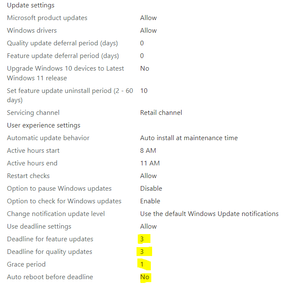
[Edited] Hello everyone, hoping you all are having a good day. I need some inputs on my current Windows 10 update rings policy. I set the deadline settings as shown below to multiple pilot devices. These devices are identical in all hardware but has different windows 10 builds (1909, 1709, 1903, 20H1, 21H2). Devices with Windows 10 1709 builds has been successful but I got this error "-2016281111 (Not applicable for this device)" on other versions. Policy Applied : User group User License : M365 Business premium and Windows 10 Enterprise E3Connecting Single On-Premise AD to Multiple O365 Tenant
Please pardon me for posting this kind of question. I found some post with similar issues but my problem has something different that made me create another thread. Anyways... We have this existing client that has 7 separate O365 tenants. They decided to separate the tenants because of the 300 license limitation for Business Premium plans. These tenants have different domains and different set of users. However, they are now requesting that all of the users from these 7 tenants will be able to see each other in the Global Address List. I have read that this is not possible but I really need to know what are my options in this scenario. Client has a single Active Directory on-premise that contains all the users from these 7 tenants. Also, they are NOT using Exchange On-premise. Thanks in AdvanceSolved3.5KViews0likes11CommentsRe: Intune Enrollment via GPO User eXperience
Chris-Yue It is actually required as part of the GPO Policy for Hybrid-joined devices. It should be worth noting that when configuring GPO for devices, you only need to change Computer Config policies and never duplicate the same policy on the User Config. Here's a preview of mine.11KViews0likes1CommentRe: Intune Enrollment via GPO User eXperience
StuartK73 I have these problems every time. what I did is to run dsregcmd /status and see if the AzureADPRT value is NO. then if the value is NO, reboot the machine and login using the O365 account UPN (mailto:sample@contoso.com). It doesn't matter if it is the same with the on-premise AD UPN but you need to type the whole UPN name as login. It will create a new profile and then go to work or school account and click on info. Once all the progress is successful, run the dsregcmd /status command again and see if the AzureADPRT value has changed. Note: do not run cmd as administrator if you are applying the policy per user basis not on per device. Also check the task scheduler of the affected machine. A successful Hybrid-joined device will automatically create a scheduled task. Also, check the event viewer for errors. Hope this helps.11KViews0likes0CommentsDecommissioning Exchange 2013 Server in a Hybrid Deployment with AD Connect
Hello Everyone, Apologies if this has been asked many times somewhere but I need to clear up some possible ways to resolve this. I got this scenario where we have a customer with existing Exchange 2013 on-premise server, AD Connect, and AD running on W2K12R2 and we managed to fully migrate every user to O365 using Hybrid Migration. DNS records are now pointed to O365 and no other activities are being done in on-premise exchange. Now, we are trying to eliminate the Exchange 2013 server. I have read a lot of articles already saying we need to keep the last exchange server just to manage the exchange attributes on-premise because of the SoA. And it is the only method that is supported by Microsoft. I know this is partly true because as I experienced before we got a customer that did not make a clean uninstall of the Exchange server and when we tried to sync the AD Users to O365 using AD connect we encountered some errors on the exchange attributes and I had to manually clean all of those (Thanks to powershell). My question is this, is it possible if I disable the AD Synchronization to O365 first then Uninstall the Exchange On-premise Server and clean all the exchange attributes in AD then re-run the AD Connect and do a Softmatch of the AD users to the O365 users? Will this help me get out of that attribute thing from Exchange? Your opinion is highly appreciated. Stay Safe everyone. Regards, Almar2KViews0likes3CommentsWill Creating a Teams Group from an existing Sharepoint Team Site increases the Site Storage to 25T?
Hello Everyone, We have this existing Sharepoint Team Site that is used for file repository. Now the site is running out of storage and we are looking for another options on how we can add up storage to the existing site without additional cost before we conclude in purchasing the O365 Extra File Storage Add On. I am aware that creating a Team from an existing Sharepoint Site or O365 group is possible but I am not quite sure if creating a Team from an existing Sharepoint Site will add up storage on that existing site - which I am hoping could also be 25TB. Any helpful thoughts will be much appreciated. Thank youSolvedRe: Teams Live Events and audio
Thank you so much gpetino73 Your reply has helped me a lot. And as a help to the community, I made a deep dive step by step guide on how to do the trick using the workaround you suggested. Here's the link to my site: https://www.untoldit.com/2020/04/how-to-broadcast-pre-recorded-video.html61KViews2likes0CommentsRe: Connecting Single On-Premise AD to Multiple O365 Tenant
NunoAriasSilva Yes, this is the first thought that came in my mind when this concern came in. However, maintaining 300 users in 7 tenants is not practical to do. Because if there is any change in one user, I have to change it across the 7 tenants.3.2KViews0likes6Comments

Recent Blog Articles
No content to show