User Profile

geoperkins
Brass Contributor
Joined 7 years ago


User Widgets
Recent Discussions
Windows Defender error 0x800106ba after DISM installation
I am trying to enable Windows Defender (Microsoft Defender for Endpoints) on Windows Server 2019 Standard Edition. I use the Deployment Image Servicing and Management (DISM). Then check the results, but the results always give error 0x800106ba and in the M365 admin portal I see the server, but the device health status is blank/unknown. This server previously had a different anti-virus on it, and all steps to uninstall and de-provision that product have been done. In fact, that uninstall and de-provision works for Windows Server 2012r2 clients with Windows Defender assuming the anti-virus role and updating in the M365 Defender portal. But something is different about Windows Server 2019. My question is, what is Windows Defender checking (registry key for example) that tells it to throw the 0x800106BA error? Can I manually tell Windows Defender that it is the boss, the old boss is gone?1.3KViews0likes0CommentsRe: DFS Referral Cache Is Invalid and Not Automatically Refreshing
See also https://learn.microsoft.com/en-us/answers/questions/1287263/dfs-referral-cache-is-invalid-and-not-automaticall Might be helpful to [Like] up-vote that (and this) thread. Thanks. It is not clear to me which forum these technical questions belong in. Microsoft? Are you monitoring your own forums?1.3KViews0likes1CommentDFS Referral Cache Is Invalid and Not Automatically Refreshing
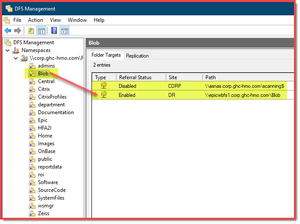
After updating existing DFS-N target folders, clients (Win10, Win2019, etc.) with existing cache DFS-N referral gives ‘Element Not Found’ (in File Explorer GUI) or ‘Cannot find path ... because it does not exist’ (in CLI) errors. Upon investigation, finding DFS-N referral cache entry listed as 'Type: 0x10 ( OUTSIDE_MY_DOM )' but Expires is not honored and entry is stuck in local cache. The entry is a DFS-N domain path entry, the cached result is incorrect. Work-around: Only restarting the client, or installing RSAT DFS Management tools (DFSUTIL) can flush the referral cache. Because DFSUTIL is not something that can be remotely executed, there is no solution without touching the client to install the utility. Updated DFS-N target folder Client referral cache contents Client error message Recovery step 1. Delete original DFS-N target folder, re-create a new target to eliminate the false ‘Type:0x10’ ‘( OUTSIDE_MY_DOM )’ error condition. Recovery Step 2. Restart Client. Or Use Recovery Procedure 3. Recovery Step 3a. Add RSAT DFSUTIL to client. Recovery Step 3b. DFSUTIL cache referral flush. This seems very much like a bug in the client-side DFS-N cache. 1. Referral Cache is getting an incorrect Type when the Domain DFS-N server is updated. 2. Invalid entry in Referral Cache subsequently does not automatically timeout and flush after 1800 seconds. I already have a work-around, but need a Microsoft software bug fix, please.1.4KViews1like3CommentsFailure configuring Windows updates. Reverting changes. Do not turn off your computer.
Windows Server 2012 R1. I cannot install any more/most security updates (the previous admin gave up I guess, leaving me a mess of vulnerabilities). I am stuck because the IE11 update (KB 4492872) refuses to install. This is a prerequisite for nearly everything that came after. Can someone please help? This is the one important Windows 2012 Server that I'd rather live out the remainder of its sorry life in its current incarnation. So, no, I do not want to build a new server from scratch and reinstall an old application. This is the last physical server in our otherwise virtual data center. Failure configuring Windows updates. Reverting changes. Do not turn off your computer. Excellent resources for troublelshooting: https://www.wintips.org/fix-windows-update-problems-in-windows-7-8-server-2008-2012/ https://docs.microsoft.com/en-us/windows/deployment/update/windows-update-resources https://download.wsusoffline.net/ The tried-and-true manual reset: PS C:\Windows\system32> net stop wuauserv The Windows Update service is stopping. The Windows Update service was stopped successfully. PS C:\Windows\system32> net stop cryptsvc The Cryptographic Services service is stopping.. The Cryptographic Services service was stopped successfully. PS C:\Windows\system32> net stop bits The Background Intelligent Transfer Service service is stopping.. The Background Intelligent Transfer Service service was stopped successfully. PS C:\Windows\system32> net stop msiserver The Windows Installer service is not started. More help is available by typing NET HELPMSG 3521. PS C:\Windows\system32> ren C:\Windows\SoftwareDistribution SoftwareDistribution.old PS C:\Windows\system32> ren C:\Windows\System32\catroot2 catroot2.old PS C:\Windows\system32> net start msiserver The Windows Installer service is starting. The Windows Installer service was started successfully. PS C:\Windows\system32> net start bits The Background Intelligent Transfer Service service was started successfully. PS C:\Windows\system32> net start cryptsvc The Cryptographic Services service is starting. The Cryptographic Services service was started successfully. PS C:\Windows\system32> net start wuauserv The Windows Update service is starting. The Windows Update service was started successfully. DISM.exe /Online /Cleanup-image /Restorehealth Deployment Image Servicing and Management tool Version: 6.2.9200.16384 Image Version: 6.2.9200.16384 [==========================100.0%==========================] The restore operation completed successfully. The component store corruption was repaired. The operation completed successfully. sfc /scannow Beginning system scan. This process will take some time. Beginning verification phase of system scan. Verification 100% complete. Windows Resource Protection found corrupt files and successfully repaired them. Details are included in the CBS.Log windir\Logs\CBS\CBS.log. For example C:\Windows\Logs\CBS\CBS.log. Note that logging is currently not supported in offline servicing scenarios. WindowsUpdateDiagnostic.diagcab (5/25/2016 - 313366 bytes) Errors corrected. Install KB4492872 using stand-alone installer AMD64-all-ie11-win6.2_8d823347334b5cb35a0d174a4267e03a8ae8ccc0.msu I've extracted just the suspicious contents of the CBS log and inserted as code below. But most of this is rather meaningless. What do the errors mean? ----------------------------------------[begin CBS log suspicious messages]---------------------------------------- 2020-11-25 17:02:27, Info CBS Exec: Processing complete. Session: 30851966_1768317231, Package: Microsoft-Windows-InternetExplorer-Package-TopLevel~31bf3856ad364e35~amd64~~11.4.9600.19329 [HRESULT = 0x00000000 - S_OK] 2020-11-25 17:04:28, Info CBS Trusted Installer cannot stop right now, because the system shutdown it was waiting for has started. 2020-11-25 17:05:20, Info CBS Trusted Installer signaled for shutdown, going to exit. 2020-11-25 17:05:20, Info CBS Trusted Installer is shutting down because: SHUTDOWN_REASON_NOTIFICATION:PRESHUTDOWN 2020-11-25 17:05:20, Info CBS Starting shutdown processing in TrustedInstaller service. 2020-11-25 17:05:20, Info CBS Session: 30851966_1768317231 initialized by client WindowsUpdateAgent. ----------------------------------------[snip]---------------------------------------- 2020-11-25 17:07:51, Info CBS Progress: UI message updated. Operation type: Update. Stage: 1 out of 1. Percent progress: 15. 2020-11-25 17:07:52, Info CBS DriverUpdateInstallUpdates failed [HRESULT = 0x80070bc2 - ERROR_SUCCESS_REBOOT_REQUIRED] 2020-11-25 17:07:52, Info CBS Doqe: System reboot required. 2020-11-25 17:07:52, Info CBS Perf: Doqe: Install ended. ----------------------------------------[snip]---------------------------------------- 2020-11-25 17:13:36, Info CSI 00000179 Begin executing advanced installer phase 38 (0x00000026) index 353 (0x0000000000000161) (sequence 392) Old component: [ml:298{149},l:296{148}]"Microsoft-Windows-Win32k, Culture=neutral, Version=6.2.9200.17025, PublicKeyToken=31bf3856ad364e35, ProcessorArchitecture=wow64, versionScope=NonSxS" New component: [ml:298{149},l:296{148}]"Microsoft-Windows-Win32k, Culture=neutral, Version=6.2.9200.23195, PublicKeyToken=31bf3856ad364e35, ProcessorArchitecture=wow64, versionScope=NonSxS" Install mode: install Installer ID: {3bb9fd2b-351e-4b9c-b1fc-ed0758805998} Installer name: [6]"Events" 2020-11-25 17:13:36, Error CSI 00000003 (F) Logged @2020/11/25:23:13:36.206 : [ml:262{131},l:260{130}]"events installer: online=1, install=1, component=wow64_Microsoft-Windows-Win32k_31bf3856ad364e35_6.2.9200.23195_neutral_release__."[gle=0x80004005] 2020-11-25 17:13:36, Error CSI 00000004 (F) Logged @2020/11/25:23:13:36.237 : [ml:240{120},l:238{119}]"EventAITrace:Provider Microsoft-Windows-Win32k is already installed with GUID {e7ef96be-969f-414f-97d7-3ddb7b558ccc}."[gle=0x80004005] 2020-11-25 17:13:36, Error CSI 00000005 (F) Logged @2020/11/25:23:13:36.253 : [ml:168{84},l:166{83}]"WmiCmiPlugin manproc.cpp(694): InstrumentationManifestAssert failed. HR=0x80073aa2."[gle=0x80004005] 2020-11-25 17:13:36, Error CSI 00000006 (F) Logged @2020/11/25:23:13:36.253 : [ml:166{83},l:164{82}]"WmiCmiPlugin eventloghandler.cpp(192): ProcessEventsInstall failed. HR=0x80073aa2."[gle=0x80004005] 2020-11-25 17:13:36, Error CSI 00000007 (F) Logged @2020/11/25:23:13:36.253 : [ml:170{85},l:168{84}]"WmiCmiPlugin eventloghandler.cpp(212): EventLogHandlerInstall failed. HR=0x80073aa2."[gle=0x80004005] 2020-11-25 17:13:36, Error CSI 00000008@2020/11/25:23:13:36.268 (F) CMIADAPTER: Inner Error Message from AI HRESULT = HRESULT_FROM_WIN32(15010) [[22]"Configuration error."][gle=0x80004005] 2020-11-25 17:13:36, Error CSI 00000009@2020/11/25:23:13:36.268 (F) CMIADAPTER: AI failed. HRESULT = HRESULT_FROM_WIN32(15010) Element: [92250]"<events xmlns="http://schemas.microsoft.com/win/2004/08/events"> <provider guid="{8c416c79-d49b-4f01-a467-e56d3aa8234c}" messageFileName="%SystemRoot%\system32\win32k.sys" name="Microsoft-Windows-Win32k" resourceFileName="%SystemRoot%\system32\win32k.sys" symbol="W32kControlGuid"> <channels> <channel chid="defch" name="Microsoft-Windows-Win32k/Tracing" type="Analytic" /> <channel chid="uipich" name="Microsoft-Windows-Win32k/UIPI" type="Debug" /> <channel chid="powerch" name="Microsoft-Windows-Win32k/Power" type="Analytic" /> <channel chid="concurrencych" name="Microsoft-Windows-Win32k/Concurrency" type="Analytic" /> <channel chid="renderch" name="Microsoft-Windows-Win32k/Render" type="Analytic" /> <channel chid="messageCh" name="Microsoft-Windows-Win32k/Messages" type="Analytic" /> <channel chid="contentionCh" name="Microsoft-Windows-Win32k/Contention" type="Analytic" /> </channels> <opcodes> <opcode name="OldToNewRendering" value="10" /> <opcode name="NewRendering" value="11" /> <opcode name="AppRenderingUpdate" value="12" /> <opcode name="AppRenderingTightUpdate" value="13" /> <opcode name="DirtyUpdate" value="14" /> <opcode name="AccumulatedDirtyUpdate" value="15" /> <opcode name="DWMPickedUpDitryUpdate" value="16" /> <opcode name="ValidateWindow" value="17" /> <opcode name="InvalidateWindow" value="18" /> <opcode name="PostGestureInputMessage" value="19" /> <opcode name="PostGestureMessage" value="20" /> <opcode name="TranslationUpdate" value="21" /> <opcode name="TranslationUpdateOffset" value="22" /> <opcode name="TranslationUpdateRectClip" value="23" /> <opcode name="UpdateDxAccumFromGDI" value="24" /> <opcode name="UpdateDxAccumFromDX" value="25" /> <opcode name="GetDxAccum" value[gle=0x80004005] ----------------------------------------[snip]---------------------------------------- 2020-11-25 17:13:36, Error CSI el="defch" keywords="AutoRotation UIUnresponsiveness win:ResponseTime" level="win:Informational" opcode="win:Stop" symbol="ForegroundWindowFullScreenStop" task="ForegroundWindowFullScreen" value="206" /> <event channel="defch" level="win:Informational" opcode="win:Info" symbol="ChangeDisplayModeBroadcast" task="ChangeDisplayModeBroadcast" value="207" /> <event channel="defch" keywords="Rendering UserActivity" level="win:Informational" opcode="win:Info" symbol="ContactVisualizationInfo" task="ContactVisualization" template="ContactVisualizationInfo" value="213" /> <event channel="defch" level="win:Informational" opcode="win:Info" symbol="ChangeDisplayModeDeferral" task="ChangeDisplayModeDeferral" value="214" /> <event channel="defch" keywords="UserActivity" level="win:Informational" opcode="win:Info" symbol="SystemConvertibleState" task="ConvertibleState" template="ConvertibleStateInfo" value="215" /> <event channel="defch" keywords="UserActivity" level="win:Informational" opcode="win:Info" symbol="SystemDockState" task="DockState" template="DockStateInfo" value="216" /> <event channel="defch" keywords="win:ResponseTime" level="win:Informational" opcode="win:Stop" symbol="ViewStateChange_Stop" task="ViewStateChange" template="ViewStateChangeTemplate" value="10002" /> </events> </provider> </events>" [gle=0x80004005] ----------------------------------------[snip]---------------------------------------- 2020-11-25 17:13:36, Error CSI 0000000a@2020/11/25:23:13:36.268 (F) CMIADAPTER: Exiting with HRESULT code = HRESULT_FROM_WIN32(15010).[gle=0x80004005] 2020-11-25 17:13:36, Info CSI 0000017a Performing 1 operations; 1 are not lock/unlock and follow: (0) LockComponentPath (10): flags: 0 comp: {l:16 b:88a11f9a80c3d601f000000008044404} pathid: {l:16 b:88a11f9a80c3d601f100000008044404} path: [l:234{117}]"\SystemRoot\WinSxS\x86_microsoft.windows.s..ation.badcomponents_31bf3856ad364e35_6.2.9200.16384_none_353ccb4c94858655" pid: 408 starttime: 132508195307263207 (0x01d6c380671e14e7) 2020-11-25 17:13:36, Error [0x01802b] CSI 0000017b (F) Failed execution of queue item Installer: Events ({3bb9fd2b-351e-4b9c-b1fc-ed0758805998}) with HRESULT HRESULT_FROM_WIN32(15010). Failure will not be ignored: A rollback will be initiated after all the operations in the installer queue are completed; installer is reliable (2)[gle=0x80004005] 2020-11-25 17:13:36, Info CBS Added C:\Windows\Logs\CBS\CBS.log to WER report. 2020-11-25 17:13:36, Info CBS Added C:\Windows\Logs\CBS\CbsPersist_20201125231210.log to WER report. 2020-11-25 17:13:36, Info CBS Added C:\Windows\Logs\CBS\CbsPersist_20201125220329.log to WER report. 2020-11-25 17:13:36, Info CBS Added C:\Windows\Logs\CBS\CbsPersist_20201118171209.cab to WER report. 2020-11-25 17:13:36, Info CBS Added C:\Windows\Logs\CBS\CbsPersist_20201117200957.cab to WER report. 2020-11-25 17:13:36, Info CBS Added C:\Windows\Logs\CBS\CbsPersist_20201117180944.cab to WER report. 2020-11-25 17:13:36, Info CBS Could not get active session for current session file logging [HRESULT = 0x80004003 - E_POINTER] 2020-11-25 17:13:36, Info CBS Not able to add pending.xml.bad to Windows Error Report. [HRESULT = 0x80070002 - ERROR_FILE_NOT_FOUND] 2020-11-25 17:13:36, Info CSI 0000017c Creating NT transaction (seq 2), objectname [6]"(null)" 2020-11-25 17:13:36, Info CSI 0000017d Created NT transaction (seq 2) result 0x00000000, handle @0x3ec 2020-11-25 17:13:36, Info CSI 0000017e@2020/11/25:23:13:36.441 Beginning NT transaction commit... 2020-11-25 17:13:36, Info CSI 0000017f@2020/11/25:23:13:36.456 CSI perf trace: CSIPERF:TXCOMMIT;30982 2020-11-25 17:13:36, Info CSI 00000180@2020/11/25:23:13:36.456 CSI Advanced installer perf trace: CSIPERF:AIDONE;{3bb9fd2b-351e-4b9c-b1fc-ed0758805998};Microsoft-Windows-Win32k, Version = 6.2.9200.23195, pA = PROCESSOR_ARCHITECTURE_IA32_ON_WIN64 (10), Culture neutral, VersionScope = 1 nonSxS, PublicKeyToken = {l:8 b:31bf3856ad364e35}, Type neutral, TypeName neutral, PublicKey neutral;598769us 2020-11-25 17:13:36, Info CSI 00000181 End executing advanced installer (sequence 392) Completion status: HRESULT_FROM_WIN32(ERROR_ADVANCED_INSTALLER_FAILED) ----------------------------------------[snip]---------------------------------------- 2020-11-25 17:13:36, Info CSI 00000182 Begin executing advanced installer phase 38 (0x00000026) index 354 (0x0000000000000162) (sequence 393) Old component: [ml:298{149},l:296{148}]"Microsoft-Windows-Win32k, Culture=neutral, Version=6.2.9200.17025, PublicKeyToken=31bf3856ad364e35, ProcessorArchitecture=amd64, versionScope=NonSxS" New component: [ml:298{149},l:296{148}]"Microsoft-Windows-Win32k, Culture=neutral, Version=6.2.9200.23195, PublicKeyToken=31bf3856ad364e35, ProcessorArchitecture=amd64, versionScope=NonSxS" Install mode: install Installer ID: {3bb9fd2b-351e-4b9c-b1fc-ed0758805998} Installer name: [6]"Events" 2020-11-25 17:13:36, Error CSI 0000000b (F) Logged @2020/11/25:23:13:36.503 : [ml:262{131},l:260{130}]"events installer: online=1, install=1, component=amd64_Microsoft-Windows-Win32k_31bf3856ad364e35_6.2.9200.23195_neutral_release__."[gle=0x80004005] 2020-11-25 17:13:36, Error CSI 0000000c (F) Logged @2020/11/25:23:13:36.550 : [ml:240{120},l:238{119}]"EventAITrace:Provider Microsoft-Windows-Win32k is already installed with GUID {e7ef96be-969f-414f-97d7-3ddb7b558ccc}."[gle=0x80004005] 2020-11-25 17:13:36, Error CSI 0000000d (F) Logged @2020/11/25:23:13:36.550 : [ml:168{84},l:166{83}]"WmiCmiPlugin manproc.cpp(694): InstrumentationManifestAssert failed. HR=0x80073aa2."[gle=0x80004005] 2020-11-25 17:13:36, Error CSI 0000000e (F) Logged @2020/11/25:23:13:36.550 : [ml:166{83},l:164{82}]"WmiCmiPlugin eventloghandler.cpp(192): ProcessEventsInstall failed. HR=0x80073aa2."[gle=0x80004005] 2020-11-25 17:13:36, Error CSI 0000000f (F) Logged @2020/11/25:23:13:36.550 : [ml:170{85},l:168{84}]"WmiCmiPlugin eventloghandler.cpp(212): EventLogHandlerInstall failed. HR=0x80073aa2."[gle=0x80004005] 2020-11-25 17:13:36, Error CSI 00000010@2020/11/25:23:13:36.550 (F) CMIADAPTER: Inner Error Message from AI HRESULT = HRESULT_FROM_WIN32(15010) [[22]"Configuration error."][gle=0x80004005] ----------------------------------------[snip]---------------------------------------- 2020-11-25 17:13:36, Error CSI 00000012@2020/11/25:23:13:36.550 (F) CMIADAPTER: Exiting with HRESULT code = HRESULT_FROM_WIN32(15010).[gle=0x80004005] 2020-11-25 17:13:36, Error [0x01802b] CSI 00000183 (F) Failed execution of queue item Installer: Events ({3bb9fd2b-351e-4b9c-b1fc-ed0758805998}) with HRESULT HRESULT_FROM_WIN32(15010). Failure will not be ignored: A rollback will be initiated after all the operations in the installer queue are completed; installer is reliable (2)[gle=0x80004005] 2020-11-25 17:13:36, Info CSI 00000184@2020/11/25:23:13:36.550 CSI Advanced installer perf trace: CSIPERF:AIDONE;{3bb9fd2b-351e-4b9c-b1fc-ed0758805998};Microsoft-Windows-Win32k, Version = 6.2.9200.23195, pA = PROCESSOR_ARCHITECTURE_AMD64 (9), Culture neutral, VersionScope = 1 nonSxS, PublicKeyToken = {l:8 b:31bf3856ad364e35}, Type neutral, TypeName neutral, PublicKey neutral;180030us 2020-11-25 17:13:36, Info CSI 00000185 End executing advanced installer (sequence 393) Completion status: HRESULT_FROM_WIN32(ERROR_ADVANCED_INSTALLER_FAILED) ----------------------------------------[snip]---------------------------------------- 2020-11-25 17:13:36, Info CSI 00000186 Begin executing advanced installer phase 38 (0x00000026) index 355 (0x0000000000000163) (sequence 394) Old component: [ml:308{154},l:306{153}]"Microsoft-Windows-System-Events, Culture=neutral, Version=6.2.9200.21973, PublicKeyToken=31bf3856ad364e35, ProcessorArchitecture=x86, versionScope=NonSxS" New component: [ml:308{154},l:306{153}]"Microsoft-Windows-System-Events, Culture=neutral, Version=6.2.9200.23176, PublicKeyToken=31bf3856ad364e35, ProcessorArchitecture=x86, versionScope=NonSxS" Install mode: install Installer ID: {3bb9fd2b-351e-4b9c-b1fc-ed0758805998} Installer name: [6]"Events" 2020-11-25 17:13:37, Info CBS Progress: UI message updated. Operation type: Update. Stage: 1 out of 1. Percent progress: 76. 2020-11-25 17:13:39, Info CSI 00000187@2020/11/25:23:13:39.082 CSI Advanced installer perf trace: CSIPERF:AIDONE;{3bb9fd2b-351e-4b9c-b1fc-ed0758805998};Microsoft-Windows-System-Events, Version = 6.2.9200.23176, pA = PROCESSOR_ARCHITECTURE_INTEL (0), Culture neutral, VersionScope = 1 nonSxS, PublicKeyToken = {l:8 b:31bf3856ad364e35}, Type neutral, TypeName neutral, PublicKey neutral;4935241us 2020-11-25 17:13:39, Info CSI 00000188 End executing advanced installer (sequence 394) Completion status: S_OK ----------------------------------------[snip]---------------------------------------- 2020-11-25 17:13:39, Info CSI 00000189 Begin executing advanced installer phase 38 (0x00000026) index 356 (0x0000000000000164) (sequence 395) Old component: [ml:312{156},l:310{155}]"Microsoft-Windows-System-Events, Culture=neutral, Version=6.2.9200.21973, PublicKeyToken=31bf3856ad364e35, ProcessorArchitecture=amd64, versionScope=NonSxS" New component: [ml:312{156},l:310{155}]"Microsoft-Windows-System-Events, Culture=neutral, Version=6.2.9200.23176, PublicKeyToken=31bf3856ad364e35, ProcessorArchitecture=amd64, versionScope=NonSxS" Install mode: install Installer ID: {3bb9fd2b-351e-4b9c-b1fc-ed0758805998} Installer name: [6]"Events" 2020-11-25 17:13:40, Info CBS Progress: UI message updated. Operation type: Update. Stage: 1 out of 1. Percent progress: 77. 2020-11-25 17:13:42, Info CSI 0000018a@2020/11/25:23:13:42.163 CSI Advanced installer perf trace: CSIPERF:AIDONE;{3bb9fd2b-351e-4b9c-b1fc-ed0758805998};Microsoft-Windows-System-Events, Version = 6.2.9200.23176, pA = PROCESSOR_ARCHITECTURE_AMD64 (9), Culture neutral, VersionScope = 1 nonSxS, PublicKeyToken = {l:8 b:31bf3856ad364e35}, Type neutral, TypeName neutral, PublicKey neutral;5995554us 2020-11-25 17:13:42, Info CSI 0000018b End executing advanced installer (sequence 395) Completion status: S_OK ----------------------------------------[snip]---------------------------------------- 2020-11-25 17:13:42, Info CSI 0000018c Begin executing advanced installer phase 38 (0x00000026) index 357 (0x0000000000000165) (sequence 396) Old component: [ml:330{165},l:328{164}]"Microsoft-Windows-Directory-Services-SAM, Culture=neutral, Version=6.2.9200.16497, PublicKeyToken=31bf3856ad364e35, ProcessorArchitecture=wow64, versionScope=NonSxS" New component: [ml:330{165},l:328{164}]"Microsoft-Windows-Directory-Services-SAM, Culture=neutral, Version=6.2.9200.22085, PublicKeyToken=31bf3856ad364e35, ProcessorArchitecture=wow64, versionScope=NonSxS" Install mode: install Installer ID: {3bb9fd2b-351e-4b9c-b1fc-ed0758805998} Installer name: [6]"Events" 2020-11-25 17:13:42, Info CSI 0000018d@2020/11/25:23:13:42.257 CSI Advanced installer perf trace: CSIPERF:AIDONE;{3bb9fd2b-351e-4b9c-b1fc-ed0758805998};Microsoft-Windows-Directory-Services-SAM, Version = 6.2.9200.22085, pA = PROCESSOR_ARCHITECTURE_IA32_ON_WIN64 (10), Culture neutral, VersionScope = 1 nonSxS, PublicKeyToken = {l:8 b:31bf3856ad364e35}, Type neutral, TypeName neutral, PublicKey neutral;187274us 2020-11-25 17:13:42, Info CSI 0000018e End executing advanced installer (sequence 396) Completion status: S_OK ----------------------------------------[end CBS log suspicious messages]----------------------------------------7.2KViews1like1CommentRe: ADFS and SSO for Exchange Online
Our organization was able to solve this problem and I documented the solution over on https://social.technet.microsoft.com/Forums/en-US/79c2050b-9977-4524-83a5-eb47d86e2f96/bypass-adfs-sso-url-side-door-into-portalofficecom?forum=ADFS ("https://social.technet.microsoft.com/Forums/en-US/79c2050b-9977-4524-83a5-eb47d86e2f96/bypass-adfs-...) Stephen Bell8KViews0likes1CommentRe: ADFS SSO sign-in as different user
Our organization was able to solve this problem and I documented the solution over on https://social.technet.microsoft.com/Forums/en-US/79c2050b-9977-4524-83a5-eb47d86e2f96/bypass-adfs-sso-url-side-door-into-portalofficecom?forum=ADFS (https://social.technet.microsoft.com/Forums/en-US/79c2050b-9977-4524-83a5-eb47d86e2f96/bypass-adfs-sso-url-side-door-into-portalofficecom?forum=ADFS) gperkins22KViews0likes0Comments
Recent Blog Articles
No content to show