User Profile

SOI_7
Iron Contributor
Joined 7 years ago


User Widgets
Recent Discussions
- 1.2KViews0likes0Comments
Bad Italian translation for "Paste as" in right click context menu
In the right click context menu, "Paste as" is currently translated as "Ultimoe al" for the italian localization, which is a mistake (it isn't even a word in italian). It should actually be "Incolla come". Italian: English: I've already submitted this as a Feedback, but I'm posting it here as well for more visibility1.5KViews0likes3CommentsRe: Say hello to the new Favorite Sidebar feature in the Edge browser
HotCakeX I assume this works as a side pane that pushes the page to the left, like the Side Search and Collections pane. I really don't get why the Edge team is still going this route instead of making them as flyouts, like in the old Edge17KViews0likes5CommentsFound a cool extension that enables a Downloads flyout
In the legacy Edge you could access downloads from the Hub menu, or pin a Downloads button to the toolbar. On Edge Chromium, downloads can be accessed only on a dedicated tab. This extension I found on Reddit enables a toolbar button that replicates the legacy behavior, although not identically: https://tmdm.ginomessmer.me/ Sharing it for everyone who likes it, and also as a tip in case the devs are looking into bringing back this feature525Views3likes0CommentsRe: Introducing sidebar search in Microsoft Edge
mayusuf yeah, I imagined it was just a webpage container for non- Bing searches. You may want to consider using the mobile version of the website for non-Bing search engines. I've already reported my feedback through the Feedback button5KViews1like0CommentsRe: Introducing sidebar search in Microsoft Edge
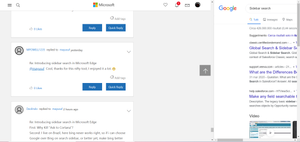
mayusuf While I love this feature finally being available, I think the current implementation is jarring and I hope it's just a foundation for a better update in the future. There are in particular three issues that bother me: 1) First of all, I expected the Sidebar to be a flyout menu that stays above the current web page, instead it's the same container used for Collections, that pushes the webpage to the left, which is a very poor solution since it makes me loose focus on what I was reading 2) Once you summon the Sidebar, there's no visual feeback to close it, there's no close button and pressing shortcuts like ESC don't do anything. The only way to close it is to right click on the sidebar and press the Close button from the submenu 3) Using Google as the default search engine produces nasty results in the sidebar: I see the whole Google search page and I have to scroll it horizontally to see the search results. It should instead fit the sidebar width:10KViews1like2CommentsRe: Set Aside Tab Feature | Collection Added to Edge insider Dev and Canary
Yes, the "Add tabs to collection" function is super quick in the current state, but it's the resume that is a bit clunky. If I were the Edge team, I'd at least make the "Open all" button always visible in the Collections menu so that even the resume is a 2 clicks action7.1KViews2likes3Comments[Feature Request] Search button in PDF Reader
I have reported this with the Feedback button multiple times, but it still doesn't exist. The PDF Reader should have a Search button (in the legacy Edge it was on the left, near the pages numbers). Right now I'm forced to use keyboard shortcuts to search something in a document, and probably some users don't even know they can since there's no dedicated button for this.1KViews0likes1Comment- 10KViews0likes0Comments


Recent Blog Articles
No content to show