User Profile

Erik_Moreau
MVP
Joined 10 years ago


User Widgets
Recent Discussions
Re: Panda usb vaccine not working on 24H2
Hi Winsty, On Windows 11 the risk the Panda tool tries to protect from is already disabled by default, autorun.inf will not be executed. If you want to check, this command will check the state of the setting, by default set to 0xFF (255) disabling Autorun on all devices reg query "HKLM\SOFTWARE\Microsoft\Windows\CurrentVersion\Policies\Explorer" /v NoDriveTypeAutoRun Hope this helps,45Views0likes0CommentsRe: Server 2025 Core ADDS DC, Network Profile Showing as "Public" and not as "DomainAuthenticated"
Hi, I've created this Workaround Script: It will create a folder C:\install\scripts, put a fix script in it and schedule it to run at startup, the script will reset the adapter if in public profile $scriptContent = @" # FixPubFWProfile.ps1 # This script fixes the public network profile # Get the network profiles `$networkProfiles = Get-NetConnectionProfile # Wait for 60 seconds Start-Sleep -Seconds 60 # Loop through each profile and restart-adapter if it is set to public foreach (`$Nprofile in `$networkProfiles) { if (`$Nprofile.NetworkCategory -eq "Public") { Restart-NetAdapter -Name `$Nprofile.InterfaceAlias } } "@ $scriptPath = "c:\Install\Scripts\FixPubFWProfile.ps1" # Create the directory if it doesn't exist if (-not (Test-Path -Path (Split-Path -Path $scriptPath))) { New-Item -ItemType Directory -Path (Split-Path -Path $scriptPath) -Force } # Write the script content to the file Set-Content -Path $scriptPath -Value $scriptContent Write-Output "Script created at $scriptPath" $action = New-ScheduledTaskAction -Execute "powershell.exe" -Argument "-ExecutionPolicy Bypass -NoProfile -File `"$scriptPath`"" $trigger = New-ScheduledTaskTrigger -AtStartup $principal = New-ScheduledTaskPrincipal -UserId "SYSTEM" -LogonType ServiceAccount -RunLevel Highest $settings = New-ScheduledTaskSettingsSet -AllowStartIfOnBatteries -DontStopIfGoingOnBatteries -StartWhenAvailable #check if the task already exists $taskExists = Get-ScheduledTask -TaskName "FixPublicNetworkProfile" -ErrorAction SilentlyContinue if ($taskExists) { Write-Output "Scheduled task 'FixPublicNetworkProfile' already exists" } else { Register-ScheduledTask -Action $action -Trigger $trigger -Principal $principal -Settings $settings -TaskName "FixPublicNetworkProfile" -Description "Fixes the public network profile 1 minute after startup" Write-Output "Scheduled task 'FixPublicNetworkProfile' created to run at startup with a 1 minute delay in the script" } also on my blog: https://www.technine.be/wp-content/uploads/2025/04/Fix-Public-Network-Profile.ps1 hope this helps,73Views3likes2CommentsRe: Is it REALLY a bad idea to install Windows 11 on an 'unsupported' system?
Hi Everettiin, Your processor is supported, if you Motherboad bios allows it you might be able to activate the Virtual TPM To enable TPM (Trusted Platform Module) on your Gigabyte Z370 Aorus Gaming motherboard with an i7 8700K CPU, follow these steps: Access BIOS Settings: Restart your computer and press the Delete key repeatedly during startup to enter the BIOS. Navigate to Trusted Computing Settings: Once in the BIOS, switch to Advanced Mode (usually by pressing F2). Go to the Settings tab, then select Miscellaneous or Peripherals (depending on your BIOS version). Enable Intel Platform Trust Technology (PTT): Look for the option labeled Intel Platform Trust Technology (PTT) and set it to Enabled. Save and Exit: Save your changes (usually by pressing F10) and exit the BIOS. Verify TPM in Windows: After rebooting into Windows, press Windows + R, type tpm.msc, and hit Enter. This will open the TPM Management Console, where you can confirm that TPM is enabled.187Views0likes0CommentsRe: Please suggest “A Basic Understanding of Python” via Microsoft Learn
Hi SupakornM, The MSLearn courses you are referring to don't seem to be there anymore, if you're looking for Python tracks, this will filter learn on anything Python related: https://learn.microsoft.com/en-us/training/browse/?terms=python depending on what you want to do with it there are many choices, a fun way to get started is using the Minecraft based courses.147Views0likes0CommentsRe: Missing Copilot Feature in Windows 11 Insider Build
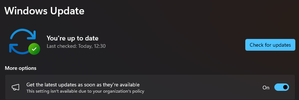
Hi muis6847, Copilot is still a CFR (Controlled Feature Release), this means it does not show up everywhere yet. I've also had devices where it went missing & came back. To make sure you get it as soon as possible, make sure you are signed in with a Microsoft account, not a local user. also tuning on the 'Get the latest updates as soon as they are available' is important. you can find this slider in settings under windows update. From the Microsoft support pages: 'The initial markets for the Copilot in Windows preview include North America and parts of Asia and South America. We’ll add more markets over time.' Depending on you location you might need to change your regional settings to be able to test it out for now.9.4KViews0likes1CommentRe: Windows Insider Program
Hi Diane, If you want to leave the program, here are the steps to take on the website: https://insider.windows.com/en-us/leave-program If however you installed one of the insider builds and you want to go back to a non-insider build, you eighter need to roll back the upgrade, which is only possible for a short time or need to reinstall your device with a new Windows that is not an insider build.699Views0likes1CommentRe: Ninja Cat Giveaway: Episode 5 | Mobile Threat Defense
- Social manipulation: This is when malicious actors send fake emails (phishing) or text messages (smishing) to users to trick them into giving private information such as their passwords or downloading malware on their devices. - Data breaches via malicious apps: This happens when users download apps that look legitimate but actually skim data from their device. Examples are spyware and malware that steal personal and business information without users realizing it. - Network-based attacks: These are especially common and risky because cybercriminals can steal unencrypted data while people use public WiFi networks.50KViews0likes0CommentsRe: Ninja Cat Giveaway: Episode 4 | Defender Experts for Hunting Overview
- How would YOU explain/describe Defender Experts for Hunting to someone? Defender Experts for Hunting is a service that provides proactive threat hunting across your Microsoft 365 environment. It leverages the advanced hunting data from Microsoft 365 Defender to detect and investigate threats that may evade traditional security solutions. Defender Experts for Hunting is staffed by Microsoft security experts who have deep knowledge and experience in threat hunting and analysis. They will deliver contextual alerts and remediation instructions to help you quickly respond to any malicious activity they find. - Also in your own words: what is Threat hunting? Threat hunting is an exciting and challenging cybersecurity function that uses proactive practices and intelligent technology to identify and reduce malicious activities in an organization’s systems. It assumes that attackers have already compromised the organization’s systems at their core level. Threat hunting is an active IT security exercise that digs deep to find malicious actors in your environment who have escaped your first endpoint security defense. Threat hunting is an art and a science that requires many skills and experience to be effective.51KViews2likes1CommentRe: Installation fails every time!
Hi Sam, you have no 3rd party Anti-Virus solution? if so remove it fist then run the following in an elevated dos box net stop bits net stop wuauserv reg delete "HKLM\SOFTWARE\Microsoft\Windows\CurrentVersion\WindowsUpdate" /v AccountDomainSid /f reg delete "HKLM\SOFTWARE\Microsoft\Windows\CurrentVersion\WindowsUpdate" /v PingID /f reg delete "HKLM\SOFTWARE\Microsoft\Windows\CurrentVersion\WindowsUpdate" /v SusClientId /f reg delete "HKLM\SOFTWARE\Microsoft\Windows\CurrentVersion\WindowsUpdate" /v SusClientIDValidation /f rd /s /q "C:\WINDOWS\SoftwareDistribution" net start bits net start wuauserv wuauclt /resetauthorization /detectnow PowerShell.exe (New-Object -ComObject Microsoft.Update.AutoUpdate).DetectNow() This will fully reset your Windows update, hope it fixes your issue10KViews1like4CommentsRe: Installation fails every time!
Hi Sam, You could start with the Quick Fixes listed here: https://docs.microsoft.com/en-us/windows/deployment/upgrade/resolve-windows-10-upgrade-errors If they do not help running SetupDiag could get us more info (also available on url above)10KViews0likes11Comments

Recent Blog Articles
No content to show