User Profile

KeepingITreal
Brass Contributor
Joined 7 years ago


User Widgets
Recent Discussions
Re: Guest users removed from Teams Group Chat
Adding/having other internal members does not seem to help. Somebody internal likely needs to remove the creator of the group before the account get's disabled to replace chat ownership for the group to survive uninhibited for continued use.291Views0likes0CommentsRe: Answering calls when call queue agents are unavailable or away
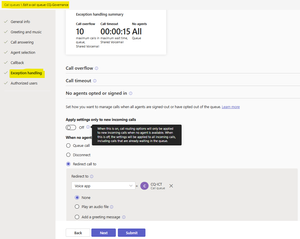
You can still set the CQ Agent alert time as 15 sec and the CQ Time out to 15 sec. It may say it "should" be greater but it will save from my experience. Also, you could try utilising the fairly new CQ Exception handling section, there you can set a condition to redirect calls if no agents are signed in or have opted-out of the CQ (Agents need to be proactive and set Teams presence or opt-out of CQ when they are unavailable to help this work best). Example: Ref. https://learn.microsoft.com/en-US/microsoftteams/create-a-phone-system-call-queue?tabs=call-exception-handling#no-agents-optedlogged-in-set-how-to-handle-calls-when-no-agents-are-optedlogged-into-the-queue27Views0likes0CommentsRe: Answering calls when call queue agents are unavailable or away
NoNotMe As suggested above. You should consider adding the other users to the Call Queue as agents of the Call Queue. These users can then opt out of the Call CQ in their Teams user settings. When they need to cover the Receptionist, they simply go into their call settings and opt back into the Call Queue and later opt out when Receptionist returns.5.7KViews1like0CommentsRe: Cant add 000 to Teams Emergency policy - Calling Policies
Hi AshJor, Did you have any joy with this? The most important thing is to test that 000 works via Microsoft Teams in Australia for you or your customer. Here is a the test procedure to follow in Australia: Ref. https://www.commsalliance.com.au/__data/assets/pdf_file/0003/1884/Procedure-for-making-Test-Calls-to-Emergency-Codes-000-September-2020.pdf 000 is unique to Australia. Ref. https://en.wikipedia.org/wiki/List_of_emergency_telephone_numbers#Oceania The Australian Communications and Media Authority (ACMA) states that when a call to 000 is received by Emergency Services from a Mobile or VOIP service "The operator will ask you for the town and state you are calling from. This is because you may not be at your home or billing address." Ref. https://www.acma.gov.au/emergency-calls Here is some more detailed information on how Teams/VOIP emergency calls are handled by the service provider: https://www.commsalliance.com.au/__data/assets/pdf_file/0009/1017/CA-VoiceOverIP_Emergency-Services-24Oct06.pdf Note - Dialling 112 from a fixed line telephone in Australia (including payphones) will not connect you to the emergency call service as it is only available from digital mobile phones. Ref. https://www.triplezero.gov.au/triple-zero/other-emergency-numbers#:~:text=Australia%E2%80%99s%20primary%20emergency%20call%20service%20number%20is%20Triple%20Zero%20(000), It maybe be until Microsoft fix the internal validation rules for Emergency dialling string, it wont be practical to have a Teams Emergency Calling policy. Hope to get an update from you and if I learn more I will also add it to this message 🙂327Views0likes0CommentsRe: Outlook Add-in Missing
mscola If retail version of Outlook installed Teams Add-in is not supported and wont appear. Reinstall Office from portal.office.com, Start Teams first, then start Outlook (likely need to setup user profile again). Refer: https://answers.microsoft.com/en-us/msoffice/forum/all/unable-to-add-ms-teams-addin-with-outlook/5b9217d1-f68b-4da3-9fb8-79c876260c59480KViews0likes0Comments
Recent Blog Articles
No content to show