User Profile

alexmarin89
Iron Contributor
Joined 7 years ago


User Widgets
Recent Discussions
Re: Windows 11 context menu
Edijs_Perkums_MasterPackager Yes you can add context menus by using MSIX Sparse Packages. First, you need to set your MSIX to allow external content to reference content outside its package, in a specific location on disk. Next, the app must point to your Win32 executable and lastly enable the Unvirtualized Resources capability. Once you have done all that, install the sparse package from your MSI package and you should by on your way. A more in-depth article on this https://www.advancedinstaller.com/how-to-create-sparse-package.html. PS: I work for the Advanced Installer team.3.7KViews0likes3CommentsMSIX Dependencies
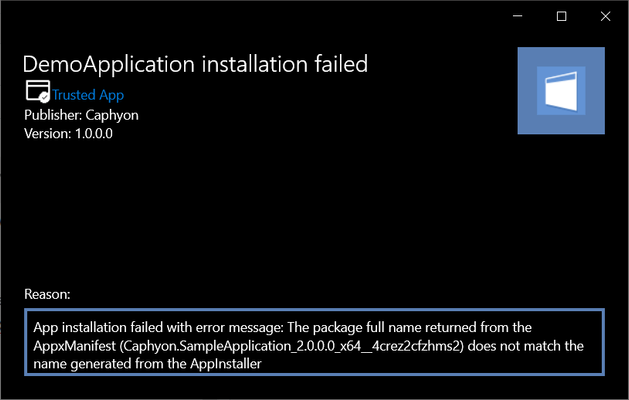
Hi, I've tried to create an MSIX package which has a dependency for another MSIX package. As far as i know, if you manually deploy an MSIX package that has a dependency, the dependency must be manually installed before, because the main MSIX package does not know where the dependency is (makes sense). So i started to make an .appinstaller file which contained the <Dependencies> element so that the installation could first install the dependency, and afterwards the main MSIX. Inside the element, the URI is set to an UNC path. When i try to install the package via the .appinstaller file, the following error occurs: Looking through the https://docs.microsoft.com/en-us/uwp/schemas/appinstallerschema/element-dependencies about this, i can see that my package name is declared correctly. However, my appinstaller file was missing the dependency ProcessorAchitecture, which was X64 (in some cases, i see that the AppInstaller is looking for the _native version by default). After placing the ProcessorAchitecture to X64 in the .appinstaller, i tried the installation again, but this time with the following error: I then went and manually tried to install the dependency first (from my local pc), and then the MSIX package (without the .appinstaller file). The dependency is installed on the system, as the Get-AppxLog suggests: 09/11/20 - Mon 9:45:32 PM 613 Performance summary of Deployment Add operation on Package Caphyon.SampleApplication_2.0.0.0_x64__4crez2cfzhms2: Overall time: 5329 ms Gap: 16 ms Enqueue cost: 109 ms Dequeue delay: 0 ms Gap: 16 ms Bundle processing cost: 0 ms Indexing cost: 63 ms Resolve dependency cost: 15 ms Gap: 16 ms Check approval cost: 297 ms Evaluation cost: 2843 ms Hardlinking evaluation cost: 2750 ms Stage required cost: 79 ms Flushing and closing files cost: 0 ms Gap: 15 ms Machine register cost: 63 ms Stage user data cost: 0 ms Gap: 31 ms Registration cost: 359 ms Gap: 16 ms Repository commit transaction cost: 1328 ms Gap: 31 ms Data flush cost: 0 ms Post DeStage repository commit transaction cost: 0 ms Remaining cost: 32 ms But when i try to install the main package it appears it doesn't detect the dependency: The AppxManifest file seems to be ok according to the https://docs.microsoft.com/en-us/uwp/schemas/appxpackage/uapmanifestschema/element-packagedependency: <Dependencies> <TargetDeviceFamily MaxVersionTested="10.0.19041.0" MinVersion="10.0.17763.0" Name="Windows.Desktop"/> <PackageDependency MinVersion="2.0.0.0" Name="Caphyon.SampleApplication" Publisher="CN=TestCert_2020-3-25_14-56-53"/> </Dependencies> The dependency has a publisher specified and it's signed, so it doesn't fall in the framework category, and the dependency version is equal to the minimum version specified here. In the end, i managed to install the main MSIX and dependency in the following order: 1. Manually install the dependency first 2. Install the main app via the .appinstaller file from the URI share Somehow, it then detects that the dependency is installed. If i try to uninstall the main MSIX package and leave the MSIX dependency on the system, and then try to reinstall the main MSIX manually from my PC, the same error code as mentioned earlier appears. I couldn't find any additional error codes other than 0x80070057, which is specified https://docs.microsoft.com/en-us/windows/win32/appxpkg/troubleshooting that: "One or more arguments are not valid If you check the AppXDeployment-Server event log and see the following event; While installing the package, the system failed to register the windows.repositoryExtension extension due to the following error: The parameter is incorrect. You may get this error if the manifest elements DisplayName or Description contain characters disallowed by Windows firewall; namely | and all , due to which Windows fails to create the AppContainer profile for the package. Please remove these characters from the manifest and try installing the package. " Am i missing something here?8.1KViews2likes3CommentsRe: How to collect software inventory with SCCM CB for deployed MSIX apps?
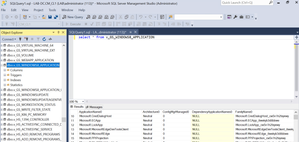
Bigair-MifiHi, you can use the WMI class SMS_G_System_WINDOWS8_APPLICATION to create a query in SCCM. As an example: select SMS_R_System.Name, SMS_R_System.Client from SMS_R_System inner join SMS_G_System_WINDOWS8_APPLICATION on SMS_G_System_WINDOWS8_APPLICATION.ResourceID = SMS_R_System.ResourceId where SMS_G_System_WINDOWS8_APPLICATION.ApplicationName = "microsoft.windowscommunicationsapps" This will show you all the computers with "microsoft.windowscommunicationsapps". To get all MSIX/Appx apps from the infrastructure, you could use: select distinct SMS_G_System_WINDOWS8_APPLICATION.ApplicationName, SMS_G_System_WINDOWS8_APPLICATION.FamilyName, SMS_G_System_WINDOWS8_APPLICATION.FullName, SMS_G_System_WINDOWS8_APPLICATION.Publisher, SMS_G_System_WINDOWS8_APPLICATION.Version, SMS_G_System_WINDOWS8_APPLICATION.Architecture from SMS_G_System_WINDOWS8_APPLICATION Additionally you have a default report called https://docs.microsoft.com/en-us/mem/configmgr/core/servers/manage/list-of-reports If you want to do something in the database, you can use the v_GS_WINDOWS8_APPLICATION view.5.6KViews1like0CommentsRe: Need configuration information added to .CONFIG file at MSIX install time.
Hi, It’s not possible during install to achieve this. However, using the PSF, you can add a custom script (powershell) to run before opening the application. Take the desired input from the script and change the file. If the file is present in the installation directory, you must also create a redirect for it in the appdata of the app. In Advanced Installer we have a special section for the PSF called AppCompat where you can achieve this.2.4KViews0likes3CommentsRe: Way to package a shortcut with MSIX
Priyanka_AggarwalHi, The shortcut trick from APP-V to link Java with IE doesn't currently work with MSIX. Maybe in the future it will be possible when linking for MSIX packages becomes available. For the moment, as far as i know, msix linking is in the backlog.3.3KViews0likes4CommentsRe: MSIX Packaging java jre
julien_GfiHi Julien. I have converted Java just for tests with MSIX. While the conversion might work (i haven't tested the full functionality of Java), what you are trying to achieve i don't think it's possible with MSIX at the moment. The workaround for IE shortcut that you use in APP-V is not possible with MSIX yet. Maybe in the future when linking (or connection groups as we know in APP-V) is launched for MSIX a workaround might be found.4.7KViews2likes1CommentRe: missing .lnk shortcuts shortcut from MSIX package
Archana2612Hi. In MSIX you don't technically have shortcuts, you have Applications. These can only target .exe files, that is why you can't add you .chm or website as a shortcut. As an alternative, in Advanced Installer, we are launching the applications via a custom stub.exe, thus making it possible to add websites or chm files.3.4KViews2likes2CommentsRe: Writing to local registry
HiJeffWhiteside . After you add RegistryWriteVirtualization and FileSystemWriteVirtualization, when you try to install the MSIX package, indeed these capabilities appear. Capabilities: "Write registry entries and files that are not cleaned up on uninstall". However, when you try to install it, you receive the following error "This app package is not supported for installation by App Installer because it uses certain restricted capabilities.". The xmlns:rescap XML namespace declaration is added in the package manifest. The only way i got this to install is by running powershell as admin and use add-appxpackage. Am i missing something?2.8KViews1like2CommentsRe: [MSIX] - Packaging GIMP
TheStingPilotI tested 2.10.12 by creating the folder structure specified in their git board (C:\Output\Gimp) and installed it there (the path should be after installation C:\Output\Gimp\Gimp 2). After that in the capture with Advanced Installer i specified the application folder to be GIMP 2, that solved for me the problem of copying the dlls to system32 and system64. But that doesn't work either. However, i've done more tests and i was thinking maybe something has changed since the 2.10 release of GIMP...and indeed something has changed. I made a capture for GIMP 2.8.22. When you try to build it the first time you will receive some errors that GIMP 2\32\lib\gimp\2.0\python\gimp.pyd.debug' is not a valid Portable Executable for 'Build_MSIX_APPX->x64' build and other 4 or 5 .debug files. I've deleted the files, doesn't seem to affect how it works. But of course i ran into the issues with the dlls that are not loading. So again i've copied the dlls in System32 and System64. I also changed the Application Folder to be in GIMP 2. And after that, everything works! GIMP 2.8.22.0 works with MSIX! I am now curious what are the differences, i will try to do some more digging to see if maybe it's something that can be solved for the latest 2.10 releases also. I thought maybe it's some hardcoding in some files, the only thing i found it in pygimp.interp located in lib\gimp\2.0\interpreters: python=C:\Output\Gimp\GIMP 2\bin\pythonw.exe python2=C:\Output\Gimp\GIMP 2\bin\pythonw.exe /usr/bin/python=C:\Output\Gimp\GIMP 2\bin\pythonw.exe :Python:E::py::python: However, trying to dehardcode that file doesn't solve much. And with a normal installation if you delete that file it doesn't seem to affect the functionality of GIMP, so that's a no go there also. You can get the MSIX for 2.8.22.0 https://1drv.ms/u/s!Aur7_pRUgEnsiLljrcV30jjD_eWdpg?e=XHDVWV.13KViews2likes0CommentsRe: [MSIX] - Packaging GIMP
pandaysumitroy Indeed, just tried it now and it doesn't work. Apparently this only suppresses the load failure of the plugins. Apparently the GIMP community is also https://gitlab.gnome.org/GNOME/gimp/issues/1145/ (also somebody else already tried to put the plugins in System32 and System64 with the same exact results). However, i did notice something, which i am not sure why is happening like this for the moment. While you capture GIMP, if you install it in other folder than the default one (C:\Test or C:\Gimp or any other folder), when you install the MSIX you won't receive the plugin failures anymore (so no need to copy the dlls in System32 and System64). From my opinion this has something to do with how GIMP gets the paths and the whole logic of finding/loading plugins. Still searching for a work around to make it work, will let you know if i have any further progress with this.13KViews1like5CommentsRe: [MSIX] - Packaging GIMP
TheStingPilotFound a workarround for this. If we check with procmon what is happening, after gimp is loaded, the plugins are searching for some DLLS in BIN. While the psf redirection works and the plugins then search in the correct directory, for whatever reason gimp.exe fails to start. When it calls to dlls it returns only buffer overflows. However, if we look closely in procmon, we can see that each and every plugin is searching for the DLL files in 3 directories: 1. The BIN folder 2. The plugin directory (each plugin searches in its own directory) 3. System64 (C:\Windows\System32) - For 64bit plugins 4. System32 (C:\Windows\Syswow64) - For 32bit plugins I have made a capture of Gimp with Advanced Installer, and, without any redirections, i copied all the DLLs from the BIN folder in System64. After the installation almost everything seems to work (99%), except twain.exe. To fix twain.exe to throw an error, you must also copy all the DLL files from 32\BIN to System32. After that everything works correctly and applications starts/loads plugins. Hope this helps, Kind regards.13KViews3likes10CommentsRe: Context Menu in MSIX packaged application.
Yes, in VLC it works because you have for each file association a registered .exe that it points to. For example you point .mp3s to open up with vlc.exe. But in cases like notepad++, winzip,etc, you have a shell extension which is not placed on a specific file association and it points to a .dll file. Also, in MSIX, the context menu is not placed with the captured registry. Context menu is added inside the AppManifest.xml file.4.4KViews1like0CommentsRe: replacement for ActiveSetup and AdvertisedShortcut to deploy User Parts
thomasboettnerMSIX is technically a user-based installation, if you double click the MSIX file this will register the application only on the user that installs it. However, all the files are placed in %ProgramFiles%\WindowsApps\PublisherName.AppName_AppVersion_architecture_hash If another user wants to install the application, this will only register it on that current user. All files (including user files) are present in the above location. From some tests that i did, when you provision an app on all users using Add-AppxProvisionedPackage -online -PackagePath "c:\package.msix", after another user logs in on the machine, the install (or publish to be more correct) of the app will happen silently and all the userdata that is present in the VFS of the MSIX (from %PF%\WindowsApps) will be published in the user location: %localappdata%\packages\PublisherName.AppName_hash That location simulates all the necessary user locations like AppData, LocalCache, RoamingState, etc. So in theory, you don't need ActiveSetup or Advertised Shortcuts to place userdata like we did on MSI technology.1.7KViews1like2Comments
Recent Blog Articles
No content to show