User Profile

Abdelhakim_Y95
MCT
Joined 7 years ago


User Widgets
Recent Discussions
Unable to generate Achievement codes
Hello Support, After Succesfully enrolling in the TSP Program, i went on with the next step. On the 14th of July 2025 i've created an account to generate Achievement codes with. Untill this day i still have no possibility to achieve this. I have enrolled the newly created account (Training<PartnerID>@outlook.com) according to the account-enrollment-for-achievement-code.pdf twice but that made no difference.. Please help me out :)Outlook / Office links opening in Edge (with Sidebar)
Hi All, There has been a recent change in the way that URL's from office, in my case Outlook, open.. For my current employer they use specific SaaS tools that only work in Google Chrome so i've set the default browser for all workplaces on Chrome. Same as this tutorial: Set Google Chrome as Default Browser Using Intune – Learn Azure, OpenAI, M365, Terraform, Cybersecurity (ntweekly.com) But now the strange thing, despite having Chrome as default browser on the system, and having a cloud policy and configuration profile activated, the weblinks still open in EDGE.. Very frustrating for end users, does anyone have a permanent solution for this or encountered the same?Solved1.7KViews0likes4CommentsRe: Windows Auto Patch vs Intune Update Rings
Can you specify which administrative stuff will be automated? I can't tell the difference between regular rings and Autopatch rings. I have activated it in a test-tenant and it only looks like more work. Regular rings for updates etc are only adjusted once in a while but that is not a huge workload. Also having to set the telemetry data to FULL is a no-go for most companies.18KViews1like0CommentsMS Teams does not retain device settings in VDI
Hi All, We implemented MS Teams a while ago to be available in our VDI environment. Several users noticed that their device settings are not retained. We have implemented MS Teams by Microsoft best practice; Teams for Virtualized Desktop Infrastructure - Microsoft Teams | Microsoft Docs Anyone else also faced this issue?Re: Wrong SMTP in Outlook for Mac
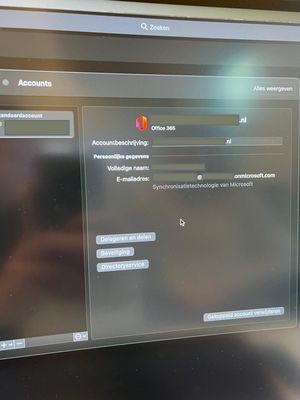
Diane_Poremsky_MVP Hi Diane, Thanks for the quick reply, i added all accounts the modern way. Also all users have the custom domain as their logon adres. But still the client shows @ tenant.onmicrosoft.com in stead of tenant.com Its just cosmetic but annoying and confusing for end users.1.8KViews0likes6CommentsWrong SMTP in Outlook for Mac
Hello team, We recently migrated from Gsuite to M365, the users in the company have Apple devices. While migrating email, the users installed office with the old SMTP Email address removed After changing the email traffic and updating the SMTP of users to @tenantname.com we started configuring Outlook profiles. The (cosmetic) issue now is that all profiles show the wrong smtp in the Outlook profile, recreating a profile did not work.. Account settings also state that the email adres is @tenantname.onmicrosoft.com Has anyone encountered this on MacOS?2KViews0likes8CommentsRe: Background image via Intune
tweetiepie1983 Do you mean which value enables preventing change of the background image? Important: This is a friendly reminder to let you know that editing the registry is risky, and it can cause irreversible damage to your installation if you don't do it correctly. We recommend making a full backup of your computer before proceeding. In the same way as with the Local Group Policy Editor, there are two ways to accomplish this task, you can enforce a default desktop wallpaper, or you can prevent users from changing the desktop background settings. Prevent users from changing desktop background Before you begin, make sure to set an image as default on the desktop using the Settings app or right-clicking an image and selecting Set as desktop background. Then if you're running Windows 10 Home, or you simply prefer to use the Registry to make changes to the OS, use the following steps to restrict users from setting a new wallpaper: Use the Windows key + R keyboard shortcut to open the Run command. Type regedit, and click OK to open the registry. Browse the following path: HKEY_CURRENT_USER\Software\Microsoft\Windows\CurrentVersion\Policies Right-click the Policies (folder) key, select New, and click on Key. Name the key ActiveDesktop and press Enter. Right-click on the right side, select New, and click on DWORD (32-bit) Value. Name the new DWORD NoChangingWallPaper and press Enter. Double-click the newly created DWORD and change its value from 0 to 1. Click OK. After completing the steps, users will no longer be able to set a new image as a background using the Settings app and the right-click "Set as desktop background" will not work.57KViews0likes0CommentsRe: Background image via Intune
tweetiepie1983 Thanks for your response. It's not what i'm looking for. Deploying a background via the device configuration profile results in a static background which can not be changed by anyone. You'll get the statement that its set by computer policy and may not be changed.57KViews0likes3CommentsBackground image via Intune
Hi All, We're currently busy with the Look and Feel of our Autopilot Workplace. One demand of the customer is to have a changeable background image on the workplace. I've found Michael Nihaus' tool but it's not applicable in our environment due Enterprise State Roaming. (source: https://github.com/mtniehaus/AutopilotBranding ) I've searched for CSP strings but did not find what is needed... (source: https://docs.microsoft.com/en-us/windows/client-management/mdm/personalization-csp ) (source: https://www.petervanderwoude.nl/post/easily-configure-desktop-and-lock-screen-image-via-windows-10-mdm/ ) How do you handle this?57KViews0likes5CommentsRe: BitLocker Full Disk Encryption for Windows 10 or later versions
Bitlocker is not available for Windows 10 Home. https://support.microsoft.com/en-us/help/4028713/windows-10-turn-on-device-encryption You should upgrade it to at least Pro to have a Bitlocker profile pushed via Intune. https://docs.microsoft.com/en-us/windows/deployment/windows-autopilot/windows-autopilot-requirements2KViews1like1CommentAzure AD Join via Office 365 installation!?
Hi All, The company i manage Intune for, states that when installing office 365 on their private device and they sign in to it, they join Azure AD. I've checked my devices in intune and this is really the case... I've found out that Automatic Enrollment was set to All users. How can i prevent users for not Azure AD joining via an Office 365 installation or Private device?Solved
Recent Blog Articles
No content to show