User Profile

fdwl
Former Employee
Joined 7 years ago


User Widgets
Recent Discussions
Announcing public preview of Azure Virtual Desktop RDP Shortpath for public networks
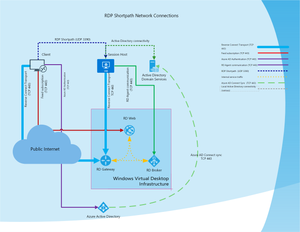
Today I have the pleasure of announcing the public preview of RDP Shortpath for public networks. This Remote Desktop Protocol (RDP) feature establishes a direct UDP data flow between the Remote Desktop Client and Session host. RDP uses this data flow to deliver Remote Desktop and RemoteApp. Why does UDP matter? What is wrong with using TCP? Reliability First of all, TCP is an unreliable transport for long-living user sessions. That is right, let me repeat – TCP is unreliable. If you know networking, you might think I'm crazy saying that. But trust me, it's true. TCP is an excellent protocol for guaranteed delivery of small amounts of data. It's easy to implement. Applications like browsers or email clients just send the data and forget about it. They don't need to implement the logic to verify that data is delivered or is delivered in time and with no errors. The protocol will ensure the packet consistency; order, and retry the transmission if delivery fails. However, RDP uses long running connections and long-running TCP connections are problematic. Let me explain this. When Remote Desktop Client establishes the reverse connect session, it consists of two TCP connections, one from the client to the gateway and another from the session host to the same gateway. It looks straightforward, but let's check what is going on over the wire. Let's take the connection from the session host to a gateway as an example. First, Remote Desktop Service opens a local TCP socket on the local network interface. Then, it sends a TCP SYN to the gateway. What happens with the packet? The packet goes out of the Virtual Machine NIC. Then, it travels over the Azure Virtual Network, reaching the NAT gateway, Load Balancer, Azure Firewall, or other NVA. All those virtual elements perform either connection tracking or network address translation, which means that virtual appliances track the status of the TCP connection in memory. Then, after the NAT, the TCP packet travels over the Azure backbone to the Azure Virtual Desktop Gateway. The gateway is not a single big VM. Instead, it is a distributed cluster of applications running on Azure App Service. On the backend, multiple load balancers and firewalls are tracking the TCP session and translating the packet again to the private IP address and port of the App Service instance. And believe me, this is a simplified description. Software-Defined networks perform a lot more translations and packet encapsulations while tracking the state of the connections. On the client side, a similar story. First, the packet is sent to the home router that performs the translation on the client. Then it may pass the packet inspection firewall. At some point, the packet will reach the AVD gateway and pass through those load balancers again. Microsoft is doing a lot to improve the reliability of the Azure part of the path your TCP packet takes, including fault-tolerant load balancers and scalable NAT gateways. However, not all components are in our control. For example, customers deploy force tunneling on-premises, Zero Trust Network services, and use deep packet inspection. This is complicated even more by dynamic routing, VPNs, and software-defined networking setups. Any one of those dozens of physical or virtual appliances on the way of RDP flow may fail or may need to be serviced. In such cases, the TCP session could be dropped. However, such network failures always would come as a surprise. This is because the TCP protocol stack will never report any network errors to the application on the higher level until it reaches the point where the connection is not recoverable. We take this seriously at Azure Virtual Desktop. We have proactive monitoring of the session and a fast reconnect for TCP-based transport. However, even if the sessions are automatically re-established, it takes some time and affects the user experience. The solution comes with using UDP-based transport. First, the tracking of UDP streams is done differently on the load balancers, firewalls, and NAT devices. Second, because of the connectionless nature of UDP, those network devices cannot reset the UDP flow by sending the RST signal. Each packet in the UDP stream is independent of each other and could be lost without affecting the health of the entire flow. Third, UDP is more tolerant to the temporary network interruptions caused by wireless interference or by changes in dynamic routing. UDP does not care about each individual packet's packet order or delivery. It does not have built-in congestion or rate control, which means that if you want to use UDP, you need to implement all of this on your own. And that is what we did by implementing URCP for RDP Shortpath. With this setup, we have better visibility into the network. We see delays in every packet we send and immediately recognize if some data was lost in transit. However, we resend it only if we need to do that. Bandwidth TCP is great for local networks but not on the Internet. Yes, if the packet is lost, it will be retransmitted, but that's not the worst thing that could happen. Bandwidth availability is an essential factor. Unfortunately, TCP congestion control algorithms limit the ability to saturate the network. It is also highly inefficient in window scaling, especially on high latency networks. Knowing the network better and not being protected by TCP algorithms, we can signal back to the RDP stack. This will adjust the encoding parameters or change the frame rate of the graphics stream. This is not news for those who manage VoIP or real-time communications like Teams. Most of those applications use UDP as the primary transfer. Not just graphics is improved by UDP. Your file transfers, print jobs, MMR, and device redirection take advantage of increased bandwidth and reduced latency. In addition, you can now use VoIP applications on your remote desktops even if they have no specific optimizations for VDI environments. Latency So UDP is suitable for RDP, but is UDP enough? Customers implement UDP-based gateways in many on-premises deployments and other virtualization products. Is it good? It's easy to implement. But in the case of the multitenant cloud service like Azure Virtual Desktop, it would require the inbound firewall rules to be configured, which is unacceptable by most customers. On top of that, such a gateway is just another address translation device that acts as a performance bottleneck and reduces the available bandwidth. It also requires packet travel for the gateway location and increases the network latency. Solution We understand the challenges of remote protocols in the cloud. Because of that, when we developed RDP Shortpath, we focused not just on enabling UDP for your user sessions but also on enabling it most efficiently. For this, we focused on establishing a direct UDP flow between client and session host, bypassing all unnecessary gateways. Many of you are familiar with RDP Shortpath for managed networks. IT works great for many customers, with users accessing their remote desktops from the enterprise and office settings. However, the feedback that we hear from you clearly shows that while RDP Shortpath is great for managed networks such as ExpressRoute, it is a non-starter for users who travel or work from their homes. We recognize these challenges, and our protocol team worked hard on the feature released to the public preview today. Meet RDP Shortpath for public networks. Like its oldest brother, this feature establishes direct UDP flow for RDP. However, it does not require any inbound ports to be opened on the firewall. Instead, it will automatically select the network conditions. It uses a combination of NAT traversal protocols such as STUN and UPnP and the process of Interactive Connectivity Establishment (ICE). RDP then would establish the direct UDP flow in most network setups. As a result, your users would get lower latency, better network utilization, and high tolerance to packet loss or network configuration changes. To demonstrate the benefits of RDP Shortpath, I recorded a video that shows the commercial for Microsoft Flight Simulator. I watched the video over two RDP sessions. One with reverse connects TCP transport, another with RDP Shortpath. To keep the setup closer to reality, I used WAN emulator software to introduce a packet loss. For reference, I added the original video to the bottom of the screen. As you can see, UDP, even with a horrible 10% packet loss, gives you smoother playback and better image quality. How does RDP Shortpath work? RDP Shortpath for public networks performs dynamic analysis of your network. It works in many cases, but some configurations are not compatible. For sure, you must have the UDP traffic flowing on your network. But even if UDP is allowed on the network, RDP Shortpath may fail if you use double NAT setups. This includes a Carrier-Grade NAT used by some cellular operators. It also may fail because some firewalls specifically block NAT traversal protocols or are configured to prevent port reuse. In such cases, you may increase the chance of establishing the Shortpath connection by enabling the native IPv6 or using Teredo networking. You may also use Azure load balancer for the outbound network access or assign a public IP address to a VM. There's no need to allow any inbound connectivity in all these cases. No need to open port 3389 or any other port. If RDP Shortpath fails to establish, the user wouldn't notice a thing and will continue to use the TCP -based reverse connection transport. Getting started with RDP Shortpath for public networks You can find information about RDP Shortpath configuration in Azure Virtual Desktop documentation. It also includes recommendations for troubleshooting. Thanks This release results from the work of multiple teams at Microsoft, and I would like to thank all my colleagues for their outstanding work. I am also grateful to all customers and MVPs that participated in the private previews and provided their feedback. 26KViews10likes28Comments
RDP Shortpath for managed networks is generally available!
Another day, another release! Today I'm thrilled to announce that RDP Shortpath for managed networks is now generally available. This feature enables the client and session host to establish a direct and secure connection using a high-performant and reliable UDP-based transport. Key benefits of Shortpath for managed networks are: Reliability - RDP Shortpath transport uses highly efficient Universal Rate Control Protocol (URCP). URCP dynamically learns about network parameters and uses RDP-specific congestion control. URCP adds an enhanced error correction and flow control that is designed for networks that are known to experience sporadic and temporary losses, such as wireless networks or wide area networks with dynamic routing. Performance- URCP operates at low delay and loss levels as needed by Remote Desktop. URCP achieves the best performance by dynamically learning network parameters and providing protocol with a rate control mechanism. RDP Shortpath establishes the direct connectivity between Remote Desktop client and Session Host. Direct connectivity reduces the dependency on the gateways, improves the connection's reliability, and increases the bandwidth available for each user session. The removal of additional relay reduces the round-trip time, which improves user experience with latency-sensitive applications and input methods. RDP Shortpath brings support for configuring Quality of Service (QoS) priority for RDP connections through a Differentiated Services Code Point (DSCP) marks RDP Shortpath transport allows limiting outbound network traffic by specifying a throttle rate for each session. This release is part in a series of RDP transport improvements. Stay tuned for more previews and releases coming soon! Next steps Learn more in the networking section of Azure Virtual Desktop documentation : Understanding Azure Virtual Desktop network connectivity Azure Virtual Desktop RDP Shortpath for managed networks Implement Quality of Service (QoS) for Azure Virtual Desktop12KViews5likes4CommentsAnnouncing general availability of Screen Capture Protection for Azure Virtual Desktop
Work From Home (WFH) was never so popular (or inevitable) as today. At the peak of COVID-19 lockdowns, more than 85% of connections to Azure Virtual Desktop were coming from users working from home. More than half of those users are sitting in front of devices not managed by corporate IT. Most of those unmanaged client devices are desktops often shared across family members. For sure, the lockdowns will eventually be lifted. Still, as many industry analytics agree, at least 50% of the users will continue to work from home. While bring-your-own-device (BYOD) initiatives are trendy, customers struggle with securing access to corporate data. In a shared home computer scenario, the client device may contain spyware or other types of malware that periodically make screenshots and send them to the attacker. Home users may also use some legit applications to track what kids are doing online. In most cases, such apps also constantly record the screen and store the output either locally or in a third-party cloud service. Even with no malware, there's always room for human error and accidental sharing of confidential information using screen sharing either in virtual meeting or because of social engineering attacks. Because the risk of a data breach is still high, extra security controls are the top requested features for Azure Virtual Desktop. Today we are excited to announce the general availability of Screen Capture Protection. This new Azure Virtual Desktop feature prevents sensitive information from being captured by the software running on the client endpoints. When you enable this feature, remote content will be automatically blocked or hidden in screenshots and screen shares. This protection works for built-in functionalities such as pressing the PrtScn button on the keyboard or Snipping Tool and third-party applications installed on the client. Protection is enforced by verifying the Azure Virtual Desktop client's capabilities, and if the user tries to connect with the unsupported client, Azure Virtual Desktop will deny the connection. You can enable the feature to secure a single session host or use Active Directory Group Policy to manage protection for different host pools centrally. We recommend using this feature in combination with disabling the device and clipboard redirection. The feature is available for all Azure Virtual Desktop customers at no extra cost. To get started, have a look at Screen Capture Protection documentation that outlines the necessary steps needed to enable this feature. 9/16 Update - SCP feature is temporary unavailable in Azure Government cloud. We are working on deployne the required stack updates. The post will be updated when deployment is complete. 10/12 Update - SCP is now available for macOS and supports Sovereign clouds. learn more: Screen Capture Protection for macOS client and support for Sovereign Clouds15KViews6likes9CommentsScreen Capture Protection for macOS client and support for Sovereign Clouds
A few weeks ago, we saw a lot of excitement around the General Availability of Screen Capture Protection for Azure Virtual Desktop. Today we are happy to announce that we extended support for this feature on the macOS client. So if you have users accessing both full desktops or RemoteApp, their sessions can be protected. In addition to macOS support, the Screen Capture Protection feature is now available in all clouds, including Azure Government and Azure China. For more details about the feature, please read the original announcement. To get started, have a look at Screen Capture Protection documentation that outlines the necessary steps needed to enable this feature.6KViews3likes2CommentsRe: Announcing general availability of Screen Capture Protection for Azure Virtual Desktop
c_rod Primary purpose of the feature is to protect content from unintended leak, by accidental sharing or through spyware. It is not possible to completely prevent intended stealing of the content on unmanaged client device or using external capture such as camera or HDMI capture boxes, if content requires such protection, DRM protection should be applied instead. While roadmap discussion is off-topic, we are considering additional protections including the support for nested sessions and extended client support. Please use AVD ideas to help prioritizing the work.14KViews1like0CommentsRe: AVD deployment with existing multiple regions
Short answer - yes, you can peer your regional networks and configure default internet route to go out locally To make AVD work you need to have a traffic going out to the Internet (with a default route or using the Service Tag), it is recommended to route Internet traffic directly out of vnet, without sending it on-prem or sending it to another region. Additionally you need to take care of AD connectivity within a vnets, so you would probably need a peering for your private subnets.3.2KViews0likes0CommentsRe: Announcing public preview of RDP Shortpath transport for Windows Virtual Desktop
MajidDj Client IP is logged in event 131, see https://docs.microsoft.com/en-us/azure/virtual-desktop/shortpath#using-event-logs It will be logged to the WVDConnections table closer to GA. also this table lists the client version15KViews0likes1CommentAnnouncing public preview of RDP Shortpath transport for Windows Virtual Desktop
As we promised during the Microsoft Ignite conference, we are introducing a new capability that can take into account the type of network you are connecting from, and when possible, establish a direct peer-to-peer UDP transport rather than using the Windows Virtual Desktop gateways. For a starter, I would like to remind you that Windows Virtual Desktop uses Remote Desktop Protocol (RDP) to provide remote display and input capabilities over network connections. RDP has initially released 22 years ago with Windows NT 4.0 Terminal Server Edition and was continuously evolving with every Microsoft Windows and Windows Server release. From the beginning, RDP developed to be independent of its underlying transport stack, and today it supports multiple types of transport. It could be a Hyper-V bus transport for managing VMs using the Enhanced Session Mode or TCP-based transport in Quick Assist, or combined TCP/UDP transport for on-premises deployments. When we designed Windows Virtual Desktop, we built an entirely new transport called Reverse Connect. Reverse connect transport is used both for establishing the remote session and for carrying RDP traffic. Unlike the on-premises RDS deployments, reverse connect transport doesn't use an inbound TCP listener to receive incoming RDP connections. Instead, it is using outbound connectivity to the Windows Virtual Desktop infrastructure over the HTTPS connection. This gives a secure and simple way to implement connectivity for your remote desktops. For the details about reverse connect, see a brand new topic in Windows Virtual Desktop documentation. While reverse connect gives a secure and reliable way of communicating with desktop, it is based on TCP protocol, and its performance is heavily dependent on the network latency. It also inherits other drawbacks from TCP, such as slow start, congestion control, and others. Introducing RDP Shortpath RDP Shortpath is a family of UDP-based transports that extend Windows Virtual Desktop connectivity options. Key benefits of Shortpath are: RDP Shortpath transport is based on top of a highly efficient Universal Rate Control Protocol (URCP). URCP enhances UDP with active monitoring of the network conditions and provides fair and full link utilization. URCP operates at low delay and loss levels as needed by Remote Desktop. URCP achieves the best performance by dynamically learning network parameters and providing protocol with a rate control mechanism. RDP Shortpath establishes the direct connectivity between Remote Desktop client and Session Host. Direct connectivity reduces the dependency on the Windows Virtual Desktop gateways, improves the connection's reliability, and increases the bandwidth available for each user session. The removal of additional relay reduces the round-trip time, which improves user experience with latency-sensitive applications and input methods. RDP Shortpath brings support for configuring Quality of Service (QoS) priority for RDP connections through a Differentiated Services Code Point (DSCP) marks RDP Shortpath transport allows limiting outbound network traffic by specifying a throttle rate for each session. Sounds good? Then try it yourself by following the detailed documentation. Feedback We'd like to hear from you about your experiences with this public preview! For questions, requests, comments, and other feedback about RDP Shortpath, please use this feedback form. Don't hesitate to post feature suggestions on: https://aka.ms/wvdfbk Next steps Learn more in the brand-new networking section of Windows Virtual Desktop documentation : Understanding Windows Virtual Desktop network connectivity Windows Virtual Desktop RDP Shortpath Implement Quality of Service (QoS) for Windows Virtual Desktop Remote Desktop Protocol bandwidth requirements18KViews4likes14CommentsRe: OpenVPN client in WVD
Braguzz you can run "stop-service openvpnservice" on the AzureVM in Azure Portal If you want to use any kind of VPN from the Azure VM, make sure VPN configuration forward only specific routes to the tunnel, keeping the default gw on the local interface. In case of openvpn - make sure that "redirect-gateway" option is not used https://community.openvpn.net/openvpn/wiki/IgnoreRedirectGateway3KViews0likes1CommentRe: Reverse Connect failed
jonathan-b your firewall rules should allow TLS connections over TCP port 443 to the hosts with url matching the wildcard *.wvd.microsoft.com. We don't recommend whitelisting just individual hosts that are resolved by DNS because their names and IPs are dynamic. Alternatively, you can enable Service Endpoint for Microsoft.Web service on the VM subnet13KViews0likes5CommentsRe: WVD Session hosts Public IP
Dazzalc In scenarios like yours, we recommend to create Azure Load Balancer with a static IP and configure it for outbound connections like described in scenario 3 here: https://docs.microsoft.com/en-us/azure/load-balancer/load-balancer-outbound-connections11KViews1like4Comments
Recent Blog Articles
No content to show