User Profile

grant_jenkins
Iron Contributor
Joined 7 years ago


User Widgets
Recent Discussions
Copilot Connector for DevOps - Crawl Account = Search Admin?
Hi all, We’re about to set up Copilot Connectors for Azure DevOps (ADO) Wikis and Work Items across multiple organizations. During this process, we discovered that the account used to create the connector—requiring the Search Administrator role—is automatically designated as the crawl account. This crawl account must have read access across all projects within the ADO organization. Currently, we’re using our individual user accounts (with Search Administrator privileges) to create the connectors. However, we cannot use these accounts as crawl accounts due to access limitations. Ideally, the crawl account should be a service account with the necessary read permissions. The issue is that Microsoft’s configuration appears to require the same account to both create the connector and act as the crawl account. This would mean logging in with a service account that has Search Administrator rights, which is not a viable or secure option for us. Are we misunderstanding the setup? Is there a way to use our own accounts to create the connector and then specify a separate service account as the crawl account during configuration? We’re hoping someone can confirm that this separation is possible—and that we don’t need to grant Search Administrator privileges to a service account just to complete connector setup. Thanks - Grant.Re: JSON formatting within SharePoint not functioning?
RMDUser1 JSON formatting is often tricky to get working at the best of times. Do you have any explicit examples of what works on one view, but not another? It could be that you're trying to reference a column that's on the first view, but not part of the second view, etc. Sorry, hard to know what the core issue is without more details.121Views1like1CommentRe: Site Level retention policy Vs Content type level retention policy
My understanding is that they will both be applied and the most restrictive policy will overwrite the other one. For example, if one is retain for 5 years and one is retain for 2 years, it will retain the file for 5 years.36Views0likes0CommentsRe: How approves or users can see all the pending approval requests?
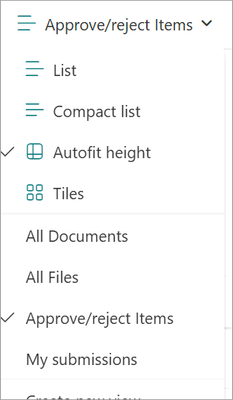
johnjohn-Peter I know this is an old post, but thought I'd provide an answer for others. When you turn on Require Approvals for a library it creates two new Views: Approve/reject items and My submissions. This will give you a list of all the files that require approval, etc.74Views0likes0CommentsRe: Handling duplicate files in a Sharpoint library
TrondGundersen Unfortunately you can't have two files with the same name in the same level in a Document Library even if the metadata is different. The only way would be to use folders to separate your files so they could have the same name. Folder 1 Filename.docx Folder 2 Filename.docx56Views0likes0CommentsRe: Document Properties
WhitneyBurr This definitely sounds like a bug. I'd suggest logging a support ticket with Microsoft to see if they can find the root cause and a resolution. Logging a ticket will get a Microsoft support person assigned who can work with you directly and perform some troubleshooting including looking at logs, etc. https://learn.microsoft.com/en-us/microsoft-365/admin/get-help-support?view=o365-worldwide#online-support54Views1like0CommentsRe: Upload Documents ANd Require check out on Modern Vs Classic Experience Document libraries
AmarDhan Unfortunately, that's just how it works today (which is not ideal) - I don't know of a workaround. I'd suggest logging a support ticket with Microsoft to see if they can change this - the more tickets they get for the same feature the more likely we'll see some sort of change (hopefully). I'll log a ticket for this one too - it will require a Design Change Request (DCR) which I can submit. https://learn.microsoft.com/en-us/microsoft-365/admin/get-help-support?view=o365-worldwide#online-support Alternatively, you can submit your feedback in the SharePoint Feedback portal. https://feedbackportal.microsoft.com/feedback/forum/06735c62-321c-ec11-b6e7-0022481f8472 If you do submit feedback to the portal, feel free to add the link here and I'll vote for it. Note that you can also vote for your own feedback which will give you one vote straightaway.65Views1like0CommentsRe: Unable to Create a Rule on a Library with Contribute Permission
AnthonyLP This is a known issue. There is a lot of inconsistency between lists and libraries unfortunately. With the retirement of SharePoint Alerts the SharePoint Rules need a complete overall to get them in a state where they are comparable. Another large limitation is that you can only create a maximum of 15 rules per library. Currently, you only need Read access on a list or library to set up SharePoint Alerts which makes sense (you're not creating or updating list items or files, etc.). This is a massive blocker to replacing SharePoint Alerts as we would now need to provide users with Contribute or Edit rights which is absolutely not an option (least permissioins).276Views1like1CommentRe: New post titles aren't saving for the page title and URL
Anthony-123 I completely agree with you. The page shouldn't be auto-saved until you have provided a Title at which time it will set the Page URL correctly. Ideally, it should prompt you to specify a Title as soon as you create the page. Unfortunately, this is inherently going to be much worse once Microsoft rolls out the new Page Templates. It will also make a complete mess of the Site Assets > Site Pages > Page(X) dynamic folders that hold your page assets, etc. I'm not sure how most of the stuff rolling out these days gets past QA - it's been getting steadily worse over the last 1 - 1.5 years.41Views1like0CommentsRe: What happens when storage capacity changed manually from Admin portal for SharePoint Site ?
It won't affect the overall storage limit at all - that only ever looks at the current storage actually used. The only thing that changes is the site can now store up to 25TB instead of 1TB. It's up to you how you manage this, but it's sometimes a good idea to set it lower than the max 25TB so owners get notified earlier when they are reaching their limit and you can then increase it appropriately.36Views0likes0CommentsRe: Imported term sets, and renaming a term set
LynnProspect You should be able to write a PowerShell script that imports a list of terms from a CSV and for each term use New-PnPTerm to add the term to an existing Term Set. powershell/documentation/New-PnPTerm.md at dev · pnp/powershell · GitHub NOTE: As always, ensure you test this in a test tenant first to ensure it works as expected. Example below. New-PnPTerm -TermSet "Departments" -TermGroup "Corporate" -Name $term69Views1like1CommentRe: How to connect SharePoint site access user details via Google Analytics data studio
I'd suggest having a look at some of the managed properties you get with search. See an example below that returns document views and viewers stats across a library. https://YOURTENANT.sharepoint.com/sites/YOURSITE/_api/search/query?querytext='isDocument%3atrue path%3ahttps://YOURTENANT.sharepoint.com/sites/YOURSITE/YOURLIBRARY/'&enableinterleaving=false&rowsperpage=500&rowlimit=5&enablequeryrules=false&selectproperties='Filename%2cTitle%2cCreated%2cLastModifiedTime%2c ViewsLast1DaysUniqueUsers%2cViewsLast2DaysUniqueUsers%2cViewsLast3DaysUniqueUsers%2cViewsLast4DaysUniqueUsers%2cViewsLast5DaysUniqueUsers%2cViewsLast6DaysUniqueUsers%2cViewsLast7DaysUniqueUsers%2c ViewsLastMonths1Unique%2cViewsLastMonths2Unique%2cViewsLastMonths3Unique%2cViewsLifeTimeUniqueUsers%2cViewsLast1Days%2cViewsLast2Days%2cViewsLast3Days%2cViewsLast4Days%2cViewsLast5Days%2cViewsLast6Days%2cViewsLast7Days%2cViewsLastMonths1%2cViewsLastMonths2%2cViewsLastMonths3%2cViewsLifeTime'&clienttype='ContentSearchRegular'65Views0likes0CommentsRe: Sites created via Microsoft Teams or Viva Engage getting 0 storage allocated
Just adding the resolution for this. It was some sort of issue with Microsoft in the backend. We logged a support ticket, and they had to clear our tenant settings somehow and it finally resolved itself.90Views0likes0CommentsRe: SharePoint Approval process not working
RichardJohnson Do a lot of these files have unique permissions? If so, then I'd agree that the likely issue will be due to the number of items in the library. Microsoft keeps saying you can store 50 million items in a list/library, but it already starts to break at 5001, and at around 20k you see other issues, and just gets worse. I'd suggest trying to split the library up into multiple libraries if possible (archive perhaps). After making the user an owner, can you go into Library settings > Permissions for this document library, then click on Check Permissions to see what permissions he has on the library?54Views1like0CommentsRe: Choice column - have any limits changed
RebeccaD_HW_1 I just tested this in one of my lists and I'm able to store a lot more than 255 characters across multiple choices, and even a single choice being more than 255 characters. I wonder if someones gone in and limited the Choice column to 255 characters at some point.266Views0likes0CommentsRe: Turn off comments in SharePoint library
LP4415890 Turning Comment off here will just disable the ability for users to add new comments, but won't hide the Comments panel, and no option that I know of to hide it unfortunately. Once you set it to No, the Comments pane should at least be collapsed from what I've seen.334Views1like0CommentsRe: branding top navigation
NickMumby There's not an out of the box way to change how it looks unfortunately. You can change the theme of the Header via Change the look > Header to try and make it stand out more. If you wanted to make design changes to it (larger font, different location, etc.), you would need to use SharePoint Framework (SPFx) Application Customizer, but to target the menu it would end up being an "officially" unsupported solution since you'd need to hook into the Document Object Model (DOM) of the page which Microsoft could change at any time.55Views1like0CommentsRe: How to add managed properties to a SharePoint sites ?
You can already search for sites based on Title, WebUrl, etc. I'm assuming you want to add some custom metadata to tag your sites with and filter on that. One option would be to utilize the Site property bag where you can add custom properties directly to the site - but not possible via the UI - would need to use PowerShell, Power Automate, SharePoint REST API, etc. and you would need to be a Site Collection Administrator to add the property to the site. Once the property has been added, it will be crawled, and you will be able to add it to a Managed Property, including a Refinable String if you need it to be refinable. Here’s a straightforward way to add a custom site‐level property (in the property bag) via PowerShell, using the SharePoint PnP module. Once this is crawled, SharePoint will create a crawled property (like ows_q_TEXT_MyCustomSiteProperty) that you can then map to a managed property in your Search Schema. # 1. Install PnP.PowerShell if you haven't already # Install-Module PnP.PowerShell # 2. Connect to your site $siteUrl = "https://contoso.sharepoint.com/sites/YourSite" Connect-PnPOnline -Url $siteUrl -Interactive # 3. Add/update the property # This writes to the root web’s property bag $key = "MyCustomSiteProperty" $value = "SomeValue" Set-PnPPropertyBagValue -Key $key -Value $value # 4. (Optional) Verify it’s there Get-PnPPropertyBag | Where-Object { $_.Key -eq $key } | Format-Table Key, Value What happens next: Wait for Search to crawl your site (or manually trigger an incremental crawl if on-prem). In the Search Administration (or via PnP/REST), find the new crawled property (usually named ows_q_TEXT_MyCustomSiteProperty). Create a new Managed Property and map that crawled property to it, so you can query/filter on it.45Views0likes0Comments

Recent Blog Articles
No content to show