User Profile

woelki
Iron Contributor
Joined 7 years ago


User Widgets
Recent Discussions
Federation Trust Gateway broken - OrgCertificate cannot be uploaded
Hey guys, last week we have done Windows Server updates and this broke some stuff. Some certificates have been unbound and so on. Until then the full classic hybrid worked quite good in our Exchange Server 2016 CU23 environment. We are just in the process of upgrading/migrating. But after this point of time the On-Premises users stopped being able to see the calendars of the cloud users, other way around still worked. So we started trying to fix the hybrid deployment with several runs of the HCW (which is always fine) and rebuilding the organizational relationship and the trust federation gateway. This was quite exhausting, as we updated a bunch of domains in global DNS several times. Currently, neither direction is functioning. Now it looks like the Federation Trust Gateway is in an inconsistent state. When I try... Set-FederationTrust -Identity "Microsoft Federation Gateway" -PublishFederationCertificate then I get the message, that the rollover certificate (OrgNextPrivCertificate) is not set and that I only can publish, when this is done. When I try to define a rollover certificate, then I get the message, that the rollover certificate cannot be set until the OrgCertificate has been published. So, we have a chicken-and-egg situation here. Thanks for any help.70Views0likes0CommentsRe: Hybrid Update Agent download fails
Hi Lukas, great that you are already on it. But the hybrid agent installer itself doesn't help us, does it? So the HCW will still abort at this point. Or is it possible to place the MSI at the right location, so that the HCW will recognize the downloaded file? I already tried this yesterday with the temp folder location under %appdata%719Views2likes2CommentsRe: Hybrid Update Agent download fails
I wanted to make this topic a bit more visible so I collected some information. Problem Description Error: 504 Gateway Timeout during the Hybrid Agent download step (MSHybridService.msi). Affected HCW Version: 17.1.3891.0 (Updated over the weekend). Affected Exchange Version: Exchange Server 2016 CU23 and 2019 CU15 Technical Details & Diagnosis Performed The error is reported in the log as follows: *ERROR* [...] System.Net.Http.HttpRequestException: Der Antwortstatuscode gibt keinen Erfolg an: 504 (Gateway Timeout). *ERROR* [...] Unable to ping Highlands service What we have ruled out (Tests confirmed successful): Network/Proxy: The error occurs in both the corporate network and private test environments. TLS/Crypto: TLS 1.2 registry entries are correctly configured and utilized by the .NET Framework. Target Reachability: A direct .NET PowerShell test from the server to the download URL returns Status 200 (OK): Invoke-WebRequest -Uri "https://hybridconfigwizard.azurewebsites.net/MSHybridService.msi" -Method Head # -> Result: Status 200177Views3likes0CommentsHybrid Update Agent download fails
Hi there, last Friday I was successfully able to execute the HCW with the full classic deployment. As we had some sharing issues we tried the full modern as well. But we were able to execute the HCW and finish it all the time. This morning there was an update for the HCW and suddenly we had issues with the part Hybrid Update Agent download which always mentions "Content Not Found" We tried this several times throughout the day, but unfortunately the error is still the same. Is there a general issue with the location of the HybridAgent file since the HCW has been updated? Kind regardsSolved1.8KViews4likes19CommentsCreate new M365 developer subscription after deletion
Hey guys, unfortunately my second developer subscription expired in last september, deletion followed in November. It is said, that after 60 days you would be able to create a new subscription, but nothing changes for me, no possibility to create a new one. Referencing to Microsoft Learn, it looks like this topic is not a rare one and MS does not really provide a solution and is leading to wrong support channels, as the visual studio subscription team would be not responsible. https://answers.microsoft.com/en-us/msoffice/forum/all/how-to-renew-deleted-developer-subscription/c3cb0f28-1cb0-4ce4-813b-1321cbd38981 So what is your experience or is somebody here to help me out?149Views0likes1CommentDouble entries in userCertificate avoids Hybrid Join
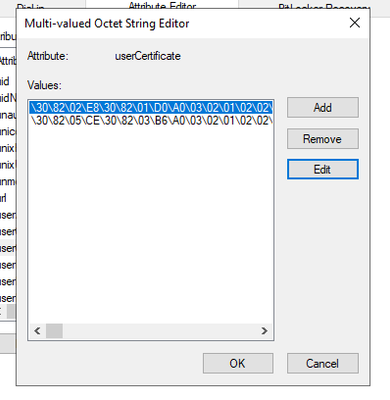
Hey guys, I have an interesting situation at a customer. He utilizes a third party MFA provider while being on a federation. That means new computers never will have a registered state. For users it is mandatory that theirs clients have fulfilled the Hybrid Join to use M365 apps, what can be a real pain. So the Automatic-Device-Join task has to create the userCertificate on the OnPremises computer object, before it can be synchronized to Entra. Here comes the issue. In some cases we see that some computers will create two userCertificate entries. This situation will lead to an inconstistent Hybrid Join. I already tried to remove one of the certificates, but for me it is impossible to recognize which is the right one. Only solution for me was to remove both entries under userCertificate and let the Automatic-Device-Join task create a new one. Afterwards the Hybrid Join will work. I want to understand, which process or scenario might create the double userCertificate entries?SolvedAllow password change only on VPN
Hey guys, currently I'm supporting a customer who got a lot of remote workers which are not often in the office. I realized that there are a lot of password issues. The cloud journey of the customer just has begun. So there is a hybrid, but Intune is not a topic yet. They have SSPR activated, and the users use different option to change their passwords, either with Ctrl + Alt + Del or directly via MySecurityInfo. Unfortunately this leads to having two passwords, if the clients are not connected to VPN. So a resetted password would effect M365 services and On-Premises infrastructure, but not the password of the local device, because this one would keep the cached device password while not having connection to local AD. For sure you can solve this with an operational order and just tell the users that they should only change their password while being on VPN, but I would prefer to manage this with a technical solution. One idea would be to remove the password change feature for Ctrl + Alt + Del (hopefully via GPO) and add a Conditional Access policy which should only allow the SSPR while being on VPN. It's just my personal brainstorming. Is this feasible, or how would you deal with this, if your device are not directly joined to Entra? Thanks in advance.Hybrid confusion after linked mailbox deletion
Hey guys, I got a tricky one, hopefully I can explain it in the needed detail. So I'm in the project of consolidating several organizations in one forest, one domain. I'm just referring to company A and B including target domain C. So company A got an Exchange hybrid deployment in a dedicated forest. The smaller company B (different forest) decommissioned their Exchange server and received linked mailboxes at company A. Not that complicated yet, but the admins have been confused now, because the linked mailbox accounts and the original accounts have been synchronized. Over the years the knowledge was lost. No we are going to build up target domain C. The linked mailbox accounts of company B have been deleted. The original accounts and clients have been migrated to target C and the objects are synchronized with the most recent information to Entra. So now the mailboxes of company B cannot be managed in Exchange Online, because they are synchronized (Consistency-Guid has been transferred), but the on-premise object has not the proper Exchange information. I know in general you can execute Enable-Remotemailbox again on a provisioned mailbox in order to link it again to an on-premise object, but this only works in the forest, where the local Exchange Server is homed. Is there an easier solution than deploying a second hybrid server in target C?256Views0likes0CommentsImprove user experience after client migration
Hi guys, hopefully this is the best hub, but as it is hybrid related I think this should match. I am currently migrating a customer where we are consolidating several AD domains into one. With Quest Migration Manager for AD we are moving accounts and clients. On the Quest side, everything works great so far, but we have some problems to make the whole migration process even cleaner for the user. The user accounts are already pre-migrated and are not a problem. When the client is migrated, we just set an attribute on the user account so that the AAD Connect knows that it should now synchronize it from the new domain. However, we have some problems with the client. The move to the new domain works cleanly and naturally, a lot of GPOs are fetched now from the new domain controllers. The biggest challenge, however, is the Workplace or the hybrid join. The device still has to be synced to the cloud, the user has of course just logged in and wants to work. However, the workplace join is not yet complete at this point and the user receives a lot of MFA pop-ups from the Federated MFA provider Authpoint. It has been shown that if some time passes by and the user restarts again, the Workplace Join works and the user no longer receives multiple MFA Auth requests. Have you had similar experiences with on-premise client migrations with M365 connection? Would it be best to prevent the Workplace Join in the new domain for the time being? Best regards, woelki525Views0likes0CommentsUser object not synchronized anymore
Hey guys, we have one user object which seems not to sync anymore. Some days ago the sync was fine for the mailbox marketing@contoso.com Then we migrated the mailbox from OnPrem to EOL. Now we recognized that the default onmicrosoft email address changed, it is now marketing1234@contoso.onmicrosoft.com I wondered about it so I added marketing@contoso.onmicrosoft.com and marketing1234@contoso.onmicrosoft.com OnPrem. I hoped it would sync and afterwards I can remove the unwanted address. The AAD Connect shows no errors, the user object is still in the OU which is activated for sync. What would be the smoothest way to fix this? Kind regards, woelkiSolvedRole for managing Out-of-Office in admin center
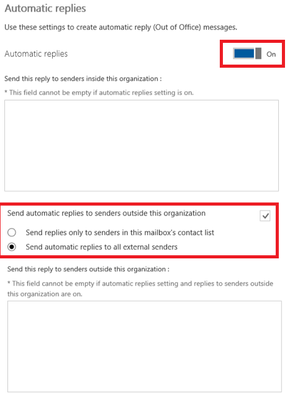
Hey guys, we are just empowering our helpdesk to handle more tasks. We want them to set out of office replies in a smooth way. I know how to do this via powershell, OWA or the Exchange Admin Center. In Exchange the role "User Options" is needed for that. But this will not activate this option in the admin center. Is there a less privileged role than GA or Exchange admin which can manage this OOF setting? Kind regards, woelkiPartial offboarding - restrict file access
Hi there, we have a customer who wants to execute a partial offboarding for an employee. It looks like they want to split up with him, but the decision is not made, yet. So they want to restrict the whole file access for him, but he should be still able to use email. Hey shall not be able to use OneDrive, Teams, SharePoint and so on. If I'm correct if you disable OneDrive for him, other employees are still able to share files with him, right? So I guess the most important thing would be to remove the Office Online service plan. So he should not be able to open shared files. But to be on the safe side, we could simply remove everything excluding the Exchange Online Plan, right? What do you think? Kind regards, woelki710Views0likes0CommentsComfortable way to access local intranet
Hey guys, I have a very special question today. We are just onboarding a new customer to Office 365. He already owns a tenant and is synchronizing AD accounts. But the general O365 enrollment will not start before January 2020. But he is keen on evaluating Intune. He provided some requirements he wants to be able to manage. For example Exchange OnPrem, which is possible partly. But the interesting thing is the intranet. Currently they are utilizing a Typo3 intranet and they are not planning to migrate this SharePoint. Furthermore their current MDM solution XenMobile from Citrix is providing a sandbox. When the users start the sandbox application a VPN connection is created automatically so that they are able to browse the intranet. I bet there a similar customer scenarios where they want to keep their intranet locally. What would be the best solution to enter their intranet in a smooth way? Kind regards, woelki2.7KViews0likes2CommentsOATH hardware token - seed file upload processing
Hi there, I have some questions about the uploading behaviour regarding OATH hardware token seed files. https://docs.microsoft.com/en-us/azure/active-directory/authentication/concept-authentication-oath-tokens#oath-hardware-tokens-preview I guess there is a lack of information. Is it possible to add a hardware token to several tenants? It seems that there will be no error, but it looks like while processing a new uploaded file, the processing will not come to an end. Furthermore I'm wondering how additional new tokens should be added. Should I upload my CSV "master" file again with the new tokens added, or is it ok to upload a new file only with the new tokens? Nevertheless, I have not been able to upload further files. The notifications about the current processing status are not helpful, in most cases they show 0 failures, 0 success. Can anyone shed some light into this case? BTW: Some additional information I figuered out. If you started the MFA registration via TAP (temporary access pass) via aka.ms/mysecuritysignins you are allowed to add a FIDO2 token directly without have a backup telephone numer added. But you are always enforced to have a backup phone number whilst having an OATH hardware token assigned, even if you are eligible to start the registration via TAP.Use 3rd party federation Service with Microsoft conditional access?
Hi there, a customer of us is in a pilot period of utilizing a 3rd party federation service. To be exact the FortiAuthenticator is installed On-Premises and should handle the MFA process. So we already changed the domain status with Set-MsolDomainAuthentication to federated for a specific domain. The customer and we know that there are certain limitations regarding conditional access. But I don't find a solid documentation about this. Is no conditional access possible at all, or just regarding conditional access policies enforcing MFA? The goal would be (if possible) that a user should meet the compliant device or hybrid joinded device state after he authenticated with the FortiAuthenticator. Thanks in advance. Kind regards, woelkiRe: Updating unattended EWS scripts using modern auth
OK, like I have discovered, the PartnerAccessToken does not really work for EWS. It seems the only possibility is to use the Get-MsalToken. But in first line it is interactive. How can I get it turn to unattended? # Provide your Office 365 Tenant Id or Tenant Domain Name $TenantId = "contoso.onmicrosoft.com" # Provide Azure AD Application (client) Id of your app. # You should have configured the Delegated permission "EWS.AccessAsUser.All" in the app. $AppClientId="xxxxxxxx-xxxx-xxxx-xxxx-xxxxxxxxxxxx" $MsalParams = @{ ClientId = $AppClientId TenantId = $TenantId Scopes = "https://outlook.office.com/EWS.AccessAsUser.All" } $MsalResponse = Get-MsalToken @MsalParams $EWSAccessToken = $MsalResponse.AccessToken Import-Module 'C:\Program Files\Microsoft\Exchange\Web Services\2.2\Microsoft.Exchange.WebServices.dll' # Proivde the mailbox id $MailboxName ="email address removed for privacy reasons" $Service = [Microsoft.Exchange.WebServices.Data.ExchangeService]::new() # Use Modern Authentication $Service.Credentials = [Microsoft.Exchange.WebServices.Data.OAuthCredentials]$EWSAccessToken # Check EWS connection $Service.Url = "https://outlook.office365.com/EWS/Exchange.asmx" $Service.AutodiscoverUrl($MailboxName,{$true}) # EWS connection is Success if no error returned. What I have done now:3.7KViews0likes0CommentsUpdating unattended EWS scripts using modern auth
Hi there, a lot of possibilities about phasing out legacy authentication have been discussed here. But I still have a lack of information or let's say I want to find the most comfortable and most secure possibility for my customers. https://docs.microsoft.com/en-us/powershell/exchange/app-only-auth-powershell-v2?view=exchange-ps But if your scripts contain EWS connections you have to initialize a different way of authentication. So I found the following option using MSAL, unfortunately this does not work in unattended mode. https://morgantechspace.com/2022/03/connect-ews-api-with-modern-authentication-using-powershell.html And then there is the possibility using the secure application model. https://docs.microsoft.com/en-us/powershell/partnercenter/multi-factor-auth?view=partnercenterps-3.0#secure-application-model I got this working now, the creation of the token for the first time has to be done interactively and the token only lasts for 90 days. I read the hint for securely saving the token to the Azure KeyVault, but how do I do this and how can I re-call this token? Is there even a better way of refreshing the token manually? Is this now the new go-to solution for unattended EWS scripts, or do you have a even better solution?Work account not added automatically - SSO not working with ADFS
Hi there, we have a customer who has a synchronized AD. They use ADFS for Authentication and SSO, but SSO does not seem to work smoothly. My guess is that the employee think SSO is working in some cases, because the have saved cookies or have active tokens. Wehen I want to recreate the issue with a simpe call of portal.office.com I'm always redirected to the ADFS Site URL and I have to enter the password. I checked the account information in the Windows 10 device I cannot see an added work account. Shouldn't the Office 365 work account automatically be added here? So what is missing here? Kind regards, ChristianLicense needed for MFA with hardware token?
Hi there, a customer of us wants to improve his MFA distribution. Therefore he wants to utilize hardware tokens, but there is no decision for TOTP or FIDO2, yet. Currently the customer utilizes Office 365 E3 licenses for the end users and as the cloud strategy is not yet defined finally, he does not want to buy further "addon" licenses. At present they have deployed basic MFA without Conditional Access. Is it possible to use any kind of hardware tokens without Azure AD Premium P1? Thanks in advance. Best regards, Christian

Recent Blog Articles
No content to show