User Profile

stevenzelenko
Brass Contributor
Joined 7 years ago


User Widgets
Recent Discussions
MSIX Apps Not Showing the Windows 11 Start Menu
We are seeing a strange issue in our AVD Dev build. We followed all guidelines on packaging up MSIX apps and can attach them via the Azure portal, but these apps are not showing in the start menu. And if we switch the user to use published apps, when you click on the icon, it opens file explorer. The permissions on our azure storage account share is correct wo we are stumped. We have a ticket open with MSFT but thought I'd see if anyone has seen/corrected this.188Views0likes3CommentsRe: Creating custom images
Cody Kloepfel yeah. So uninstall the RD agent and bootloader agent from each VM. What I would do is to remove the Registration info for all your host pool VMs and then re-install the agents if they aren't connecting. The cmdlet I believe is "Remove-RdsRegistrationInfo -TenantName <tenantname> -HostPoolName <HPname>." Re-install the agents. You don't necessarily need to create a registration token in WVD. When asked to enter it just click continue through the installer. If that doesn't work, then start over and follow this article from the top down. When I tried to create a registration key, I couldn't get the heartbeat service to connect. It was only after I removed it and just re-installed the agents without a key that it started talking to the back end service. https://docs.microsoft.com/en-us/azure/virtual-desktop/create-host-pools-powershell Skip the part about creating a host pool as you've already done that. You can find the agents here as well. I spoke to a WVD engineer about gold images and they definitely should be removed before it's sys prepped. Hope this helps you out. Let me know.5.4KViews0likes0CommentsRe: How do I configure WVD to only use one monitor/screen - It always spans all my monitors
FortyMegabytes didn't realize there was a preview RD app for mac. This seems to work now. https://install.appcenter.ms/orgs/rdmacios-k2vy/apps/microsoft-remote-desktop-for-mac/distribution_groups/all-users-of-microsoft-remote-desktop-for-mac41KViews0likes0CommentsRe: How do I configure WVD to only use one monitor/screen - It always spans all my monitors
FortyMegabytes did you have to reboot the servers after this was applied? A lot of our users are using the RD app for Mac (which in general isn't great) and when they go in windowed mode, it puts their multiple monitors in a window. Looks awful. Anyone have any comment if this is a limitation with RD app for Mac?41KViews0likes2CommentsRe: WVD Role Assignments - can't determine who can do what.
Yuukan I'm the wrong guy to ask. I'm just a customer. Looks like we can't just yet. I find it hard to believe that this service doesn't do group membership out of the box. I would vote for this on teh user voice. https://windowsvirtualdesktop.uservoice.com/forums/921118-general3.7KViews0likes0CommentsRe: Creating custom images
Chris Calaf we actually created a gold image using the recommended capture approach for Azure VMs. We built out one WVD multi session VM in a host pool, built out our apps, then sysprepped and captured it. However, we ran into an issue when we deployed with it as we had to uninstall all of the WVD agents and bootloaders on each VM deployed and re-install it with a new token to connect them up to the WVD service. All is well now. We uninstalled the agents and bootloader from our gold WVD image and seems to work well now.5.6KViews0likes2CommentsWVD Load Balancing Question
We have deployed what would be our small production shared desktop VMS. There are three (-0, -1, -2). We created an image from our dev deployment and deployed to our prod with some minor issues. After that was resolved, we now see all 3 hosts ready to take connections. However, we see that only -0 and -2 are taking connections and -1 is sitting there lonely. I probably have to increase our test group but what should the load balancing behavior be? We are set to "Breadth-First" so I would suspect that 3 sessions be load balanced across 3 servers. Instead we we see 2 on one, 1 on the another, and then one just sitting there empty. All 3 are set to allow new sessions. Is this normal?1.1KViews0likes2CommentsRe: Default apps in WVD
DavidBelanger Essentially correct. We want the server apps to be associated with the files in user's FSLogix profile. So if a user has a pdf file in OneDrive or in their documents folder, it should associate with Reader. So far we have tried an associations xml file via GPO as well as some registry settings. We'd like chrome for browser, outlook for mail, word for doc and docx, etc. Every session all apps return to Windows 10 default. So for instance, if we click a URL it will open in edge, a mailto: within outlook will prompt which app to open with and will always default to the windows mail client. Even if the user selects outlook and check to remember this app, if they log off and back in, that gets reset. We are forcing users to one drive and opening files like PDFs and .docs seem to work ok but PDF will always prompt the user to choose a default application for PDFs. It's like it doesn't honor the GPO or registry and will always default to using Windows 10 default apps. We are using remote apps only and the profiles are handled with FSLogix containers.16KViews0likes4CommentsRe: Can Publish Snipping Tool as a Remote App but it doesn't launch
Christian_Montoya it was very weird with this one. I had to log into the web browser and launch the app and then it launched using the RD app for windows. As far as Team, looks like the VDI install is out but it ain't perfect. We have to run a logon script to get it to open at user logon when using published apps.2.4KViews0likes1CommentDefault apps in WVD
We are dealing with an issue with WVD Remote Apps where we cannot set or maintain default apps for users. For instance, we want the default browser to be Chrome, mail to be OutLook, .doc files to open in Word, PDFs to open in Reader and the settings are not sticking. We've tried to apply GPO using the app associations .xml file and it doesn't work. We even went as far as writing policy to modify registry for all app extensions and that doesn't work. NOTE: we are using only remote apps and not a full desktop. This is really the last thing that we can't get to work and are stumped. Any help would be appreciated and would like to know if others have experienced this. A little more about the setup. We have deployed 2 session hosts with FSLogix containers to host our profiles on a file share.17KViews2likes17CommentsRe: Only allow browser access
evasse We may want to have users to not have the capacity to use the Remote Desktop application on iphone, android, PC, Mac, etc to connect to the service but only allow access to the apps via a web browser. This would be for a small case where we wouldn't want to allow the configuration to be set on1.1KViews1like0CommentsCan Publish Snipping Tool as a Remote App but it doesn't launch
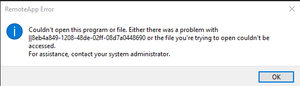
I'm working through a strange issue. I've used the Web-ux to deploy a start menu app, in this case Snipping Tool, and it shows as an available app. When I try to open it, I get the attached error. I have set a regkey to disable the allowed apps list. I've published everything else via powershell and it's fine but using the web UI or powershell to add it as an available app simply won't load. Now, if I get tricky and go to word or something, File > Open and then migrating to snipping tool in system32 directory, right clicking it and opening it from there, it works. Just won't open using the WVD windows app. Now here is another weird thing, I can launch it using the web interface just fine and then it works in the RD app consistently going forward. Also, how the heck can we publish Teams?2.5KViews0likes3CommentsRe: How to add a new host to WVD hostpool?
Christian_Montoya Hi Christian. I posted it earlier in the thread but here it is again. I think it had something to do with the domain join process or installing the extensions because the VM was created with the correct naming, disk and vNic but we couldn't log into it and it wasn't an available session host in the host pool. Building a VM and manually adding it was the route we took. The error does mention a property called 'imageReference' but I looked to see if I could find specifics but that seems to be a pretty generic error but could be mistaken. I thought it meant to do with something on changing the sku size but the VM creates so that isn't it. Appreciate the help. You all have done a great job with WVD. It's still young so understand it isn't perfect. "code":"DeploymentFailed","message":"At least one resource deployment operation failed. Please list deployment operations for details. Please see https://aka.ms/DeployOperations for usage details.","details":[{"code":"Conflict","message":"{\r\n \"error\": {\r\n \"code\": \"PropertyChangeNotAllowed\",\r\n \"message\": \"Changing property 'imageReference' is not allowed.\",\r\n \"target\": \"imageReference\"\r\n }\r\n}"}]} {"code":"DeploymentFailed","message":"At least one resource deployment operation failed. Please list deployment operations for details. Please see https://aka.ms/DeployOperations for usage details.","details":[{"code":"Conflict","message":"{\r\n \"status\": \"Failed\",\r\n \"error\": {\r\n \"code\": \"ResourceDeploymentFailure\",\r\n \"message\": \"The resource operation completed with terminal provisioning state 'Failed'.\",\r\n \"details\": [\r\n {\r\n \"code\": \"DeploymentFailed\",\r\n \"message\": \"At least one resource deployment operation failed. Please list deployment operations for details. Please see https://aka.ms/DeployOperations for usage details.\",\r\n \"details\": [\r\n {\r\n \"code\": \"Conflict\",\r\n \"message\": \"{\\r\\n \\\"error\\\": {\\r\\n \\\"code\\\": \\\"PropertyChangeNotAllowed\\\",\\r\\n \\\"message\\\": \\\"Changing property 'imageReference' is not allowed.\\\",\\r\\n \\\"target\\\": \\\"imageReference\\\"\\r\\n }\\r\\n}\"\r\n }\r\n ]\r\n }\r\n ]\r\n }\r\n}"}]}22KViews0likes2CommentsRe: How to add a new host to WVD hostpool?
HandA Those are the only two I changed in the template and used my AD Domain Admin creds to join it to the domain which is different than my global admin in Azure. Anyway, I manually added a VM using the instructions provided earlier in this thread and it was a lot better of an experience. The administrative tasks for this service are rather clunky and there isn't a lot of detail with the error log that can point you in the specific direction. It's basically just says there is an error with a variable that was changed. Well, which one?22KViews0likes4CommentsRe: How to add a new host to WVD hostpool?
Christian_Montoya Hi Christian. I have tried three different ways to add servers to a host pool. It seems as though it is consstantly failing because of a conflict and I'm assuming because there is another computer there that it's trying to re-create with the same name? Not sure. But I've tried manually, Provision a host pool and the arm template and I cannot add more servers to the pool. This iis essential as we are ready to increase this to a wider audience so we will need to get specifics down on how to expand these pools. Thank you for your help. {"code":"DeploymentFailed","message":"At least one resource deployment operation failed. Please list deployment operations for details. Please see https://aka.ms/DeployOperations for usage details.","details":[{"code":"Conflict","message":"{\r\n \"error\": {\r\n \"code\": \"PropertyChangeNotAllowed\",\r\n \"message\": \"Changing property 'imageReference' is not allowed.\",\r\n \"target\": \"imageReference\"\r\n }\r\n}"}]} {"code":"DeploymentFailed","message":"At least one resource deployment operation failed. Please list deployment operations for details. Please see https://aka.ms/DeployOperations for usage details.","details":[{"code":"Conflict","message":"{\r\n \"status\": \"Failed\",\r\n \"error\": {\r\n \"code\": \"ResourceDeploymentFailure\",\r\n \"message\": \"The resource operation completed with terminal provisioning state 'Failed'.\",\r\n \"details\": [\r\n {\r\n \"code\": \"DeploymentFailed\",\r\n \"message\": \"At least one resource deployment operation failed. Please list deployment operations for details. Please see https://aka.ms/DeployOperations for usage details.\",\r\n \"details\": [\r\n {\r\n \"code\": \"Conflict\",\r\n \"message\": \"{\\r\\n \\\"error\\\": {\\r\\n \\\"code\\\": \\\"PropertyChangeNotAllowed\\\",\\r\\n \\\"message\\\": \\\"Changing property 'imageReference' is not allowed.\\\",\\r\\n \\\"target\\\": \\\"imageReference\\\"\\r\\n }\\r\\n}\"\r\n }\r\n ]\r\n }\r\n ]\r\n }\r\n}"}]}22KViews0likes6Comments

Recent Blog Articles
No content to show