User Profile

MarWerNo
Brass Contributor
Joined 7 years ago


User Widgets
Recent Discussions
Re: OneDrive Client, Files on Demand and Syncing large libraries
M1Storyteller I had a similar issue when migrating a lot of data or re-distributing data over my 5 accounts since 1TB is not enough in todays time. (I had finally uploaded 6TB over my slow connection to my old provider when they announced the end of the service... highly annoying). There seems to be no clear way. If there is a suffix ID it is always a duplication, so these files can usually be deleted. The platform detects a change in timestamp or file size and duplicates it. This could be due to a auto save function in the software you are using or simply a problem when copying from one file system onto another. It is highly annoying that this does not work as it supposed to. First option: Try resetting the OneDrive database (there are a number of tutorials online) and see if this fixes the issue. Let the computer online for several days and see if this resolves it, don't make an file changes. Sometimes it works, sometime not... If not, I would do the following: - Make backup of all files, make sure you have a "Master" where you know you have ALL files. Clean up duplicate files - Disconnect the OneDrive service on you PC - Delete all files in your local OneDrive - Delete all files in the Online OneDrive - Copy only one file or folder after another. Always wait until syncing has finished. In this time, I would not use it as a working directory (I know this is annoying...). I actually have done it with a work around as well: I left the files where they where and synced to a empty folder. Now place a Symlink to the first folder at the original place. Let it sync. Now do the next one and so on. If you want, you can replace the Symlink with the actual folders. Just make sure you and Onedrive is offline when you do the moving around (Remove symlink, place original folder inside Sync folder) What I found is simple: OneDrive does not like too many files changed at once and it seems to have more of an issue with plenty of small files than with fewer large files. Also there is a path length restriction, so I placed the Onedrive folder on the top level of a drive letter I created specially for OneDrive. Since I have multiple account, I need to be at least one folder deep, the OneDrive folder is in a one letter folder 🙂 Like: W:\M\Onedrive Where "Onedrive" is the automatically created folder by OneDrive Other Accounts follow the same rule with other letters. I have multiple log-ons on the computer with each Account syncing its own folder. Again, with Symlinks, I pull the various places/ accounts into one folder as a working folder on my PC. Having multiple account (Family) will help to have smaller databases on each account which so far works for me. So I have all the Software and Backup on my Onedrive account, my Wife has all the Pictures and private files. My kids have all my music and videos. Each have a folder with all data pulled in one folder. Since I had one account left, I created one OneDrive account for my relatives into which we have all common pictures from all the family gatherings or holidays or trips we made together. And is also used as exchange folder to share larger files by e-mail. In this way I do not need to have a share in my private files (location). One thing I forgot: I almost never switch off m PC nowadays, otherwise Onedrive seems to be unable to catch up... From a security point of view, this is of course a terrible practice...5.7KViews0likes0CommentsRe: Sharing option missing in Windows File Explorer
For me it was the solution described in this forum: https://www.tenforums.com/software-apps/95815-no-context-menu-onedrive-directory-2.html In Short, change the following registry key to the setting below: [HKEY_LOCAL_MACHINE\SOFTWARE\Microsoft\Windows\CurrentVersion\Policies\System] "EnableLUA"=dword:00000001 Especially if the current setting is 0 It only works after a restart!49KViews2likes2CommentsRe: Missing OneDrive context menu in windows 10
For me it was the solution described in this forum: https://www.tenforums.com/software-apps/95815-no-context-menu-onedrive-directory-2.html In Short, change the following registry key: [HKEY_LOCAL_MACHINE\SOFTWARE\Microsoft\Windows\CurrentVersion\Policies\System] "EnableLUA"=dword:00000001 Especially if the current setting is 0 It only works after a restart!22KViews0likes1CommentRe: OneDrive Client, Files on Demand and Syncing large libraries
dustintadam @Microsoft OneDrive team Hi Dustin, many thanks for your write-up and efforts taken. Funny enough I do not have an issue with the Business client so I used Office365 with OneDrive privately. I have close to 900GB of data and over 400000 files (and this still does not count in my recorded TV library with another 7TB). I am regularly having issues with the sync hanging and CPU loaded to 50 - 70% (on a 3.2GHz Quad core machine with 16GB RAM...). Restarting the client takes a long time before it takes up its work again an is only a temporary solution. Since I am on a slow network (not of my choosing, it just isn't possible at this small village I am living in) files on demand is not an option. Also I really would like to have almost all the files on all machines (5 total) at all times (with exception of the Video and music library on my 2 laptops). One thing that seems to hang OD client for sure: It really doesn't like similar file names with the German character "ß" (which happens often in my Music library). i.e. fussball.jpg fußball.jpg Similar names seem to be looking the same to the OD client and it will hang! Once I deleted the similar files (doesn't matter if I do it to the file with "ss" or "ß"!) syncing goes on smooth(er). This is a real problem in German speaking countries! Maybe other countries have similar letters which also cause this issue. Also it seems to hang often on my ".odg" files (Open office draw / Libre Office file format in compressed vector drawing format) which I use extensively for my renovation work. Highly annoying if you find out that a file has not been synced and now you are left with 2 drawing files (with 20 layers) and you do not know/ can't find out what you have changed on either of them... And we are not talking large file size, it is just below 200KB! Teamviewer has saved my a.. in many occasions because of a mess up by OneDrive. For this reason I often leave my computers on all the time. Not really great on money, material and environment. Which brings me to another topic: Why isn't it possible for OneDrive to "see" what folder you are in/ files used last and sync those folders/ files with higher priority? Enable marking certain folders as priority over others manually? Or even better make a "force sync on this file" option available. This would really be useful if you are on a slow network or if you have to shut-down your laptop (sometimes due to low battery and/ or plane boarding). Especially in Business environment. I often had to wait around for 30 minutes or more to wait for OD to pick-up that one particular file that I needed on a Business trip overseas or wanted to have it online to share it with my colleagues.44KViews1like0CommentsRe: Printing Forms - questions view
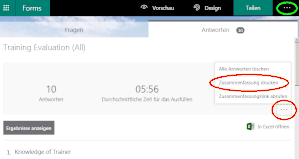
This comes up in various places without answers so I copy this answer in: There is a way, but it is not very obvious: Check out the 3 dots on the response page circled in red. It is NOT in the 3 dots menu on the top right circled in bright green. The circled is the option to print (sorry, I am on a German setting page)38KViews0likes2CommentsRe: Is it possible to print a summary of the responses? When I try, only the current page is printed.
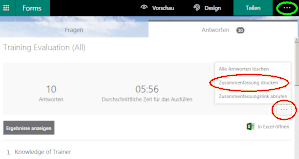
There is a way, but it is not very obvious: Check out the 3 dots on the response page circled in red. It is NOT in the 3 dots menu on the top right circled in bright green. The circled is the option to print (sorry, I am on a German setting page)7.5KViews2likes1Comment
Recent Blog Articles
No content to show