User Profile

TheHailender
Brass Contributor
Joined 7 years ago


User Widgets
Recent Discussions
Question on the licensing of AAD Indenity Governance (Terms of use)
I would like to use the "Terms of use" functionality for internal and external employees. But I don't know how many ADD P1 licenses I need. Do I need one license for each internal employee or is one license sufficient for one administrator? And what happens if not all employees are licensed with a P1 license? Thx JensSolvedWhat does the "Users can add gallery apps to their Access Panel" setting mean?
Hi, can someone explain what the "Users can add gallery apps to their Access Panel" setting mean? https://portal.azure.com/#blade/Microsoft_AAD_IAM/StartboardApplicationsMenuBlade/UserSettings/menuId/ Unfortunately I cannot find any understandable documentation 😞 Turning on and off has no effect in the access panel of my users? Thanks for all understandable explanations 🙂 JensNeed a DWG file for demo purposes
Hello community, someone has a small demo DWG file? I would like to demonstrate the MSFT Search floor plan functionality, but I don't have the possibility to create my own DWG file. It would be perfect if the room labels would correspond with the MFST demo tenants Thanks a lot... Jens499Views0likes0CommentsRe: What does the "Users can add gallery apps to their Access Panel" setting mean?
HI VasilMichev, Thanks for your patience. But I still don't get it. How can a user add an app to his Acces Panel without an admin having to pre-integrate the app? For me, pre-integration means that the app has to be assigned to a user and has to be made visible to the user Or does it all have something to do with the self-service functionality?9.3KViews0likes1CommentRe: What does the "Users can add gallery apps to their Access Panel" setting mean?
Hi VasilMichev, But of course I read the tooltip, but unfortunately I did not understand it 😉 I'm not quite sure what this setting looks like from an end-user perspective. Where can a user add SSO apps in his Access panel/MyApps if the setting is set to "yes"? Is see no option, and it is ever probably not meant that the user has the possibility to log in with his O365 account e.g. at Doodle? That's what the " Users can consent to apps accessing company data on their behalf" setting is for. And I'm not sure what the phrase "...without an admin needing to pre-integrate that application..." means. Bye Jens9.5KViews0likes4CommentsGet document by SharingDocId with Powershell
Hi, I found the hidden list "Sharing Links" on a SharePoint site. It seems that all shared links are stored in this list. Now my question: How do I get to the shared document using this link? I assume that the SharingDocId references the document. Does anyone have an idea? Bye Jens2.1KViews0likes1CommentAccess issue when adding a OneNote Tab in Teams
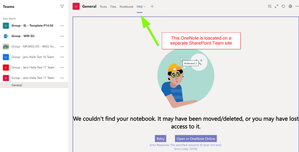
Hi, Adding a OneNote-Tab, via the https://docs.microsoft.com/en-us/graph/teams-configuring-builtin-tabs#onenote-tabs , for a OneNote which is in the same Team works without errors. But when I try to add a OneNote-Tab for a OneNote which is located on another SharePoint site (not in the Team assigned team site) I get this error. By the way, I have access to the corresponding OneNote and a manually created Tab to the OneNote works... Does anyone have an idea or a similar problem? Bye and thanks JensSolved1.4KViews0likes1CommentInvestigate files which are shared by a internal shared link
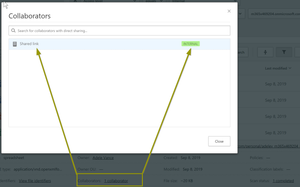
Hi, Using cloud app security I only want to find the files that have been shared via a "Shared Link - Internal". But the filter "Access level=Internal" returns all internally shared files, also to the files shared directly to one person. It doesn't seem to be filterable, although in the UI I see under the Collaborators the sharing type "Shared Link - Internal". Does anyone have any idea how I can filter for this type? An Excel export doesn't help either. Thx JensSolvedRe: Hide the 'works with' information on the Office 365 profile card
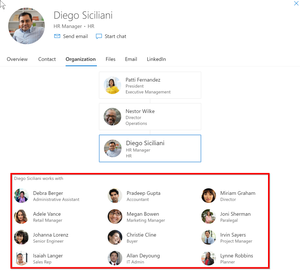
adam deltingernot realy. On my customer the 'manager attribute' is empty or not maintained. So I assume that the 'works with' info will generated by some other O365 magic. And by my customer is not desired to see who works with whom ;-)28KViews0likes2CommentsHide the 'works with' information on the Office 365 profile card
Hello, Is it possible to hide the works with Information in the organization-tab on the Office 365 https://support.office.com/en-us/article/Profile-cards-in-Office-365-e80f931f-5fc4-4a59-ba6e-c1e35a85b501? And knows somebody how the works with Information will generated? FYI: I disabled OfficeGraph in the SharePoint AdminCenter. ThxSolved49KViews2likes66Comments

Recent Blog Articles
No content to show