User Profile

pat-techcommunity
Copper Contributor
Joined 7 years ago


User Widgets
Recent Discussions
Guest User - sync SharePoint Library to local client
Hello @all, short question: I've a short question regarding guest users in Office365 tenant. I would like give guest users the ability to sync parts of Sharepoint Library (created by a O365 Group) to the local client. Is that possible? More Details - what I did so far I googled lots of websites but I feel the stuff is too old and Microsoft improved inbetween the guest modes in Office365. I tried it with a test account. I invited an external user via Azure AD and on the external user site I accpeted the invitation. The external user created a personal microsoft account and is able to use Teams and SharePoint in the webbrowser. This all works fine. But as a last step I would like to sync the folders from the library to the guest computer. I click the sync button in the webbrowser (Library) and the local OneDrive will open (blue one (business), the white OneDrive (personal) is already setup). Result: Now, the system says I need my work or school account. Hmmmm..here I stuck. I tried the upn which consist of "mailadress_domain.tld#ext#@tenantname.onmicrosoft.com). The login find's the user, but I as soon as I click "forward" the site changes and than comes back to the login page. I guess its because azuread finds the upn, but has no access to password or respectively no handler which points the login process to the private microsoft account ad, where the password is stored. I also applied a E1 license to the guest account (via portal), to test if there is any change, but no. Therefore my question again: Is it possible to give guest users the ability to sync a SharePoint library with OneDrive (personal account)? Thank you so much for reading this! 🙂 Best Regards, PatSolvedAdvanced Threat Protection - onPremise
Hi Folks, 🙂 I have a question regarding ATA for onPremise from Microsoft. Even the software further improvements stopped, its still be maintained and I think it makes sense to make use of it in a local domain network. 🙂 My issue: I cannot find the original setup. I have an VLSC Account, but the software is not available when I search for it. Does anyone know where else do find the binaries? Or does have a better idea? 🙂 Here is what I looking for: https://learn.microsoft.com/en-us/advanced-threat-analytics/what-is-ata Thank you in advance. 🙂 Best regards PatrickSolvedRe: Guest User - sync SharePoint Library to local client
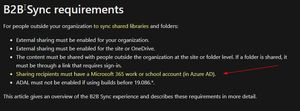
Tanya Denton Hi Tanya, thank you very much. I red this article today too (at least two times 😄 ), but I must have overseen it. I marked the key facts in yellow. It clearly says for sync a work or school account is necessary. Well, thank you for your time and pointing me in the right direction! 🙂28KViews0likes1Commentdynamic Excel table in a Word document
Hello there, 🙂 I maybe have a stupid question, but as I often learned it is always a good idea to talk with people about it and maybe it turns out, it is not so stupid at all. Therefore, here my question: I have an Excel file, which contains certain formulars (like addition, using today function, calculate the difference between to dates etc. pp.). Now it is necessary to transform that Excel file to a Word document. This worked so far, as that the documents look the same, but I need the previous mention Excel features also very dynamic and editable in this Word document. I know that it is possible to import a Excel table into a Word file. But this is just useful for small tables. The current Excel file is about three A4 pages. Maybe important to know as well: Because of system incapabilities it is not possible to use an Excel file, it has to be a Word document. Does anyone know if it is possible to use Excel feature seamlessly in Word? Thank you so much in advance and for taking the time reading this question. Best regards, Patrick837Views0likes0CommentsRe: OneDrive - doesn't upload files - reset without dataloss a solution?
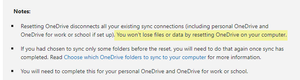
Hi Folks, 🙂 I just searched and found the answer on the support page (somehow I must have over read it). It is save to reset OneDrive, no local files will be deleted. https://support.microsoft.com/en-us/office/reset-onedrive-34701e00-bf7b-42db-b960-84905399050c Best regards, Pat1.6KViews0likes0CommentsOneDrive - doesn't upload files - reset without dataloss a solution?
Hi Folks, i need your help regarding OneDrive. I already searched the web and followed best practices, but nothing helped so far. The issue: OneDrive for Business does not upload new or edited files (regardless of filetype). New files from Sharepoint or OneDrive Storage will be downloaded by the sync engine. The only thing OneDrive presents is "processing changes". I checked different things: for hidden files, for files with tilde charakter move, renamed files delete the dot file in the folder (just tested it with one folder) In many ways doing a OneDrive reset helped a lot. This time is different. There are files for at least 5 days work on the local machine, which are not uploaded to SharePoint. These files are scattered in lot of different folders. My question - do files which are not uploaded before the reset survive the reset? I would do this one: (%localappdata%\Microsoft\OneDrive\onedrive.exe /reset) Or does the reset mean "flush local storage"? I really struckle how to solve the sync issue without losing the data, which currently stored on the local computer. By local computer I mean in the OneDrive sync folder. Currently I the machine is a Windows 1903. I already thought about to upgrade to the latest release, maybe this will help the sync engine. But also here the same worry, does the not uploaded files survive. I really appreciate any hints. 🙂 Thank you very much in advance! Best regards, PatSolved1.6KViews0likes1CommentRe: Customize presentation of contact details in Outlook
Hi Vasil, I would like to thank you! The MAPI values are working well. I was hoping that the AD-Attributes are also working, therefore I've opened Ticket at Microsoft Support. Our findings are the same - the MAPI values are the only working solution to rewrite information in the outlook contact card. So, I also thank you for your effort and help! :)8.6KViews0likes0CommentsRe: Customize presentation of contact details in Outlook
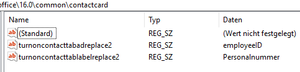
Hi Vasil, thank you so much for your effort!! Okay, that's truly a proof. Obviously I'm doing something wrong. I configured both registry keys as well, but the changes wont take effect. In this case I used the label telephone "work" to override and linked it with the AD-Attribute "employeeID". The result (after gpudpate & Outlook restart). I don't have a glue what I'm doing wrong. My guess - is there a specific way how to link the AD-Attribute? The attribute is configured in both sources (AD and Azure AD) with same ID and filled with Information. As already said, I'm really grateful for your help!8.7KViews0likes2CommentsCustomize presentation of contact details in Outlook
Hi, I’m new to this community and first of all I would like to say “hello”. ;) I’ve got a question about contact details card in Outlook and how they can be extended in the Office365 Environment. The source information stored in an active directory and which sync's to Azure AD. Now, I would like to present the employeID in the contact details. I verified that the flag employeID is successfully synced to Azure AD. But than my knowledge stops. My first question: Is it possible to customize the contact details in Outlook (I intend to use the "person search" bar) to display more information? Or does anyone know which Information can be display in this "person search" bar? Unfortunately I haven't found a sufficient documentation about such a topic. Thank you very much. Please don't hesitate to ask if any questions arise. :)Solved9KViews0likes6CommentsRe: Customize presentation of contact details in Outlook
Hi Vasil, thank you very much for your reply. Great, that gives me hope that it is possible.;) Based of that link you've posted I found inspiration again and did a bit of further research (matching Outlook 2016). I found that MS provides a set of Group Policies to chance the contact card details. I also played a little bit with that. But, unfortunately the replacements doesn't work. I used the values and filled it with the specific values: [string] = turnoncontacttabadreplace16 = extensionAttribute1 [REG_DWORD] turnoncontacttablabelreplace16 = Personalnummer (The 16 should replace the birthday) I also tried some Azure AD Attributes, but the behaviour doesn't change. So, now I'm wondering, does this work for a O365 Environment with Exchange Online also? Thank you very much in advance!8.8KViews0likes4Comments
Recent Blog Articles
No content to show