User Profile

MichalZiemba
MCT
Joined 7 years ago


User Widgets
Recent Discussions
Re: how to create a team without sending out the default "you have been added to team..." mail message?
Hi trillian74 Did you manage to disable the welcome mail? It seems I struggle with exactly the same request and already checked the WelcomeMessageEnabled is set to False for my Team/group but still I receive the welcome mail.1.4KViews0likes0CommentsRe: Disable email being sent to newly added users
Hi Bruce Weatherford I found this thread as I got exactly the same wish. Disable the mail "You have been added to a team in Microsoft Teams" coming to a new team member. I have checked my team/group and the parameter WelcomeMessageEnabled is set to False already (I haven't changed anything). So my question is, has this parameter been appreciated and no longer respected, or is there anything else we can do to disable the welcome mail coming in? /Mike11KViews0likes0CommentsRe: disable teams notification when a user is added
Hi anubhav1987 Have you tried to disable the Welcome Message on the group level? You can give it a try using PowerShell but you need an Exchange admin role to be able to do this: # import module ExchangeOnlineManagement Import-Module ExchangeOnlineManagement # connect to Exchnge Online Connect-ExchangeOnline -UserPrincipalName <UPN> [-ExchangeEnvironmentName <Value>] [-ShowBanner:$false] [-DelegatedOrganization <String>] [-SkipLoadingFormatData] # check if the WelcomeMessageEnabled is true Get-UnifiedGroup <group ID>|fl WelcomeMessageEnabled # set WelcomeMessageEnabled to False Get-UnifiedGroup <group ID> | Set-UnifiedGroup -UnifiedGroupWelcomeMessageEnabled:$false It looks that this works on my side, but I am not sure if this is not yet another option that needs to be set. I haven't found anything in the Teams management settings. Let me know if this worked or how did you solved if you found another solution. /Mike3.5KViews0likes1CommentRe: Creating a teams channel does not create sharepoint folders
Hi Consultantlk06 Did you manage to solve the issue? I am facing the same problem when using built-in templates; channel folders are not created unless you go to the channel and click the Files tab. How to force it to create folders for channels?1.7KViews0likes0CommentsRe: SharePoint Sites Best Practice - Project
Hi Kelvin_Kirby You got my attention to Project Online and I quickly dig to see how this supports creating sites for specific projects. Before I go deeper, can you confirm that "You can only add Project Online to a site collection that uses the Classic Team Site or Project Site template" as it states here? If the Project online can use modern sites, can you bring some articles on how to do that, please?9.2KViews0likes2CommentsRe: SharePoint list formatting issue -multiline text column doesn't show values after formated with JSON
Hi ganeshsanap You were right. This field was marked as rich text. I was sure that it is not but I was wrong. Now, when I correct the filed type, all looks OK. Do you know by the way how to limit the height of the row on thee format view? I tried the following but without any impact on the height of the rows. { "$schema": "https://developer.microsoft.com/json-schemas/sp/v2/row-formatting.schema.json", "elmType": "div", "style": { "min-height":"1em", "height": "1em" } }7.4KViews0likes2CommentsSharePoint list formatting issue -multiline text column doesn't show values after formated with JSON
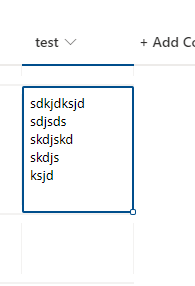
Hi, I am struggling with the simple formatting of the multiline text field (not a rich text field). I want to display the pencil which when you click, opens the item in the edit mode. When I apply the JSON format below values in my column disappear but the pencil is visible and actionable. Can you tell me what am I doing wrong? { "$schema": "https://developer.microsoft.com/json-schemas/sp/v2/column-formatting.schema.json", "elmType": "div", "children": [ { "elmType": "div", "txtContent": "@currentField", "style": { "white-space": "nowrap", "overflow": "hidden", "text-overflow": "ellipsis" }, "attributes": { "iconName": "Edit", "class": "sp-field-quickActions" }, "customRowAction": { "action": "editProps" } } ] } Redirect me with my question if this is not the right forum. Here it is before applying the format: And here is after applying the format;Solved7.8KViews0likes4CommentsRe: SharePoint list and Galery view with links to filtered sub list
ganeshsanap Thank you for your help so far. The title only works like a charm. But when I try to add the rest of the fields I run into the empty screen like before. Can you paste an example of the JSON format with at least two properties in the tile, please? I.e. Title and additional fields like date or ID. I will be trying to get it to work on my end as well.5.7KViews0likes2CommentsHow to aggregate results from a query
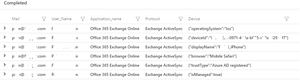
I have built a simple query to show the result of a specific conditional access policy, but I am struggling with device info. Cannot aggregate the info into one row. First, let's start with the most simple query and filter on the specific sign-in event (CorrelationId). SigninLogs | where TimeGenerated > ago(1d) | mvexpand PolicyResults = ConditionalAccessPolicies | mvexpand Device = DeviceDetail | where (PolicyResults.id == "####-004016656ca4" or PolicyResults.id == "####-a2e429a5325d") and PolicyResults.result != "reportOnlyNotApplied" |where CorrelationId == "#####-10c620ed816d" |project Mail=UserPrincipalName, User_Name=UserDisplayName, Application_name=AppDisplayName, Protocol=ClientAppUsed, Device It gives me such results: If I refer to specific properties in the Device and get them in separate columns, still got multiply raws as result. |project Mail=UserPrincipalName, User_Name=UserDisplayName, Application_name=AppDisplayName, Protocol=ClientAppUsed, Device.displayName, Device.operatingSystem But still got results in multiply rows. I guess "summarize" can help but don't know how to use it. Any tips?Solved5.4KViews0likes5Commentsreset access rights for the Office 365 group site
Is there a fast way to reset all non-standard (restore broken inheritance and remove shared links) access rights given on the Office 365 Groups SPO site? We found it quite messy and before we convert the group into a team in Teams we would like to clean it up.843Views0likes0CommentsRe: Copy a SPO team site to a private channel site
As an explanation, we cannot wait any longer for Shared Channels in Teams to be available which has been introduced in 2019. We need to move the content of the team available in the General channel to a private one to be able to invite externals to collaborate in other channels within the same team. Maybe you have any tips on what else can we do to secure the content stored on the site of the team?804Views0likes0CommentsCopy a SPO team site to a private channel site
Hi, Except for tools like ShareGate, are there any native Microsoft tools to copy the SPO site content connected to the team in Teams to its private channel' SPO site (not only doc libs but also lists created on the main team site)? If not, what tool except ShareGate can you recommend? Is it possible in PowerShell? /MikeEnforce the user to enter their security info before MFA is enabled
The question is very simple: Can I enforce the user to set up their Security info from a sign-in prompt a few days before I enforce the user to use MFA? I am preparing the MFA rollout and I can see Microsoft documented the process of how to Set up your Security info from a sign-in prompt. By the way, the user experience which is documented over there can be seen on new tenants or after you enable combined security information registration in Azure Active Directory at your old tenant. The very first screen on that page triggered my curiosity on how to make it before the MFA is enabled for the user. I found the article Combined security information registration for Azure Active Directory overview where there is a use case I need to implement, but not documented. Can you tell me if this is possible and If yes, give me a tip on what to do to make it happen, please? By the way - the Require Re-register MFA option when the user is not enforced to use MFA doesn't trigger this setup security info request during the sign-in process.Solved
Recent Blog Articles
No content to show