User Profile

RahamimL
Iron Contributor
Joined 8 years ago


User Widgets
Recent Discussions
Re: Azure PIM with Microsoft Graph Command Line Tools
To anyone who needs this. Checked what happens when the user running the script has consent but is without the admin roles and the desired result is achieved. Meaning, even if there is a user consent, no action can be made on the user unless PIM is enforced.964Views0likes0CommentsAzure PIM with Microsoft Graph Command Line Tools
Hi everyone, We are using a powershell script when onboarding \ offboarding users. The script uses these modules: AzureAD, ExchangeOnlineManagement, MSOL, MicrosoftTeams, Microsoft.Online.Sharepoint. Since AzureAD and MSOL will be deprecated, I started migrating our script to the MgGraph module. My problem \ question is: How can I use PIM with MgGraph? The reason I'm asking is because if the app has user consented to permissions how does "Just in time" work in this case? Thanks, Rahamim.Solved947Views0likes1CommentRemote Desktop HTML5 use a web account to sign in to the remote computer.
Hi everyone, We have multiple RDS servers 2019, domain joined with HTML5 installed use application proxy. I know there is an option to download the RDS file which can probably allow connecting with web authentication and MFA. But when I try this on our servers, I don't have this option. Does anyone know if this option is applicable? Thanks, Rahamim.Laptops using both LAN and WIFI
Hi everyone, We deployed WCM policies to favor ethernet over Wi-Fi and to use soft disconnect to make the transfer more fluent. Our laptops are connecting to ethernet via a USB replicator (some using USB-C and others with HP 3005 models.). Has anyone encountered a situation where even after this deployment, the laptops still use both network adapters (Answering to ping on both LAN and Wi-Fi)? Thanks in advance, Rahamim.Publish SharePoint site as a tile in office portal for specific users.
Hi everyone, We want to publish a tile of a specific SharePoint online site to the app launcher. We want it to be available to specific users. The problem we are facing is - If we deploy it via org settings, it is to everyone. If we want to use application proxy, we are required a connector. Is there another way to add the site as a tile or an app to a group of people? Thanks, Rahamim.SolvedRe: Hyper-V VM blue screen
Just found this on the dump: SYMBOL_NAME: cldflt!CldiStreamCancelSynchronousRequest+20 MODULE_NAME: cldflt IMAGE_NAME: cldflt.sys STACK_COMMAND: .cxr 0xffff8502c5e8dd80 ; kb BUCKET_ID_FUNC_OFFSET: 20 FAILURE_BUCKET_ID: AV_cldflt!CldiStreamCancelSynchronousRequest OS_VERSION: 10.0.17763.13KViews0likes0CommentsRe: Remote Desktop Web Access HTML5 certificate error after replacing
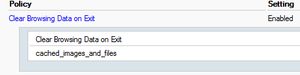
jafrie12s As a bypass what I did was deployed the following for both chrome and edge. (We're not using Firefox): Deployed clear browsing data: Deployed limit cookies from matching URLs to the current session. Both settings can be deployed to users or devices. Again, this is a bypass. I still think there should be a better solution for this. Rahamim.19KViews0likes7CommentsRe: Remote Desktop Web Access HTML5 certificate error after replacing
Pat55 Hi, I imported the new certificate to all 5 locations in the following order: RD connection broker - SSO RD connection broker - Publishing RD Web Access RD Gateway I than updated the package and imported the new certificate to the brokercert. Was this wrong?19KViews0likes6CommentsRe: Remote Desktop Web Access HTML5 certificate error after replacing
Alban1998 thanks for replying. Both certificates are wildcard certificates which we bought from a provider. Do you have a link I can check? Like I said after cleaning up, the connection work successfully. Maybe I'm using a certificate that is not configured for this?19KViews0likes0CommentsRe: Hyper-V VM blue screen
Alban1998 Thanks for the reply, I was afraid you'd say that. This issue could happen on the second server on our farm, but the issue is random. If that is the case and since we keep our environment fairly updated, we might have a problem where someone did an action with OneDrive that might cause a BSOD...3.2KViews0likes1CommentRe: Hyper-V VM blue screen
Sorry, I meant there are more than 150 profiles in the server. Most of the time we have 30-40 users connected simultaneously. I do a lot of maintenance on the servers (Deleting old profiles, defragging the disks, using OD cleanup policies and storage sense.)3.3KViews0likes3CommentsHyper-V VM blue screen
Hi everyone, I have a terminal server VM which is part of a 2019 RDS farm. The server is 40 giga memory with 16 cores and 320 GB disk (100 of them are free to make sure that a dump file can be created just in case.) I also have another 100 GB disk to dump the .DMP file. I also configured the NUMA of the VM: max processors per V-NUMA node - 16 Max memory per V-Numa - 20GB Max V-NUMA nodes per socket - 4 Up until the past 2 days we had minimal crashes. The server does have more than 150 profiles opened, and we do use OneDrive on the server installed to all users. We do have SAP and SPSS installed on the TS along with Office 365 shared license. The reason I mention all these things is to maybe help point me in the right direction. Now for the problem - Every time the server crashes I have a Hyper-V Worker error 18950 with the reason for the blue screen - "has encountered a fatal error. The guest operating system reported that it failed with the following error codes: ErrorCode0: 0x3B, ErrorCode1: 0xC0000005, ErrorCode2: 0xFFFFF8012FA65284, ErrorCode3: 0xFFFFD908E25FDD80, ErrorCode4: 0x0. If the problem persists, contact Product Support for the guest operating system". When I do catch the blue screen, it reports something about cldflt.sys. Looks like a service issue which I can't figure out. The dump file is 4 GB and when I try to debug with WINDBG it says the file is corrupt. If someone has an idea other than rebuild the server. I would be more than happy to hear. I can upload the dump file if someone thinks they can do something with it. Thanks in advance. Rahamim.Remote Desktop Web Access HTML5 certificate error after replacing
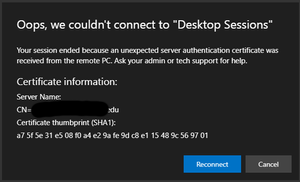
Hi everyone. We needed to update our certificate in our RDS servers. Unfortunately, now users receive this alert: I know this is old, but I was hoping maybe someone found a better solution. Stuff that I tested to reduce the problem: clear cookies for specific sites at the end of a session clear images and files when the browser close (running this manually solves this most of the time). Deployed the certificate thumbprint as GPO. (didn't have to before but maybe will assist later) Allow .RDP files from valid publishers and user's default .RDP settings (we use a wildcard certificate, so this is ashot in the dark.) Any help would be appreciated. Rahamim.Bitlocker 851 the system cannot find the path specified
Hi everyone, We are trying to migrate computers from domain joined to INTUNE. Every time we disjoin a computer the BitLocker has a problem suspending or even disabling and re-enabling. What we found is an error 851 the system cannot find the file specified. When we rejoin to The domain and enable BitLocker the error does not happen and BitLocker is enabled successfully. We also use a pin with the boot up. I tried searching the issue and attempted the repairs suggested with no luck. Any ideas would be appreciated. Rahamim1.1KViews0likes0Comments
Recent Blog Articles
No content to show