User Profile

ZoltanLehoczky
Brass Contributor
Joined 8 years ago


User Widgets
Recent Discussions
Re: Frightening permissions required when adding Google calendar to Outlook
PeterAshford In the meantime, I managed to just display my personal Google Calendar's (or another one's) content in Outlook: You can select "Add calendar" → "Subscribe from web", and use the export URL of the other calendar. For Google Calendar you can find this under Settings → "Settings for my calendars" → select the calendar in question → find the "Secret address in iCal format”.3.1KViews0likes1CommentFrightening permissions required when adding Google calendar to Outlook
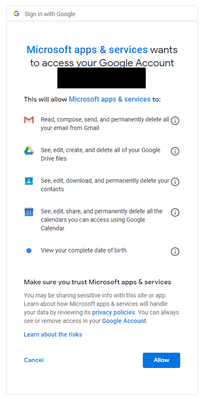
Under Outlook Online you can add personal calendars (so they're merged in the view with your work calendars) from under Add calendar -> Add Personal calendars. Great idea! However, when you try to add a Google calendar these are the required permissions: This is a complete no-go for me: I'd like to display my personal calendar in Outlook. I don't even want to edit it. But I could kind of accept calendar permissions. But why on earth does Outlook need permission to have complete control over my e-mails? My Drive? My contacts? Can this be changed? This would be crucial because it seems that currently there is simply no way to have a single calendar view of all events in your personal work (Outlook), group work (Office Groups) and personal private (Google) calendars in a single view: Due to this you can't view Google Calendar events in Office, and due to this issue it's not possible to show group calendar events in Google Calendar. Thanks in advance!3.5KViews2likes3CommentsOffice 365 Group calendar sharing (mobile and to Google Calendar)
I've created an Office 365 Group (by creating a team in Microsoft Teams), which also has an accompanying calendar. Following http://blog.schertz.name/2018/07/displaying-teams-in-the-exchange-online-address-book/ I made the calendar visible in the online Calendar under Groups. Now I'd like to manage this calendar on my mobile device (Android phone) and be able to share it via an ICS link just as a personal calendar. How is this possible? This is what I've tried: Using the Share button in OWA won't let me select the group calendar. Despite me being an admin I can use "Open another mailbox..." to log into the group and use the Share button there because I get a "You don't have permission to open this mailbox." error message. (I also have the Send As and Send on Behalf permissions.) The Android Outlook app will show the group and there I can browse upcoming events but I see no way to browse the calendar as an actual calendar (like my personal calendar), nor am I able to add events to it. If I try to add the group calendar as a new calendar there I get "Can't add calendar", "You can't open Groups calendars at this time.". This issues seem to contradict what's written in this thread: https://techcommunity.microsoft.com/t5/Office-365-Calendar/Shared-calendars-now-sync-to-mobile-phones/td-p/107023 However there is also an open UserVoice issue about maybe ICS export: https://office365.uservoice.com/forums/286611-office-365-groups/suggestions/14907267-import-export-365-group-calendars-calendars-from-f So far it seems that the only way to achieve this is to add every group event to my personal calendar, one by one, which is obviously not suitable. Thanks in advance!16KViews1like1Comment
Recent Blog Articles
No content to show