User Profile

jaydestro
 Microsoft
Joined 8 years ago


User Widgets
Recent Discussions
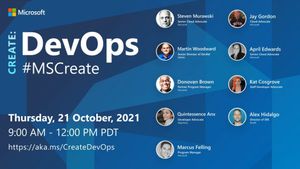
Join us at #MSCreate: DevOps on @LearnTV October 21, 2021
Microsoft’s Donovan Brown defines DevOps as, “the union of people, process, and products to enable continuous delivery of value to our end users.” Microsoft Create is back again and by popular demand, we are going to talk about everything DevOps. Join us at “Create: DevOps” as we discuss automation, cloud-native, infrastructure as code, and security. When: Thursday, October 21, 2021 9 AM PT – 12 PM PT Where: Microsoft LearnTV How: Register here for free DevOps Community Experts I’ll be hosting “Create: DevOps” on Microsoft Learn TV on October 21. 2021 at 9 AM PT. I’ll be joined by Steven Murawski as we welcome presentations from some amazing speakers from across DevOps. We’ll have expert community leaders like Donovan Brown, Martin Woodward, Quintessence Anx, April Edwards, Alex Hidalgo, and Kat Cosgrove speaking about subjects that make up five key pillars of DevOps. We’ll cover subjects such as culture shift, implementation of automation, cloud native applications, security, and a panel on observability. Together with our community speakers, we share with you how to break down the silos of development and operations teams with the tools and processes that set them up for success. DevOps is more than just CI/CD, it’s about cultural shifts within your organization. DevOps: A Cultural Shift DevOps looks to bring people together in IT organizations through shared goals, increased collaboration, and focus on improvement. While technology plays a key role in DevOps by implementing tools for automation, time management, and communication, ultimately a cultural shift within organizations is critical for success. DevOps is a strategy that’s been proven to work. As per the 2019 DevOps Research and Assessment report, high-performing teams using DevOps see 208x more frequent deployments, 106x faster from commit to deploy, 7x lower change failure rate, and a much faster incident recovery. This all leads to greater reliability of our systems. You’ll also get a chance to take part in a hands-on lab that provides an introductory look at some of the tools that give teams ways to automate and deploy their applications and infrastructure. Our team will be showing you how to deploy an Azure Kubernetes Cluster with the help of Infrastructure as Code tool Bicep and GitHub Actions. We’ll also explain how to create a more secure environment in sharing sensitive information by utilizing Azure Key Vault. This workshop is geared toward those just getting started with DevOps tooling. Steven Murawski, Marcus Felling, and I will demonstrate how to implement a fully automated deployment using CI/CD methodology powered by GitHub Actions. Let’s reduce our manual work and automate all the things! Get even more from this Create: DevOps event! Earn an Azure Hero Builder Badge Both Bicep and GitHub actions are great tools to help automate your infrastructure deployments on Azure. Be sure to stay with us till the end of the Workshop and learn how to automate deploying a Bicep file to Azure to earn an Azure Hero Builder Badge. We are always working to empower technical practitioners of all backgrounds. Microsoft created Azure Heroes to inspire developers to learn, coach, and build on Azure and promote a healthy, inclusive community. Earn yours while at Create: DevOps and show the world how much you’d like to give to the community. Plant a tree when you join Create: DevOps and complete a Learn Module Create cultural shifts through DevOps while impacting the planet with Ecosia. When you join Create: DevOps and complete one of the Microsoft Learn modules, we will plant a tree on your behalf. Our goal through this event is to plant over 1,440 new trees. Help restore the environment and communities all around the world. Learn more about our initiative here. Certificates will be issued after completion of Learn Module. Microsoft Learn is one of the best places to get free technical and conceptual training on subjects related to DevOps. You’ll be able to educate yourself on the latest Azure products, methods of implementation, and even have a little fun by earning experience points. Be a level ten wizard! Challenge your friends! Start your certification journey to become a DevOps Engineer with Microsoft Learn. See you there I really hope you join us for this great opportunity to hear about DevOps culture, tools, and cloud native implementation. We look forward to you being part of this very special event. When: Thursday, October 21, 2021 9 AM PT – 12 PM PT Where: Microsoft LearnTV How: Register here for free969Views0likes0CommentsTop Stories from the Microsoft DevOps Community – 2021.10.08
The top stories from the #AzureDevOps #community for 2021.10.08 are here! Welcome back! I am Jay Gordon and every week I try to bring you the latest updates from around the DevOps on Azure community. If you have a post you’d like to have me include, I am always listening. This includes any community events or even videos you’ve posted. You can reach out on Twitter or LinkedIn and I will be sure to share your latest post with the community. Also, be sure to tag your posts with #AzureDevOps! Before I get into this week’s post, I just wanted to share that I’ll be hosting Create: DevOps on Microsoft Learn TV on October 21. 2021 at 9 AM PT. I’ll be joined by Steven Murawski as we welcome presentations from some amazing speakers from across DevOps. We’ll have people like Donovan Brown, Martin Woodward, Quintessence Anx, April Edwards, Alex Hidalgo, and Kat Cosgrove. When: Thursday, October 21, 2021 Where: Microsoft LearnTV How: Register here for free I really hope you join us for this great opportunity to hear about DevOps culture, tools, and cloud-native implementation. Well, we have another great week of contributions from the community. I’ve got a jumbo-sized update this week. So let’s dive into the posts on subjects like GitHub Actions, service hooks, git, monitoring, and more. Reuse your workflows across multiple projects with GitHub Actions Damien Aicheh shares how to reduce duplication when creating GitHub Actions workflows by reusing what you have already built. How to: Service Hooks Mapping on Azure DevOps Vinicius Moura is one of our most prolific contributors, and this week he comes with a script to list all of your Service Hooks (in all Team Projects) within the Azure DevOps organization. Video: What is a Git Merge Conflict? Cameron McKenzie describes what a git merge conflict is and how to resolve issues that may arise. Azure DevOps – Managed Identity for Automation Tests Dylan Morley provides insight into how to create service connections to securely run your tests. Azure DevOps with Pipeline for Azure Storage Munki repo Tobias Almen continues his series on Munki by setting up a pipeline to sync data into Azure Storage. DevOps Master Class – Part 8 – Monitoring & Feedback John Savill always brings some great content to the DevOps community and this week is no different as he covers monitoring and feedback. sqlcmdcli Sergio Govoni shares his new CLI for ad hoc, interactive execution of commands on SQL Server to simulate specific workloads, anonymize sensitive data and much more. Azure DevOps Connect To Azure Cloud Using Service Principal Jinalkumar Patel provides a tutorial on using a Service Principal to connect your Azure DevOps Pipelines to Azure. Thank you to all this week’s contributors! We appreciate the posts by Damien, Vinicius, Cameron, Dylan, Tobias, John, Sergio, and Jinalkumar. If you’ve written an article about Azure DevOps or find some great content about DevOps on Azure, please share it with the #AzureDevOps hashtag on Twitter! Happy Friday, may your deploys go as planned and your weekend be fun!1.1KViews0likes0CommentsTop Stories from the Microsoft DevOps Community - 2021.09.03
New on the Azure DevOps Blog: Top Stories from the Microsoft DevOps Community - 2021.09.03 New #DevOps posts by Andrew Urwin, Vivek Raja P S, John Reilly, Michael Stephenson, Hashmat Mohammadi, and Andy Barnes! Use the #AzureDevOps hashtag to be included! #azure #cloud #technology #microsoft #devops641Views0likes0CommentsTop Stories from the Microsoft DevOps Community – 2021.08.06
It’s Friday, and every Friday we try to bring you the latest and greatest in content about DevOps. This week we dedicate this list of community posts to our lost friend, Abel Wang. Abel was always about elevating the community and helping others do their best. There’s no substitution for the real thing and Abel was absolutely that. A rock star in tech and in music, Abel brought positivity and exuberance in everything he did. We’ll miss you, friend. This week’s batch of posts focuses on automation, testing, governance, and more. No time to waste we have a lot of posts to read, let’s get into it. On repeatable automations Matteo explains why anything worth doing more than once is worth automating. Azure DevOps: Meet The “Office For Developers” Lindsay Scott talks about how Azure DevOps helped keep his company’s IT projects on track. Debugging concurrent code with Coyote The always insightful Simon Bisson of InfoWorld looks at the new .NET distributed systems testing framework. Deploy and Assign Azure Policy via Azure DevOps Pipelines Charbel Nemnom explains how Azure Policy ensures proper governance of your deployments. Deploying Your Azure Function Using Azure DevOps One of our favorite MVPs, Gregor Suttie, shares how to automate your Azure Functions. No more right-clicking to deploy from Visual Studio Code! Deploy to Azure Kubernetes (AKS) from Azure DevOps with Azure Pipeline Coder Dave returns with another video stream on deploying to AKS. Streamline Your Terraform Builds #EP9 Sunny streams on how to streamline your Terraform builds on Azure. Create Issues in Azure DevOps via Snyk API Mark Johnson shares a tutorial on creating a Logic App to create a webhook to your Synk account. If you’ve written an article about Azure DevOps or find some great content about DevOps on Azure, please share it with the #AzureDevOps hashtag on Twitter! Thank you Matteo, Lindsay, Simon, Charbel, Gregor, Davide, Sunny, and Mark for putting together these great updates! This week sure produced an impressive crop of new posts! Happy Friday, may your deploys go as planned and your weekend be fun!1.1KViews0likes0CommentsAzureFunBytes Reminder - Intro to @BicepLang with @adotfrank - 7/8/2021
AzureFunBytes is a weekly opportunity to learn more about the fundamentals and foundations that make up Azure. It's a chance for me to understand more about what people across the Azure organization do and how they do it. Every week we get together at 11 AM Pacific on Microsoft LearnTV and learn more about Azure. When: July 8, 2021 11 AM Pacific / 2 PM Eastern Where: Microsoft LearnTV This week on AzureFunBytes we flex some Azure muscle with Bicep. Bicep is a language that allows you to use declarative syntax to codify your Azure infrastructure deployments. Bicep is an Azure native Domain-Specific Language (DSL) that promotes a cleaner syntax, improved type safety, and better support for modularity and re-use of code. Bicep is a transparent abstraction over Azure Resource Manager (ARM) templates that gives you the ability to create nearly any required resource with in Azure. Bicep has a playground that allows you to start using existing ARM Template Quickstarts right away. Or if you choose to build them from scratch, the snippets with the VS Code Bicep extension will be a huge help. I was lucky enough to get one of the experts on Bicep to join us this week! We'll welcome Microsoft Program Manager Alex Frankel to the show to give us greater insight into how to use Bicep to create our infrastructure. I'll ask Alex your questions, we'll look at some Bicep basics, discuss best practices, and even kick off some deployments. Don't miss this incredible opportunity to learn about building your Infrastructure as Code (IAC) with Bicep! Our Agenda: Why we are investing in bicep in the first place ARM Templates are by far the most popular declarative tool for deploying to Azure, want to improve experience for those customers Clarify that Bicep is just one of many great options Key differences between Bicep and ARM templates Modules, richer intellisense, auto DependsOn, richer type safety How the language is designed and the importance of tooling In terms of language design (not complexity), Bicep shares more DNA with C# and TypeScript than traditional “scripting” languages like HCL or Chef Tooling is built alongside the language, so our syntax decisions are always driven by our ability to build tooling to go with it Benefits of being “Azure native” Day zero support for all resource types No state management without losing the ability to perform what-if (“tf plan” equivalent) and manage lifecycle (“tf destroy” equivalent) Works with other platform capabilities like Template Specs, Azure Marketplace, etc. Full details of how the Bicep language works can be found in the [Bicep documentation] and there is a rich library of examples to help you get a jumpstart. From the Bicep GitHub repository docs, how to get started: To get going with Bicep: Start by installing the tooling. Complete the Bicep tutorial Alternatively, you can try the Bicep Playground or use the VS Code Devcontainer/Codespaces repo to get a preconfigured environment. If you have an existing ARM Template or set of resources that you would like to convert to .bicep format, see Decompiling an ARM Template. Full details of how the bicep language works can be found in the Bicep documentation and there is a rich library of examples to help you get a jumpstart. How does Bicep work? First, author your Bicep code using the Bicep language service as part of the Bicep VS Code extension Both Az CLI (2.20.0+) and the PowerShell Az module (v5.6.0+) have Bicep support built-in. This means you can use the standard deployment commands with your *.bicep files and the tooling will transpile the code and send it to ARM on your behalf. For example, to deploy main.bicep to a resource group my-rg , we can use the CLI command we are already used to: az deployment group create -f ./main.bicep -g my-rg For more detail on taking advantage of new Bicep constructs that replace an equivalent from ARM Templates, you can read the moving from ARM => Bicep doc. Here's an example of a Bicep template to create a two subnet Azure VNET: resource virtualNetwork 'Microsoft.Network/virtualNetworks@2019-11-01' = { name: 'name' location: resourceGroup().location properties: { addressSpace: { addressPrefixes: [ '10.0.0.0/16' ] } subnets: [ { name: 'Subnet-1' properties: { addressPrefix: '10.0.0.0/24' } } { name: 'Subnet-2' properties: { addressPrefix: '10.0.1.0/24' } } ] } } You can add parameters, use modules, link templates, set variables, and set outputs within your template. You can deploy your Bicep templates using Azure CLI, PowerShell, and even the Azure Portal. The Bicep 0.4 community call from June 2, 2021: Learn about Azure fundamentals with me! Live stream is normally found on Twitch, YouTube, and LearnTV at 11 AM PT / 2 PM ET Thursday. You can also find the recordings here as well: AzureFunBytes on Twitch AzureFunBytes on YouTube Azure DevOps YouTube Channel Follow AzureFunBytes on Twitter Useful Docs: Get $200 in free Azure Credit Microsoft Learn: Introduction to Azure fundamentals Microsoft Learn: Deploy and manage resources in Azure by using Bicep Bicep Documentation Quickstart: Create Bicep files with Visual Studio Code Bicep Playground ARM template documentation Tutorial: Create and deploy first Azure Resource Manager Bicep file Bicep on Twitter Install the Azure CLI Best practices for Bicep What is Infrastructure as Code? About Domain-Specific Languages969Views0likes0CommentsTop Stories from the Microsoft DevOps Community – 2021.07.02
Full blog post on the Azure DevOps Blog: https://cda.ms/2d6 The top stories from the #AzureDevOps #community for 2021.07.02 are here! Happy Friday to you all, that means it’s time to catch up on these great posts about DevOps. This week we look at Azure Pipelines, Kubernetes, Azure subscription management, and even BizTalk! I think we’ve got a great variety of content for you, so let’s get into it! Coder Dave gives you a YouTube tutorial on Virtual Machine Scale Set Agents for Azure Pipelines. EVERYTHING About the Scale Set Agents for Azure Pipelines (VMSS) Dennis Martinez shows you how simple browser end-to-end testing can be with TestCafe and Azure Pipelines. Cross Browser Testing With TestCafe and Azure Pipelines Ranjith reminds of the importance of Kubernetes Security with this tutorial on using WhiteSource Bolt from the Azure DevOps Marketplace. Conduct Vulnerability Management for Your Kubernetes Applications Neeraj Kumar gets back to basics with his tutorial about getting started with Azure DevOps by creating a CI/CD pipeline. Understanding Azure DevOps and Building CI/CD Pipeline Andrew answers the question, “Is it possible to deploy to an Azure subscription in another Azure AD tenant with Azure DevOps?” How to deploy to different tenants with Azure DevOps Sandro rubs some DevOps on your BizTalk Server. BizTalk Server: Automation Deployment with Azure DevOps – Create a build agent Benjamin gives you some tips of enabling desktop widgets in Azure DevOps Server. Azure DevOps Server 2020: Missing Sprint Burndown Dashboard Widgets Thank you so much to this week’s contributors to the community: Dave, Dennis, Renjith, Neeraj, Andrew, Sandro, and Benjamin! Every post is a chance for others to learn and grow their DevOps experience. If you’ve written an article about Azure DevOps or find some great content about DevOps on Azure, please share it with the #AzureDevOps hashtag on Twitter! Happy Friday, may your deploys go as planned and your weekend be fun!1.3KViews0likes0CommentsCall for Papers now open: Azure Cosmos DB Conf 2024
We are thrilled to announce that the Call for Papers (CFP) for Azure Cosmos DB Conf 2024 is now officially open! This is an exciting opportunity for you to share your knowledge, experiences, and innovations with a vibrant and diverse community of developers. About the conference Azure Cosmos DB Conf is a free virtual developer event co-organized by Microsoft and the Azure Cosmos DB community. Scheduled for April 16, 2024, this conference marks our fourth year of bringing together the brightest minds in the field. It’s not just a conference; it’s a celebration of innovation and collaboration in powering today’s most advanced modern and AI-driven apps. What to expect This year’s event promises a wealth of knowledge with sessions delivered by both Microsoft and community experts. The conference will be streamed as a one-day 3-hour show, accompanied by additional on-demand sessions. Expect insightful, pre-recorded 15-minute sessions focusing on various aspects of Azure Cosmos DB. Why should I submit a session? Submitting to the Azure Cosmos DB Conf 2024 is an invaluable opportunity for professionals in the field. It’s not just about showcasing your expertise in Azure Cosmos DB and related technologies, but also about connecting with industry experts and peers, fostering relationships within the community. This platform offers you a chance to gain recognition and enhance your professional profile, contributing to your career growth. Beyond personal recognition, your contribution plays a crucial role in enriching the community’s collective knowledge and experience. It’s also an excellent way to develop and refine your public speaking and presentation skills, engaging with a diverse and global audience. You don’t want to miss this opportunity! Call for Papers is due February 15, 2024. We invite you to submit your proposals on the following themes: Intelligent Applications with AI and Azure Cosmos DB: Showcasing AI-enabled applications using Azure Cosmos DB’s vector database capabilities with Large Language Models (LLMs) from Azure OpenAI Service. Innovative and Specific Use Cases: Share your unique customer scenarios and solutions where Azure Cosmos DB played a pivotal role. Specific Programming Languages: Insights on utilizing Azure Cosmos DB SDK in languages like Java, Python, and Node.js. Connecting with Open-Source APIs: Experiences in integrating Azure Cosmos DB with APIs like MongoDB, PostgreSQL, Apache Cassandra, and Gremlin. Demonstration-Heavy Content: Submissions rich in live demonstrations or code are highly encouraged. Data Migration Sessions: Addressing the challenges and strategies in data migration to and from Azure Cosmos DB. Integration with Azure Ecosystem: Exploring the synergy between Azure Cosmos DB and other Azure services. Submission guidelines When submitting, please include details about yourself, prior presentation experiences, and any relevant links (videos, code repos, etc.). The selection process will consider your expertise in Azure Cosmos DB and your ability to deliver a confident and well-prepared talk. Call for Papers (CFP) for Azure Cosmos DB Conf 2024756Views0likes0CommentsJoin Us! Azure Cosmos DB at Microsoft Build 2022
Find out what's new in the world of Azure Cosmos DB directly from our team at Microsoft Build 2022. We will be introducing new features that enable developers to build scalable, cost-effective cloud-native applications with ease. Join senior leadership, program managers, and engineers for live sessions, roundtable discussions, and much more. This live event will be held virtually and is free for anyone to register. You won’t want to miss it! ### Tuesday, May 24, 2022 Scale Cloud-Native Apps and Accelerate App Modernization Tuesday, May 24th | 9:50 AM – 11:10 AM (PT) | 12:50 PM – 1:10 PM (ET) Learn about all the new exciting features coming to Azure Cosmos DB and join Microsoft senior leaders, Brendan Burns, Julia Liuson, Kathleen Mitford, and Scott Guthrie, as they kick off this year’s Microsoft Build,. The theme of this year’s keynote is “Scaling your application innovation and modernization with cloud-native architectures and fully managed databases – without compromise.” ### Wednesday, May 25, 2022 Deploy Modern Containerized Apps and Cloud-Native Databases at Scale Wednesday, May 25th | 9:00 AM – 9:45 AM (PT) | 12:00 PM – 12:45 PM (ET) The microservices app pattern is widely used to accelerate solution velocity and agility. Learn about the latest updates in Azure Container Apps, a service tailored for high productivity with microservices and serverless containers. Then join senior program manager Justine Cocchi, Dustin Brown, Director at SitePro, and Bob Lowell, Director at Walmart to learn about the latest features coming to Azure Cosmos DB and how to use them to build distributed, modern, and cloud-native applications at scale and cost-effectively. Validating Azure Cosmos DB Strategies for Cost Effectiveness and Elasticity Wednesday, May 25th | 11:00 AM – 12:00 PM (PT) | 2:00 PM - 3:00 PM (ET) Pre-registration by May 24th is required to attend this session. In this round table, Azure Cosmos DB Senior Program Managers Estefani Arroyo, Mark Brown, and Deborah Chen are looking to review and get insights into how effective or meaningful any of these strategies are to your past or current usage of Azure Cosmos DB. The input you provide directly impacts how we prioritize and approach making Azure Cosmos DB both more cost-effective and efficient as well as providing higher levels of elasticity for your workloads. Ask the Experts: Modern Containerized Apps and Cloud-Native Databases at Scale Wednesday, May 25th | 1:00 PM – 1:30 PM (PT) | 4:00 PM – 4:30 PM (ET) Join Azure Cosmos DB Senior Program Managers Justine Cocchi and Deborah Chen as they answer your questions about building applications using serverless containers on Azure Container Apps, and Azure Cosmos DB, a fully managed NoSQL database service for modern app development. Azure Cosmos DB: Learn How to Enable Analytics Over Real-time Operational Data with Azure Synapse Link Wednesday, May 25th | 2:00 PM – 3:00 PM (PT) | 5:00 PM - 6:00 PM (ET) Azure Synapse Link for Azure Cosmos DB is a cloud-native hybrid transactional and analytical processing (HTAP) capability that enables near real-time analytics over operational data in Azure Cosmos DB. In this session, Senior Program Managers, Gary Hope and Rodrigo Souza will walk through how to create your own cloud-native HTAP workloads using real-time data stored in Azure Cosmos DB. ### Get Started with Azure Cosmos DB Azure Cosmos DB is a fully managed NoSQL database for modern app development with SLA-backed speed and availability, automatic and instant scalability, and open-source APIs for MongoDB, Cassandra, and other NoSQL engines. Discover features or capabilities at www.AzureCosmosDB.com or get started for free. For up-to-date news on all things, Azure Cosmos DB be sure to follow us on Twitter, YouTube, and our blog. ### Register for Microsoft Build Microsoft Build 2022 is a FREE digital event and experience that is open to all. Click the link to register for free and take part in this year’s Microsoft Build and explore the latest innovations in code and app development from experts all around the world. Microsoft Build will be held on May 24-26, 2022. See you there! Register for free to Microsoft Build 2022 right here!853Views0likes0CommentsJoin us at Azure Cosmos DB Conf 2022 on April 19th - 20th
Azure Cosmos DB conf is coming April 19th - 20th. We've got live sessions, a great keynote with people like Scott Hanselman, and tons of on-demand sessions. You can find all the details and register (free) https://aka.ms/AzureCosmosDBConf - See you there! The event is run as three, 3-hour live streams in Americas, APAC and EMEA, each with its own unique content, with a slate of on-demand sessions as well. Visit Azure Cosmos DB Conf to see our agenda and download an .ics save the date for your calendar. Some of the key features of this event include: Three time zones (Americas, APAC, & EMEA) Unique content for each stream Straight to on-demand content launched during live event .ics save the date available based on your time zone Are you using Azure Cosmos DB? What are your favorite features? Share them in the comments below! 367Views0likes0Comments
Top Stories from the Microsoft DevOps Community – 2021.11.12
Welcome back! I am Jay Gordon and every week I try to bring you the latest updates from around the DevOps on Azure community. If you have a post you’d like to have me include, I am always listening. You can reach out on Twitter or LinkedIn and I will be sure to share your latest post with the community. Also, be sure to tag your posts with #AzureDevOps! Get the top stories from the Azure DevOps community right in your email every week with this newsletter! Sign up today and never miss any of these great posts from the #AzureDevOps community! Subscribe to the newsletter here! Well, it’s the week after Microsoft Ignite and things are a bit more “normal” for many of us who were engaged in all the keynotes, talks, and Q&A sessions. I really enjoyed this session from Microsoft partner Red Hat’s James Read, How Pelayo moved from traditional IT to DevOps with Red Hat and Microsoft. If you missed out on great sessions like this, you can find recordings of many of the sessions at Microsoft Ignite within the session catalog. Let’s dive into this week’s posts. We’ve got lots of new content including a lot on Terraform, Power Platform, containers, and more. Deploy Azure Container App from Azure DevOps Panu Oksala takes a look at one of the products announced at Microsoft Ignite, Azure Container Apps. Power Platform: setting up an Azure DevOps Pipeline Django Lohn is like many Citizen Developers creating Apps with Microsoft Power Platform. This post explains how to setup a Azure DevOps Pipeline for your Power Platform Apps. Microsoft is bringing a managed Grafana service to Azure Paul Sawers shares details on the announcement of a fully-managed Grafana service coming to Azure. Deploy Azure Kubernetes Service using Terraform with Azure DevOps pipeline and deploying a sample application Thomas Thornton continues his posts on using Terraform to deploy Azure resources. This time he shows you how to deploy a sample app to AKS. Using Containers to Share Terraform Modules and Deploy with Azure Pipelines Mark Johnson returns again this week with a new post on containers and how they can help you share your Terraform modules. Terraform, Azure DevOps, App Services, and Slots Yes! Even more Terraform! This post by John Folberth covers the swapping slots in Azure App Service. He shows you how to deploy with Azure DevOps and Terraform along with providing some helpful YAML. Thank you to all this week’s contributors! We appreciate the posts by Panu, Django, Paul, Thomas, Mark, and John. If you’ve written an article about Azure DevOps or find some great content about DevOps on Azure, please share it with the #AzureDevOps hashtag on Twitter! Happy Friday, may your deploys go as planned and your weekend be fun!1.2KViews0likes1CommentJoin us at #MSCreate: DevOps on @LearnTV October 21, 2021
Microsoft’s Donovan Brown defines DevOps as, “the union of people, process, and products to enable continuous delivery of value to our end users.” Microsoft Create is back again and by popular demand, we are going to talk about everything DevOps. Join us at “Create: DevOps” as we discuss automation, cloud-native, infrastructure as code, and security. When: Thursday, October 21, 2021 9 AM PT – 12 PM PT Where: Microsoft LearnTV How: Register here for free DevOps Community Experts I’ll be hosting “Create: DevOps” on Microsoft Learn TV on October 21. 2021 at 9 AM PT. I’ll be joined by Steven Murawski as we welcome presentations from some amazing speakers from across DevOps. We’ll have expert community leaders like Donovan Brown, Martin Woodward, Quintessence Anx, April Edwards, Alex Hidalgo, and Kat Cosgrove speaking about subjects that make up five key pillars of DevOps. We’ll cover subjects such as culture shift, implementation of automation, cloud native applications, security, and a panel on observability. Together with our community speakers, we share with you how to break down the silos of development and operations teams with the tools and processes that set them up for success. DevOps is more than just CI/CD, it’s about cultural shifts within your organization. DevOps: A Cultural Shift DevOps looks to bring people together in IT organizations through shared goals, increased collaboration, and focus on improvement. While technology plays a key role in DevOps by implementing tools for automation, time management, and communication, ultimately a cultural shift within organizations is critical for success. DevOps is a strategy that’s been proven to work. As per the 2019 DevOps Research and Assessment report, high-performing teams using DevOps see 208x more frequent deployments, 106x faster from commit to deploy, 7x lower change failure rate, and a much faster incident recovery. This all leads to greater reliability of our systems. You’ll also get a chance to take part in a hands-on lab that provides an introductory look at some of the tools that give teams ways to automate and deploy their applications and infrastructure. Our team will be showing you how to deploy an Azure Kubernetes Cluster with the help of Infrastructure as Code tool Bicep and GitHub Actions. We’ll also explain how to create a more secure environment in sharing sensitive information by utilizing Azure Key Vault. This workshop is geared toward those just getting started with DevOps tooling. Steven Murawski, Marcus Felling, and I will demonstrate how to implement a fully automated deployment using CI/CD methodology powered by GitHub Actions. Let’s reduce our manual work and automate all the things! Get even more from this Create: DevOps event! Earn an Azure Hero Builder Badge Both Bicep and GitHub actions are great tools to help automate your infrastructure deployments on Azure. Be sure to stay with us till the end of the Workshop and learn how to automate deploying a Bicep file to Azure to earn an Azure Hero Builder Badge. We are always working to empower technical practitioners of all backgrounds. Microsoft created Azure Heroes to inspire developers to learn, coach, and build on Azure and promote a healthy, inclusive community. Earn yours while at Create: DevOps and show the world how much you’d like to give to the community. Plant a tree when you join Create: DevOps and complete a Learn Module Create cultural shifts through DevOps while impacting the planet with Ecosia. When you join Create: DevOps and complete one of the Microsoft Learn modules, we will plant a tree on your behalf. Our goal through this event is to plant over 1,440 new trees. Help restore the environment and communities all around the world. Learn more about our initiative here. Certificates will be issued after completion of Learn Module. Microsoft Learn is one of the best places to get free technical and conceptual training on subjects related to DevOps. You’ll be able to educate yourself on the latest Azure products, methods of implementation, and even have a little fun by earning experience points. Be a level ten wizard! Challenge your friends! Start your certification journey to become a DevOps Engineer with Microsoft Learn. See you there I really hope you join us for this great opportunity to hear about DevOps culture, tools, and cloud native implementation. We look forward to you being part of this very special event. When: Thursday, October 21, 2021 9 AM PT – 12 PM PT Where: Microsoft LearnTV How: Register here for free753Views0likes0CommentsAzureFunBytes Reminder - Remote Possibilities with @burkeholland - 10/07/2021
AzureFunBytes is a weekly opportunity to learn more about the fundamentals and foundations that make up Azure. It's a chance for me to understand more about what people across the Azure organization do and how they do it. Every week we get together at 11 AM Pacific on Microsoft LearnTV and learn more about Azure. When: October 7, 2021 11 AM Pacific / 2 PM Eastern Where: Microsoft LearnTV This week on AzureFunBytes we look at how using remote development containers can help produce greater reliability and speed to software builds. Containers are a unit of software that allows for packaging of all the resources and dependencies. They are lightweight and are meant to require less overhead than managing a whole server with an operating system requiring regular updates and security fixes. Development containers help you focus on building code and in this software, providing a separate coding environment from your computer. This is ideal when ensuring reliability for all that may be collaborating on a single software development project. "Works on my machine" If you're a developer, you've almost certainly said those words in your life. Environments are still one of the hardest things to setup and manage. In this stream, we'll take a in-depth look at how VS Code and GitHub are solving this problem and the myriad of ways that you can access, edit and run your code. Even if all you have is an iPad." To help me understand how this all comes together, I've invited Microsoft Principal Developer Advocate Burke Holland to join me. We've got a jam packed agenda including: Opening projects in VS Code GitHub integration Remote - Containers Codespaces github.dev About Burke Holland Burke Holland is a front-end developer living in Nashville, TN; the greatest city in the world according to science. He enjoys JavaScript a lot because it's the only way he Node to Express himself. Get it? Never mind. Burke blogs only slightly better than he codes and definitely not as good as he talks about himself in the third person. Burke works with the VS Code team at Microsoft. You can find him on Twitter as @burkeholland. So be part on Thursday, October 7th at 11 AM PT / 2 PM ET on LearnTV with your questions! Learn about Azure fundamentals with me! Live stream is normally found on Twitch, YouTube, and LearnTV at 11 AM PT / 2 PM ET Thursday. You can also find the recordings here as well: AzureFunBytes on Twitch AzureFunBytes on YouTube Azure DevOps YouTube Channel Follow AzureFunBytes on Twitter Useful Docs: Get $200 in free Azure Credit Microsoft Learn: Introduction to Azure fundamentals What is a container? Microsoft Learn: Administer containers in Azure Developing inside a Container Create a development container devcontainer command line interface VS Code Remote Development Microsoft Learn: Use a Docker container as a development environment with Visual Studio Code637Views0likes0CommentsTop Stories from the Microsoft DevOps Community – 2021.09.24
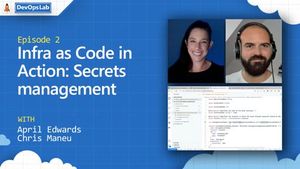
The top stories from the #AzureDevOps #community for 2021.09.24 are here! It’s officially the fall season here in Brooklyn, NY! The leaves change, it gets a little darker earlier, and of course, the weather begins to cool. But none of these changes are going to keep me from finding great DevOps content every week. This week is no different as we dive into posts on Azure DevOps, Databricks, and more. Before we hop into the stories, I wanted to tell you about one of the best video series on DevOps out there. Have you checked out The DevOps Lab yet? One of my favorite people, April Edwards, brings you fresh DevOps content in this Channel 9 series. This week she talks with Chris Maneu about Infra as Code. So we’re ready! Let’s get into this week’s posts. How to: Project Stats Mapping on Azure DevOps Vinicius Moura returns with how to create a report about your Azure DevOps organization. Using Azure DevOps Repos In Your Azure Cloud Shell MVP Anderson Patricio gives you some CLI tips for cloning your repo. Joe Guadagno on the Latest in Azure DevOps – Episode 159 Joe of Rocket Mortgage joins Jeffery on the latest episode of the Azure DevOps podcast including topics like tools, managing developer teams, and more. DevOps App Security Expert: ‘Use Microservices’ David Ramel talks to Carlos Rivas about creating secure architecture for your IT solutions by implementing microservices. Automating DevOps to Create Standard Tasks Mike Stephenson (aka AJ’s Dad) walks through setting up Power Automate for generating your Azure DevOps work items. How-To Deploy your Synapse Workspace Artifacts to a Managed VNET Synapse Workspace Rui Cunha shares this post about about deploying your Synapse workspace along Azure DevOps. Part 1: Implementing CI/CD on Databricks Using Databricks Notebooks and Azure DevOps This is the first part of a two-part series of blog posts that show how to configure and build end-to-end MLOps solutions on Databricks with notebooks and Repos API. Thank you to all this week’s contributors! We appreciate the posts by Vinicius, Anderson, Jeffery, David, Mike, and Rui. If you’ve written an article about Azure DevOps or find some great content about DevOps on Azure, please share it with the #AzureDevOps hashtag on Twitter! Happy Friday, may your deploys go as planned and your weekend be fun!976Views0likes0CommentsAzureFunBytes – Getting started with Bicep
AzureFunBytes is a weekly opportunity to learn more about the fundamentals and foundations that make up Azure. It’s a chance for me to understand more about what people across the Azure organization do and how they do it. Every week we get together at 11 AM Pacific on Microsoft LearnTV and learn more about Azure. AzureFunBytes – Getting started with Bicep have been playing with with Azure Bicep, a new Microsoft approach to deploying Azure resources using Infrastructure as Code. Today I’d like to show you how to create a basic template and deploy it to Azure. Then I will look at how quickstart templates are converted in the Bicep Playground. We’ll look at the Bicep CLI install, the VS Code plug-in, and of course Azure CLI. Bicep is a Domain Specific Language (DSL) for creating your Azure resources. While there are various methods for writing infrastructure as code (IaC), such as Ruby, etc. Bicep aims to reduce complexity by introducing a cleaner syntax for you to reuse your code more often. Bicep is a transparent abstraction of ARM templates, which differs from using another general-purpose programming language. Just like ARM templates, Bicep relies on the JSON syntax to compile and deploy your desired infrastructure. What is Bicep (Preview)? Install Bicep (Preview) Bicep on GitHub Quickstart: Create Bicep files with Visual Studio Code Bicep Playground ARM template documentation Tutorial: Create and deploy first Azure Resource Manager Bicep file Bicep on Twitter Learn about Azure fundamentals with me! Live stream is available on Twitch, YouTube, and LearnTV at 11 AM PT / 2 PM ET Thursday. You can also find the recordings here as well: AzureFunBytes on Twitch AzureFunBytes on YouTube Azure DevOps YouTube Channel Follow AzureFunBytes on Twitter1.2KViews0likes0CommentsJoin Rory Preddy of Microsoft, Thurs Sept 2, 2021 @ 11 AM PT for a discussion on accessibility
When: September 2, 2021 11 AM Pacific / 2 PM Eastern Where: Microsoft LearnTV This week on AzureFunBytes we're talking about how to create applications for everyone. Accessibility is the design of products, services, and devices that focus on making environments the most welcome and usable to any user. Different people have different methods they may interface with the applications you create. By focusing in on accessibility earlier in your software development process, you make for a more available product to everyone. What software developers create should include considerations for vision, hearing, neurodiversity, mobility, and even mental health. Through the use of assistive technology, AI, and cognitive services we can strive to consider all of our differences in order to improve accessibility. Azure has tools that can make your products available globally by integrating real-time speech translation. You can translate audio from more than 30 language and customize for specific terms that your product may reference. You can integrate Speech Translation services using SDKs provided by Azure. The Computer Vision service provides AI that analyzes content from images and videos. You can greater service those who may be vision impaired or low vision by utilizing text extraction, image understanding, and spatial analysis. To help me further understand the benefits of accessibility in our software development, I've tapped Senior Cloud Advocate Rory Preddy for some help. Here's a description of what we'll cover in Rory's own words: "My life is a hilarious roller coaster of miss-intended programming bugs because at 4 foot tall and 65 kilograms I completely fall off your radar. What did my scale call me! Why does facial recognition see me as a child? These are all valid questions I often ask myself as I navigate my weird and different world. Have you heard the phrase “You have to be this tall for Micro-services”? well, what about: “You have to be this tall to operate a mobile phone?”. I am finding it harder and harder to reach any button except for “#” and “9”. Building accessibility into the planning stages of programming can eliminate barriers for participation and create an inclusive environment for people with disabilities. Programming for diversity serves as an unquestionable indicator that your software embraces the diversity of your users and cares about their safety and comfort. Join me on a fascinating and thought-provoking look at how you can program for accessibility." Here's our planned agenda: Accessibility concepts Achieving accessible milestones Measure and automate Tooling This is a tremendously important subject I am so glad we'll be able to discuss. We'll look at some examples of how to implement some of the services that enable users of all abilities and take your questions. So be sure to join us this Thursday, September 1, 2021 at 11 AM PT / 2PM ET. Learn about Azure fundamentals with me! Live stream is normally found on Twitch, YouTube, and LearnTV at 11 AM PT / 2 PM ET Thursday. You can also find the recordings here as well: AzureFunBytes on Twitch AzureFunBytes on YouTube Azure DevOps YouTube Channel Follow AzureFunBytes on Twitter Get $200 in free Azure Credit Microsoft Learn: Introduction to Azure fundamentals Microsoft Learn: Accessibility Fundamentals Microsoft Learn: Digital accessibility Microsoft Learn: Configure Microsoft Teams meetings and calls for inclusion Computer Vision Speech Translation Accessibility Technology & Tools - Microsoft Chief Accessibility Officer Jenny Lay-Flurrie: Stories from inside Microsoft’s journey to design a more accessible world Interview with Jenny Lay-Flurrie, Chief Accessibility Officer, Microsoft790Views0likes0CommentsLearn about Pulumi on Azure Thurs Aug 12 on LearnTV
AzureFunBytes is a weekly opportunity to learn more about the fundamentals and foundations that make up Azure. It's a chance for me to understand more about what people across the Azure organization do and how they do it. Every week we get together at 11 AM Pacific on Microsoft LearnTV and learn more about Azure. When: August 12, 2021 11 AM Pacific / 2 PM Eastern Where: Microsoft LearnTV Agnostic tools for building your cloud infrastructure can be incredibly helpful to provide a strategy that looks beyond one single cloud. There are many alternatives in the market to using native tooling for your cloud provider or handle the work manually. Each of these "Infrastructure as Code" tools brings you the tools to deploy anywhere, anytime with the reliability and consistency you expect. You can use programming languages you might already know such as Node.js, Python, Go, and .NET and use standard constructs like loops and conditionals. Pulumi allows you to build, deploy, and manage modern cloud applications and infrastructure using familiar languages, tools, and engineering practices. With a tool like Pulumi you can build your architecture required for your IT operations to nearly 50 different cloud providers. If you also need on-prem or hybrid environments configured, Pulumi has you covered. Installing Pulumi just takes a few commands on your local environment. Pulumi uses different providers to support the various cloud services you may need. If Azure is your cloud of choice you can provision any of the services via Azure Resource Manager (ARM). The Azure provider must be configured with credentials to deploy and update resources in Azure. This can be done by either using the Azure CLI or by creating an Azure Active Directory Service Principal. To help me understand how to start working with Pulumi, I've reached out to one of my favorite people from the world of DevOps, Principal Developer Advocate at Pulumi, Matty Stratton. Matt Stratton is a Staff Developer Advocate at Pulumi, founder and co-host of the popular Arrested DevOps podcast, and the global chair of the DevOpsDays set of conferences. Matt has over 20 years of experience in IT operations and is a sought-after speaker internationally, presenting at Agile, DevOps, and cloud engineering focused events worldwide. Demonstrating his keen insight into the changing landscape of technology, he recently changed his license plate from DEVOPS to KUBECTL . He lives in Chicago and has three awesome kids, whom he loves just a little bit more than he loves Diet Coke. Matt is the keeper of the Thought Leaderboard for the DevOps Party Games online game show and you can find him on Twitter at @mattstratton. We will work together to learn how to get started, how to use the programming language you may already know, and find out if Pulumi for your Azure deployments is right for you. Here's our planned agenda for our show on LearnTV: Why bother writing automation code anyway I'm a developer. why do I can about infrastructure automation? I'm an ops person. Why should I write code? Why Pulumi when there are other tools and stuff already? We'll answer these questions and more this Thursday, August 12, 2021 at 11 AM PT / 2PM ET. Learn about Azure fundamentals with me! Live stream is normally found on Twitch, YouTube, and LearnTV at 11 AM PT / 2 PM ET Thursday. You can also find the recordings here as well: AzureFunBytes on Twitch AzureFunBytes on YouTube Azure DevOps YouTube Channel Follow AzureFunBytes on Twitter Useful Docs: Get $200 in free Azure Credit Microsoft Learn: Introduction to Azure fundamentals Cloud Engineering Summit Getting Started with Pulumi Upcoming workshops, etc What is Infrastructure as Code? What is Azure Resource Manager? Azure Command-Line Interface (CLI) - Overview | Microsoft Docs Application and service principal objects in Azure Active Directory946Views0likes0CommentsAzureFunBytes Reminder - Deploy With ARM Templates with @shankuehn - 7/15/2021
AzureFunBytes is a weekly opportunity to learn more about the fundamentals and foundations that make up Azure. It's a chance for me to understand more about what people across the Azure organization do and how they do it. Every week we get together at 11 AM Pacific on Microsoft LearnTV and learn more about Azure. When: July 15, 2021 11 AM Pacific / 2 PM Eastern Where: Microsoft LearnTV When deploying to the cloud you need to ensure that you're doing so with reliability and repeatability. For this, many turn to Infrastructure as Code (IaC) to help solidify a plan with declarative instructions on what, when, and where to build. If you're looking to deploy to Azure using IaC, you can turn to Azure's native method, Azure Resource Manager (ARM) templates. ARM is a consistent management layer also known as a control plane. You can use Azure tools, APIs, and SDKs to send requests to ARM to create, modify, and destroy your resources. ARM templates are a JSON file that helps you define what exactly you need to do in your Azure deployment. You do not need to know a specific programming language in order to use this declarative syntax. Specify your needs in this template and send it to ARM using native tools such az Azure CLI or the portal. From the Azure docs on ARM templates: Within your template, you can write template expressions that extend the capabilities of JSON. These expressions make use of the functions provided by Resource Manager. The template has the following sections: Parameters - Provide values during deployment that allow the same template to be used with different environments. Variables - Define values that are reused in your templates. They can be constructed from parameter values. User-defined functions - Create customized functions that simplify your template. Resources - Specify the resources to deploy. Outputs - Return values from the deployed resources. To help me share the beauty of ARM templates, I welcome Microsoft Senior Cloud Advocate Shannon Kuehn to the show. Shannon comes with years of experience in deploying using a variety of IaC tools. A self-described tinkerer, Shannon has worked with technical mentors and colleagues who have helped her develop proficiencies in infrastructure. We will look at the ARM template structure, deploy some resources, and of course take your questions. Don't miss out on this opportunity to learn more about deploying your Azure applications with repeatability and reliability. Shannon has a big agenda planned: Intro/background Declarative code vs. imperative. Talk terms and stress the importance of idempotency with cloud scale deployments of infrastructure. ARM is based upon JSON, which is the response you get from calling an Azure REST API directly. Highlight the difference between ARM Templates and Bicep (i.e. ARM came first. ARM Templates encompass the full gambit of deployments: simple (single storage account, 1 VM), intermediate (2 VMs in the same VNet in an Availability Set), advanced (VM deployment using DSC/Custom Script Extension, nested templates) How to get started? Where to go? Azure Quickstart GitHub Repo Azure ARM Template Reference Microsoft Learn Path ARM Template best practices A few books, courses, and publications also have helped me out in making sense of things PLUS – Maybe even finding a dev who can help you understand concepts if you get a lot of errors when deploying and how to make sense of something if you’re stuck. What makes up an ARM template? (move to my local machine to demonstrate this with real live code) Start with a basic template format in Visual Studio Code. Highlight what are parameters, variables, functions, resources, and outputs. Go over metadata and comments to help ARM templates make sense to someone brand new. Go over the reasoning behind using all of these components, indicating the only required component is the resource section (but every section has a function). Talk about API versions/schema and why that’s relevant (i.e. Private Link is a newer resource, so you’d pick a newer API when building out your ARM templates) Start with a vNet. Deploy the vNet with a PowerShell script that I’ll highlight. Move to the portal and showcase where it lives. Add a VM to the same vNet. Deploy with the same PowerShell script. Highlight that the template didn’t deploy 2 vNets…only 1…and that really showcases the idempotency of declarative syntax vs. imperative syntax. Add a storage account and configure it as a file share that you can mount from within the VM. Part of this exercise will be to RDP into the VM and showing how to mount the file share. So join us this week and let's get building! Learn about Azure fundamentals with me! Live stream is normally found on Twitch, YouTube, and LearnTV at 11 AM PT / 2 PM ET Thursday. You can also find the recordings here as well: AzureFunBytes on Twitch AzureFunBytes on YouTube Azure DevOps YouTube Channel Follow AzureFunBytes on Twitter Useful Docs: Get $200 in free Azure Credit Microsoft Learn: Introduction to Azure fundamentals What are ARM templates? Define resources in ARM templates Microsoft Learn: Deploy and manage resources in Azure using JSON ARM templates ARM template best practices Quickstart: Create ARM templates with Visual Studio Code Quickstart: Create and deploy template spec Tutorial: Utilize the ARM template reference693Views1like0CommentsAzureFunBytes Reminder - @Azure Data Factory Security with @narainabhishek - 5/20/2021
AzureFunBytes is a weekly opportunity to learn more about the fundamentals and foundations that make up Azure. It's a chance for me to understand more about what people across the Azure organization do and how they do it. Every week we get together at 11 AM Pacific on Microsoft LearnTV and learn more about Azure. This is part two of our series on Azure Data Factory. Last time Mark helped get us on the road to understanding how to best get our data into the cloud by using the linked services and tools with Azure Data Factory. Data Factory contains a series of interconnected systems that provide a complete end-to-end platform for data engineers. Utilizing our data requires some thoughtfulness when it comes to security. This week on AzureFunBytes, Senior Program Manager, Abishek Narain will help us learn more about security best practices for Data Engineers. When securing your data pipeline, there are some configurations and settings suggested by Azure you should follow. You'll want to follow this security baseline that applies guidance from the Azure Security Benchmark version1.0 to Azure Data Factory. You'll also want to ensure login details to your data endpoints are protected to ensure there's no unauthorized access due to credentials existing in the wild. There are also network security considerations that you will want to adhere to for various data stores that are accessed by Azure Data Factory, whether they are in the cloud or on-prem. When: May 20, 2021 11 AM Pacific / 2 PM Eastern Where: Microsoft LearnTV Our Agenda: Authentication Meta-data encryption (Meta-data at rest) Credential management Data in transit Data at rest Network Security Azure Policy integration From the Azure Documentation on security considerations: Azure Data Factory including Azure Integration Runtime and Self-hosted Integration Runtime does not store any temporary data, cache data or logs except for linked service credentials for cloud data stores, which are encrypted by using certificates. With Data Factory, you create data-driven workflows to orchestrate movement of data between supported data stores, and processing of data by using compute services in other regions or in an on-premises environment. You can also monitor and manage workflows by using SDKs and Azure Monitor. So let's connect and collect together and talk about big data security! We'll take questions from the audience and try to understand how all the pieces fit together to gain important insights that drive our businesses. Learn about Azure fundamentals with me! Live stream is available on Twitch, YouTube, and LearnTV at 11 AM PT / 2 PM ET Thursday. You can also find the recordings here as well: AzureFunBytes on Twitch AzureFunBytes on YouTube Azure DevOps YouTube Channel Follow AzureFunBytes on Twitter Useful Docs: AzureFunBytes Episode 43 - Intro to @Azure Data Factory with @KromerBigData Get $200 in free Azure Credit Microsoft Learn: Introduction to Azure fundamentals Azure security baseline for Azure Data Factory Security considerations for data movement in Azure Data Factory What is Data Factory? Data access strategies Azure Key Vault secrets in pipeline activities Azure Policy documentation Compute environments supported by Azure Data FactoryAzureFunBytes Reminder - Intro to @Azure Data Factory with @KromerBigData - 5/13/2021
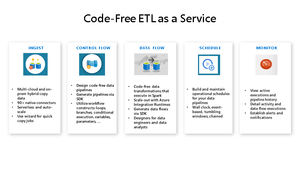
AzureFunBytes is a weekly opportunity to learn more about the fundamentals and foundations that make up Azure. It's a chance for me to understand more about what people across the Azure organization do and how they do it. Every week we get together at 11 AM Pacific on Microsoft LearnTV and learn more about Azure. Data drives so many of our decisions. Whether it's determining which products to have viewed first in our online retail store, or creating reports for business intelligence, we've got so much data! It's time to figure out how to learn how to take that data and provide human-readable information that will help us continue to make the right decisions. This week on AzureFunBytes, I will be joined by Principal Program Manager, Mark Kromer about how to store and process our big data with Azure Data Factory. Mark will discuss the ETL (Extract, Transform, Load) process that gets our data into Azure Data Factory. I'll ask Mark how can we transfer the data we might have to Azure? We'll look into how to create pipelines to automate the ingestion of our data from various data stores. When: May 13, 2021 11 AM Pacific / 2 PM Eastern Where: Microsoft LearnTV Our Agenda: Introduction to Azure Data Factory How to get started Implementing data pipelines for automation Connecting to various data sources Demos Q&A From the Azure Documentation "What is Azure Data Factory?" Azure Data Factory is the platform that solves such data scenarios. It is the cloud-based ETL and data integration service that allows you to create data-driven workflows for orchestrating data movement and transforming data at scale. Using Azure Data Factory, you can create and schedule data-driven workflows (called pipelines) that can ingest data from disparate data stores. You can build complex ETL processes that transform data visually with data flows or by using compute services such as Azure HDInsight Hadoop, Azure Databricks, and Azure SQL Database. Integrate all your data with Azure Data Factory—a fully managed, serverless data integration service. Visually integrate data sources with more than 90 built-in, maintenance-free connectors at no added cost. Easily construct ETL and ELT processes code-free in an intuitive environment or write your own code. Then deliver integrated data to Azure Synapse Analytics to unlock business insights. So let's connect and collect together and talk about big data! We'll take questions from the audience and try to understand how all the pieces fit together to gain important insights that drive our businesses. Learn about Azure fundamentals with me! Live stream is available on Twitch, YouTube, and LearnTV at 11 AM PT / 2 PM ET Thursday. You can also find the recordings here as well: AzureFunBytes on Twitch AzureFunBytes on YouTube Azure DevOps YouTube Channel Follow AzureFunBytes on Twitter Useful Docs: Get $200 in free Azure Credit Microsoft Learn: Introduction to Azure fundamentals Microsoft Learn: Integrate data with Azure Data Factory or Azure Synapse Pipeline Microsoft Learn: Data integration at scale with Azure Data Factory or Azure Synapse Pipeline Azure Data Factory Azure Data Factory documentation Azure Data Factory Tutorials Extract, transform, and load (ETL) Transferring data to and from Azure Big data architecture style Watch our snack-sized video tutorials here to learn more about building ETL with data flows Follow the Delta Lake tutorial here to build your own lake Branching and chaining activities in an Azure Data Factory pipeline using the Azure portal For access to the taxi medallion sample data to build these pipelines on your own, visit Mark's sample data repo here and look for trip data and trip fare588Views0likes0Comments







Recent Blog Articles
AzUpdate S04E05: Azure Kubernetes Service, CIS Certification, Windows Server, and burstable disks.
This week Pierre is off which means I return as your host with new team member Joylynn Kirui! We got to learn a bit more about Joylynn and her lovely home nation, Kenya. Let’s jump right into i... 3.7KViews1like0Comments