User Profile

Dirkberlin
Copper Contributor
Joined 8 years ago


User Widgets
Recent Discussions
Re: New Teams / Meeting addin missing on Windows Server 2019 RDSH / Autostart Issue
Hi calaneo, so, you don't use FSLogix right now? Please note: Folder Redirection or Roaming User Profiles aren't supported with the new Teams client in VDI environments since they can't roam folders in AppData\Local\Packages\MSTeams_8wekyb3d8bbwe\LocalCache\Microsoft\MSTeams. Customers can continue to use Folder Redirection or Roaming User Profiles with a complementary product, such as FSLogix, Citrix Profile Manager, and VMware DEM, that can roam the Appdata\Local folders above. Maybe that's your problem?3.8KViews0likes1CommentRe: New Teams / Meeting addin missing on Windows Server 2019 RDSH / Autostart Issue
calaneo @Spragaz @thoger5 @kingrafe Hello, yesterday I tried the workaround to install the plugin manually as an admin on my test environment server 2019. That worked for me in the test environment. The plugin was installed for the testuser. But I guess it will not update automatically in the future, as the user has no right to install. My problem and this workaround is described here: https://learn.microsoft.com/en-us/microsoftteams/new-teams-vdi-requirements-deploy#teams-meeting-add-in In the log file for the tma addin, I found the error "Installation success or error status: 1625." which means there seems to be a policy restricting this. However, there is no policy in place. I will continue testing it.. EDIT: I must have set a registry entry incorrectly yesterday. Now that I have corrected this, the Meeting Add-In is installed automatically. You can find it in the link above. I have set the registry values for DisableMSI and DisableUserInstalls. Teams started automatically for me, I have no problem with that. I now have new Teams and the add-in is also provided automatically. The user profiles are saved via FSLogix. Did you deploy Teams via DISM as indicated in the link? I will now try for some other users... Best regards Dirk4.1KViews0likes4Commentsmultiple calling plans for one user
Hi, is it possible to assign two calling plans to one user? case: The user only requires domestic calling plan for 90% of all calls. The user very rarely requires international calls. So best plan would be domestic calling plan. But it would be great to assign the pay-as-you-go calling plan too, for international calls. Would that be possible? If yes, would Microsoft charge only the international calls via the pay-as-you-go calling plan and the domestic calls via the domestic calling plan? best regards DirkSolved1.3KViews0likes1Commentorganization information not shown, tenant id doesn't exist
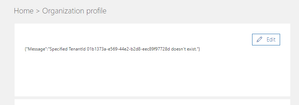
hello, I've created a tenant for testing purposes. I can't find my organization information within the admin portal. It shows: When I click edit it's not possible to enter these information because I can't choose a preferred language. Maybe because the not editable field "country or region" is not set. Any ideas on how to fix that? best regards dirk1.9KViews0likes2Comments
Recent Blog Articles
No content to show