User Profile

testio2
Brass Contributor
Joined 8 years ago


User Widgets
Recent Discussions
Sharepoint teams site Searching list
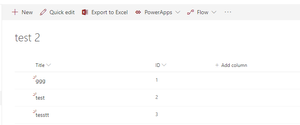
Hello, I have a list in a Teams site that I opened in SharePoint. Is there any way to filter the default 'ID' column in a searchable way? Please see pics For example I have 100 items/ IDs in a list. I wanted to filter the ID by say 1, 50 and 100. Currently I would have to scroll down and find the ID but is there no search bar functionality? Thanks!890Views0likes1CommentCreate an 'Age/Days old' column in SharePoint List
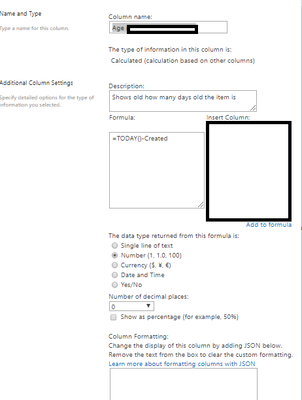
Hello. I am using SharePoint Online with a sharepoint list I wanted to create a column which is called 'Age' This would show many days old an item is What I currently have (Please see pic) is: 1) Created a calculated column called 'Age' 2) Added the formula =TODAY() - Created. (I had tried just TODAY-Created but it gave same reply /saw the () online) 3) Put the data type to return as a number This seemed to look ok as it said e.g. 5 days old. But you have to click on the item and edit it and only then will the age column update...It does not increase every day so 5,6, 7, etc on its own. I have to go to the item, make some form of edit and only then will it update from say 5 days old to 7 days Is there anyway to have this automatic column that just shows a number of how old the item is? Thank you!!! EDIT. I just saw this post https://sharepoint.stackexchange.com/questions/88849/days-since-list-item-was-created which had some formulas such as which I am trying such as ==DATEVALUE(TEXT(NOW(),"mm/dd/yyyy"))-DATEVALUE(TEXT(Created,"mm/dd/yyyy")) and =TEXT(NOW(),"mm/dd/yyyy") - Created But I am trying them outSolved73KViews1like17CommentsSharePoint Online: Translated Site
Hello Is there anyway to provide a translated site for a SharePoint online communication site? SPECIFICALLY for Internet explorer.. Examples: drop down for users to select language...some steps on how to change settings so whole site is in desired language etc? Please i'd appreciate any ideas. I read about the machine translation but don't think it works for Online.1.2KViews0likes2CommentsSharepoint online - Default Hyperlink in a list/form
Hello I have a SharePoint List A user clicks new item and fills in the list like a form One Column is 'Training Material'. Is it possible for this column to have a default Hyperlink value that would send the user to somewhere else on my SharePoint site? Maybe via Powerapps? Thank youSolved1.1KViews0likes1CommentMultiple Language SharePoint Communication Site
Hello everyone! I have an office 365 Knowledge Centre that uses the default Microsoft training videos and the rest of the site is in English Is it possible to be able to translate this (Using Microsoft Translate or Google Translate..) into different languages depending on the User? Is there a tool/app I can add to my homepage that shows a drop down with languages? Or is the only way for a user to go into their settings and change their default language? Thank you! Please suggest any better methodd if possible556Views0likes0CommentsRe: Embedding a Microsoft Video into a Sharepoint Online Site
Hi Deleted What do I search for in the Network tab to find the source? https://www.hanselman.com/blog/HowToDownloadEmbeddedVideosWithF12ToolsInYourBrowser.aspx I went to network then content but saw a whole bunch of links/mp4s :/8.9KViews0likes1CommentRe: Embedding a Microsoft Video into a Sharepoint Online Site
I dont really know much about embedding. Is there a code you can give me that will add the video in the link I wanted. Is it possible to embed the video/website on the link I sent? Or what would be the best way to embed a downloaded video/or the link I sent to an online sharepoint site so its like a Youtube video that embeds straight away? Id assume its just clicking Add embed code in the sharepoint? Or since I now have the video downloaded, upload that... Thank you8.9KViews0likes0CommentsEmbedding a Microsoft Video into a Sharepoint Online Site
Hello Could someone explain if it is possible to embed this video from Microsoft into a Sharepoint online site? https://www.microsoft.com/en-us/videoplayer/embed/RWeolz?pid=ocpVideo0-innerdiv-oneplayer&postJsllMsg=true&maskLevel=20&market=en-us I tried clicking add links, or embedding it and pasting the link but it does not work. Otherwise is there a way to download this video and then insert it to the sharepoint site? I see a download button on the Microsoft video at the bottom but it does nothing Thank youSolved9.2KViews0likes8CommentsOneNote Windows 10 Best Practices
Hello all! I am looking to create a list of Best practices / Use cases on why and when you should be using the new OneNote (Windows 10 app) I am looking for scenarios such as... you need to share your whole notebook or a snapshot of a page with your team.and then talk about how you would do it..or you forget your laptop at a meeting and can use OneNote mobile instead. Or ways OneNote can replace 'old' lesser effective methods such as pen and paper Does anyone have a list of best practices or referral sites to look at real life work based examples of when you should be using OneNote? People seem to struggle to know when to use certain apps so I wanted to create a PDF/document collecting many different scenarios where OneNote is ideal Thank you! Appreciate any replies5.9KViews0likes1CommentOneNote 2016 v OneNote 10
Hello I am looking to train/raise awareness at a large organisation/team on either OneNote windows 10 or OneNote 2016 Reading the road map and seeing the OneNote 2016 is being phased out ~2025? Should I focus the training/Microsoft guides for the OneNote windows 10 app? As eventually users will most likely need to switch? Areas of concern: Does the latest windows update need to be done in order to get the latest OneNote win 10 version? We have OneNote version: 16001.11029.20060.0. I am unsure if this is the latest one, I dont think it is as the newest update is in November 2018 (Version 16.11001.20079). I cannot find my version in the windows whats new site: https://support.office.com/en-us/article/what-s-new-in-onenote-for-windows-10-1477d5de-f4fd-4943-b18a-ff17091161ea#Audience=Everyone If thats the case, I am unsure if we will always be up to date / security issues involved or can wait for the new essential features.. 2) Is it better to start with the more established OneNote 2016 version? The issue is I want to use Microsoft Content to teach this/ Microsoft training guides/videos but the most up to date Microsoft tutorials with videos are only for OneNote Win 10: https://support.office.com/en-us/article/onenote-video-training-1c983b65-42f6-42c1-ab61-235aae5d0115?ui=en-US&rs=en-US&ad=US The Microsoft training for OneNote 2016 is just steps with no videos. It would have been great if the 2016 training had videos too. I will be making a Sharepoint site to store all this training material/act as a knowledge base https://support.office.com/en-us/article/top-categories-03f0666a-6b5c-4b9f-bc64-56f2ae1f4617?ui=en-US&rs=en-US&ad=US Is it better to just stick to OneNote for 2016 for now? I have found out that useful features such as custom tagging, page indenting and a better home ribbon layout are missing in the windows 10 version Thank you!2.4KViews1like4Comments
Recent Blog Articles
No content to show