User Profile

ThinkSync
Brass Contributor
Joined 8 years ago


User Widgets
Recent Discussions
Cross Workspace Query
Hi all, As a part of our Sentinel on-boarding project, we're in the process of centralising LA workspaces. The Sentinel LA workspace permission is set to "Use resource or workspace permissions", however the cross workspace query below fails with a permission error: workspace("<LA-Workspace-Name>").Heartbeat | where Computer contains "<ServerName>" Does anyone know if the KQL can be tweaked to avoid delegating read permissions to the LA workspace? Hoping we can do something similar to user using the "logs" option from the VM. Many thanks, Matt884Views0likes0CommentsRe: Azure MFA and Azure MFA Server side by side
Great stuff, a chalk and talk will certainly help breakdown your scenario :) I'd also suggest asking about guidance around moving away from ADFS to PHS combined with blocking basic authentication using conditional access. Both are recommend by the product group as best practise.16KViews1like0CommentsRe: Azure MFA and Azure MFA Server side by side
Eli Shlomo Sorry, I'll have to politely disagree :-) Looking at authentication from an architectural perspective, now that basic authentication can be blocked using conditional access, customers can start to move away from ADFS and start using Password Hash Sync…. but that's a topic for another thread :-) Righty hoo, NPS - completely agree the documentation is a little cryptic and if implemented incorrectly, could lead to credentials being sent over the wire in clear text. In most cases we don’t need to perform primary auth against AD a second time or even at all. So, we set the policy to “Accept users without validating credentials”. (remember the NPS extension doesn't authentication users, it passes the request to the MFA Endpoint which triggers a user proof up - text, phone or auth app) Next, the NPS policy needs something to check, so we use a simple NASID condition, “MFA” as seen in the example below. As the RADIUS Access-Requests messages are processed without credential validation, we can switch the RAIDUS auth protocol to MSCHAP v2 There’s a few more things to tweak on Netscaler and Windows which I’ll post in a blog later this week.16KViews0likes3CommentsRe: AzureAD sharepoint SAML integrattion
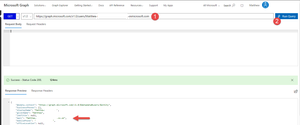
Hello, Sorry for the delay. Firstly, I recommend making sure the following attributes match. This reduces administrative overhead and provides the best user experience. Setting Azure AD Attribute Name SIP ProxyAddresses – denoted with a prefix of uppercase ‘SMTP’ Primary SMTP (default send from address) ProxyAddresses – denoted a prefix ‘SIP’ Mail WindowsEmailAddress (Exchange), Mail (Graph API) User Principal Name (AzureAD login name) UserPrincipalName Alternative ID (**avoid if possible) ** I hear you On-prem Active Directory admins, yes, it’s a lot of work but these changes will save you a world of pain 😊 With reference to your problem, the mail attribute “user.mail”, isn’t used by Exchange or sending email, and is often out of date or not set at all. Now in saying that, Azure AD has some interesting rules which in some cases populate the mail attribute: https://support.microsoft.com/en-gb/help/3190357/how-the-proxyaddresses-attribute-is-populated-in-azure-ad Personally, I wouldn’t rely on Azure AD updating synchronised accounts. Please manage the mail attribute using On-Prem AD to avoid ambiguity. So how does this help me? 😊 Check one of your problematic users using the Graph API explorer, unless you connect to Exchange Online, mail attribute isn't exposed: Login to the graph api explorer - https://developer.microsoft.com/en-us/graph/graph-explorer# Paste the following query into the query window and add you users UPN https://graph.microsoft.com/v1.0/users/%5bUPNHere]2.9KViews0likes0CommentsRe: AzureAD sharepoint SAML integrattion
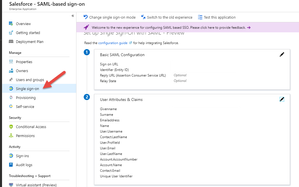
Hello, Please check your Saleforce claim mappings, nameidentifier should map to user.mail or user.userprincipalname. These values should be identical to the Saleforce account FederationID. If you’re using user.mail, please check the accounts have the mail attribute using the Azure AD PowerShell cmdlets for cloud accounts or sync'd, Active Directory Users and Computers. If you’ve found this post helpful, please click the Like button.2.9KViews0likes4CommentsRe: Sync Azure AD to onPremise AD (user properties)
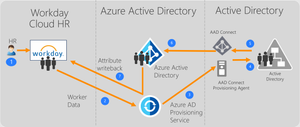
Enter AAD Connect Provisioning Agent 😊 To use this feature, you need Azure AD P1 and a Workday subscription. Please note, this feature is currently in preview. “The Azure Active Directory user provisioning service integrates with the Workday Human Resources API in order to provision user accounts. Azure AD uses this connection to enable the following user provisioning workflows: Provisioning users to Active Directory - Synchronize selected sets of users from Workday into one or more Active Directory domains. Provisioning cloud-only users to Azure Active Directory - In scenarios where on-premises Active Directory is not used, users can be provisioned directly from Workday to Azure Active Directory using the Azure AD user provisioning service. Writeback of email addresses to Workday - The Azure AD user provisioning service can write the email addresses of Azure AD users back to Workday.” https://docs.microsoft.com/en-us/azure/active-directory/manage-apps/user-provisioning https://docs.microsoft.com/en-us/azure/active-directory/saas-apps/workday-inbound-tutorial If you’ve found this post helpful, please click the Like button.11KViews1like2CommentsRe: Azure MFA and Azure MFA Server side by side
Eli Shlomo – thanks for sharing the links. Ueli Zimmermann - the Azure MFA feature program manager has some insightful comments on Reddit: https://www.reddit.com/r/AZURE/comments/7r4324/azure_mfa_server_on_premise_lifecycle_roadmap/ “There isn't any engineering effort going into MFA server, and eventually it will end of life. All of our work is going into Azure MFA and features like conditional access policy...” “Eventually, yes, Azure MFA Server will probably be deprecated in favour of the cloud-only Azure MFA service. However, we wouldn't do this until we have feature parity in cloud-only Azure MFA, and a reasonable migration path. We also wouldn't do this without advance notice: I'm not completely sure (I'll find out and report back), but I'm pretty sure this will be at least 1 year. There are still some features we haven't quite finished yet which are only available in Azure MFA Server but not in the cloud-only service (PIN mode, pre-registration, OATH token support, etc.), but we're working on it.” So I wouldn’t be overly concerned if you’ve already deployed MFA Server, however to avoid migrating in the future, I’d recommend opting for the NPS extension or appliances that support direct Azure MFA integration. Hope this help, Matt16KViews0likes5CommentsRe: Intune auto MDM enrollment for devices already Azure AD joined?
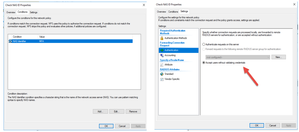
Hi All, Auto-Enrolment can be triggered using local policy. Please ensure users are logging into Windows using their Azure AD credentials, the device is Azure AD joined and users have been assigned Intune licenses. Local policy can be configured using GPEdit.msc or applying the registry key below. Agreed this doesn't help in scenarios where you have roaming users, however the reg key could be deployed using PowerShell when users visit the Office. ** Tested using W10 - 1809 [HKEY_LOCAL_MACHINE\SOFTWARE\Policies\Microsoft\Windows\CurrentVersion\MDM] "AutoEnrollMDM"=dword:0000000192KViews0likes0CommentsRe: Azure MFA and Azure MFA Server side by side
Hello! Please try to avoid deploying the MFA Server. This product will be deprecated in the not to distant future. Have you considered using the Azure MFA NPS extension? I've recently deployed the extension for Citrix 2FA via Netscaler and it works really well. What workloads are you wanting to use MFA for?16KViews0likes2CommentsRe: Intune auto MDM enrollment for devices already Azure AD joined?
Hi Jose, Spent some time testing your scenario in my lab, and as suspected, you don't need to leave AAD and rejoin to trigger silent auto-enrolment :) Please start another thread, tag me and we'll walk through my results. Kind regards, Matt92KViews0likes2CommentsRe: Intune auto MDM enrollment for devices already Azure AD joined?
Ok... so to make sure I'm following your scenario :) You have a large deployment of W10 machines in Workgroups (not joined to on-prem Active Directory), which have been Azure device joined (not Hybrid/ADDJ) and you want trigger Intune auto-enrolment?92KViews0likes7CommentsRe: Intune auto MDM enrollment for devices already Azure AD joined?
Hi Guys, Haven't had a chance to try this out in my lab, but it looks like enrolment can be triggered with Group Policy "starting Windows 10, version 1709 you can use a Group Policy to trigger auto-enrolment to MDM for Active Directory (AD) domain joined devices." "When the auto-enrollment Group Policy is enabled, a task is created in the background that initiates the MDM enrollment. The task will use the existing MDM service configuration from the Azure Active Directory information of the user. " https://docs.microsoft.com/en-us/windows/client-management/mdm/enroll-a-windows-10-device-automatically-using-group-policy Hope this helps!92KViews0likes9CommentsRe: finding out who's invited a guest
Ed Eastwood Interesting use case. You could periodically query the unified log for invitation events and then write the requester to one of the B2B users attributes. Once you have the requester in a format you can query, it would be a simple case of creating a dynamic group rule. Lots of custom code though.... Other option would be to use the B2B portal which has the ability to align groups to a domain. For example, I have a customer demo with SalesForce using the B2B portal. The B2B portal has a config for the gmail domain, which automatically assigns the user to a Salesforce group. That group is assigned to the Saleforce app and associated user/license provisioning. When the user logs into the Access Panel, they see the Salesforce icon, which gives them SSO without any administrator interaction. Self-service portal for Azure AD B2B collaboration sign-up https://docs.microsoft.com/en-us/azure/active-directory/b2b/self-service-portal *** Be careful using Dynamic Groups for B2B users, you might find yourself in a licensing predicament. "This feature requires an Azure AD Premium P1 license for each unique user that is a member of one or more dynamic groups." Hope this helps!9.6KViews0likes0CommentsRe: AzureAD sharepoint SAML integrattion
Hello, Saleforce integration can be tricky, have you checked the following? You have licensed Saleforce accounts that correspond to your Azure AD accounts - "shadow accounts" that sit in the Salesforce iDP. The Salesforce accounts FederationIdentifier matches your Azure AD accounts UserPrincipalName. If you haven’t setup account provisioning referenced above, please follow the following tutorial Configure Salesforce for automatic user provisioning https://docs.microsoft.com/en-us/azure/active-directory/saas-apps/salesforce-provisioning-tutorial Hope this helps!2.9KViews0likes0CommentsRe: Best practice to add guest to AAD?
Apologises, didn't see the other replies :) If you'd like to move B2B invitations away from SPO/Teams, try the B2B portal or delegate one of the 3rd parties B2B accounts, the Guest Inviter role. https://docs.microsoft.com/en-us/azure/active-directory/b2b/delegate-invitations https://docs.microsoft.com/en-us/azure/active-directory/b2b/self-service-portal10KViews1like0CommentsRe: Best practice to add guest to AAD?
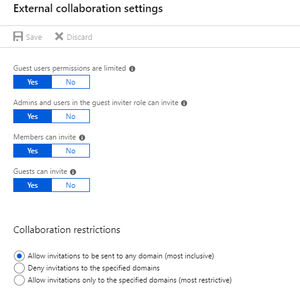
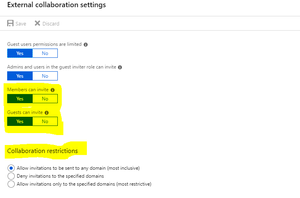
Hi Joseph, The short answer is no – both ways create “shadow” accounts in your tenant, which the B2B user then needs to redeem before use. https://docs.microsoft.com/en-us/azure/active-directory/b2b/redemption-experience Some customers manage and restrict account creation using the B2B portal, or create B2B accounts for their users to then assign to resources. If you’d like to restrict B2B account creation, please refer to the ‘External collaboration settings’ blade. Hope this helps.10KViews2likes2CommentsRe: MS Teams Invitation redemption & Self service account sign up is disabled
Hi Unnie, Please check with the company inviting you to collaborate, this error occurs when external collaboration has been restricted. Settings to query: Members can invite Guests can invite Collaboration restrictions31KViews0likes7Comments
Recent Blog Articles
No content to show