User Profile

rpextech
Copper Contributor
Joined 8 years ago


User Widgets
Recent Discussions
Re: Domian jonin failed when add VM
xuzhang3 Are you using a traditional domain controller in Azure AD? If so, did you modify the VNET DNS settings to point to your domain controller. If you are trying to join Azure AD Domain Services with accounts synced from on premise you need to apply the DNS settings to the VNET for Azure ad Domain services (so that VNET is servicing that vnet) although its recommended that you do not deploy WVD directly to the same VNET that is hosting Azure AD DS. But rather create another peered network and use that. If you are using Azure AD DS, then you need to make sure you have legacy password has synchronisation or you will get the account is locked message. https://docs.microsoft.com/en-us/azure/active-directory-domain-services/tutorial-configure-password-hash-sync You will likely need to change the password for the specific account you want to use to join the domain first after the step above. I find its easier to deploy a windows 10 VM and just try and join the domain first, fix that and your WVD deployment should work27KViews0likes0CommentsRedirected Printers Not available in all Apps
Hi All, I have a weird issue on WVD. user is using a legacy application "Taz Books", when they go to print they do not see thier redirected printer. If i go into settings, and select printers (modern interface) i cant see the redirected printer. If i go into old control panel, i cant see the redirected printer. If i print from Edge, i cant see the redirected printer. If i print from Chrome, i can see the the redirected printer. If i print from office applications, i can see the redirected printer. How is this supposed to behave? Anyone else see this problem. Surely i should be able to see the list of printers redirected in settings and all applications? Thanks Richard1.3KViews0likes0CommentsRe: (WVD) Windows Virtual Desktop USB Redirection Full
Jamesatighe Hi James. The other thing i noticed yesterday. I was having inconsistent results trying to reproduce the problem. What i found was if i closed the remote app (which is running BigHand). I'm monitoring msrdc.exe using https://www.nirsoft.net/utils/cports.html current ports. I can see after about 15 seconds that there are some additional connections that are made and dropped. Then if i try and open the published app again after that, i'm prompted for credentials. I enter them, then it fails and BigHand audio does not work. If you reopen before that 15 second window the problem doesn't occur and i'm also NOT prompted for credentials. If you stay persistently connected. It doesn't seem to occur. You can probably replicate the behaviour yourself, assuming its not some setting we have that's causing it. Its like the remote host is somehow closing the connection and the client is not handling that correctly. I think the reason we are seeing more of the problem at the moment is many users working from home with poor broadband connections.8.5KViews0likes0CommentsRe: (WVD) Windows Virtual Desktop USB Redirection Full
Jamesatighe Hi James, having done some significant testing i believe this error relates to these event ids 227,228, 101 in RemoteDesktopServices-RdpCoreTS On the host Event ID 227 Failed GetConnectionProperty' in CUMRDPConnection::QueryProperty at 3008 err=[0x80004001] Event ID 227 'Failed CreateVirtualChannel call on this Connections Stack' in CUMRDPConnection::CreateVirtualChannel at 2622 err=[0xd0000001] Event ID 228 Disconnect trace:CUMRDPConnection Disconnect trace:'calling spGfxPlugin->PreDisconnect()' in CUMRDPConnection::PreDisconnect at 5073 err=[0x0], Error code:0x0 I have a ticket logged with Microsoft relating to this and will post the output here.8.3KViews0likes2CommentsRe: (WVD) Windows Virtual Desktop USB Redirection Full
Jamesatighe Im having another issue here with Fusion by freedom scientific. Your workaround of killing msrdc.exe fixes it. This tool magnifies and then connects to a remote instance of the application through the same channels for audio also. Connect first time, works Reconnect- doesnt work Kill msrdc.exe works I tried regressing the versions also RemoteDesktop_1.2.1026.0_x64 Same problem RemoteDesktop_1.2.1104.0_x64 This already didn’t work RemoteDesktop_1.2.1185.0_x64 tried this build also. Same problem. This is the newest build.8.5KViews0likes0CommentsWVD Hosts and Personal Enrollment
Hi Folks, We have a real estate of desktops natively joined to azure AD. AutoPilot, MDM managed. We also have windows virtual desktop pools with some legacy published apps, one of which requires outlook to send emails. However i believe that running through the outlook profile is prompting the user to enroll the WVD host to intune and is then publishing applications to my WVD hosts and breaking the Shared Licensing for remote desktop because another version of office is being installed over the time. I appreciate i can block personal enrollment, but is there a more graceful way to block this happening on my WVD hosts. Its very annoying. Thanks RichardSolvedRe: WVD OneDrive Cannot Connect to Windows
Scott Windmiller It seems to have gone away now or at least not been reported after latest Windows Update. Latest Version of FSLOgix and latest onedrive build. I cant be sure really since users clicking "Download Files" makes the problem go away. It did seem to persist for specific users and not for others. If the user was suffering the problem. If i logged onto another host, the problem followed them, but if i rebooted the hosts the problem went away but then came back later. It was very odd. I think just updating everything seems to be key. Maybe its some combination of versions of products maybe. I logged a ticket with Microsoft but it wasnt very useful.5KViews0likes0CommentsTeams Machine Wide Install on WVD Issues
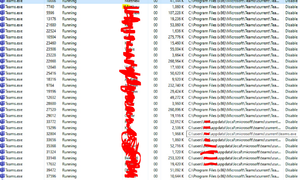
We have a weird issue with teams wide install. We have 3 WVD hosts, and i suspect one of them maybe has not correctly installed the Teams Wide installer, maybe due to registry for WVD on teams not being detected prior to install. The hosts that are configured correctly. have a shortcut on the desktop that points to "C:\Program Files (x86)\Microsoft\Teams\current\Teams.exe" My faulty host does not have that shortcut Some users seems to be running like a user installed version of teams, maybe because they logged onto the faulty installed host and their install as moved with their profile which is FSLOGIX profile disks My question is, how to i come back from this. Is there anyway to remove the "user installed" copies of teams, and then get them to use the teams machine wide version once i reinstalled it correctly on the host? Any advice appreciated. Thanks Richard1.5KViews0likes0CommentsRe: WVD OneDrive Cannot Connect to Windows
Doug_Coombs We updated OneDrive to latest build and FSLogix and set a scheduled task to restart search service on user logoff. Problem seems to be reduced but not eliminated. Clicking download files does make the problem go away.. Its Curious.5.1KViews0likes6CommentsWVD OneDrive Cannot Connect to Windows
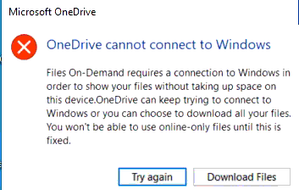
Hi Folks We have a windows 10 Multi session WVD deployment. FSLogix with Office containers. OneDrive sporadically for a few users is coming up with this. "In Cloud" files. It seems that if you click Download Files it seems to work,otherwise i continuously just prompts with this message if you click try again We have seen an article which suggests restarting the search service at logoff, but that doesn't appear to be helping. We were also given a newer July release of OneDrive by Microsoft. Still no difference. Kinda feel like its related to office Containers and maybe its not OneDrive specically. Seems search indexer attaches to the database SearchIndexer (11860,D,50) S-1-5-21-1872125703-660177160-416216471-1114: The database engine attached a database (8, C:\Users\John\AppData\Roaming\Microsoft\Search\Data\Applications\S-1-5-21-1872125703-660177160-416216471-1114\S-1-5-21-1872125703-660177160-416216471-1114.edb). (Time=0 seconds) Then crashes. SearchIndexer (11860,T,97) S-1-5-21-1872125703-660177160-416216471-2609: The database engine stopped the instance (6). Any advice experience welcome. Thank you RichardSolved5.4KViews0likes10CommentsRe: Requirement to have an on-prem AD
So i have on premise AD with AD connect syncing to Azure AD. Then i created an Azure AD Domain instance and bound it to a VNET and then used that network to connect my Windows Virtual Desktop to and join that domain. So its not joining azure AD directly but a fully synced Azure AD Domain services which is syncing with Azure AD. So technically you arent joining Azure AD natively.35KViews0likes12CommentsRe: Error: User is not authorized to query the management service
Christopher Anderson I have the same issue too after following the instructions. New-RdsTenant -Name 'projectstest' -AadTenantId xxxxxxx-xxxx-xxxx-xxxx-xxxxxxxx -AzureSubscriptionId xxxxxxx-xxxx-xxxx-xxxx-xxxxxxxx New-RdsTenant : User is not authorized to query the management service. ActivityId: xxxxxxx-9dec-485a-82ee-xxxxxxxxxxx Powershell commands to diagnose the failure: Get-RdsDiagnosticActivities -ActivityId xxxxxxx-9dec-485a-82ee-xxxxxxxxxx At line:1 char:1 + New-RdsTenant -Name 'projectstest' -AadTenantId xxxxxxx-xxxx-xxxx-xxxx-xxxxxxxx ... + ~~~~~~~~~~~~~~~~~~~~~~~~~~~~~~~~~~~~~~~~~~~~~~~~~~~~~~~~~~~~~~~~~~~~~ + CategoryInfo : FromStdErr: (Microsoft.RDInf...nt.NewRdsTenant:NewRdsTenant) [New-RdsTenant], RdsPowerSh ellException + FullyQualifiedErrorId : UnauthorizedAccess,Microsoft.RDInfra.RDPowershell.Tenant.NewRdsTenant Followed the guide here https://docs.microsoft.com/en-us/azure/virtual-desktop/tenant-setup-azure-active-directory Turned off MFA for the account. Granted permissions for client and server here https://rdweb.wvd.microsoft.com/ Granted permissions here for Virtual desktop https://aad.portal.azure.com/59KViews0likes0CommentsRe: Requirement to have an on-prem AD
Does appear to be the case, however I did deploy using Azure ad domain services on a vnet and on my existing on premise with Azure ad connect I followed these steps to sync the password hashes https://docs.microsoft.com/en-us/azure/active-directory-domain-services/active-directory-ds-getting-started-password-sync35KViews0likes0Comments
Recent Blog Articles
No content to show