User Profile

rajeshkhanikar
Brass Contributor
Joined 8 years ago


User Widgets
Recent Discussions
Unable to sign in to Office 365 applications
Since yesterday morning 16 December 2019 from approx 08:00 CET, many of our users (including Global Admins) are unable to sign-in to Office 365 applications after changing their password. We have contracted our CSP Support line, they have escalated this to Microsoft support, but it looks like either Microsoft support doesn't have time or is not able to understand and diagnose our issues. Therefore, we are seeking help from the community. We are still waiting for a response to our ticket created yesterday. How many users are affected? Anyone who has reset their password since 16 December 2019, these users have their MFA enabled. Where are we trying to login? http://outlook.office.com/ https://portal.office.com/ https://portal.azure.com/ https://teams.microsoft.com/ Did you try a different browser and computers? Yes, tried on 15 different Windows 10 computers as well as Mac Catalina. Tried Google Chrome, Microsoft Edge, Internet Explorer. Tried all modes, normal, InPrivate, Incognito. Tried resetting the browser, cleared cache etc. Did you try from a different network? We have tried from our office in Asia, Europe, Africa and South America. What error do you get? While trying to sign in to https://outlook.office.com, we get a descriptive error, like the ones shown below - :-( Something went wrong We can't get that information right now. Please try again later. X-ClientId: B56AB6862D78445D946886A5B617E761 request-id 60cc8e50-61b3-4b6d-86c9-c91438b705c0 X-Auth-Error OpenIdConnect Microsoft.Exchange.Security.OpenIdConnect.OpenIdConnectIdpException X-OWA-Version 15.20.2538.20 X-FEServer AM4PR0501CA0049 X-BEServer AM0PR09MB3905 Date:17/12/2019 10:14:20 :-( Something went wrong We can't get that information right now. Please try again later. X-ClientId: 12954B324E92477FBF13056043B3CF91 request-id f61f3ac7-5934-41b9-b004-28fd2968517b X-Auth-Error OpenIdConnect Microsoft.Exchange.Security.OpenIdConnect.OpenIdConnectIdpException X-OWA-Version 15.20.2559.13 X-FEServer AM5PR04CA0010 X-BEServer AM5PR0701MB2563 Date:17/12/2019 10:14:50 :-( Something went wrong We can't get that information right now. Please try again later. X-ClientId: 9C15D0C9438F478B917C1EA0FD154D2E request-id f82ceaf5-3c61-417b-8f5c-7b4c37120da2 X-Auth-Error OpenIdConnect Microsoft.Exchange.Security.OpenIdConnect.OpenIdConnectIdpException X-OWA-Version 15.20.2538.20 X-FEServer AM6P191CA0007 X-BEServer AM5PR0501MB2530 Date:17/12/2019 10:14:35 If we try to sign in to https://portal.office.com or https://www.office.com this is the error we get -17KViews0likes3CommentsRe: WiFi WPA2 Enterprise seamless sign-on
Ben Nichols Yes, certificate based authentication is an option. In our case requirement was to use only Azure AD, without any on-premise servers (no federated AD) or VMs on cloud. Using only Azure AD, cloud only users, currently it is not possible.42KViews0likes1CommentRe: WiFi WPA2 Enterprise seamless sign-on
Forgot to update this. Short answer: If the computer is only joined to Azure AD, WPA2 Enterprise seamless authentication is not possible. As of now (March 2019) it is not possible to have seamless (users are not prompted for authentication) WPA2 Enterprise authentication when the computers (Windows 10) are not joined to an on-premise AD (only joined to Azure AD). This is because winlogon credentials contains a cloud user which will not be allowed to authenticate automatically on RADIUS (radius is using the on-premise AD).43KViews0likes10CommentsRe: Installing application that requires .NET 3.5 Framework on Windows 10 devices
I am able to solve this by using PowerShell workflows, the script enables .netfx3, reboots the computers and resumes installing the application. I have to register the application for intune to detect it. The only issue is that intune see this as a failed installation - some more housekeeping scripts can fix this. I hope this will be fixed in intune.9.5KViews1like1CommentWiFi WPA2 Enterprise seamless sign-on
WPA2 Enterprise setup in intune requires the on-premise domain-joined NDES server and certificate issued by internal CA. WPA2 Enterprise seamless authentication will not work if the device is not joined to the on-premise AD. By seamless, we mean that users are not prompted for authentication. How do we enable seamless WPA2 Enterprise authentication for Azure AD joined Windows 10 computers (computers which are only joined to Azure AD, not hybrid)?Solved43KViews1like17CommentsRe: WiFi WPA2 Enterprise seamless sign-on
Thanks for your response. We have seen this article. But it doesn't discuss expected behaviour for Azure AD joined computers (not hybrid). Our goal is to enable seamless WPA2 Enterprise authentication for only Azure AD joined computers (not hybrid).43KViews0likes4CommentsInstalling application that requires .NET 3.5 Framework on Windows 10 devices
I have a win32 application that requires .net 3.5 framework. I am unable to figure out how to deploy this application using intune. I am encountering the following issue: The first command in my script enables .net 3.5 in the Windows 10 device, but then it requires a restart, without which the second line won't execute. start /wait DISM /Online /Enable-Feature /FeatureName:NetFx3 /All wscript install.vbs How do I solve such dependency issues using intune?SolvedIssues with OneDrive sync client and SharePoint
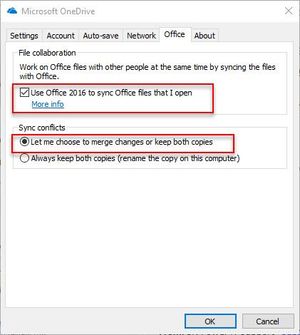
Dated: 6th December 2018 We are having some issues with OneDrive sync client SharePoint online. Deleted files re-appears and files are duplicated with computer name even when users are connected to the Internet. We are located close to Ireland (56 ms latency to Office 365 servers) and have 100/100 Mbps Internet connection (load on the line is less than 10%) and there are only 3-4 SharePoint users. OneDrive version: Version 2018 (Build https://go.microsoft.com/fwlink/?linkid=844652) Please let us know the expected behaviour in these cases: SharePoint library is synced using OneDrive for user John and Alex, a folder is selected to "Always keep on this device" And OneDrive setting for office is as follows: Case 1 Time User: John (local OneDrive folder) SharePoint Online Library User: Alex (local OneDrive folder) 10:00:00 Creates file1.docx file1.docx is synced from John file1.docx is synched from SharePoint 11:00:00 Disconnects from the Internet file1.docx Disconnects from the Internet 12:00:00 Deletes file1.docx (while offline) file1.docx Edits file1.docx (unintentional edit while offline) 13:00:00 Still offline file1.docx is updated from Alex Connects to the Internet and OneDrive syncs 14:00:00 Connects to the Internet and OneDrive syncs file1.docx file1.docx 14:00:01 ? ? ? Case 2 Time User: John (local OneDrive folder) SharePoint Online Library User: Alex (local OneDrive folder) 10:00:00 Creates file1.docx file1.docx is synced from John file1.docx is synched from SharePoint 11:00:00 Disconnects from the Internet file1.docx Disconnects from the Internet 12:00:00 Deletes file1.docx (while offline) file1.docx Edits file1.docx (unintentional edit while offline) 13:00:00 Connects to the Internet and OneDrive syncs file1.docx is deleted - from John's Still offline 14:00:00 file1.docx does not exist file1.docx does not exist Come online and OneDrive syncs 14:00:01 ? ? ?1.2KViews0likes0Comments

Recent Blog Articles
No content to show