User Profile

Rahul.Mittal
 Microsoft
Joined 10 years ago


User Widgets
Recent Discussions
Re: Best cameras, microphones, and speakers for main meeting room of (a) 10 people, and (b) 25 people
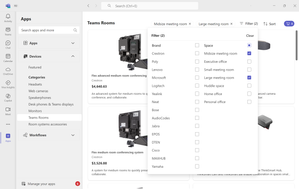
David-Elliott You can explore the Teams Rooms device bundles, in the device store inside Teams App. You can filter on mid and large meeting rooms for relevant results. Learn more about Teams Rooms here: https://www.microsoft.com/microsoft-teams/microsoft-teams-rooms Learn more about Teams device store here: https://learn.microsoft.com/microsoftteams/devices/device-storeRe: Visio Javascript API for VIsio Online
Hi Jouni Sorry that you faced this. Would you be able to provide the code snippet where you are seeing this console error? You can also use tellVisio [at] microsoft [dot] com for providing more details regarding this or any other feedback that you have related to the Visio Online APIs. Regards Rahul Mittal | Program Manager | Microsoft Visio12KViews0likes1CommentRe: Visio Javascript API for VIsio Online
Hi You could try the below options to get rid of the extra space and borders. 1. If your diagram canvas has white space, please use 'Fit to Drawing' option available in Visio Desktop. See attached. 2. Use the document.view.hideDiagramBoundry = true; to hide the diagram boundary. 3. Change the width/height of the iFrame to fit your drawing page, by using the below code during initialization: var session = new OfficeExtension.EmbeddedSession( url, { id: "embed-iframe", container: document.getElementById("iframeHost"), width: "400px", height: "100%" }); 4. There is an API under development for completely hiding the iFrame borders. application.showBorders = false; The API should be available by March and you could check this page for updates related to this API. Regards Rahul Mittal12KViews0likes0CommentsRe: Visio Javascript API for VIsio Online
Hi David It is good to hear that you want to use Visio Online APIs for publishing documents on SharePoint. You can find more details in the API reference and some examples in this blog. Regarding the issues faced, you can change the styling of the iframe by getting the iframe element through it's id and applying the properties. Something like document.getElementById("embed-iframe").style.marginTop = "10px"; As scroll bars help the user in panning the diagram, you can hide the scroll bars, by disabling the pan capability by calling the below API. document.view.disablePan = true; Regards Rahul Mittal | Microsoft Visio12KViews0likes4CommentsRe: Is the js api available to non first release
Hi, Visio Online JS APIs are available to all Office 365 business cusotmers, i.e. it is available to non-First Release tenants as well. You can create custom solutions on top of Visio Online using the API reference at: Visio-javascript-reference-overview. For any feedback or if you run into some issues, please reach out to us on tellvisio[ATmicrosoft.com. Regards Rahul Mittal | Program Manager 2 | Microsoft Visio1.1KViews0likes0Comments