User Profile

halbot
Brass Contributor
Joined 8 years ago


User Widgets
Recent Discussions
How to access public folders in current version of Outlook desktop?
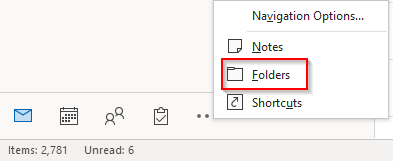
I may be being stupid here, but in older Outlook versions (i.e. before the visual update), you could click the 3 dots in bottom left, click Folders and then see Public folders. Old (version 2108) That menu has gone, so how to access public folders? It's also not possible using OWA without adding to favorites. New (version 2206) Hoping there is a way otherwise we are doing to have a big issue with over 10k public folders. ThanksSolved8.3KViews0likes3CommentsRe: "This site is on hold" when attempting to replace root site
This is caused by a retention policy, open https://compliance.microsoft.com/, Information Governanance, Retention policies, find any policies applying to Sharepoint sites and exclude the site using it's URL. Note: the interface here is odd, you have to add the URL, then select it again before pressing done otherwise it doesn't save. Also exclude the current home site (in case you are replacing one).8.6KViews0likes0CommentsRe: Post flooding error
Update: in the end, I had to exit new post, saving to notepad in case it was lost, create a new post, recover from draft, then finally the post worked. Not exactly easy. I suspect the issue was caused by initially clicking post before a label was selected5.2KViews1like3CommentsGuest MFA - require register phone as well as authenticator app
Hi all So I am aware of cross-tenant MFA settings and we are testing this feature, but it does not help in all scenarios e.g. guest has AAD but doesn't have MFA enforced in their home tenant. So Guests are forced to register for MFA in our tenant using a conditional access policy. This uses the authenticator app by default, unless they click the text 'I want to set up a different method' at the bottom (which no one notices). Now using the app for Guests is problematic. Frequently they change phones and forget to move their authenticator app over, resulting in loss of access. When that happens, they have no way of getting back in since the app is their only authentication method. They don't have the number of our helpdesk since they are external, so don't know how to call support and get their authentication methods reset. So they basically get locked out forever and just give up try to access content shared with them. So I would like to do one of the following: Force them to add a phone number upon first registration Change phone number to default, before app registration Or better still - use email as a fall back, since we already have their external email address they could just be sent a one-time code. I think the last option is the best, since SMS is not exactly secure. There is an option 'email one-time passcode for guests', however this only applies to Guests who don't have an AAD or MS account. It would be great if this option also applied to AAD guests who lost their app. Does anyone know a way around this situation? We can't ask guests to go in via myapps, switch tenants, and add a method, that's just not going to happen. Thanks Hal5.7KViews1like3CommentsPost flooding error
I created a normal post, click Post and get an error: Correct the highlighted errors and try again. Post flooding detected (community received posts of a unique message more than 1 times within 3,600 seconds) So apparently I can't post for an hour. I've given up and gone somewhere else, this feature needs fixing, I didn't do anything odd just wrote a post and hit the post button.5.4KViews8likes12CommentsStart and wait for approval does nothing inside apply to each
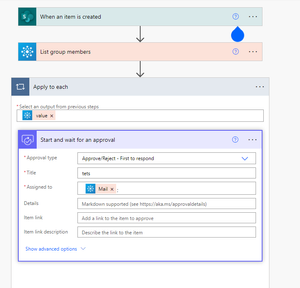
Can anyone help me figure out what is going on here? I need a flow that will count the number of approvers, and if over 3 people approve, then I will mark the item (in a sharepoint list) as approved. So I am getting all the users of a 365 group, and sending all the members an approval request, and then I will increment a variable. But I can't get the approval step to do anything. Doing a 'Create approval' step works just fine, so the apply each is working, but the 'Start and wait for approval' doesn't even create the approval, no notifications received at all, so it's not waiting for the response, it just gets stuck without creating an approval. I get the same behavior when doing get Azure AD group member, or get 365 group member, the issue seems to when when 'Start and wait for approval' is inside a loop (which I want because I need to count the responses). Here is the flow:Re: Office 365 Domain name change/add
How do you manage email addresses for users then? You have to do this in AD, the normal way (and in fact only supported way) is to have a minimal exchange server which you use to provision cloud mailboxes by writing the email attributes to the AD user object. If you have exchange OnPrem you could also then use an email address policy to update everyone’s addresses. So you are just going to have manually add the email addresses instead of using a policy however you would normally do it. Or use powershell. You should be aware however that your current config is not supported.1.7KViews1like1CommentRe: BYOD Policy Assignment
Hi StuartK73 I would avoid this if at all possible. What happens if a user has a provided (enrolled) device, and also wants to BYOD their own? With PIN however you should not have an issue, if you look at the info for setting 'App PIN when device PIN is set', it says that this applies to MDM enrolled devices only. So you can set that and the app PIN will still be required for BYOD (MAM) devices, since it is the app which is protected and not the device.1.5KViews0likes1CommentSome videos have audio but video does not play
So we are uploading videos in preparation for launch of Stream. Most are fine, but some have no video, only the audio plays. The strange thing is that they are all cut from the same footage, so we cut into sections, upload them separately, and some don't work. They are all the same format. They play locally. If we download them from Stream, they also work, so the upload seems OK. If we delete from Stream and then upload again, there is the same issue. This happens in IE11 and Chrome, for all users when viewing affected videos. Any ideas? ThanksBlank screen in IE11 on Windows 10
So some of our users have an issue where they go to stream and are just presented with a white page and nothing else. The page has finished loading, you can view source and see that there is a page there, and a load of assets including CSS files have loaded if you look in the F12 debugger. Chrome works fine for the same users on the same machine. Anyone else have this, and is there a fix?
Recent Blog Articles
No content to show