User Profile

Dorje-McKinnon
Iron Contributor
Joined 8 years ago


User Widgets
Recent Discussions
SharePoint Knowledge Agent ExcludeSelectedSites max 100 urls
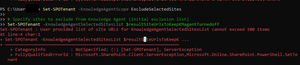
Hi All, just an FYI post about a Knowledge Agent preview powershell limitation. As a long time Digital Workplace specialist I've just tried out the Knowledge agent powershell (reference) , to try and test it on 2 of the 444 sites I have in my tenant, but I couldn't. The ExcludeSelectedSites setting for KnowledgeAgentScope has a limit of 100 urls in the KnowledgeAgentSelectedSitesList array. I found this out by running the following commands, where I had 442 urls in the $urlsToKeepKMagentTurnedOff array. Set-SPOTenant -KnowledgeAgentScope ExcludeSelectedSites Set-SPOTenant -KnowledgeAgentSelectedSitesList $urlsToKeepKMagentTurnedOff I know it is preview but unless we can test this out on real sites, prior to TURNING it on for every site we need to be able to test and trial it to build up our understanding so we can help our site / teams owners.60Views1like0CommentsRe: Report on Sharing links for "People in your organization"
Hi CarlJF , Sorry we don't have that feature enabled in our tenancy so I don't know where you would get that information. If you have some Powershell skills look at the comment below from BarryGoblon , it may be that the Graph query he provided has that information in it.658Views0likes0CommentsRe: Scheduling new posts error
Kham1989 and MyUsernameNotAvailable and Helen Cummings If your issue is that you're using a custom content type in the SitePages library, the following should get Scheduling working for the custom content type. This was my reference for the following: https://learn.microsoft.com/en-us/sharepoint/troubleshoot/sites/cant-schedule-publish in contenttype hub > site pages > settings turn on versioning, major and minor versions in /sites/contentTypeHub/SitePages/Forms/AllPages.aspx turn on Scheduling in SharePoint admin centre https://xxxx-admin.sharepoint.com/_layouts/15/online/AdminHome.aspx#/contentTypes find the content type "Comm site page" in my case When you open it you'll see "Publish Start Date" as a new column ( I assume this is because my custom content type is based on the default "Site Page" content type, so it has inherited this.) Publish > republish should take 15mins to flow down to all the libraries using that content type reference for all this (except the turn on major minor versions) https://learn.microsoft.com/en-us/sharepoint/troubleshoot/sites/cant-schedule-publish50Views0likes1CommentRe: Scheduling new posts error
Kham1989 and MyUsernameNotAvailable and Helen Cummings I've just had one of my editors tell me about the same problem. Create a News Post from a template, add some content, save draft, then edit again, click Page details and then the "Scheduling" drop down is blank. In our case the News Post template, was a specific content type i.e. not the default "Site Page" content type. After changing a file that had a blank "Scheduling" drop down, back to the default "Site Page" content type the "Scheduling" drop down was no longer blank and could be set. I'll come back with a reply if I can find a way to enable Scheduling with a custom site pages content type.51Views1like0CommentsRe: SharePoint News Web Part connecting to "Select Sites" is not pulling in new news stories
Just an update: Our tenancy just started working on the 7th of April. No notification from MS, and when I asked for one didn't really get anything other than they were rolling out fixes. It works which is great, but . . . not good enough for a global service to work when Region = English (United States) but not for the rest of us. And yes I know it was related to filtering using other properties as well but seems like too little regression testing.357Views1like0CommentsRe: SharePoint News Web Part connecting to "Select Sites" is not pulling in new news stories
Hi Ethan1 , My communications team just told me about this issue a few hours ago. I've logged a ticket with Microsoft, see below. It must be a coding issue with the News Web part because If I change the Time Zone from New Zealand to US Pacific time And the Region Locale to English United States - the test site news web part and Highlighted content web part show the same correct news items. I've just tested - the Region Locale for the site is the thing that breaks the news web part. If it isn't "English (United states)" >>>> ticket content <<<< Like other users since about 25 Mar 2025 our home page News web part only displays items published on or before 12 Mar 2025. See this similar post https://answers.microsoft.com/en-us/msoffice/forum/all/newswebpart-not-showing-all-expected-news/cbf1c570-083c-4501-ac46-e5cc7844bf20?page=2&messageId=832dc1cd-1ee7-4186-8bec-0833ca2e894d And this similar issue https://techcommunity.microsoft.com/discussions/sharepoint_general/sharepoint-news-web-part-connecting-to-select-sites-is-not-pulling-in-new-news-s/4397574 A test site with News web part and Highlighted Content Web part both using the same filter criteria show different news items. Proving that the news items and filter criteria are OK, and that the problem is with the code of the News web part. If I change the Time Zone from New Zealand to US Pacific time And the Region Locale to English United States - the test site news web part and Higlighted content web part show the same correct news items.673Views2likes0CommentsRe: Word Online no OfficeTemplate library - does anyone have this yet ?
Just revisiting this thread - I just tried again 3 years later using https://www.office.com/create BUT still only the PowerPoint templates are accessible. No Word templates, No excel templates accessible to Online Word or Online Excel. Chris McNultyor Mark-Kashman - perhaps you could update us all on when Word/Excel templates might become available via https://www.office.com/create195Views0likes0CommentsRe: Report on Sharing links for "People in your organization"
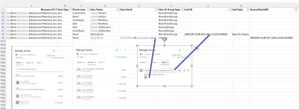
Hi AlejandroGombao , Below is a screen shot of the report filtered for one file, and the matching SharePoint "Manage access" screens. You'll see the Sharing link doesn't have any email addresses, BUT the next row under it does. And from my example you'll see how each row in the spreadsheet matches the "Manage access" permissions. Note also that "Can edit" actually translates into two rows in the spreadsheet, an Edit row AND a Contribute row. > Site usage > Shared with external > Run report CSV related to "manage access" screens You mention "user email is blank" on the "SharingLink" rows, I think you just need to look at the following row or rows for the actual people the link was shared with. But remember the person sharing a link may have used the copy link function, and manually sent an email. In which case there will be no record of the email addresses the link was sent to in this spreadsheet, because SharePoint wasn't given that information. You mention that you're migrating 150 sites from one tenant to another tenant in a different region. I've done migrations like this using PowerShell and the products built to do migrations. I would strongly recommend you either buy a product or engage a contractor who has a migration tool. This sort of migration done manually is VERY challenging. Using a tool built for the purpose will give you and your users a much improved experience. It also has a report that gives you this security type information. I hope this helps.2.1KViews0likes0CommentsRe: Microsoft Planner - Remove email disclaimer
Hi Gerardo Moreno Diaz , jcgonzalezmartin , wgroves Very old thread, but when I had the same issue today it was the first that came up. In our case the solution was to EXCLUDE emails from having the Disclaimer added to them in the system which your company uses to add the Disclaimer. In our case we use Exchange Online > Mail flow > rules In there we have a rule which adds the disclaimer to every email , except ones which match certain criteria. The criteria to add which stops the disclaimer being added to Planner Plan Task comments is: excluding mails that match "Message headers" that "match these text patterns" "X-MS-TrafficTypeDiagnostic" - message header matches - "PlannerComment" After implementing that and waiting 1min, the next Planner Task comment that got added in our M365 environment DID NOT have the disclaimer at the bottom of it. I hope this helps other people who discover this problem as they move to Exchange Online.903Views2likes1CommentRe: Redirect SharePoint modern page
Hi mrueegger It is possible using out of the box SharePoint Online functionality to redirect a page to another page. For example in my intranet I have a page /sites/intranet/sitepages/old.aspx It contains useful information. After a restructure that information is now owned and maintained by the safety team who have their own communications site ( /sites/safety/ ) , and already have an old.aspx so they have to rename the page to new.aspx In summary our old page is here: /sites/intranet/sitepages/old.aspx the new page is here /sites/safety/sitepages/new.aspx To ensure that anyone who goes to /sites/intranet/sitepages/old.aspx is redirected to /sites/safety/sitepages/new.aspx we have to do the following: in this library /sites/intranet/sitepages/ add an out of the box content type called "Link to a Document" you may have to enable content types for the site pages library and or the intranet site now delete the /sites/intranet/sitepages/old.aspx then in the SitePages library use the New button to create a new "Link to a document" you'll be asked for the "document name" , enter old you'll be asked for the "document url" , enter https://<YourTenant>.sharepoint.com/sites/safety/sitepages/new.aspx click OK in the /sites/intranet/sitepages/ library you'll now have an old.aspx if you click on the name in the library OR if you link to the full URL https://<YourTenant>.sharepoint.com/sites/intranet/sitepages/old.aspx it will redirect you to new.aspx You can use the same solution if you have some custom ASPX files which redirect users (created pre 2024), but new copies of those ASPX files download to the user's computer.1.5KViews0likes0CommentsRe: Report on Sharing links for "People in your organization"
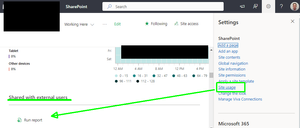
Hi klassenkbrandonu , I may have misunderstood but I think that the following out of the box report will work for you, but it only applies to the site collection you run it in. Go to the SharePoint site you want to report the sharing links for. click the Cog menu item (you have to be a site collection admin or Teams Owner) click the "Site Usage" menu item when the page loads scroll down and under the "Shared with external users" heading click the "run report" note displayed below the heading are the sharing links created in the past 30 days, BUT the export contains all sharing links for the entire site. You have to save it to a document library within the site. When I ran it I came up with a CSV that when I filtered as follows: Item type = Folder User or group = Internal Resource path = (the folder I wanted to report on) I got a list of email addresses that currently had access to the folder I wanted to report on AND the type of Permission they had (read/contribute etc). For Site admins or those not comfortable with scripting and the Graph api this is a viable alternative. NOTE I didn't check extensively but the label for this report is "Shared with external users" BUT the CSV I got seemed to have information about files or folders shared with external and internal users.2.7KViews0likes4CommentsRe: SharePoint Online Homesite shows HOME rather than name of the site or group
Hi vani , Turns out when i looked again, most (but not all) of my sites had the correct names i.e. not HOME. But there were still a few, less than 10%, that this change to the order worked for. So thank you vani , great tip, and a good reminder that when things in SharePoint land are really weird, community support is AWESOME.1.7KViews1like0CommentsRe: SharePoint Online Homesite shows HOME rather than name of the site or group
vani Doh! it makes so much sense that it is the search "Managed properties" order that is the problem. On https://MyTenant-admin.sharepoint.com/_layouts/15/searchadmin/ta_managedproperty.aspx?property=Title&level=tenant My tenant's "mappings to crawled properties" field was Title title ows_Title TermTitle ows_BaseName MailSubject Mail:5 People:PreferredName Basic:displaytitle Basic:#10 Basic:#9 MetadataExtractorTitle MetadataExtractorTitle I moved Basic:displaytitle to the very top. We have a long weekend here in New Zealand so I've taken a copy of https://MyTenant.sharepoint.com/_layouts/15/sharepoint.aspx?v=following And I'll compare it to the same page next week and let you know how it goes. Many thanks for replying to this very old post 🙂1.8KViews0likes2CommentsRe: SharePoint : Your storage is almost full - one approach
Hi N51768 I'm not sure what the retention policy will do to your space ? You'll need to ask someone who works with that a lot. If you've used "Version settings" for your libraries, that should mean that you have a maximum of 60 versions for any file in that library. I'd suggest you check that first. e.g. a file that has existed for a long time, and is edited regularly might have be on Version 276, and you should only be able to go back 50 versions to version 226 and not further back in time. If that is true for your files, then the space may be being eaten up by either the retention policy and or the size of the files. In my environment I found that some files with 100s of versions took up almost no space, but that for most Word and Excel files previous versions were the same size as the file at that version. So for some files that were being edited hundreds of times a day we moved over to SharePoint lists or other solutions. This saved us quite a bit of space. The other recommendation would be to get your Microsoft Account manager to take a look and help out. If you have that many files and are spending extra on storage they will likely be able to provide some recommendations.7.3KViews0likes1CommentSharepoint online http request document set recycle
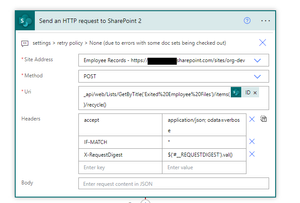
I'm posting this as I couldn't find a solution online that covered my situation. I hope the following is useful to other Digital Workplace administrators and those looking after large SharePoint instances. I have 2 SharePoint Online libraries: EmployeeFiles and ExitedEmployeeFiles They contain document sets of Employee Files. Each document set has a status. The status can be Current or Exited. The use case is our HR team want to change the status of the document set, and the Power automate flow runs overnight and moves the document set as follows: document set in EmployeeFiles with Exited status , should move to ExiteEmployeeFiles library document set in ExitedEmployeeFiles with Current status, should move to EmployeeFiles library We have a flow doing EmployeeFiles > ExitedEmployeeFiles no problem But the new flow going the reverse direction failed and failed and failed with 502 errors. The ExitedEmployeeFiles to EmployeeFiles flow has the following logic: For each Status = Current document set, copy it to the EmployeeFiles library If the copy was successful then send the ExitedEmployeeFiles document set to the recycle bin, just in case we need it for some reason. The send to recycle bin action was a SharePoint http request as follows { "host": { "connectionReferenceName": "shared_sharepointonline", "operationId": "HttpRequest" }, "parameters": { "dataset": "https://companyname.sharepoint.com/sites/org-dev", "parameters/method": "POST", "parameters/uri": "_api/web/Lists/GetByTitle('Exited%20Employee%20Files')/items(28132)/recycle()", "parameters/headers": { "accept": "application/json; odata=verbose", "IF-MATCH": "*", "X-RequestDigest": "$('#__REQUESTDIGEST').val()" } } } The error code that it was giving was { "error": { "code": 502, "source": "region-001.azure-apim.net", "clientRequestId": "417d03b8-e528-4f1f-b44a-a84665eba404", "message": "BadGateway", "innerError": { "status": 502, "message": "The file is currently checked out or locked for editing by another user.\r\nclientRequestId: 417d03b8-e528-4f1f-b44a-a84665eba404\r\nserviceRequestId: ddfef0a0-d098-2000-b931-5d16381a3f93", "source": "https://ravensdown.sharepoint.com/sites/org-dev/_api/web/Lists/GetByTitle('Exited%20Employee%20Files')/items(28132)/recycle()", "errors": [ "-2130575306", "Microsoft.SharePoint.SPException" ] } } } For 2 or 3 days I tried different forms of the HTTP request to fix this issue. But I couldn't do it. The key problem I had was that the error said the item was checked out, but the item is the document set, and there is no way to check out a document set so I thought there was an issue with my HTTP request formatting. >>>>> drum roll <<<<< It turns out that the cause of the 502 is not the DOCUMENT set, the thing being copied and then deleted, BUT it's content files. The document set I was doing all my testing on, happened to contain one word document checked out to a user who had left the organisation several years ago. Because the document was checked out by someone else, not the user I run my Power Automate flows with, it couldn't see the file OR take control of it. Interestingly the PowerAutomateFlow could copy the document set (but not the checked out files) but to my user the same number of files existed before copying and after copying so there was no OBVIOUS reason for the error. What the document set couldn't do was send the document set to the recycle bin. Now there is a clue as to the issue, but I was too literal interpreting the error message. "The file is currently checked out or locked for editing by another user." Because the software team used "the file" I assumed they were talking about the document set I was trying to send to the recycle bin. BUT no the error is referring to the single file INSIDE the document set that was checked out by another user. >>> The solution <<< Find the checked out files and check them in. To do this you do need special permissions. Before you start you have to be an Owner of the TEAM that owns the SharePoint site, or have SharePoint site collection admin rights to the SharePoint site that the SharePoint libraries are in. If you have this security right then you can go to the library, and click the Cog, then click "library settings" , then click "more library settings" , then click "Manage files which have no checked in version". Then select all the documents, and click TAKE control. Before you leave the page open all the folders, those files exist in using different tabs. Then go and check those documents in. Once I'd done this, the Power Automate flow http request just worked YAH! >>> For good measure <<< Attached is a screen shot of the Power Automate HTTP request action that I used to send the file / document set / item to the recycle() bin. I'm including it because I found it really hard to find documentation on this. The code for each property of the action so you can copy them is as follows _api/web/Lists/GetByTitle('Exited%20Employee%20Files')/items(@{items('Apply_to_each_2')?['ID']})/recycle() accept application/json; odata=verbose IF-MATCH * X-RequestDigest $('#__REQUESTDIGEST').val()Re: user home folder
Hi wisemouseoutlookcom Your language isn't specific enough so I'll make some assumptions. - When you say "365 group" you mean a 365 group, that was created when a TEAMS team was created, and thus it has a related SharePoint site associated with the TEAMs team. If this is your scenario you need to understand how a SharePoint site tied to a TEAMS team processes security. - The 365 group, has TEAMS Owners and Members security roles. - Owners can alter the fundamental aspects of the TEAMS team - Members can see and edit all files within the SharePoint part of the TEAMS team. You asked "folder only to be accessed by the user " By default there is no part of the SharePoint site associated with a TEAMS team that only User X can access. By Default the User X is the ONLY person who has access to their OneDrive. So one solution would be to use your flow to create a folder in their OneDrive with the same name as the TEAMs team. Then put a link to their onedrive in the TEAMS team. When they click on it it takes them to their folder and it works. When anyone else clicks on their link it says access denied. Another solution would be to use your flow to Create a document library in the TEAMS team, that is the user's name e.g. BobBrown. Then in the same flow change the permissions for that document library so ONLY the user and the Team owners have access to it. This would be quite a bit of work to create the library, change the permissions, then ensure there is a link somewhere in the TEAMS team that any user can access. If you provide more detail about WHY you want this to happen there may be other options e.g. a SharePoint list that has rows only the creator can see. Good luckRe: emails with attachments to channel are wrapped in additional EML
Hi Russ0203 I found your post while looking for a solution to a different problem (emails to teams channel create duplicate sharepoint eml files, but only show one post in the teams channel). So I haven't had your problem and fixed it but I do have a suggestion for a different solution. Rather than using the monitoring for a new post to the channel. You could try every hour running a flow that looks at all the most recent channel posts and applying your business logic that way: Then to solve your actual problem, I see two options. Option 1 - look at the JSON that gets returned when you get the post, and see if you can figure out some logic to get to the burried attachments that way. Option 2 - all emails to a TEAMS channel and their attachments are saved into the SharePoint site for the TEAM > Documents library > Channel folder > EmailMessages_<month>_<year> folder e.g. EmailMessages_11_2023 So you could just pick up the attachments as PDF or XLSX or whatever from there directly. Hope this helps.859Views0likes0CommentsRe: Set Default Sharing to "People with Existing Access"
Hi TedLarsen Great question - can you set a default sharing setting for every new team you create? For files you can use the SharePoint admin > Policies > Sharing > File and folder links menu item that is available here https://<yourTenantName>-admin.sharepoint.com/_layouts/15/online/AdminHome.aspx#/sharing Here you can set the tenant and onedrive default External sharing (we use "new and existing guests") AND the "File and folder links" options. You can choose between "Only people in your organisation" (we use this setting) or "Specific people (only the people the user specifies)" (we manually set this for some teams). If you need to alter external guest access to the team e.g. email address removed for privacy reasons you need to do that via the TEAMS admin center policies. I hope this helps.2KViews0likes0CommentsSharePoint : Your storage is almost full - one approach
I've been looking for low impact ways to minimize our storage usage across our SharePoint tenant. This post outlines the approach I took and the outcome, and who it might work for. My environment: Only 350GB remaining in Tenancy 8.7 TB used. 265 sharepoint sites in total (teams / communication etc) I decided to focus on sites with more than 100Gb of storage used. In my case this turned up 16 sites. Of these I had to exclude 2 sites. This left 14 sites using 5.194553 TB My goal was to have low/no impact on users while reducing the volume of content in our M365 tenant SharePoint environment. My approach was to do the following: - Get list of all SharePoint site collections, find out Size of each Those larger than 100Gb do the following: - delete all items in recycle bin deleted more than 30 days ago (current setting 93 days, unchanged) - delete all items from 2nd stage recycle bin (current setting 30 days, unchanged) - change all user libraries from 500 to 100 major versions In my environment the recycle bins are rarely used and when I ran a script to work out the average number of versions it was in the 10s at most and for most sites it was 3 or 4. NOTE no sites have minor versioning turned on. I wanted to measure the change so I exported a usage report pre and post doing the above. To achieve all this I used the following code, then the following day checked the SharePoint admin centre reported the same "Storage used" numbers. BE AWARE the code below DELETES data you cannot get back (file versions, and files in the recycle bin). DO NOT RUN THIS to try it out. Test it on one or two sites first. Even if you have backups getting version history back would be very challenging. <# goal is to reduce size sites take up 1 change version from 500 to 100 2 recycle bin deleted more than 30 days ago, move to 2nd stage recycling 3 empty second stage recycling #> #Get current stats #Connect to Admin Center $AdminCenterURL = "https://MyCompanyName-admin.sharepoint.com" Connect-PnPOnline -Url $AdminCenterURL -Interactive reportTenantSiteCollectioninfo function reportTenantSiteCollectioninfo { Try { #export file path $dateStamp = get-date -format "yyyyMMdd-hhmm" $CSVPath = "c:\Temp\SiteUsageRpt-"+$dateStamp+".csv" #Get all site usage details $Sites = Get-PnPTenantSite -Detailed | Select * $SiteUsageData = @() ForEach ($Site in $Sites) { #Collect site data $SiteUsageData += New-Object PSObject -Property ([ordered]@{ 'Title' = $Site.Title 'URL' = $Site.Url 'Description' = $Site.Description 'Owner' = $Site.OwnerName 'Storage Quota' = $Site.StorageQuota 'Storage MaximumLevel' = $Site.StorageMaximumLevel 'Storage Usage Current' = $Site.StorageUsageCurrent 'Resource Quota' = $Site.ResourceQuota 'Resource Quota Warning' = $Site.ResourceQuotaWarningLevel 'Resource Usage Average' = $Site.ResourceUsageAverage 'Resource Usage Current' = $Site.ResourceUsageCurrent 'Template' = $Site.Template 'Sharing Capability' = $Site.SharingCapability 'Lock Status' = $Site.LockState 'Last Modified Date' = $Site.LastContentModifiedDate 'Subsites Count' = $Site.WebsCount }) } $SiteUsageData #Export Site Usage Data to CSV $SiteUsageData | Export-Csv $CSVPath -NoTypeInformation Write-Host "Site Usage Report Generated Successfully!" -ForegroundColor Green } Catch { Write-Host -ForegroundColor Red "Error generating site usage report:" $_.Exception.Message } } Function Set-PnPVersionHistoryLimit { param ( [Parameter(Mandatory=$true)] $Web, [parameter(Mandatory=$false)][int]$VersioningLimit = 100 ) Try { Write-host "Processing Web:"$Web.URL -f Yellow Connect-PnPOnline -Url $Web.URL -Interactive #Array to exclude system libraries $SystemLibraries = @("Form Templates", "Pages", "Preservation Hold Library","Site Assets", "Site Pages", "Images", "Site Collection Documents", "Site Collection Images","Style Library","Teams Wiki Data") $Lists = Get-PnPList -Includes BaseType, Hidden, EnableVersioning #Get All document libraries $DocumentLibraries = $Lists | Where {$_.BaseType -eq "DocumentLibrary" -and $_.Hidden -eq $False -and $_.Title -notin $SystemLibraries} #Set Versioning Limits ForEach($Library in $DocumentLibraries) { #powershell to set limit on version history If($Library.EnableVersioning) { #Set versioning limit Set-PnPList -Identity $Library -MajorVersions $VersioningLimit Write-host -f Green "`tVersion History Settings has been Updated on '$($Library.Title)'" } Else { Write-host -f Yellow "`tVersion History is turned-off at '$($Library.Title)'" } } } Catch { Write-host -f Red "Error:" $_.Exception.Message } } <# Get a list of big sites #> $bigSites = $SiteUsageData | where "Storage Usage Current" -gt 100000 $bigSites = $bigSites | where title -notin ("excluded site 1","excluded site 2") $bigSites.count #loop through the big sites foreach($bigsite in $bigSites) { connect-pnponline -url $bigSite.URL -interactive ## get the deleted items that were deleteed more than 30 days ago $date30daysago = (get-date).adddays(-30) $DeletedItemsOlder = Get-PnPRecycleBinItem | Where { $_.DeletedDate -le $date30daysago} | Sort-Object -Property DeletedDate -Descending $DeletedItemsOlder.count #move all these to 2nd stage recycle bin $DeletedItemsOlder | Move-PnPRecycleBinItem -force #empty the second stage recycle bin Clear-PnPRecycleBinItem -SecondStageOnly -force #get all the libraries $Webs = Get-PnPSubWeb -Recurse -IncludeRootWeb ForEach($Web in $Webs) { Set-PnPVersionHistoryLimit -Web $Web } } #get site info again reportTenantSiteCollectioninfo Outcome [Updated 7 Aug 2023] On the day the outcome was spectacularly unsuccessful. I saved 24GB by doing this across 5.194553 Terra bytes or less than 0.5 % So worth trying, but not valuable in my environment, I thought. But when I looked at the SharePoint admin screen, Storage used, in August there is a big drop two days after running this script. From 8.8TB down to 8.6TB so approx 200GB saving. Unfortunately this may not have been all to do with this script (other things going on in my tenant) but a lot of it is, again not massive at 2% but useful. When would this be valuable for reducing storage volume ? I think the key thing isn't the removal of files from the recycle bins, but the removal of older versions of files. SO if you have an environment with most files having 100's of versions , and those versions are large changes to the file each time. (e.g. a daily report that has new images replace existing ones each day) then this could save a lot of space. What about you? How do you reduce SharePoint storage? What have you found that works?11KViews0likes5CommentsTeams channel email delivery fails for non-team member
I'm logging this, and the solution because I found LOTS of similar problems due to the first line of the email returned to the sender being a generic Microsoft sentence used in lots of email bounce backs. Setup We have a TEAMS team , that has 4 members, we published the email address for that channel to the company using an Exchange Contact (so we could change it later if required). The goal being anyone in the company could email the channel, so the teams team members would ALL have visibility to the emailed material. The problem A staff member emailed the Teams Channel email address and got a reply which stated the following: Subject: Undeliverable: Test submission Body of email: Delivery has failed to these recipients or groups: email address removed for privacy reasons The sender is not a member of the team and does not have permission to send email to this channel. Searching for the delivery has failed, gives back LOTS of google relsults that aren't the issue because that first line in the email is used for lots of errors. So I looked at the email headers and that didn't help me much. THE KEY is searching for the third line in the bounce back email "the sender is not...." Turns out that every TEAMS channel email address now has "Advanced Options" , which didn't used to be there (I don't know when this was implemented) https://support.microsoft.com/en-gb/office/manage-who-can-send-email-to-a-channel-in-microsoft-teams-4f1a1224-e71b-45de-8f68-8e08f7874fa9#:~:text=%3E%20Get%20email%20address%2C%20and%20then,your%20audience%20to%20specific%20domains It seems the default (please reply if you know for sure) is the "only members of this team" can send to this channel. Solution If you're getting users reporting they can't email a TEAMS channel and the email they get back contains "The sender is not a member of the team and does not have permission to send email to this channel." the fix is simple: change the channel's email advanced settings 🙂8KViews3likes2Comments
Recent Blog Articles
No content to show